
All articles in 'Learn Excel' Category
{ 9 Comments }
Save a ton of time by using Mouse scroll-wheel to Navigate Excel Ribbon
Published on Feb 16, 2010 in Learn Excel

Today’s quick tip is by far the quickest and most profitable tip of all. To switch between ribbon tabs or to change to a particular tab, you can use mouse scroll-wheel. Just place mouse pointer on a ribbon tab, and scroll-down or up using your mouse’s scroll-wheel and you can switch between tabs. Learn more […]
Continue »Remember the Sales Visualization Challenge? We got 32 extremely good dashboards submitted and finally you voted Alex Kerin’s entry as the winner. So when I informed Alex that he is the winner, I also asked him to send me a pic of him with the iPod Touch that he won. Yesterday, he sent it to […]
Continue »{ 14 Comments }
Group Project Activities to Make Readable Gantt Charts
Published on Feb 11, 2010 in Charts and Graphs, Learn Excel
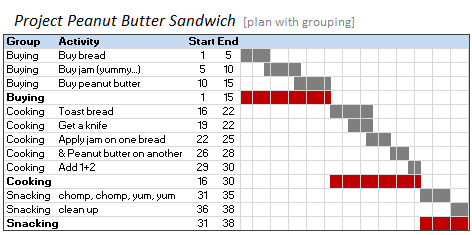
In Excel Gantt Charts part of our project management series, we have discussed about how using Conditional Formatting and Formulas we can make a gantt chart like this: But when you have large project plans, gantt charts like above can get pretty intense and hard to read. So a better approach is to group various […]
Continue »{ 5 Comments }
Preparing Profit / Loss Pivot Reports [Part 2 of 6]
Published on Feb 10, 2010 in Learn Excel, Pivot Tables & Charts
![Preparing Profit / Loss Pivot Reports [Part 2 of 6]](https://chandoo.org/img/ea/profit-loss-reports-2.png)
This is part 2 of 6 on Profit & Loss Reporting using Excel, written by Yogesh Data sheet structure for Preparing P&L using Pivot Tables Preparing Pivot Table P&L using Data sheet Adding Calculated Fields to Pivot Table P&L Exploring Pivot Table P&L Reports Quarterly and Half yearly Profit Loss Reports in Excel Budget V/s […]
Continue »{ 75 Comments }
What is Excel SUBTOTAL formula and 5 reasons why you should use it
Published on Feb 9, 2010 in Learn Excel
Today we will learn Excel SUBTOTAL formula and 5 beautiful reasons why you should give it a try.
SUBTOTAL formula is used to find out subtotal of a given range of cells. You give SUBTOTAL two things – (1) a range of data (2) type of subtotal. In return, SUBTOTAL will give you the subtotal for that data. Unlike SUM, AVERAGE, COUNT etc. which do one thing and only one thing, SUBTOTAL is versatile. You can use it to sum up, average, count a bunch of cells.
Continue »{ 7 Comments }
Excel School is Open for Admissions
Published on Feb 8, 2010 in Learn Excel, products

Dear Readers & Friends, I am very happy to announce that Excel School online training program is now available for your consideration. Please read this short post to understand what you will get when you sign-up for this program and how you can join. What will you get when you join? Access to Private Member-only […]
Continue »{ 6 Comments }
Excel School Registration Opens on Monday (8th Feb, 2010)
Published on Feb 5, 2010 in Learn Excel, products

I have very exciting news for you. Finally, the excel school program is ready for your consideration. We are opening registration on 8th of Feb. (if you don’t know what Excel school is… it is a 12 week online excel training program, conducted by me. You can find full details, get a free lesson here.) […]
Continue »{ 16 Comments }
P&L Reporting using Excel [Part 1 of 6 on Excel & Accounting]
Published on Feb 4, 2010 in Learn Excel, Pivot Tables & Charts
![P&L Reporting using Excel [Part 1 of 6 on Excel & Accounting]](https://chandoo.org/img/ea/excel-accounting-pl-reports-1.png)
With this post we are starting a new series on how to do basic accounting in Microsoft Excel. In this and next 5 posts, we will aim to setup Profit & Loss account reporting for multi-location retail company.
During this series we will learn how to make P&L reports on various criteria with just few clicks.
Many users find it difficult to manage their P&L reporting for Multi Location organization.
We will be using Pivot Tables for our reporting purpose and will take example of a Retails chain with multiple locations divided into various regions.
Continue »
Okay, this is a cop-out, but I have been busy and not-in-a-mood-for-writing in the last 2 days. (I don’t know, but I feel a bit low, may be it is all the snow around and constant work due to excel school and day job).
So, let us have an open thread on Excel Shortcuts. I will start by listing down all the excel keyboard shortcuts I use regularly,
Continue »{ 13 Comments }
Data Validation using an Unsorted column with Duplicate Entries as a Source List
Published on Feb 2, 2010 in Learn Excel
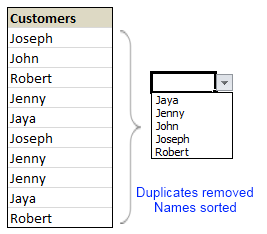
Here is a typical scenario: We want to allow only one of the pre-defined customer names in our spreadsheet. We have listed down all the customers in column B and want excel to check against this list and validate the data. But there are 3 problems. (1) Our list is not sorted alphabetically (2) It contains duplicates and (3) The list comes from external source, so we can not remove duplicates and sort the list every time.
Now how can we set up a simple data validation list that would not repeat customer names and shows them in sorted order like this.
Read the rest of this guest post by Hui to learn how to use data validation in creative new ways.
Continue »{ 1 Comment }
Excel Links of the Week – now even more downloads edition
Published on Feb 1, 2010 in excel links

Welcome to another edition of excel links. During the last week, I have revised excel downloads page on PHD and now it contains over 75 excel templates, tutorial downloads. I am not sure if you dig the new format of the page though. So go take a look at it and let me know what […]
Continue »{ 142 Comments }
Pivot Table Tricks to Make You a Star
Published on Jan 27, 2010 in Featured, Learn Excel
We, data junkies, love pivot tables. We think pivot tables are solution for everything (except for may be global warming and that broken espresso machine down stairs).
Today, we are going to learn 5 awesome pivot table tricks that will make you a star.
Continue »![Delete Blank Rows in Excel [Quick Tip]](https://chandoo.org/img/q/delete-blank-rows-excel.png)
Blank rows or Blank cells is a problem we all inherit one time or another. This is very common when you try to import data from somewhere else (like a text file or a CSV file). Today we will learn a very simple trick to delete blank rows from excel spreadsheets. Read this post to findout how to delete blank rows / cells from your excel data in a snap.
Continue »{ 30 Comments }
Excel School Online Training – More Details
Published on Jan 25, 2010 in Learn Excel, products
Last week I asked you “would you be interested in an online excel training program?” and quite a few of you have responded with “YES”.
So I decided to start excel school. This is a 12 week online training program that will explain various MS Excel concepts to you in an easy to understand format. I am calling it “school” because the program will be fun, exciting and playful – just like school. We will learn from each other as much as we learn from the course itself. Read the rest of the post to see “Excel School Intro” video.
Continue »
Today we will build a mortgage payment calculator (and amortization schedule) using excel. But we will not build a boring excel sheet, we will build a mortgage calculator that is easy to play with.
A mortgage payment is a monthly installment that you pay towards a loan. Any mortgage loan will typically have, (1) loan amount, (2) duration of the loan in years, (3) interest rate per year
Given these 3 parameters, we can easily determine the monthly installment amount (this will be the same amount for all months during loan tenure)
We are going to use Excel’s form controls (more on this below) to build a mortgage payment calculator like this.
Continue »
