
All articles with 'Learn Excel' Tag

Does your data hold hidden secrets?
In Part 2 of Are You Trendy? we will examine the Excel functions that assist us in Trend Analysis.

The Properties button on the Developer Tab in Excel 2007/10 can be used to access a number of Worksheet properties normally only available through VBA and even a few which aren’t available through VBA.
Lets take them for a spin.

Often you may have a set of data and need to know what an intermediate or future value of that data may be.
This week we will investigate 3 methods of tackling this problem using Excel.
In this post we’ll look at manual forecasting.
{ 14 Comments }
220 Excel Tips, Tutorials, Templates & Resources for You [Celebrating 20k RSS Members]
Published on Jan 20, 2011 in Charts and Graphs, Learn Excel
![220 Excel Tips, Tutorials, Templates & Resources for You [Celebrating 20k RSS Members]](https://img.chandoo.org/l/220-excel-tips-tricks-templates-resources.png)
I have an exciting news & massive post for you.
Chandoo.org reaches 20,156 RSS Subscriber mark on Jan 19, 2011As of Jan 19, 2011, our little blog has registered our 20,000th RSS Subscriber. While this is not a huge achievement or anything, It certainly calls for celebration. I am so happy to see our mission to make people awesome in Excel is reaching out to more people everyday. Thank you.
To celebrate this milestone, I am doing a massive post with 220 Excel tips, tricks, tutorials & templates.
Formulas [52 tips]
Formatting & Conditional Formatting [36 tips]
Charting [60 tips]
Tables & Pivot Tables [15 tips]
Using Excel [47 tips]
Free Downloads [5 tips]
Recommended Resources [5 tips]
{ 64 Comments }
Find the Average of Closest 2 Numbers out of 3 [formula challenge]
Published on Jan 19, 2011 in Excel Howtos
![Find the Average of Closest 2 Numbers out of 3 [formula challenge]](https://chandoo.org/img/hw/average-of-closest-2-numbers.png)
Today I am asking you a tricky formula question. This is asked by Ionel on the Introduction to VLOOKUP, OFFSET & MATCH Formulas post. The question is, I have data in three columns: A,B,C and I want to get the average of the closest two values out of three in each row. Could you help […]
Continue »{ 11 Comments }
Excel Links – My First International Excel Workshop Edition
Published on Jan 17, 2011 in excel links

Stage is almost set for my first international Excel workshop. That is right. I am doing a physical excel workshop on Intermediate & Advanced Excel at Maldives between January 23 and 27, 2011. I feel quite excited to do this.
While I derive immense pleasure and learn lots of new things by running Excel School, there is one nagging problem. It is an online program, so the scope of physical interaction with students is limited.
Doing a physical class is a great way to meet new people, gather material for new content, get ideas, learn new things and get challenged. And that is why I am looking forward to do my workshop in Maldives next week.
If you would like to join this workshop: Please call Mr. Guru Raj, Training Manager at IIPD, Malè. His number is +960 7625338. (Workshop agenda)
Because I will be busy with the workshop next week, I will not be able to post much on the blog. I have requested Hui, our guest author to keep you all engaged. So expect some delicious stuff from him while I am away.
Continue »{ 0 Comments }
Join Excel School & Become Awesome in Excel
Published on Jan 12, 2011 in Learn Excel, products
Friends & Readers of Chandoo.org, I am excited to announce that Excel School, my online excel & dashboard training program is now available for your consideration. Please take a minute to read this post.
What is Excel School & Who Should join?
Excel School an online Excel & Dashboards training program. It is designed to make you awesome by teaching formulas, charting, formatting, data analysis & dashboards.
If you use Excel everyday and find my site useful & helpful, then this is a perfect program for you.
I have trained more than 700 students in this program so far and many of them have benefited tremendously. I am hoping you too will benefit from Excel School.
If you want to join Excel School, click here.
Continue »{ 27 Comments }
How to Embed Youtube videos in to Excel Workbooks?
Published on Jan 11, 2011 in Excel Howtos

Often, while creating a complex model or dashboard, you may want to include additional training material in the workbook. So let us learn how to embed flash movies, Youtube videos etc. in to Excel workbooks.
To Embed Flash Movies, Youtube Videos in to Excel, follow these steps.
Continue »{ 25 Comments }
Using Array Formulas to check if a list is sorted.
Published on Jan 7, 2011 in Excel Howtos
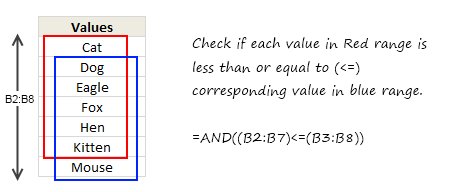
Today, we will learn an interesting array formula trick to test if a list is sorted or not. During last one week, I got 2 requests from different clients for some excel related work. Both of them had one thing in common. To test whether a list is sorted or not. So I got thinking, […]
Continue »{ 7 Comments }
Do you want to Learn Excel? Consider Joining Excel School
Published on Jan 6, 2011 in Learn Excel, products
As you may know, I run an online Excel training program called as Excel School. So far, I have conducted 3 batches of Excel School training and now on January 12th I am opening registrations again for new students.
In this post, I am going to share few important details about the program and give 3 FREE lessons to you. Read on, if you are interested to learn Excel.
Continue »{ 21 Comments }
How to Filter Odd or Even Rows only? [Quick Tips]
Published on Jan 5, 2011 in Excel Howtos
![How to Filter Odd or Even Rows only? [Quick Tips]](https://chandoo.org/img/q/filtering-odd-or-even-rows-excel-howto-th.png)
Ashish sends out this SOS thru email, “I need your help in putting filters . Can we filter the cells on the basis of their even or odd character. i.e in the table of 1-1000, i wish to filter, 1,3,5,7,…”
An odd request, I must say. But nevertheless, possible in Excel.
Read this quick tip, If you want know how to filter odd or even rows only in a list of values.
Continue »{ 8 Comments }
Excel Links – What are your plans for 2011?
Published on Jan 3, 2011 in excel links, personal
Wish you a happy new year and Welcome back to Chandoo.org. So how did you celebrate the new year’s eve? We put the kids to sleep early and partied till 1. Next day, we took them to a park. The kids loved grass, trees and ran like wind. What about you? As for the new […]
Continue »
This year has been hectic for Chandoo.org. We have posted 229 excel tips & articles this year. In addition, we had 6500+ comments & a lot of new pages on the website. We have also trained more than 700 students in Excel & Financial Modeling thru Excel School & Financial Modeling School programs.
In this post, I will share some of the best content on Chandoo.org in year 2010. Just read these posts to supercharge your excel skills.
Continue »{ 8 Comments }
11 Excel Trackers & Templates to help you Rock 2011
Published on Dec 28, 2010 in excel apps

We are just a few days away from 2011. New year always brings hope, cheer, joy and revitalizes us. So naturally many of us embark on journeys with new goals, resolutions, things to do.
Naturally, Excel can help us better manage the new year. In this post, I am featuring 11 templates so that you can have a rocking 2011.
Continue »{ 12 Comments }
Use Filter By Selected Cell’s Value to save time [Quick Tips]
Published on Dec 22, 2010 in Learn Excel
![Use Filter By Selected Cell’s Value to save time [Quick Tips]](https://img.chandoo.org/q/filter-by-selected-cells-value-excel-tip.png)
We are busy decorating the Christmas tree, making preparations for the holidays. But I have a very quick tip for you.
[Note: all these tips work in Excel 2007 or above]
Whenever you are working with huge lists of data, filtering & sorting is one simple way to analyze the data quickly.
You can quickly filter your data based on current cell’s value by right clicking and then selecting filter > filter by selected cell’s value.
Continue »
