
All articles in 'Learn Excel' Category
{ 188 Comments }
I struggle doing __________ with Excel. Fill in the blanks…,
Published on May 27, 2014 in Learn Excel
As I am doing a road-trip across parts of southern India (we are in the beautiful temple town of Madurai as you read this post), here is something to keep you busy.
Fill in the blanks & post in comments.
I struggle doing _________________ with Excel.
Continue »{ 16 Comments }
Excel Links – Delay in State migration visualization results edition
Published on May 20, 2014 in excel links
Hello friends,
First a quick update about state migration visualization contest.
We got more than 50 wonderful entries for this contest. I have compiled 50% of the entries. Due to personal reasons (its annual vacation time at our household), I had to delay the rest and resume it after first week of June. So the results will be announced in 2nd week of June. Thanks for understanding and your patience. Watch this space for mind-boggling dashboards in 3 more weeks.
Click “Read more” to get a sneak-peek at 3 random entries & 4 useful Excel links.
Continue »{ 38 Comments }
What is your passion? [weekend poll]
Published on May 2, 2014 in Learn Excel, personal
![What is your passion? [weekend poll]](https://chandoo.org/wp/wp-content/uploads/2014/05/what-is-your-passion.png)
This weekend, lets get passionate 😉
Few days ago, Cheryl, one of our forum members asked this question:
How do you know Excel is your passion? Or is it?
I am searching for my passion, you know that thing that makes my heart sing. I mean I am listening for the pitter-patter in my ticker. So how do I know if Excel is it? Or anything for that matter. I am looking for that thing that will make me turn my tv off. (TV is my crack, I am truly addicted). I thought it was database development and honestly I am not altogether sure that it isn’t. Excel may be a substitute. A more attainable passion.
Give me some insight peeps. Some thoughts, musings, ideas.
As usual, many of our forum members chipped in with words of wisdom. Hopefully Cheryl saw their replies, if she ever managed to turn off that tv.
That gave me an idea for this week’s poll.
What are you passionate about?
Continue »{ 6 Comments }
CP007: aweSUM() – Overview of SUM functions in Excel
Published on May 1, 2014 in Chandoo.org Podcast Sessions, Learn Excel

Podcast: Play in new window | Download
Subscribe: Apple Podcasts | Spotify | RSS
In the 7th session of Chandoo.org podcast, lets make you aweSUM().
Imagine for a second that Excel cannot add up numbers. And no it cant subtract them either. What would that look like?
A glorified Notepad. That’s right. Excel’s ability to add up numbers, along with features like formulas, charts, pivot tables & BHATTEXT() are what make it such a lovely software. May be not the BHATTEXT(), but we all agree that Excel is so versatile and useful because it can add up numbers (and perform other calculations) with ease.
But how well do you know the SUM formulas of Excel?
In this podcast, you will learn,
- Special personal fruit announcement 😛
- + operator
- Status bar & total rows in tables
- Auto Sum feature
- SUM() function
- SUMIFS function
- Special cases of SUMIFS function
- SUBTOTAL & AGGREGATE functions
- Other summing functions – SUMPRODUCT etc.
{ 16 Comments }
Modeling tiles in a room using Excel Conditional Formatting
Published on Apr 22, 2014 in Charts and Graphs, Learn Excel
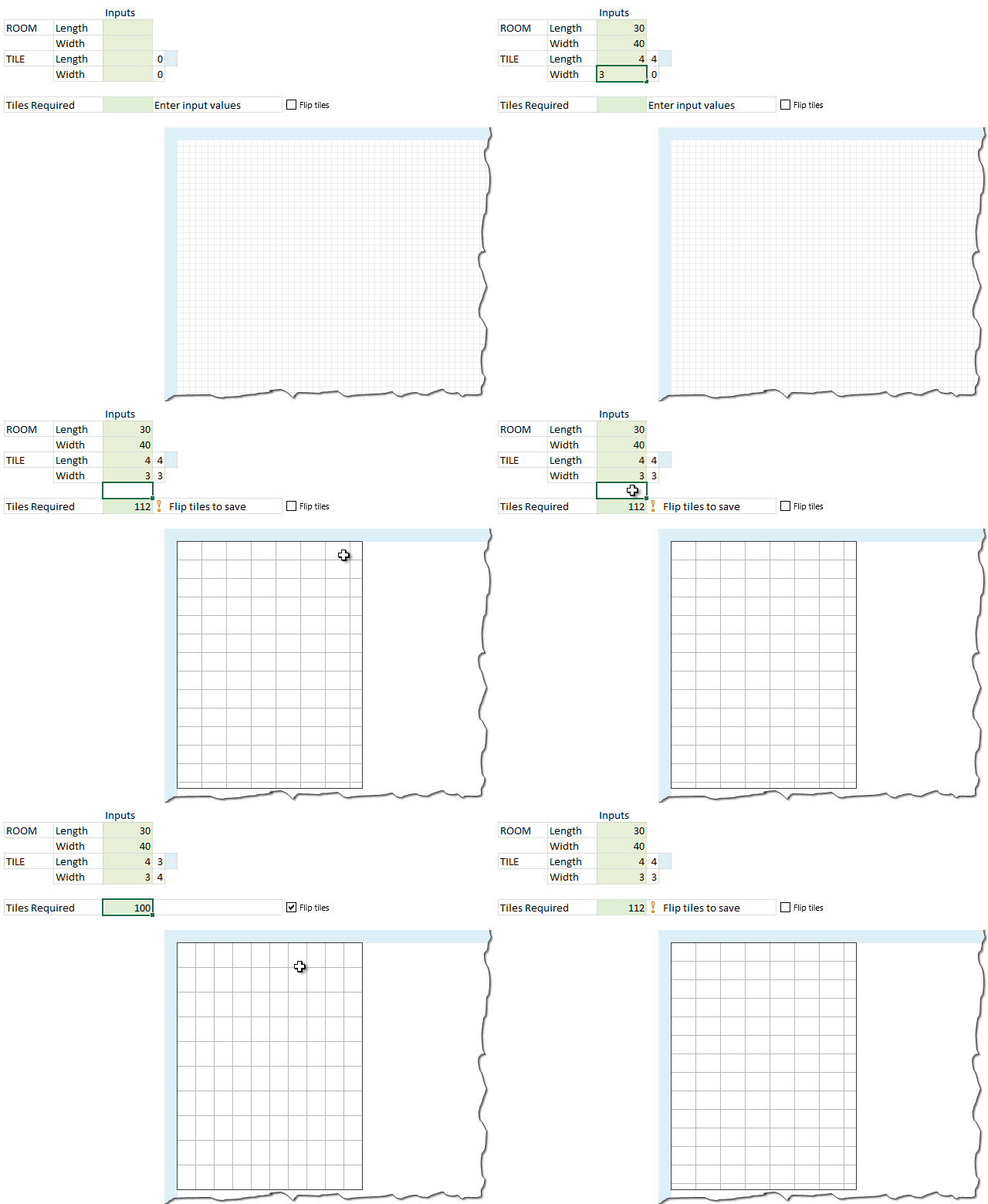
Last week we learned how to answer questions like, “How many tiles in a room?” using Excel. We learned about CONVERT function and fraction number format settings in Excel.
But why stop at calculation? We can even model a room full of tiles, thanks to Excel’s grid nature.
So today, we will learn how to create a room layout as shown above, using Excel.
Continue »{ 19 Comments }
Free Invoice Template using Excel – Download
Published on Mar 19, 2014 in excel apps, Learn Excel
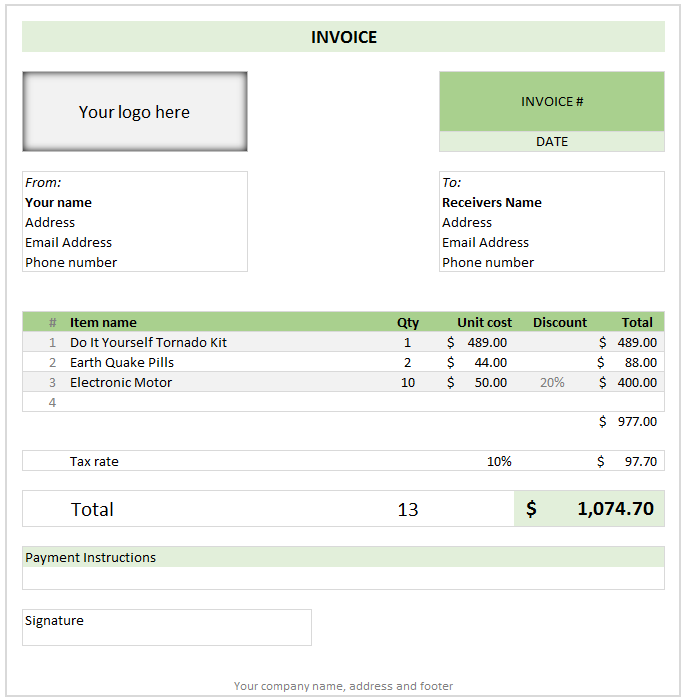
Anyone running a small business knows the oozing bits of joy when you hear a customer saying, “Can you send me an invoice?”
While creating an invoice is an easy task, if you want something that is professional looking, easy to manage and works well, then you are stuck.
That is where Excel really shines. By using an invoice template, you can quickly create and send invoices.
Today I want to share one such template with you all. Why? Because we are awesome like that.
Continue »{ 7 Comments }
You can move formula help box with your mouse!!! [quick tip]
Published on Mar 12, 2014 in Learn Excel
![You can move formula help box with your mouse!!! [quick tip]](https://chandoo.org/wp/wp-content/uploads/2014/03/move-formula-help-box-with-mouse.gif)
One of the most useful features of Excel is formula help box. You know the little yellow box that appears as soon as you start typing a formula in a cell. I use this all the time to understand what the syntax of a particular function is, what parameters to pass etc.
Although I love it, sometimes it does get in the way when writing formulas. Because the help box sits on top of my data, often I find it hard to know which cell to link to.
Solution?!?
Simple. Use your mouse to move away the help box wherever you want.
Continue »{ 16 Comments }
Excel links – What is your next Excel book edition?
Published on Mar 5, 2014 in excel links

Outside of a dog, a book is a man’s best friend. Inside of a dog it’s too dark to read. -Groucho Marx
We don’t have a dog (yet), but we have a lot of books. Anytime I am in a bookshop, I feel like a mosquito in fat-camp. So you can imagine me smacking my lips when I saw your suggestions for favorite Excel books recently. There were more than 50 different books recommended by our readers. Of course I cannot buy all the 50 in one go. That would make Jo (my wife) angry. So I bought one that most of you recommended.
Ctrl + Shift + Enter by Mike Girvin
It is a book about array formulas, advanced formulas and data analysis techniques. I am eagerly waiting for the delivery to devour it. Once I am done with it, I will post a review here.
What about you? What Excel book are you reading now? Please share in comments.
Continue »
Hi folks,
I am super-excited to tell you that Chandoo.org Podcast will be launching on 6th of March (Thursday). First episode is already recorded and I am getting ready for the big launch.
Name of the podcast
Last week I asked you what should we call our podcast. And I got more than 250 suggestions (150+ thru comments another 100 thru email). While the suggestions ranged from funny (chanpoo, addict.xls) to word plays (Excelent cast, Lord of the cells, Speaking Cells) to outright brilliant (XL.AM remember AM radio?). Some of the suggestions were crazy too: Word on the sheet, YouChandooIt, Didasko.xlsx – greek word “to impart knowledge”.
Thanks everyone for the ideas and suggestions.
A majority of you suggested that we call it Chandoo.org Podcast. This keeps the name generic, sticks to our brand and sets us apart. So that is what we will call it.
The full name of the show is Chandoo.org Podcast – Become Awesome in Data Analysis, Charting, Dashboards & VBA using Excel
And our first episode will be launched on Thursday, 6th of March.
Continue »{ 67 Comments }
Handle Volatile Functions like they are dynamite
Published on Mar 3, 2014 in Learn Excel, Posts by Jeff

If you’re building large models, then you may want to use volatile functions – including OFFSET(), INDIRECT(), and TODAY() – with caution, because unless you know what you are doing, they *might* slow Excel down to the point that data entry is sluggish, if not downright tedious.
In fact, you *might* want to consider getting out of the habit of using these functions at all if there are alternatives, and you might want to replace volatile functions in your existing models with non-volatile alternatives…I have reduced recalculation time in large models from minutes to milliseconds by doing just that!
So what the heck does volatile actually mean? And why should you care? Let’s find out, shall we?
Continue »{ 59 Comments }
Robust Dynamic (Cascading) Dropdowns Without VBA
Published on Feb 25, 2014 in Learn Excel, Posts by Jeff
Recently I posted about how you could construct dynamic (cascading) dropdowns that could easily handle multiple levels, like this: …and we saw that users could subsequently change upstream dropdowns in a way that would make downstream choices invalid, like this: In my previous post I used some VBA to clear out any ‘downstream’ choices if […]
Continue »
Friends and supporters of Chandoo.org,
I am very happy to tell you about another great way to learn Excel & stay awesome
Chandoo.org podcast
That is right. As part our mission to make you awesome in Excel, this year I will be adding a podcast.
Continue »{ 35 Comments }
Quick and easy Gantt chart using Excel [templates]
Published on Feb 18, 2014 in Charts and Graphs, Learn Excel
![Quick and easy Gantt chart using Excel [templates]](https://img.chandoo.org/pm/quick-gantt-chart-template-excel.png)
Gantt charts are a very popular way to visually depict project plans. Today, let us learn how to use Excel to make quick & easy Project Plan Gantt Chart.
This is what we will be creating.
Continue »{ 76 Comments }
What is your favorite Excel book? [open thread]
Published on Feb 7, 2014 in Learn Excel
![What is your favorite Excel book? [open thread]](https://chandoo.org/wp/wp-content/uploads/2014/02/what-is-your-favorite-excel-book.png)
Today lets talk about Excel books. The question is simple.
What is your favorite Excel book? Please share your answers using comments.
My favorite books are..,
Continue »{ 75 Comments }
Right-click from the keyboard, not the mouse.
Published on Jan 21, 2014 in Learn Excel, Posts by Jeff

Well here’s something I never knew until today…I was watching one of Mike ExcelIsFun Girvin’s great YouTube videos from his great Slaying Excel Dragons series – the one on Excel 2010 Keyboard Shortcuts – when he showed how to do the equivalent of a mouse right click using a key on the keyboard that I’d […]
Continue »
