
All articles in 'Learn Excel' Category
{ 89 Comments }
Extract usernames from E-mail IDs [using LEFT and FIND formulas in Excel]
Published on Jan 19, 2010 in Learn Excel
![Extract usernames from E-mail IDs [using LEFT and FIND formulas in Excel]](https://chandoo.org/img/f/username-from-email-id-excel-formula.png)
Today we will learn to use Excel’s LEFT and FIND formulas. But what fun it is to learn a new formula on a Tuesday? So, we will actually learn to use these formulas to solve the problem: “extract the username from an email ID” How is an email ID structured? Any email ID contains 2 […]
Continue »{ 9 Comments }
Excel Links – What are your plans for 2010 Edition
Published on Jan 11, 2010 in excel links

So we are in 2010, dawn of a new decade. In fact everyday is a start of new decade, as my friend Jon reflects on twitter. So what are your plans for this year and decade? As for me, I haven’t really jotted down any new year resolutions. So I am using this post as […]
Continue »{ 13 Comments }
Highlighting Repeat Customers using Conditional Formatting [Part 2 of 2]
Published on Jan 6, 2010 in excel apps, Learn Excel
![Highlighting Repeat Customers using Conditional Formatting [Part 2 of 2]](https://chandoo.org/img/n/repeat-customers-excel-conditional-formatting.png)
This is second part of 2 part series on conditionally formatting dates in excel.
Highlighting Repeat Customers using Conditional FormattingIn yesterday’s post we have learned how to conditionally format dates using excel. In this article, you will learn how to use these conditional formatting tricks to highlight repeat customers in a list of sales records.
Continue »{ 187 Comments }
Conditionally Formatting Dates in Excel [Part 1 of 2]
Published on Jan 5, 2010 in Excel Howtos, Learn Excel
![Conditionally Formatting Dates in Excel [Part 1 of 2]](https://chandoo.org/img/n/conditional-formatting-button.png)
This is first part of 2 part series on conditionally formatting dates in excel.
Conditional formatting is a very useful feature in Excel. You can use Conditional formatting to tell excel how to format cells that meet certain conditions. For eg. You can use conditional formatting to show all negative values in a range in red color. Today we will learn how to use conditional formatting to format dates.
Continue »{ 11 Comments }
Best of Pointy Haired Dilbert – 2009
Published on Dec 30, 2009 in blogging, Learn Excel

Ah, you thought I will let you go to the next decade without a “year in review” post? No so fast my friend, not so fast.
[This post is a bit long by our standards, but full of gooey excel goodness. So get a cup of coffee or choco and get going]
And if you are in a rush, here is my wish – Happy New Year 2010 🙂
Continue »{ 12 Comments }
How to Find Dates of Public Holidays using Excel
Published on Dec 24, 2009 in Learn Excel
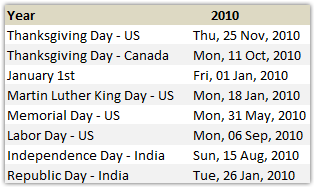
Lets celebrate these holidays in PHD Style. By learning few excel formulas that you can use to find out dates for some of the popular public holidays like – labor day, memorial day etc. When is Labor Day (US) in 2010? Labor day (the US variant) is celebrated on first Monday of every September. It […]
Continue »
We all know how to make comments on excel documents, just select the cell where you want a comment, press SHIFT+F2 and make the comment. But the comments are only visible when you open the workbook. What if you want to print out an excel file, but include all the comments as well?
Turns out you can do that with a hidden option in excel page setup.
Continue »![2010 Calendar – Excel Template [Downloads]](https://chandoo.org/img/n/2010-calendar-thumb.png)
Here is a 2010 new year gift to all our readers – a free 2010 calendar excel file (a little secret: just change the year in “outline” sheet from 2010 to 2011, to get the next years calendar. It works all the way up to year 9999). You can even get a Printable PDF Calendar. There are 14 different sheets in the calendar file. First one is an outline calendar for the entire year. The next 12 are monthly calendars. And the last sheet shows a mini-calendar for the year 2010.
Read the rest of this post to know more and download the calendar.
Continue »{ 6 Comments }
Use CTRL+F1 to collapse ribbon [super-mini-quick-tip]
Published on Dec 9, 2009 in Learn Excel
![Use CTRL+F1 to collapse ribbon [super-mini-quick-tip]](https://chandoo.org/wp/wp-content/uploads/2009/12/ctrl_f1_keyboard_shortcut.png)
In office 2007 (and 2010) you can immediately collapse the ribbon by pressing CTRL+F1. Thanks to Loranga for sharing this tip. More ribbon goodness | Free e-book to learn Excel Ribbon
Continue »{ 15 Comments }
Christmas Gift List – Set your budget and track gifts using Excel
Published on Dec 7, 2009 in excel apps, Learn Excel
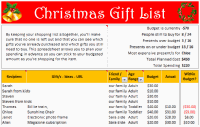
Steven, one of our readers from England sent me a Christmas gift tracker worksheet. I found it pretty cool, so made some minor changes to it and sharing it with you all so that you can have great time shopping for the holidays.
The workbook is full of lessons on conditional formatting, cell formatting, using formulas. Go ahead and download it today.
Continue »
Dilbert is my favorite cartoon (Calvin & Hobbes comes second). I like it so much that I have named this blog after Dilbert. So, today, as as ode to Dilbert and all things excel, we present you… Dilbert on Excel. Read the rest of this post to find some great dilbert strips on excel modeling, formulas, errors and annoyances. Have a fun weekend.
Continue »Recently I have conducted a survey on my blog to find out your pulse on PHD. Quite a few survey respondents have told me that PHD needs a topic-wise archive so that you can learn excel easily. So over the weekend I have prepared a webpage where you can find topic-wise posts on excel and […]
Continue »{ 23 Comments }
Findout Thanksgiving Day’s Date for Any Year [Excel Formulas]
Published on Nov 25, 2009 in Learn Excel
![Findout Thanksgiving Day’s Date for Any Year [Excel Formulas]](https://chandoo.org/img/i/findout-thanksgiving-date.png)
Every year, on 4th Thursday of November, folks in US celebrate Thanksgiving day. A similar holiday exists in Canada too, they celebrate it on Second Monday of Every October.We will celebrate thanksgiving in PHD style, by sharing a wacky formula tip.
Today, we are going to learn how to use excel formulas to find out thanksgiving day’s date for any year.
Continue »
Today I want to introduce Excel 2010 to you. Excel 2010 is the latest version of spreadsheet software from Microsoft, set to be released for sale in late 2010. On Nov 18th, MS released the public beta of Excel 2010 [download here] along with other Office productivity software.
Excel 2010 has several improvements compared to earlier version – Excel 2007. In this post, I want to highlight some of the User Interface improvements made in Excel 2010 that are very exciting and fun to use.
Continue »{ 30 Comments }
Reverse a List using Formulas [Using Excel INDEX() Formula]
Published on Nov 19, 2009 in Excel Howtos, Learn Excel
![Reverse a List using Formulas [Using Excel INDEX() Formula]](https://chandoo.org/img/l/reverse-list-in-excel.png)
Here is a simple yet novel use of formulas. Let us say you have a list of values in range A1:A5 and you want to reverse the list. In an empty cell write =INDEX($A$1:$A$5,6-ROWS($A$1:A1)) and copy down. Boom, you get the reversed list. Here is how the formula works: In the reversed list, first item […]
Continue »
