
Ask me anything
It is thanksgiving week in USA, which means our friends & readers in America are enjoying a fun long weekend with family & friends.
Happy thanksgiving day to you and your family.
Since most of our readers will be enjoying the holiday, I want to save Excel awesomeness for next week. Meanwhile, lets have our very first Ask me anything [AMA].
Ask me anything.. what is it?
It is very simple. In the comments section, you can ask me anything. I will reply to you.
Anything from Excel to my life, SUMPRODUCT to C23.. you get the drift.
Formula Forensics-No. 036: Calculating Costs that Vary by Year and Age
In this episode of Formula Forensics, lets talk about how to build a model where costs vary per year and age. In this example, we are talking about a plantation project. The costs & yields of plants vary by the year they are planted in and the age of plants. In this case, how do we calculate the total costs or returns with formulas?

Find last day of any month with this simple trick [formulas]
Here is a handy trick to calculate last day of any month.
Assuming y and m contain the year & month for which you want to find the last day’s date, write
=DATE(y, m+1,0)
That is right, you can use ZERO (0) as the day.
When you do this, Excel tells us the last day of previous month.
Secret Agent KV’s Chops…what’s in HIS Personal Macro Workbook?
Yesterday, I talked about how you don’t have to know how to code in order to highly leverage VBA. All you need to know is how to Google, Cut, and Paste. As discussed then, I ‘volunteered’ KV under pain of exposure to empty the contents of his secret satchel onto the virtual table, so that […]
What would James Bond have in his Personal Macro Workbook?
You know, I‘m constantly amazed at the depth of knowledge and wisdom that comes up in the comments of this site. For instance, the other day, undercover Excel secret agent KV came up a great list of interview questions in response to Chandoo’s great article What are best Excel interview questions?
I particularly liked this one:
Do you have a Personal Macro Workbook setup ? If yes, what are the most common macros you use in your daily work?
Secret Agent KV obviously has some purpose-built gadgets that he employs to kill inefficiencies. And he obviously also knows the two top-secret reasons to keep code in a Personal Macro Workbook:
- To keep it safe from international spy rings.
- So you can whip it out whenever you are cornered by any evil-looking spreadsheet.
While that first point is important, that second is the clincher: code stored in a personal workbook can be unleashed with a simple judo-chop to the throat.
Today, lets understand how to setup your personal macro workbook and open a secret passage-way to Excel awesomeness.
Thank you Sachin [a small tribute]
Lets talk about people who inspire us. People who show us that anything is possible. People who prove that commitment, hard work and perseverance are true ingredients of a genius.
I am talking about Sachin Tendulkar. Those of you who never heard his name, he is the most prolific cricketer in the world. He is the leading scorer in both tests (15,921 runs) and one day matches (18,426 runs). Read more about him here.
Tendulkar has been an inspiration for me (and millions of others around the world) since I was a kid. The amount of dedication & excellence he has shown constantly motivates me. It is a pity that the great man is retiring from test cricket. He is playing his last test match (200th, most by any person) as I am writing this.
So as a small tribute, I have decided do something for him. Of course, I have never been a cricketer in my life. Once in college I was reluctantly asked to be a stand-by player in a game with seniors. I did not get a chance to pad up though. That is the closest I have been to a cricketer. So I did what I do best. Create an Excel workbook celebrating Sachin’s test career.
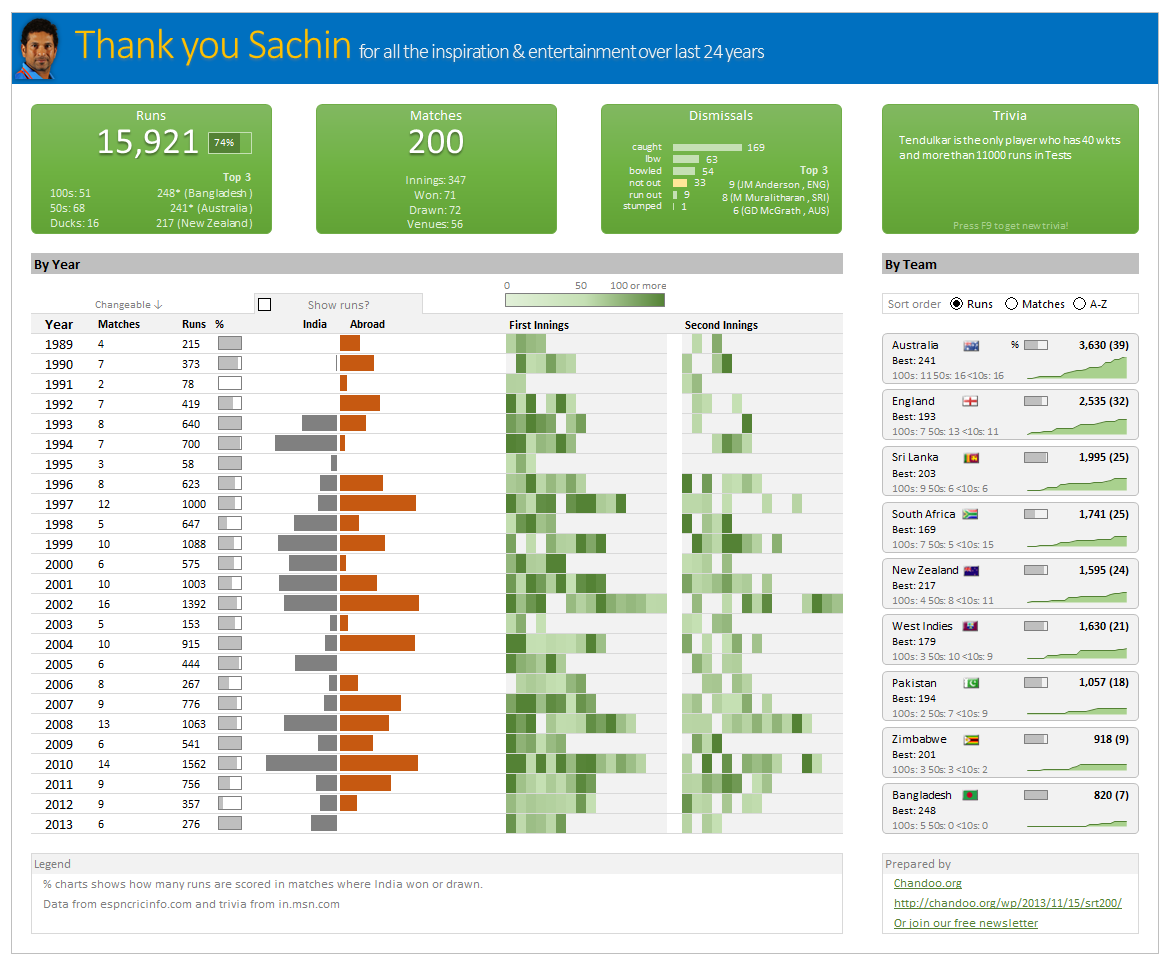
Thank you Sachin – his test career in a dashboard
Here is a dashboard I made visualizing his test cricket statistics. It is dynamic, fun & awesome (just like Sachin).
(click on the image to enlarge)
Show pop-up calendar upon right click [Excel VBA]
There are times when we are entering dates into several columns and would like to select a date from a popup calendar instead of manually typing.
Today, lets understand how we can set up a pop-up calendar in Excel so that your users can easily input dates by right clicking on a cell and inserting a date.
