

Here is a New year gift to all our readers – free 2013 Excel Calendar Template.
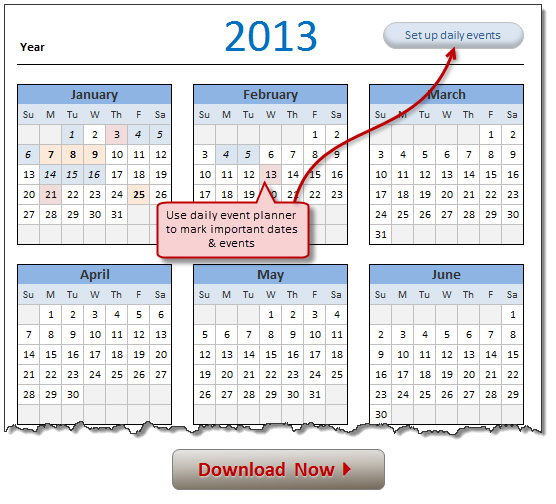
This calender has,
- One page full calendar with notes, in 4 different color schemes
- Daily event planner & tracker
- 1 Mini calendar
- Monthly calendar (prints to 12 pages)
- Works for any year, just change year in Full tab.
See more snapshots here: 2013 Calendar template snapshot 1, snapshot 2
Download 2013 Calender – Excel File
Click below links to download the calendar you want:
- 2013 Calendar & Daily planner [Works in Excel 2007, 2010 & 2013]
- 2013 Calendar Template [Excel 2007, 2010 & 2013]
- 2013 Calendar Template [Excel 2003]
How does this Calendar work?
This is the same file as 2012 calendar with the year changed. The new feature is event planner. So I will explain that alone.
- First take a look at either 2011 calendar or 2012 calendar pages to see how the basic calendar is constructed.
- In the daily events tab, we have full calendar for 2013 (or any other specified year) listed one day per row (so maximum rows are 366).
- Each day can be marked as one of the 4 types of events – Important , Anniversary, Holiday or Vacation.
- When you mark a day with either of these 4 events, in an extra column, a formula determines which event it is and places a number (between 1 to 5 – 1 for Important, 2 for Anniversary … 5 for no event)
- Back in the full calendar, we use conditional formatting to color a day based on what number is associated with it in daily planner.

- COUNTIF formulas are used to count how many days are marked as Important, Anniversary or Holiday and summarized in the full calendar view.
Go ahead and enjoy the download. The file is unlocked. So poke around the formulas and named ranges. Learn some Excel.
More Calendar Downloads:
Download these additional calendar templates and start your new year in awesome fashion!
2012 Calendar, 2011 Calendar, New Year Resolution Tracker, Picture Calendar Template and Todo list template
Techniques used: INDEX | OFFSET| INDIRECT | Array Formulas | Using Date & Time in Excel | Conditional Formatting


63 Responses
Good one Chandoo!!
Cheers!!
Dibs
Thanks 🙂
Nice 1.
Excellent
simple always rocks inside ! ! !
Excellent
Great work chandu
hi Chandoo
i have a question – while this is an great calendar template, do you have one where the text/event appears in the the Monthly Calender (the one which prints to 12 pages)
Thanks
Madhu
See this Madhu… http://img.chandoo.org/d/2013-calendar-with-event-planner-v2.xlsx
Really greate Chandoo
Thanks! Awesome gift.
Not seeing the monthy calendar in this download. Just the 12 month, daily & mini.
Please download this version – http://img.chandoo.org/d/2013-calendar-with-event-planner-v2.xlsx it contains monthly calendar too with events marked.
Hi Chandoo
I have added the monthly calendar also to the events calendar. It is an awesome spreadsheet, thanx! One question as above, what is the quickest way to have the days coloured (maybe labelled?) for each monthly calendar to reflect the event colours of the ‘full’ tab? Looking for the quickest way to copy across the conditional formatting to the monthly tab also.
Thank again
Jason
@Jason: thanks. Since you and many others have asked for it, I modified the event calendar to show monthly calendars with event colors too. Download it from here:
http://img.chandoo.org/d/2013-calendar-with-event-planner-v2.xlsx
Regarding your question:
The quickest way to apply CF to monthly calendars is,
Thanks Chandoo! Much appreciated. I also just modified the event calendar myself to show calendars with events colours. I worked out how to merge the CF across to the Monthly calendar with no issues 🙂
Jason
Awesome
Excellent… work..
Good work Dear Chandoo.
Thank you..
Chandoo,
Thanks for building such a great resource and community on Excel.
My calendar is also focussed on events and holidays. User can enter up to 100 personal events that will be displayed on the calendar and also highlighted using conditional formatting. In addition, U.S. holidays are calculated and highlighted.
The calendar can be customized for any year, starting with any month, and the week can start with any day.
Available here: http://indzara.blogspot.com/2013/01/custom-printable-calendars-built-in.html
Feedback from this great community is welcome. Thanks.
I have also added a 2013 Tamil Calendar if anyone is interested in a calendar template with Tamil Nadu Government holidays and Tamil months.
http://indzara.blogspot.com/2013/01/2013TamilCalendar.html
This is awesome, thank you!
How do I change the titles of the event types? Probably pretty basic, but I am far from being an Excel guru. I love that it keeps count of the event types used in the notes area, it is great for keeping track of vacation time used.
Wow!
I was looking for it 4 a long time. I need this!!
I change the colors and the labels to make it works in spanish
Have a question
How can i modify to have Mondays as first day of the week instead Sundays?
thank you so much!
Very useful resource, would be nice to collaborate with you on my new photo calendar website http://calendar.pdfcreations.com to customize events on pdf layouts.
your calendar helps me find certain at everything on my daily plans, right on my workbook. thanks a lot.
Chandoo. This is fantastic. A nice addition to the new 2013 calendar. Thanks for sharing the data and as usual THANKS.
Hi Chandoo,
Could you please let me know how to change your nice calendar just to have Monday as first day instead of Sunday ? Or can you please upload version with starting with Monday ?
Would appreciate this a lot !
Great work btw !!
rgrds,
slotbandit
Hi CHandoo
really good job,you are the best ,i will pass to visit you nexet week i m raghurama bahlan.
anyone can help ? how to set Monday as first in Chandoo calendar ??
@Slotbandit
On the Monthly Sheet
Change B5
From:=INDEX(m1_,1,(ROWS($B$5:B5)-1)*7+COLUMNS($B$5:B5))
To: =INDEX(m1_,1,(ROWS($B$5:B5)-0)*7+COLUMNS($B$5:B5)-6)
Make the same changes to the other months and calendars
Thanks a lot Ian !! 🙂
have a good day
Hey i was just wondering how can i change the daily drop down menu to
Appoinments
Campaigns
is it possible (or simple) to have the calendar start with a different month?
This is great!! I have MS excel 2010. I am trying to make a dropdown calendar. Having the toughest time with this. Co worker has MS Excel 2003 Same issue. Do you have something already made? Would appriciate it!!
This is fantastic, is there an academic version that goes from august ’13 – July ’14?
Dear Chandu,
Really Awesome
but I wnat to know how it convert or make 2014 calender, Pls give me suggestions.
This is particular item which i saw last 6 month but you prove it again that you are chandu.
Thanks Again
Hemant Rathi
change 2013 to 2014 on the same spread sheet and everything changes.
Dear Chandoo,
In this Excel Calender If i set up event date then it does not show in calender’s particular date.
Pls check and confirm me.
Regards
Hemant
Have you looked at the month of February when you change the year to 2026?
The first week is all blank.
Hi, this template is very good. Thanks for sharing it across. I need one more modification. When we click on the date on the one page full calander, can it show the event planned on that day!
Right now, the color of the day is changed to show the event but we need to browse to daily calander for looking at the event. Is it not!
I also wanted to have notes column in the monthly calander so that we can record the daily tasks there.
Thanks again,
Kumar
Thank you! Beautiful gift
This is a fantastic tool – i was wondering if there was anyway to add more events or separate the combination of Vacation and Holiday?
Lea,
Please take a look at my all-purpose calendar maker and let me know if that addresses your question. You can add up to (any) five types of events. In addition, weekends are also highlighted. You can customize the weekend dates too. You can add multiple events to a single day. However, I have limited the template to only 100 events as all the events have to be displayed on the 12 month calendar.
There is more customization available in the template. I hope you find it useful.
http://indzara.blogspot.com/2013/06/AllPurposeCalendar.html
I have the same question as Lea but with further additions. i.e. is there a way to :
1. Add multiple events to a single date
2. Show all the events in the Calendar with the corresponding colour in that cell (i.e. if there is a public holiday, birthday, and anniversary all on the same day, can it get reflected in the calendar)
3. if i were to add a list of events (e.g. public holidays) to the list; can i update the list chronologically again
Thanks!!
Madhu
Hello Madhu,
Please see my comment above for my response to Lea’s question. In my all-purpose calendar maker excel template, you can add up to (any) five types of events and each type is assigned a different colour. You can add multiple events to a single day. If multiple events happen on the same day and they belong to different event types (for example, holiday and birthday), the colour of the higher priority event type is displayed on the calendar. You control the priority (for example, birthday over holiday) in the template.
I couldn’t understand your third question. Please explain.
http://indzara.blogspot.com/2013/06/AllPurposeCalendar.html
Hi Indzara
Thank you for the template. its closer to what i need barring 1 thing.
Currently the cell with the Date changes colour based on priority set for the event. But i need the actual cell with the event to be colour-coded. So if I have 3 events on the same day then each cell should be coloured differently and i’ll have 3 different coloured cells for the same date.
Possible?
Thanks!!
Hello Maddy,
Thanks. I would like to make sure that I understand your question. On my 12 month calendar (which prints on one page), I display all the event names and dates on the right side of the calendar. I also display the type of event, but I don’t colour-code them. Is that what you are referring to? If so, that can be easily done. I chose not to do that, because I thought it would be too distracting to have so many cells coloured (with different colours) on one page. Please let me know.
Dear Chandoo,
Calender is awesome but……
I have download this calender and also set the event but i could not be able to get when i click on selected date.
Pls tell me complete way to process it.
Thanks
Hemant
Hi Indzara
I mean i need the cells to reflect the colour in the “Monthly_Calendar”. At the moment only the cell with the Date changes colour, but i need the cell with the event to change colour too.
Thanks
Hi Chandoo,
I Download the calender but i face problem and that is:::
If i set a event or important date by set up date then i am not be able to find on calender that event,
Say i set for 19th july Birthday then icheck in calender then no alert oe message show.
Pls sort out my problem so i can use the same.
Thanks
Hemant Rathi
How did you set the boarders? On the Full tab it doesn’t go beyond column AC? How did you do that?
Found out.
Shift+Ctrl+arrow direction.
Dear Chandoo,
Your Calendar is awesome,
But i want to know that if i set up a event in a particular date then event should be display on front of calendar ie. highlighted or display seprately; I have tried but could not see, so pls check and revert me.
Thanks & Regards
Hemant
this is so efin good!
Hi Chandoo,
Your calendar excel is awesome! But if I would like to change marked color in each condition in daily. How to do it?
Thank you.
The best regards,
Bird
Whilst having events highlighted i still found that i was using the daily tab to see what they are.
On the Daily tab I added a row count on todays date
=MATCH(TODAY(),C:C,0)-1
then added some an offset for the next 30 days
=OFFSET(C1,$N$12,0,,)
and an offset for the next 30 “notes”
=IF(OFFSET(E1,$N$12,0,,)=0,””,OFFSET(E1,$N$12,0,,))
(this removes the 0 from the next step)
Then picture linked these to the front page. Now everyday i can see what is coming up in the next month
this may be late in the year, but i was looking for calendars and came across a few of which, this one totally rocks.. Thanks Chandoo!
Hi Chandoo,
That looks great. Is there a way to set up a CF formula for a bi-weekly week pay schedule? 🙂 Many thanks if you could help me on this!
Hi Mr. Chandoo,
I am a beginner in excel. So please excuse my stupid questions:
1. I have downloaded this calender; but when I am clicking the highlighted dates events are NOT coming below the “Notes”…
2. What I have to do to change “important” “Vacation”, “Holiday” etc to something else?
Regards
Hey! This is a great calendar!
I was wondering if there’s an easy way to view the notes on the events when you click on the cell in the full calendar tab.
Thanks!
How do I get out of edit mode so I can actually use the buttons?
How do I add one more event in the calendar like Public holidat