

Jennie, a sweet and ambitious lady set out to do 101 things in the next 1001 days. She took the inspiration from Day Zero Project. Not stopping there, she prepared a cute little excel sheet to keep track of all these new year resolutions and sent it to me.
I think this is a swell excel template if you want to keep track of your goals or new year resolutions or just manage a list. See it for yourself.
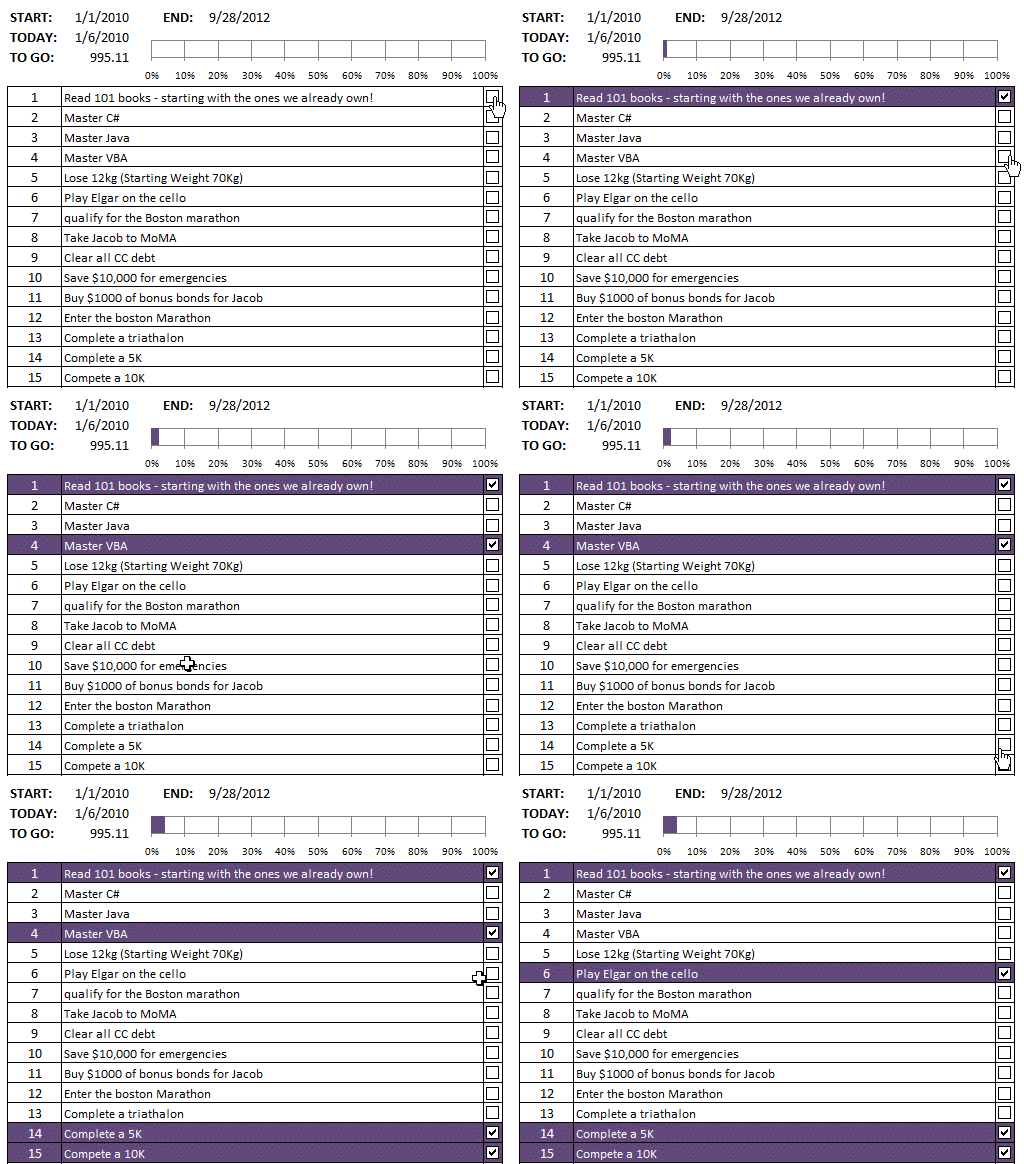
The file uses lots of excel goodness like conditional formatting and excel check-boxes. As soon as you mark a goal (or resolution) as completed, it is highlighted in a different color.
Plus there is a thermo-meter chart too, to show the progress. Pretty cool eh?
Download the Excel New Year Resolution Template
Click here to download the template. Go and make some goals and achieve them. All the best 🙂
Thanks Jennie
Thank you so much for sharing this with us.
If you like this file say thanks to Jennie. Even though it is not one of her 101 goals, I am sure she likes to be thanked by a stranger across the world.


47 Responses
Thanks Jennie, and good luck with your goals. If you complete #26 maybee you can sell it to me? We had -34 degrees celsius here this morning.
Great List! I made one small improvement. By making cell H3 read =MAX(B8:B108) I have been able to make a list as long (or short) as I like and the ‘thermometer’ updates accordingly.
Thanks again for a great tool!
Nice work Jennie – hope the weather improves because I certainly can’t do #26 anytime soon…
Chandoo – a silly question – how do you format the sheet to show no grids etc – I notice that all your examples have a clean white sheet…I paint the background to white so not sure if you do something else?
@Dan D: good stuff.. 🙂
@Ubique72: Try hide gridlines option from View > gridlines in Excel 2007 (or Tools > options > “view tab” > remove grid lines). See here for more on this http://chandoo.org/wp/2009/08/13/hide-grid-lines-quick-tip/
Awesome, Jennie. Thanks a bunch.
Thanks Dan D for that little fix. I have amended on mine for those don’t need a list of 101.
I won’t be getting around to #26 for a few months as it is summer here and +30C.
Awesome stuff!
Thanks Jennie.
Wouldn’t it be cool if we could modify to drag/drop from Outlook and automatically add a task from an e-mail item?
No idea how to do that, but it would be cool!
Thanks
Winston
I really like this worksheet, however there is one glaring problem. From 1/1/2010 to 9/28/2012 is 1002 days! I’m surprised that no one checked this
The math for the difference between two numbers is B – A + 1. Or you can just start a series of dates in cell A1 starting with 1/1/2010 through 9/28/2012 and find the last date in row 1002.
The check boxes linked to the graph and the conditional formatting for completed items is fantastic. Nice job of formatting.
Beautiful Jennie!! Very useful… thanks a million!!
@Gregory.. thanks for pointing out the simple math mistake. one donut for that 🙂
On a more lighter side, if you ever get to do all the 101 things you want to, I am sure you dont mind one extra day 😀
@Winston: Now that calls for some VBA magic… JP where art thou?
Thanks Jennie 😀
Jennie your spreadsheet is easy to use and very nice to look at, great job!
I am working on a project that could use this technique, however I’m having an issue copying the checkboxes down each row. All the links point to the original checkbox’s cell. Can anyone help, or do I have to manually change each box?
Hi, just discovered your awesome blog. Very helpful. Subscribed.
Thanks a lot and special thanks to Jennie…saved me some time from creating my own spreadsheet format ;P
I want to create a list of 25 action items instead of 101. How to i do that? I am a newbie, you would have figured that out anyway.
Hej! I LOVE this. The only problem I’ve encountered is being able to check the boxes. They work when the document is read-only. When I “save as” so I can fill in the cells, I can no longer check the boxes. I suck at Excel..ha ha! I thought it could be that I use Ubuntu with Open Office, yet I would think I would have a problem in read only as well if it were that. Ideas?
I fixed myself…duh. Instead of “save as” I used “edit file” copy.
Thanks for a great template!
Jennie, brilliant list,
id like to create something like this,
how did you link the thermometer chart to the check boxes? if anyone can help?
Nice template sir, thank you.
Good News: Found a great template for making 2012 goals
Bad News: Feeling like a complete sloth because there is no way I could so most of those already listed. 😐
Thanks Jen for the wonderful sheet. I think you are already on the road to become awesome.
@Chandoo: I know a bit of excel but now learning awesomeness from your site and all I can say is thanks for being here.
Can you please explain the making of this sheet for the beginners.
Thanks Jennie…very useful stuff
Thanks Jennie! I have altered it so its 36 things to do in 365 days! I stole a few of your resolutions too, great list! Thanks!
Hi All,
Did anyone noticed that columns H, I’s formatting??
whatever you type, just goes invisible, (once u out of the cell), but the value stays in the cell!!!
Awesome custom format ;;;
I love it! Let me play with my seniors @ office with this cool format trick 🙂
Hi
Thanks Jennie
I made some modified I hope is useful
https://docs.google.com/a/salehsaeed.com/file/d/0Bw47Kd9lRTOcb3FIai1QRktJUWs/edit
https://docs.google.com/a/salehsaeed.com/file/d/0Bw47Kd9lRTOcRndvdUVZb0gwVVU/edit
Hi Jenni,
I’d like to make my own template with a gant chart as what you’d done but I’m very novice. Would you share your knowledge how to make it step by step? Thanks a million.
Thanks Jenny, it will come in handy in my new year’s resolution.
I read Jenny’s article a year and a half ago… a little over 450 days to my 30th birthday. Inspired, I made my own list of 45 things to do in 450 days…the day I turn 30. I covered ~55% of the goals, and reading 45 books was one of the most time consuming, yet rewarding. I exercised more, took up pottery classes, tried new things and couldn’t have asked for a more rewarding experience. I dint get to watch 5 plays (got to 4) and swim once a week, for 50 weeks, volunteer for causes and spend ~60hrs (got to 20, but have enrolled in a program which is more sustained now, and hopefully a more longterm association), watch the husband play local football matches once a month… but then again, its a working list, and I loved the positivity it brought to me.
Thanks So Much Jenny! I hope you got to do most of the stuff on your list too.
This birthday, I’ve made a list of 30 things I want to do over the year. Cant wait!
Thanks a lot Jenny !
Thanks Jennie
Thanks for providing the template.
this is very useful and glad that I found one to keep tracking the goals….
Usually for me goal tracking is for couple of months every year; however this time I am still using the list – Thanks to awesome and simple excel template. It really makes wonders with tracking.
Thanks a ton!
Thank you. This is wonderful!
I just learned a little bit about the 100 goal list and eager to try it out, and this excel sheet can surely make my life lots more easier and help me to visualize my goals.
I was trying to download this New Year’s Resolution template but the link no longer seems to be working. 🙁
Please refresh the page and try again. It is working now. The link is also here – https://chandoo.org/img/c/101in1001-new-year-resolutions.xls
Thank You Jennie!!
Do you have a version available for Google Sheets? When I upload the excel to sheets, a few of the features are lost. Thank you!