

Excel is very good for keeping track of your investments. Due to its grid nature, you can easily create a table of all the mutual fund holdings and monitor the latest NAVs (Net Asset Values) to see how your investments are doing. A while back we have posted a file on tracking mutual funds using excel. Today we are going to release an upgrade for that file.
Download the mutual fund portfolio tracker excel workbook now.
[Download Excel 2003 compatible version here]
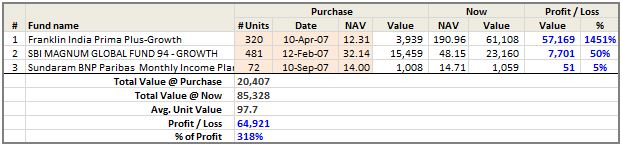
How the Mutual Fund Portfolio Tracker Works?
- We use Excel Web Queries (a powerful external data feature in excel) to get latest Mutual Fund NAVs for all the MFs in India. The list of funds along with their latest NAVs is published everyday at AMFI (The Association of Mutual Funds in India) at http://amfiindia.com/spages/NAV0.txt
- The data is delimited using ; as a separator, I have used some formulas (mainly FIND, MID and LEFT formulas) to split the text in to fund name and latest NAV.
- I have used fuzzyText UDF (user defined formula) so that we can search against this list even when you have a spelling mistake in the fund name. For more information see fuzzy text search using excel.
- In the main portfolio sheet, as soon as you type a fund name, we search against the list to see if any fund matches the one you bought. At this point, we use the fuzzyText UDF so that you can spell in anyway you want (as long as it closely matches with the fund name). Once a match is found, we show the latest NAV for that fund in the tracker worksheet. And of course, we use VLOOKUP to find the NAV.
- Rest is easy, you can figure out between sips of coffee.
- The file is protected, but there is no password. So go ahead and poke around it to learn how the whole thing works.
- Even though the file works for Indian Mutual Funds only, you can easily build a similar model for US or UK or Any other country. All you need is a public source of fund data and a little web query.
Changes from previous version
- The formulas are more robust. Earlier version (available here) has some limitations.
Selecting a fund is much more simpler. You need not scroll thru an insanely large in-cell dropdown. Instead, just type the fund name and thanks to fuzzyText UDF, the correct fund name will be found.- I have updated the webquery properties, so that formulas get refreshed automatically.
Download the mutual fund portfolio tracker excel workbook now.
[Download Excel 2003 compatible version here]
What is your favorite way to track investments?
I rely my bank’s investment tracker tools to get a quick update on my mutual funds and shares. But I use excel to pull data from various sources and analyze it to optimize my portfolio. Using excel’s financial formulas, I can easily find out CAGR or IRR on my investments is and compare it with other options. I also compare my future needs against my current holdings to see if I need to invest more.
What about you? What is your favorite way to keep track of investments?
Related Excel Templates and Articles on Personal Finance
- Find out how much you need for retirement using Excel Goal Seek
- Why you should start saving early for your retirement
- Tracking Stock Quotes and Other investments using Google Spreadsheets
- Stock quotes in excel
- Household Budget Templates – Free Download
- More articles and howtos on personal finance using excel


94 Responses
Hi Chandoo,
Thanks for the update. I have been using your tracker and find it really cool. Could you elaborate on the update? What has changed/ what has been added?
Cheers
Vaibhav
@Vaibhav.. sorry for not being clear. I have added a new section to the above post mentioning some of the key changes to the template since earlier version.
is this path still valid? http://amfiindia.com/spages/NAV0.txt. says page not found and the application is not able to retrieve data. What changes are to be done and how?
Use this link https://www.amfiindia.com/spages/NAVAll.txt
Hi Chandoo,
Thanks for the updated file. I have also created a file to track my Shares with some graphs 🙂 but I was not able to pull data for Mutual funds.
Thanks a lot again.
Couple of things, dont know if you can pull out data but here goes:
1) you need to calculate IRR s in addition to absolute gain/loss %
2) you have to atleast show benchmark returns say sensex or the nifty, say annual. If you can show it for the same time period as of when you are holding the fund, thats the ideal 🙂 . And 30 year bond yield. (maybe you can just pull out 1 year returns of each of these from another source?. From current data its best to force benchmark ETF s in your file, row 3612)
Cool interface. And sorry for the additional work 🙂
Hi,
Trying to use the excel sheet of Mutual fund tracker, but its not getting automaticaly refreshed and it says that automatic refresh fail also when i tried to insert my mutual fund the drop down list didnt come up, request you to please help me in using the excel sheet.
Hi,
Trying to use the excel sheet of Mutual fund tracker, but its not getting automaticaly refreshed and it says that automatic refresh fail also when i tried to insert my mutual fund the drop down list didnt come up, request you to please help me in using the excel sheet.
@Srickant… good points. I use the IRR analysis to see the fund performance all the time. I kept the sheet simple, but we can easily add the concept.
@Mehul… Are you connected to internet? the file should refresh automatically. Also, there is no drop down. You have to type the name. Also, enable external connections and macros, otherwise the file wont work.
Dear Chandoo, i am connected to Net all the time as i am using it from my office, i had tried writing the name too but it has not helped yet, request you to kindly mail me if possible the working file that you are using on my mail id mehul.here@gmail.com
@Mehul… I am using the same version that is uploaded here and it is working fine for me. The file already has few fund names (as examples). You need to write the names of funds as listed in AMFI website (you can remove vowels or slightly mis-spell them). Also, check if you are able to visit this page from office… http://amfiindia.com/spages/NAV0.txt
Hi Chandoo
I liked your tracker.
I have a question though. In the Portfolio Sheet, how have you restricted the navigation to go to cell M2 for example?
Dear Chandoo,
How to track divident history, or ant redemption?
Dear Chandoo,
How to keep a track of weekly dividend reinvestment funds( ICICI / UTI ) etc..weekly / fortnightly dividend reinvestment funds ?
How to keep a track of returns based on varying NAV and weekly dividend reinvestment, over a large period
Hi Chandoo
I was using your MF potfolio since last 1 year version 2 now all of sudden start giving errors
(when i am enabling update) today i have again download new version 4 and started putting the name of fund
1. its not allowing to copy paste from the nav sheet the name of funds
2. when I enabled the update latast its giving the same error #value#
Is there any prob ……….if not than can u please help me
bcoz I liked ur excel portfolio very much
Thanks & Regards
Mukund
rathimukund@rediffmail.com
Hi, Your Excel Tracker file gives bad/corrupted zip file. What’s going on?
When I type any name the pick list is not coming. what to do? I have already unprotected the sheet.
Hi Chandoo
I was using your MF potfolio since last 1 year version 2 now all of sudden start giving errors
(when i am enabling update) today i have again download new version 4 and started putting the name of fund
1. its not allowing to copy paste from the nav sheet the name of funds
2. when I enabled the update latast its giving the same error #value#
Is there any prob ……….if not than can u please help me
bcoz I liked ur excel portfolio very much
Thanks & Regards
Mukund
rathimukund@rediffmail.com
Chandoo you rock!
Chandoo, this file clearly does not work. I am new to your site but get the feeling the files are not updated with details around how to resolve issues to get the file working.
I have developed a Mutual Fund Portfolio Manager in Excel that maintains entire record of the investment and also gives annual rate of returns for each such investment. Any of your readers who desire to evaluate the Portfolio Manager may contact me at sudhem65@rediffmail.com. Thanks.
Hi, am able to refresh the NAV list however while typing the fund names in the portfolio sheet the fund names do not come up. Is something amiss??
With Excel 2010 , it is not working. Even default funds are showing “#N/A”. How to fix it?
Hi Chandoo,
Very impressed with the stuff on this website.
i have been using the mf tracker and would like to add another table that logs the weekly nav so that i can judge its growth in a graph and compare to the index This will help me judge the performance of the fund.
Pls advice me on how do i add this.
Thank you
NOT WORKING… 🙁
Ex: sbi gold fund – growth plan is missing & not updating…..
Whenever the xls file is opened…. it gives error prompt “The following data rage failed to refresh: latestMFNavs Continue to refresh all?
When I click “OK”…. nothing happens. 🙁
Hey Chandoo,
Came across your site and was pleasantly surprised.
Awesome stuff this. Do you have a stocks portfolio tracker as well. I tried a couple of them earlier but none seem to work too well or were so cumbersome that going to Moneycontrol was easier.
Would love to hear from you if you have a solution.
Cheers,
Hi Chandoo, I have been using your MF portfolio tracker for several years without any issues. Last few days, the tracker is not working, I believe some changes in the AMFI data. Can you please check and help us on this.
I’ve also reported the same thing on 4th jan…… haven’t recieved any reply to it still….. 🙁
Even for me the same error is happening when I enable the data connection for fresh data [as told by Radesh and gsvirdi].
i found the solution of it. I think recently there is some changes in AMFI’s NAV file. they have added INE number with mutual fund scheme.
those who getting the error have to copy any paste below link into their Latest NAV’s file in column E10. and drag the same upto the end of the column in entire sheet.
=IF(ISERROR(FIND(CHAR(171),SUBSTITUTE(B10,”;”,CHAR(171),3))),””,FIND(CHAR(171),SUBSTITUTE(B10,”;”,CHAR(171),3)))
after doing this change your nav will be updated and it works nice.
If any body get any error pls write it here.
Dear Aanad,
Still it’s not working. Earlier the fuzzyText in Column E was finding the text value (like nf204k01471), but with this formula of ur’s it is giving a neumerical output (like 22). I’m wondering how can it work???
With the existing Formula =IF(C10″”,VALUE(MID(B10,C10+LEN(D10)+2,FIND(“;”,B10,C10+LEN(D10)+2)-C10-LEN(D10)-2)),””) it’s giving an error #VALUE!
The above formuls should be replaced/overwritten in [strong]column C[/strong]…… As columns B & C are hidden by author so I was not able to find out the correct place for the formula.
Thx so much Anand for the solution, now the tracker file is working again.
Sir,
Using old version & satisfy with that , but currently in Jan-2012 its not working; Any help
just follow my above post and your old file will work too.
Hi, I have downloaded “MF Portfolio Tracker- India v3.0”. I am not able to input the funds in the Portfolio Sheet in the file. I have to input funds like HDFC Equity/HDFC Tax Saver/Sundaram Tax Saver and other funds in which I have invested. I am not sure about the Fuzzy Text. Its not showing in the dropdown. I am using excel 2010.
Please help !!!
Dear Varun,
It happens….. the fund name is there but still it does not appears in the cell. Manually searched from the sheet “NavPivot” and copy-paste the cell contents in the Portfolio Sheet.
Plz forgive Excell, and Chandoo for this inconvenience 🙂
GS Virdi.
Thanks Chandoo,
I found the fund names in the dropdown….. Its little inconvenient but its working….
Thanks for the templete. Its really helpful.
Varun
Thank you Chandoo,
The file is a great way to track the investments.
One doubt…how to track SIP?
Regards.
Ajay
Great Tool, since Jan 2013 started am not able to track the Fund “SBI MSFU CONTRA-DIVIDEND” in the excel. NAV is not found. Pl advice
Very cool tool. Great work. Thanks
Rahul
I have developed Advance Mutual Fund Portfolio Tracker with Comprehensive report for Portfolio Valuation & Capital Gain Reports.
You can try it. Download link is here http://goo.gl/fUclWU
I am using the the MF tracker India since long time and working very well, but since last 2 days it shows following error message.
“Unable to open http://amfiindia.com/spages/NAV0.txt. The internet site reports that the item you requeted could not be found. http/1.0 404″.
Kindly update about what changes required to overcome with this problem?
I am facing the same problem faced by Mr. Dilip. I am using MF tracker India since 2011 and working very well, but since last 2 days it shows following error message.
“Unable to open http://amfiindia.com/spages/NAV0.txt.” NAV turns to “notfound” result.
Please update what to do to resolve this issue?
Thanks…
Right now try on http://www.portal.amfindia.com.
It looks like, site is right now in modification mode. so, wait for some time. It’s my personal understandings.
Hi
For the past 10 days Mutual fund tracker is not working since web query refers http://amfiindia.com/spages/NAV0.txt. Now AMFII india had changed their web site address as http://portal.amfiindia.com/spages/NAV0.txt
I am able to refresh Latest NAV excel sheet by changing the web link in Data Tab,how ever in Portfolio sheet drop down list i am getting values for few mutual fund details.
Need help on fixing this issue Can any body help in resolving this issue
Mr. Ramesh,
Where do you find and change the web link : data tab?
I am not even getting the same.
Hi Dilip,
Follow this below steps
• In Excel sheet open Data Tab
• Click on Connections
• In the Pop up screen click on Properties
• One more pop up screen open in that select Definition Tab
• Currently the connection string refers to link http://amfiindia.com/spages/NAV0.txt
• Click on Edit Query, When you click on query in the next pop up screen you can able to see a new web page with address as http://portal.amfiindia.com/spages/NAV0.txt
• Click on Import once it is done you can see the changes in Connection string refers to new web address.
Dear Ramhesh
I have done what u have said but still it is not updating
Please solve this urgently
Regards
Dipanjan
Hi,
After doing the necessary corrections on Web Query which i had updated on 13th Oct one more step is needed to get Data refresh automatically.
In NAV PIVOT sheet if you are seeing update for few mutual funds then you need to extend the formula in Latest NAV Sheet in Column R for Scheme Code for all the Mutual Funds as on date which is being updated in AMFII website. This step need to followed for all columns up to AJ
Currently the Mutual fund details are available till Row 14073
Once i did the changes now i am able to use this excel sheet for tracking my Mutual Fund investment as before Sep 2013
Dear Ramhesh
Can u please send me the updated excel sheet it is still not working at my end I am not able to pick the MF scheme I want
Regards
Dipanjan
Hi,
even i have tried all the changes as suggested by ramesh, bust still not working, dear ramesh can you upload the file, it will help a lot
Thanks
Vikas
Hi Chandu,
The tracker update doesn’t work for year 2014. Can you help fix this?
Hi Chandoo,
I would also like to repeat the previous writer’s request. Can we have the tracker fixed to work (in excel 2003)? . An extremely useful app but unfortunately not able to deploy it. Kindly do the needful.
Hi Chandoo,
The mutual fund NAV sheet does not load proper. Any update sheet will be published.
Thanks
Jayjit
Hi Chandroo
I am using Mutual Fund tracker for the past 3 years. I had modified the Web query and i am using the tracker efffectively. As few had requested to update the tracker i do not know how and where to upload the tracker
Can you please let me know wherer can this be done
Hi Ramhesh,
You may upload to google docs (or elsewhere) and provide the link here.
Thanks
Hi
As requested access the MF tracker using below link
https://drive.google.com/file/d/0B8ydlEO_ZjMyNWJUNEJtNmNHM3M/edit?usp=sharing
Enjoy
Thanks for uploading it on google drive.
I have microsoft-2013 version.
I have downloaded fresh application bu as soon as i open the file, it open the file disappears and new file open as new blanck sheet.
please help to resolve the issue.
Thanks already for your support.
I think your wonderful programme no longer works because AMFI website says:
“You may not be able to locate the page you were looking for because of:
An outdated bookmark/favorite
An outdated search engine listing
A miss-typed address
We regret the inconvenience.
Please click on http://www.amfiindia.com to proceed to our home page.”
I strongly agree with u. HKICPA is only a “Big-4” piatrve entertainment club. How many things they have done to us? Their fees can be covered by their Company. Therefore, they have no feeling towards any increment. And we are only a small potato. Compared with other professionals such as engineers, their annual fee is only a few hundred. Why so great difference. Why we need to pay for HK$12,500 for a sole proprietorship?Why they need to hire 200 staffs? The Society of Chinese Accountants & Auditors only hired a few staffs. SCAA has done a lot of things to us such as many reasonable price seminars, members’ forum and free Annual Dinner. The contents of SCAA’s seminars are better than HKICPA. Therefore, HKICPA has done a lot of “Pretty Dame Good” things to us. It is not reasonable to increase the price to us. If Big 4 is generous enough, please asks them to donate to HKICPA individually. They enjoy the facilities much more than us.
Dear Chandoo ,
The template attached in this link is not working properly , when i download and open the file , it ask for enable editing permission. Once i give enable editing data in the Latest NAV updates sheet is getting disappeared. Kindly help me on this .
Thank you in advance.
Best Regards,
Jeetesh Jain
Dear chandoo
Please reply we are facing lots of errors in this portfolio.
like link is not working properly
we are eager to know about this.
Dear all – in case it is helpful, I have built a simple web-based portfolio tracker for mutual funds that takes just five clicks to setup. Here is a link to it:
https://www.simplemoney.in/
It works by finding the mutual fund investments you have made through your email. I got quite frustrated while using excel sheets and similar tools to track my portfolio, so I built this to automate the process and help others as well!
Thank you for sharing the details. I had checked this web based portfolio tracker.
It is really good and amazing report which you had developed.
Will it be possible to enhance this tool with down load option of reports.
Thanks for the kind words and for using the tracker!
I can add a download option for the data, but could you tell me what you want to download the data for? If it is to do some calculations, maybe I can make it easier for you and just add the calculations to the tracker directly so that it is faster.
Dear Guys
Final Solution as below
to open DATA tab window
then press Connection
then open new window select workbook window select connection as seen
open properties
select definition then Edit Query
then pest below mentioned link in address
http://www.amfiindia.com/spages/NAVAll.txt
then save
I am using MS office 2013 please help to run worksheet in the version
https://www.amfiindia.com/spages/NAVAll.txt?t=28042017015246 page where i modify in tour tracker
https://www.amfiindia.com/spages/NAVAll.txt?t=28042017015246 page where i modify inportfolio tracker v3.0
Dear Guys
Final Solution as below
to open DATA tab window
then press Connection
then open new window select workbook window select connection as seen
open properties
select definition then Edit Query
then pest below mentioned link in address
http://www.amfiindia.com/spages/NAVAll.txt
then save
Please Copy below mentioned link
Hi,
Even this is not working. Its displaying the list till “Canara Robeco Mutual Fund” only
Cheers,
Kalyan
This tool is not working anymore as the http://www.amfiindia.com/spages/NAV0.txt is not found anymore.
Do you have an alternate solution?
Use this link instead….. https://www.amfiindia.com/spages/NAVAll.txt
Thanks. That link works. Let me update
Go to amfi website and open complete NAV download option and copy the
link and pest at connection
Hi Chandoo,
I have problem in Portfolio Sheet
Column H7 is not working – NAV not showing there only Notfound shows.
in formula FUND_NAVS AND argument of 2 but i do not find out where is the range of FUND_NAVS.
Please suggest.
How to input and manage the units sold?. and its analysis and impact ?
First of all thanks for the Superb Tracker. I just set it up and added all my funds. It is working fine except the NAV of ICICI Prudential Mutual Fund is not getting updated since last two days.
Please help.
Thanks a lot in advance.
Hi Chandoo,
It is an awesome excel sheet to track my mutual funds investment. It works quite well for me, I have just added a pivot table for the creating report and easily tracking my total investment (SIPs, Lumpsum buy) for a particular fund basis.
Thank you for creating such useful excel sheet.
In the prsent sheet you have added a column for calculating the CAGR, this gives a return on yearly basis.
I request to add the feature to see the overall CAGR (ie. XIRR) for a particular fund bought in SIP or Lumsump. This feature will make the your excel sheet more useful and versatile.
Thanks in advance.
How to track redemption in this sheet
I have been trying to figure out that. This sheet is very useful no doubts, but being able to track the partial redemption or withdrawal is its limitation.
I have been a huge fan of Chandoo’s works, waiting for him to help us in this.
Hi Chandoo
I am using Excel 2007 (I know its outdated, but not able to get the latest version). The MF tracker is not working and it says the below
”
Initialization of the data source failed.
Check the database error or contact your database administrator. Make sure the external database is available, and then try the operation again. if you see this message again, create a new data source to connect to the database
”
Appreciate the help !!!
Hi Saravanan… This doesn’t work with Excel 2007. I suggest using an online tracker from a personal finance website.
Hello Sir,
I recently downloaded the excel and entered the Funds .
I wanted to understand how to update the SIP month on month for all the funds? should it be done manually?
Any option where according to the date given, the month on month deposit amount + the no of units add , automatically?
am a novice here….so pardon me if i may be asking something out of context
Hello Chandoo,
I am not able to download the file using your link?
can you please help?
Reference to link: Download the mutual fund portfolio tracker excel workbook now.
Download link is not working.
Download link for latest version is not working.
Hi Chando, thanks for doing this. I have one request, can you show us how to historical values of our individual/total portfolio to track its performance with the benchmark?
Again, thanks for your help.
Thank you very much. I wanted to create a MF tracker and ran into your excel tracker. I simply used this, and updated the NAV link and it worked beautifully.
Hi Chando, thanks for this gem.
I’ve recently noticed the AMFI links are not available for the spreadsheet to access, could you advise if there are any updates available for the file to continue tracking with another site. Or if AMFI has come up with a new link to update ?
Would be a great help if you had any advise. And all the best on the fitness journey !!!
You are welcome. AMFI site has been down for a few months now. Looks like they are no longer operating. I will keep an eye out for another source of fund values and if I come across one, I will update the workbook.
I am an investor , I heavily invest in MF and stocks , I have developed my own google sheet , which downloads the whole amfi file each days and updates the nav of each of my holding
I have used google script and triggering to ensure I donot have to do any work on day to day basis
It works well , my sheet gives me nav, nav table for each day , highest and lowest returns, each day change and perctage gain wef April 1 every day
I am a SR Cit , not professional , but have managed till this point
Hi Chandoo,
I tried the download link but it doesnt seem to be working?
Cheers
Simon