
All articles with 'Learn Excel' Tag

Can I automate 500 Columns of Data Analysis without VBA?
Absolutely!
Excel super function – Data Table to the rescue.
After reading this post, you will be able to process data like a Data Analysis Super Hero !
Continue »{ 5 Comments }
Register for our Excel & Financial Modeling Bootcamp in Singapore [Details inside]
Published on Jun 16, 2011 in Financial Modeling, Training Programs
![Register for our Excel & Financial Modeling Bootcamp in Singapore [Details inside]](https://img.chandoo.org/speaking/singapore-excel-bootcamp-thumb.jpg)
Hello Friends & Readers,
Our Singapore Excel & Financial Modeling Boot-camp is ready for your consideration.
We will be conducting it from July 8th to 10th.
Please read this short page to know details about the program and how to enroll.
Who is this boot-camp for?
This boot-camp is aimed at business analysts, financial analysts & managers, who use Excel all the time. If you are an Excel new-bie, this boot-camp is not for you. Otherwise, you will enjoy this.
Continue »{ 5 Comments }
Win Loss Chart from a Series of Win, Loss Data
Published on Jun 15, 2011 in Charts and Graphs

Last week, we learned how to create win-loss charts in Excel. In the comments, Dan said,
“Incidentally, the fastest way to do this would be using SFE, just reflect your data with 1 for a win, – 1 for a loss. There’s even an option to automatically invert negative numbers.”
Of course, we can use the beautiful Sparklines for Excel addin to do this and several other charts. But if you just have a series of Wins and Losses, like below, you can use a column chart to create win loss charts too.
Today, we will learn how to create a win loss chart from a set of win, loss data in Excel.
Continue »{ 29 Comments }
Comparing Lists of Values in Excel using Array Formulas
Published on Jun 14, 2011 in Excel Howtos, Learn Excel
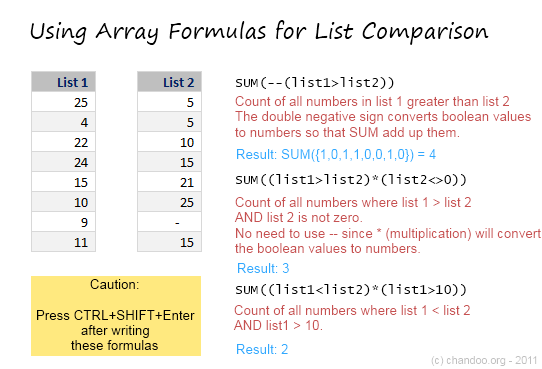
Last week, we had a home work on Calculating Donation Summaries using Excel Formulas. This is a good case where array formulas can help us. So today, we will learn how we can use Array Formulas to compare lists of values and calculate summaries. Towards the end of this post, you can see a video that explains the solution to Donation Summary Calculation problem.
Continue »{ 26 Comments }
Amount Donated vs. Pledged [Excel Formula Homework]
Published on Jun 10, 2011 in Excel Challenges
![Amount Donated vs. Pledged [Excel Formula Homework]](https://chandoo.org/img/hw/amount-donated-vs-pledged-data.png)
We have some home work folks! Today, lets test your Excel formula skills by giving some data related to a fund.
The problem:
You manage a fund for a non-profit. You have donors who pledge certain amount at the start of the year. As you go thru the year, the donors donate money to your fund. At the end of the year, you have a table like above. And you need to summarize the fund’s performance by calculating various statistics.
Go
Continue »{ 15 Comments }
How to create a Win-Loss Chart in Excel? [Tutorial & Template]
Published on Jun 9, 2011 in Charts and Graphs
![How to create a Win-Loss Chart in Excel? [Tutorial & Template]](https://img.chandoo.org/c/win-loss-chart-excel-template.png)
Win Loss Charts are an interesting way to show a range of outcomes. Lets say, you have data like this:
win, win, win, loss, loss, win, win, loss, loss, win
The Win Loss chart would look like this:

Today, we will learn, how to create Win Loss Charts in Excel.
We will learn how to create Win Loss charts using Conditional Formatting and using In-cell Charts.
Continue »
Many of us start using Excel to keep track of something. And along way, we realize that Excel has a powerful feature called formulas, using which we can automate a lot of things. BOOM! Before we realize, we are in the thick of VLOOKUPs and SUMIFs.
But, along way, we also pick up a few bad habits or believe a few myths. Today, lets bust 10 Excel formula myths that we hear often.
Read this post to learn what these myths and why you should not trust them.
Continue »{ 3 Comments }
Do you want to attend an Excel Workshop in Singapore? [Survey]
Published on Jun 3, 2011 in Financial Modeling, Training Programs
![Do you want to attend an Excel Workshop in Singapore? [Survey]](https://chandoo.org/img/speaking/singapore-excel-bootcamp-thumb.jpg)
I have happy news for you.
Paramdeep (from Financial Modeling School) and I am going to organize an Excel Workshop in Singapore during first (or second) week of July.
We want to know if you are interested in this. So please take a few minutes and go thru this small post.
Who is this workshop for?
If you are a financial or business analyst, this workshop is for you. We will be discussing various Excel & Financial Modeling topics during the 12 hour workshop (spread across 2-3 days)
Continue »{ 35 Comments }
Switch Scenarios Dynamically using Slicers
Published on Jun 1, 2011 in Pivot Tables & Charts
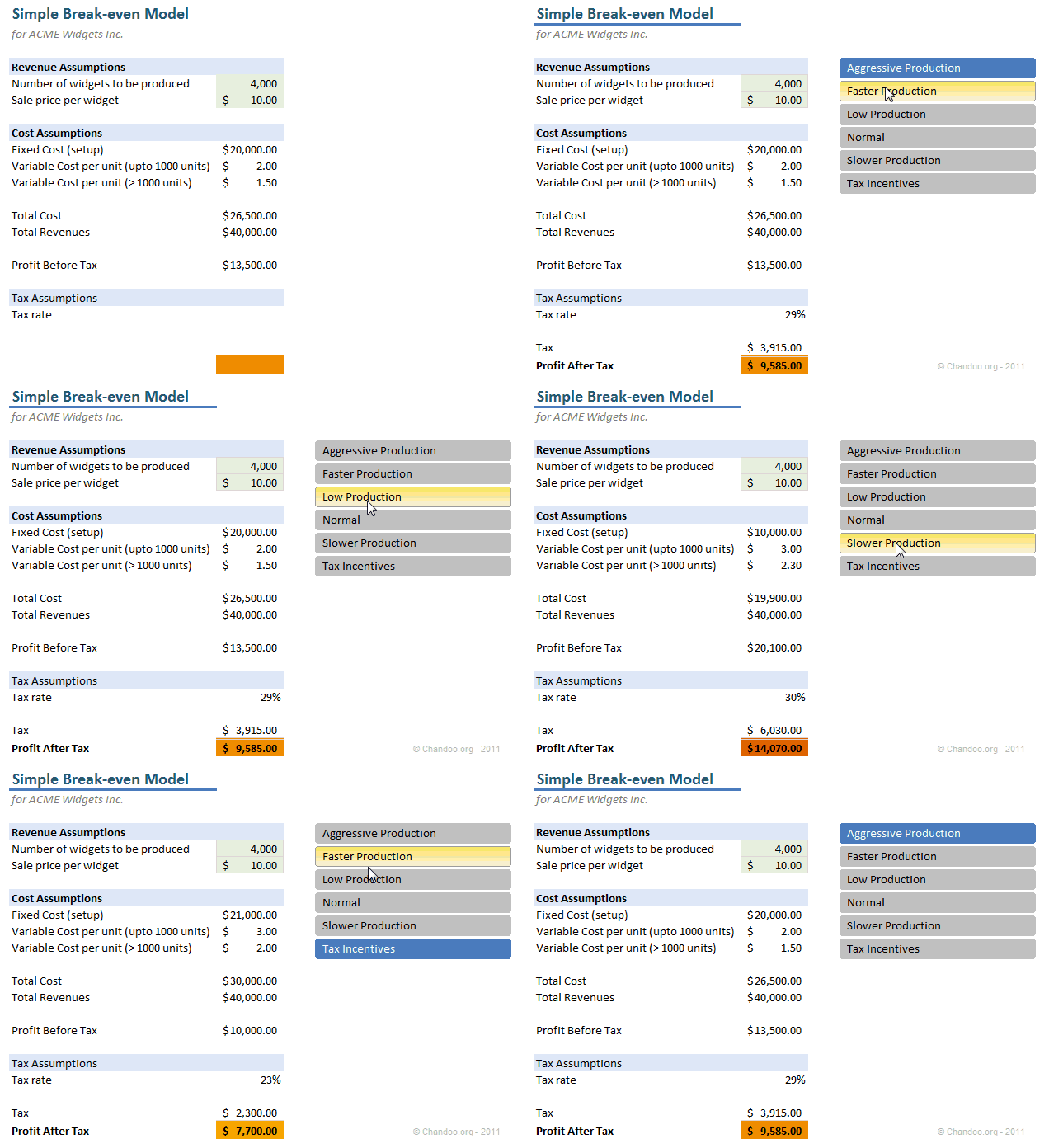
Slicers are my new favorite feature in Excel. Introduced in Excel 2010, Slicers are like visual filters.
Now, we can use slicers creatively to make an interactive scenario manager in Excel, as you can see below. We will learn how to create this in Excel in today’s post.
Continue »{ 28 Comments }
How Would You Visualize Product Sales Data? [Excel Challenges #2]
Published on May 30, 2011 in Charts and Graphs, Excel Challenges
![How Would You Visualize Product Sales Data? [Excel Challenges #2]](https://chandoo.org/img/ec/2/ec2-visualize-product-sales-data.jpg)
We have a new Excel Challenge folks!
I know our friends in US are away celebrating Memorial Day weekend. But that should not leave rest of us from fun. So, we have a new Excel Challenge. This time, you need to make a chart, to visualize product sales data.
And what more, one lucky person could get an Amazon Kindle Reading Device (Wi-fi version) by making the chart.
Continue »
How often have you had a simple table where you want to lookup a value or add up some values meeting a criteria?
This post looks at a simple way to do a 2D Lookup or 2D Sum of a values from within a 2D range with multiple criteria, without complex Sum, Offset, Index, Match, Sumifs or other functions, simply using Sumproduct
Continue »{ 17 Comments }
Mod() function in excel to Implement Escalation Frequency [Financial Modeling Tutorials]
Published on May 24, 2011 in Financial Modeling, Learn Excel
![Mod() function in excel to Implement Escalation Frequency [Financial Modeling Tutorials]](https://chandoo.org/wp/wp-content/uploads/2011/04/EscalationFrequency.gif)
You take an apartment on rent at $1000 per month and the owner puts an escalation clause saying 10% increment each 3 years. How do you model this in excel? In this tutorial we understand how escalations at certain frequency can be implemented using the mod function in excel. What is the mod() function Simply […]
Continue »{ 11 Comments }
Use Copy & Paste to Preserve References to Tables [Quick Tip]
Published on May 23, 2011 in Learn Excel
![Use Copy & Paste to Preserve References to Tables [Quick Tip]](https://chandoo.org/img/l/ed/structured-references-excel-tables.png)
With Excel 2007, Microsoft has introduced a powerful and useful feature called as Tables. One of the advantages of Tables is that you can write legible formulas by using structural references. That means, you can write easy to understand formulas like this,
But, there is a problem. When you write these formula and drag the formula cell sideways to fill remaining cells, Excel changes table column references and thus makes your formulas almost useless.
Well, there is a simple workaround for this problem
Continue »{ 4 Comments }
VBA Classes Registration Closing in a Few Hours – Join Now!
Published on May 20, 2011 in Charts and Graphs, VBA Macros
I have a quick announcement for you.
Registrations for our VBA Class will be closing in a few hours
As you may know, we have opened registrations for our first batch of Online VBA classes on May 9th. This program is aimed at beginners & intermediate level VBA users. The aim of this course is to make you awesome in VBA. We will be closing registrations for this program in few more hours (exactly at 11:59 PM, Pacific time, on 20th May 2011)
Click here to join our VBA Class now.
Continue »{ 15 Comments }
Count-down Timer App in VBA to Remind you about the VBAClasses Closing Time!!!
Published on May 18, 2011 in products, VBA Macros
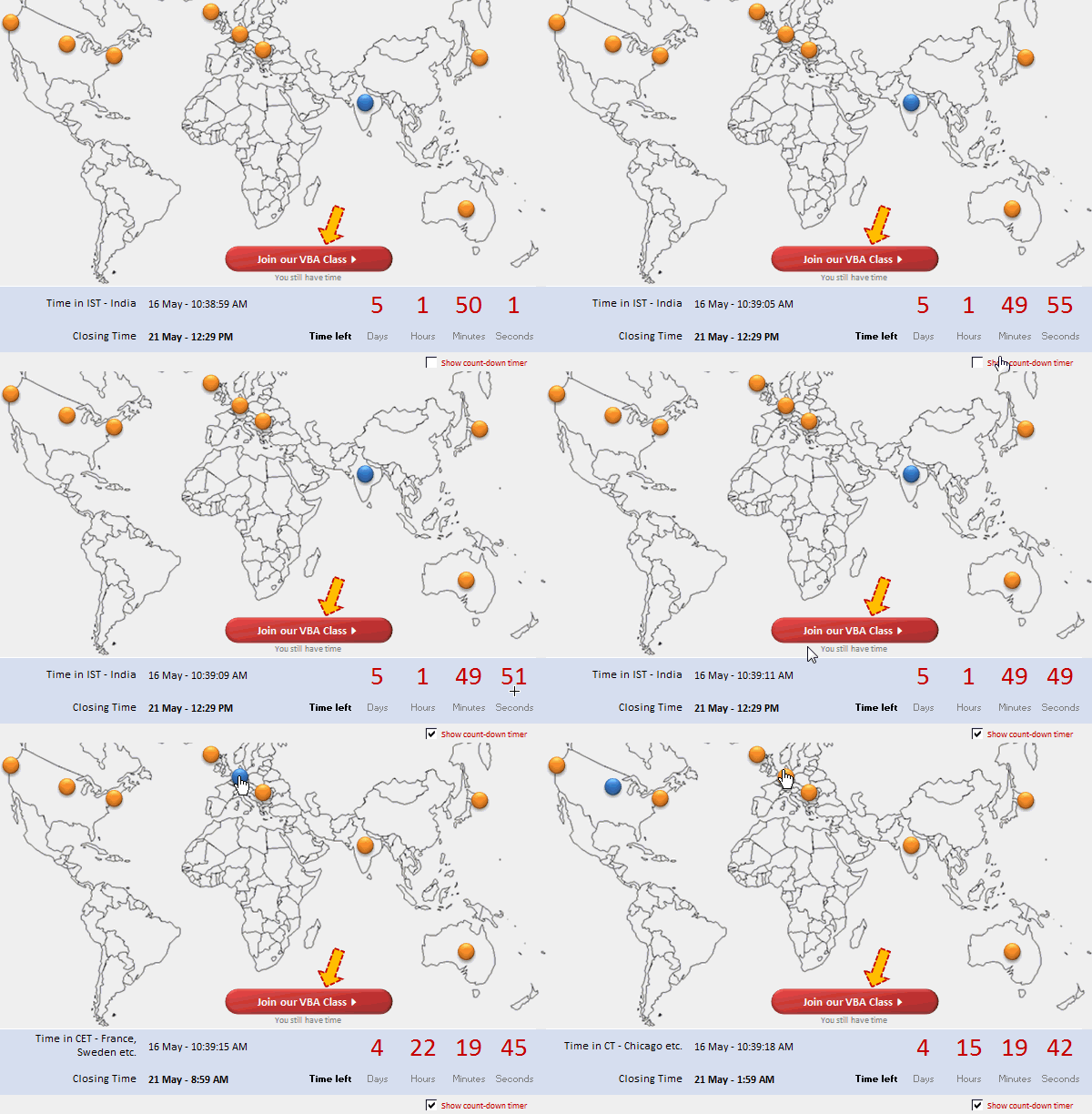
Here is a cool count-down timer application made in VBA to remind you about our VBAClasses registration closing time!
Read the rest of this post to learn how this particular app is built.
If you want to learn VBA, then click here to join our class.
Continue »
