
Top 10 things I learned using Excel for a decade
Sometime during the 2nd half of 2013, I finished 10 years of Excel usage. In the last 10 years, I completed my studies, got my first job, married, had kids, visited 15 different countries, quit my job to start a business, bought first car, first house, made dozens of new friends, read 100s of books, wrote a book and learned 1000s of new things. And all along, Excel stayed a true companion. Right from MBA entrance exam preparation in 2003 to making my summer internship project reports in 2005 to planning my wedding expenses in 2007 to getting a promotion in 2009 to planning my kids feeding schedule in 2010 to running a successful business in 2014, Excel helped me in every step.
So today, I want to tell you the top 10 things I learned using Excel in last decade. Grab a hot cup of coffee, buckle your belts and get ready for time travel.
Last day for enrollments – Join our Power Pivot course & become awesome analyst
 Hi folks,
I have a quick announcement & an awesome Power Pivot technique to share with you. First the announcement.
Only few hours left to join our Power Pivot course…
As you may know, I have opened enrollments for our inaugural batch of Power Pivot course few days ago. The aim of this course is to make you awesome in Excel, Advanced Excel, Dashboards & Power Pivot.
We will be closing the doors of this program at midnight, today (11:59 PM, Pacific time, Friday, 15th of February).
If you want to join us, click here and enroll now.
How many people have joined the class?
At the time of writing this, we have 195 students enrolled in Power Pivot class. We are eager to share Power Pivot knowledge & techniques to as many more of you as possible. So go ahead and join us because you want to be awesome in Excel & Power Pivot.
Dressing Financial Statements – What Motivated Mr. Bean to Defraud Latte?
Did you know What Happened at Last Coffee Day?
Mr. Bean “dressed up” the financial statements and was caught in the fraud. But he was the CEO of Latte! So why did he commit fraud in his own company??
Any Guess?
Take a cappuccino and I will give you a hint – How was Mr. Bean’s Bonus to be decided?
Read on to know more…
How the tax burden has changed over the years – Excellent chart by NYTimes & Redoing it in Excel
If I need some charting inspiration, I always visit New York Times. Their interactive visualizations are some of the best you can find anywhere. Clear, beautifully crafted and powerful. Long time readers of Chandoo.org knew that I like to learn from visualizations in NY Times & redo them using Excel.
Today let me present you one such chart. This is based on an interactive visualization prepared by NY Times explaining how the tax burden has changed over years for various income groups.
Take a look at tax burden chart – Excel implementation
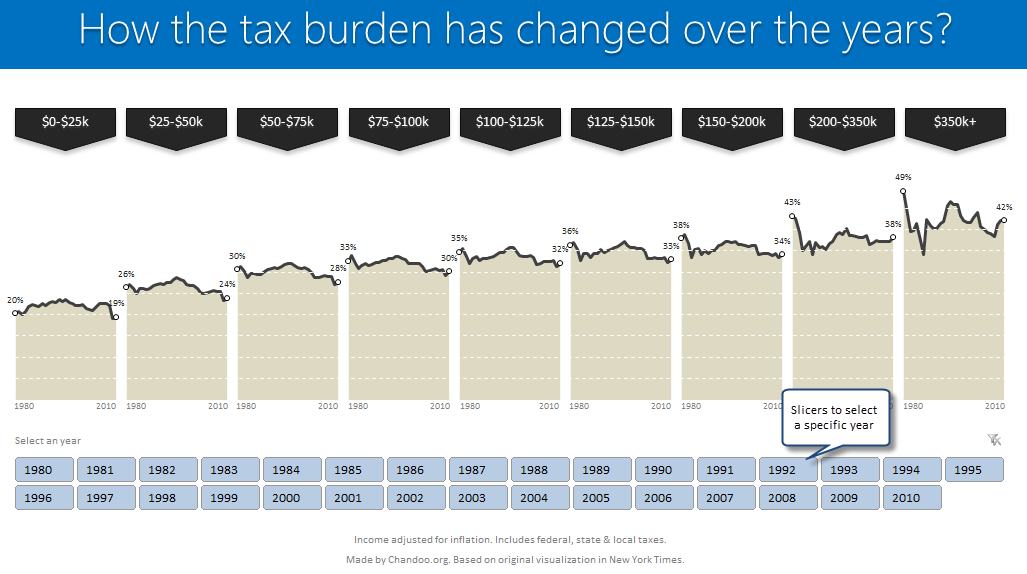
Read on to learn how to create this chart using Excel.
Using pivot tables to find out non performing customers
Moosa, one of our readers emailed this interesting question:
I have huge list of customers (around 1500).
Table includes following information
Customer # , Customer Name, Sales 2002, sales 2003, … sales 2012My requirements are
1. list of customer who did not have sales during all these years
2. List of customer who have not business from 2003
3. List of customer who have not business from 2004
Today, lets learn how to identify all the non-performing customers.
Interactive Pivot Table Calendar & Chart in Excel!
Can we make a calendar using Pivot Tables?!? Of course we can. Today let us learn a simple technique to create calendar style reports using Pivot tables. Thanks to Rob for inspiration Before making any progress, let me thank Rob from PowerPivotPro for the inspiration. Recently he wrote an article explaining how to use PowerPivot […]
An IF Formula Challenge for you
If I were to hire an data analyst, I would simply ask them to write a complex IF formula in Excel. If they can write it, the interview progresses, else, they are out. In other words,
=IF(person_can_write_big_fat_IF_formula=TRUE, proceed_with_interview, say_thanks_and_call_next_person)
If you are able to write IF formulas for any situation, then you are bound to be awesome in Excel.
So, to test how well you know your IFs & Boolean functions, let me give you a small challenge.