
All articles with 'calculated items' Tag
{ 18 Comments }
How to insert a blank column in pivot table?
Published on Apr 16, 2015 in Excel Howtos, Learn Excel

We all know pivot table functionality is a powerful & useful feature. But it comes with some quirks. For example, we cant insert a blank row or column inside pivot tables.
So today let me share a few ideas on how you can insert a blank column.
But first let’s try inserting a column
Imagine you are looking at a pivot table like above.
And you want to insert a column or row. Go ahead and try it.
Continue »{ 15 Comments }
Finding Conversion ratio using Pivot Table Calculated Items
Published on Mar 6, 2013 in Pivot Tables & Charts, Power Pivot
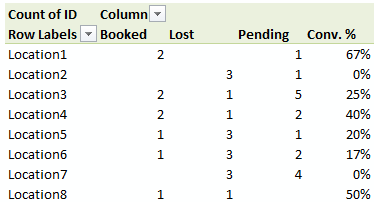
Today, lets understand how to use Calculated items feature in Pivot tables. We will use a practical problem many of us face to learn this feature – ie calculating conversion ratio from a list of sales calls.
Continue »{ 17 Comments }
Budget vs. Actual Profit Loss Report using Pivot Tables
Published on Apr 21, 2010 in Learn Excel, Pivot Tables & Charts
This is continuation of our earlier post Preparing Quarterly and Half yearly P&L using grouping option. You can also do budget v/s actual comparison using Pivot Tables. For this we will use calculated items feature of Excel PivotTables.
To begin, we have to add one more column to our data. I have added column Data Source to the end of data table. Existing data is marked as Actual and I have added more data rows which are marked as Budget. You can download new file with updated data and basic Pivot P&L.
Continue »
