

Hi folks,
I have a quick announcement & a creative dashboard to share with you. First the announcement.
Only few hours left to join our Power Pivot course…
As you may know, I have opened enrollments for our 2nd batch of Power Pivot course few days ago. The aim of this course is to make you awesome in Excel, Advanced Excel, Dashboards, Power Pivot & Advanced Power Pivot.
We will be closing the doors of this program at midnight, today (11:59 PM, Pacific time, Friday, 16th of August).
If you want to join us, click here and enroll now.
How many people have joined the class?
At the time of writing this, we have 230 students enrolled in Power Pivot class. We are eager to share Power Pivot knowledge & techniques to as many more of you as possible. So go ahead and join us because you want to be awesome in Excel & Power Pivot. See an interesting dashboard on this further down this announcement.
5 Important things about the Power Pivot course
 1. This course is self-paced
That means, you can access Power Pivot & Excel lessons from anywhere at any time. You can pause, repeat or skip lessons as per your needs.
2. You will get a course completion certificate
At the end of the course, you will get a e-Certificate showing that you have completed online course on Power Pivot. Use it to show off or claim reimbursement from your boss.
3. You need Excel 2010 or Excel 2013 Pro Plus
To enjoy our Power Pivot classes, you need either Excel 2010 (any edition) or Excel 2013 Professional Plus or Office 365 Professional Plus Editions.
However, to enjoy Excel School alone, you just need Excel 2007 or above.
4. Guest lessons by Excel celebs around the world.
If Excel world has a Hollywood, then our guest faculty would be like Tom Cruise, Ashton Kutcher or Beyonce. I am honored and thrilled to present Bill Jelen, Debra Dalgleish, Zack Barresse, Kasper de Jonge, Miguel Escobar, Denny Lee, Ken Puls and others in our online classroom. Learning from these gurus is going to be legendary.
5. Special Bonuses
I have struck a deal with Rob Collie’s publishers to bring you an e-book edition of DAX formulas for Power Pivot Analysts – the definitive guide on Power Pivot measures & calculated fields. You will be able to download your copy once you join either Power Pivot class (download link will be available after we discuss DAX formulas in the class)
Apart from this, there are more bonuses – special modules on Excel, SQL & Dashboards, cheat sheet on common DAX formulas and so much more…
When will be the next batch of Power Pivot course?
As this is the first time we are running advanced power pivot course, Rob & I will be spending a lot of time fine tuning the lessons, answering student doubts & thinking up creative ways to use Power Pivot.
I am hoping to re-open Power Pivot class again in early 2014. But we may delay it if needed.
How much time I’ve got? – Count down timer using Power Pivot
We are going to close the enrollment window at today midnight (11:59 PM, Pacific Time – Friday 16th August).
So go ahead and join us before its too late.
Creative dashboard on Enrollment stats
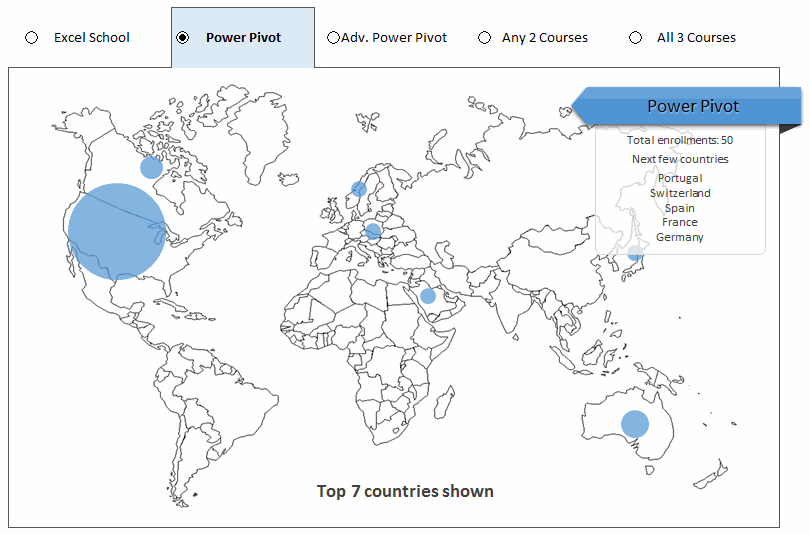
As a token of thanks for all your support, here is a dashboard I made (with Excel ofcourse). It shows how many enrollments we had to this class.
(note about the data: Country is not captured for all sales due to limitation of our shopping cart software. Sales from certain countries excluded as they go thru another system).
This is how the dashboard looks like:
How does the dashboard work?
The basic techniques used in this dashboard are,
- A bubble chart with world outline map in the background (same as Olympic medal chart)
- Option buttons to select the course
- Conditional formatting to highlight selected course
- Text boxes to display statistics for selected course
- Tables, INDEX, MATCH, LARGE formulas in the background to do the magic.
Watch below video (16 mins) to understand how this is put together.
Download the dashboard workbook
Click here to download this dashboard workbook. Play with it to understand how it works.
And remember, enrollments for Power Pivot classes are closing tonight (at 11:59 PM, Pacific time). So go ahead and enroll if you want to become Awesome in Excel.
Thank you…
Rob & I thank you so much for your overwhelming support to this class. Your enthusiasm to learn, use and master new techniques, your kindness and your passion for Excel are truly remarkable. You inspire me everyday to learn new things and share new ideas. Thank you.
PS: Go ahead and join the class because you want to be awesome.


7 Responses
Is today the last day to register for Excel School also? Or can that be done at anytime? I am interested but waiting for money to fund it!
@Heather… You can enroll in Excel School anytime. Visit http://chandoo.org/wp/excel-school/ to join us.
Hi,
Unfortunately did the link to the free download of the dashboard workbook example not work.
Can you please share it? Would love to play further and understand it better.
http://chandoo.org/wp/2013/08/16/powerpivot-2nd-batch-last-call/
Regards
Tobias
Tobias
My mistake. I have corrected it now. Try it again or use below link.
http://img.chandoo.org/power-pivot/power-pivot-enrollments-dashboard.xlsx
Hi,
I’m trying to locate the login (username/password) links for the advanced powerpivot class – can you provide.
Thanks,
Bart
Hi…I’m considering the Power Pivot course, however, it looks as if I’m a week late (just learned about your course). Given that it is a “self-paced” program, can I simply join now, or do I need to wait for a future enrollment?…Rich
I am interested in learning power Pivot could you please give me the price for your recorded video tutorial