

 Here is an interesting charting problem we come across once in a while. We have a lot of small numbers and a few very large numbers. How do we effectively plot all of them in a chart?
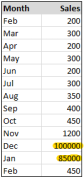
That is, you have data like the numbers shown to right, with a surprising bump during Christmas time.
Now, how do you go about making a chart?
I can think of 4 options:
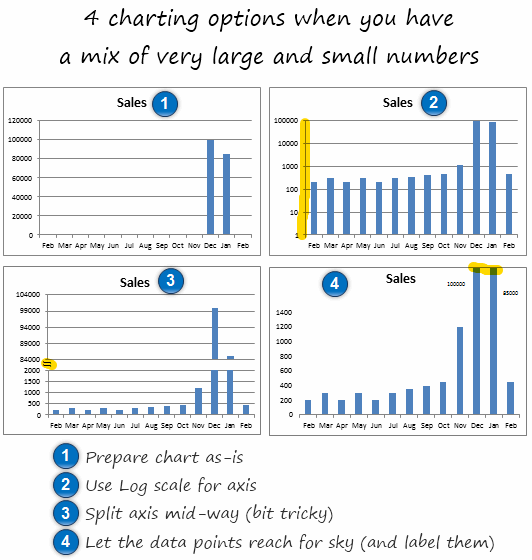
1. You make a chart as – is
2. Use log scale for vertical axis (axis option > check logarithmic scale)
3. Split the axis in to two: This is the most trickiest technique. I have used 2 charts and aligned them neatly. Thankfully Peltier Man comes to rescue. Read broken y-axis to know how to do this.
4. Let the bars reach sky: You can of course, set axis max to an arbitrary value, just so that all the small values are clearly displayed and let the higher values literally cut thru plot area.
Download these Examples:
I have put all these 4 chart examples in a workbook so you can see the underlying technique. Go ahead and download it here:
Excel Charting options when you large and small values [XLS]
What would you do?
I seldom deal with data that has this kind of outliers. But I am sure you get such data once in a while. How do you go about charting then? Share your ideas and implementations using comments.
More Charting Principles & Techniques.
Related discussion on Chandoo.org forums – Lots of small values but few extreme values – how to present it?


64 Responses
A wonderful surprise to see a question I asked in your forum appear as an article in your website. Many thanks for helping me tackle this problem, and also for considering it something that merits an actual article. I look forward to reading the replies.
Cheers
Mike (now happy)
How about a dot plot with a logarithmic scale? That way you can see the outliers, and you are not visually comparing the length of the bars.
How about putting the outliers on the secondary axis? When I use this technique I’ll often use a distinctive color for those columns and then draw a box over the secondary axis in the same color so that the reader associates, for example, green columns with the green axis on the right.
@Mike… You are welcome. It was an interesting question, and I wanted to see what our readers thought about it.
@Joe.. interesting idea. A dot plot or scatter plot is infact better as viewers do not measure the height to compare values.
As with all graphs, you need to know your audience. Taking logs is the preferred method for audiences that will understand what you are doing. However, I do not use bar graphs with log scales. I use graphs judged by position rather than length such as line graphs or dot plots. In Creating More Effective Graphs, I recommend either taking logs for more technical audiences or using complete scale breaks for others. By complete scale break I mean two separate panels; not little parallel lines that can easily be missed.
Here is how I would approach it:
http://a.imageshack.us/img405/823/largesmall.png
I usually don’t like having multiple axis charts, but I sometimes use them to show charts with two colors for a series (for example with one color for positive and another for negative). I think the same principle can be used here. Then I used a custom format, color code, and a text box to hopefully clearly convey the message that the two data points are anomolies.
It seems to me that understanding the seasonal sales peak in Dec and Jan is the most important part of the chart… particularly in relationship to the 10 other months where nothing much happens. This firm must need to plan staffing very carefully. I would go with option one and add bar value labels (so you can see that there were sales in the early months of the year) plus a 2nd y-axis plot with a cumulative percentage curve starting at feb and going to jan). Logging this data series completely destroys the point of the chart. Both the log and Option 3 are way too geeky. Option 4 looks like the person who released the information just didn’t care or didn’t get the point that could have been made.
I agree with Naomi Robbins. Use a full break with dots instead of #3 or #4. Never use a break (full or partial) with bars because of how bars encode data. If your audience understands logarithms, use lines or dots and a log scale.
I am awaiting Microsoft to allow multiple Y axis indexes to use with a line chart.
@Tiffany I didn’t notice your post before, but you basically summarized exactly how I approached it. :o) Scale is still a question when using the approach, but as long as it is clearly delineated, I think it makes sense.
Nice tricks Chandoo.
This reminds me of a recent situation that came to me where there were 50 x axis points (for various projects) so the chart had become too lengthy.
What can be done with such charts where there are too many labels and the distribution of chart does not come proper?
Working in the pharm industry this was often a common occurrence when looking at growth trends of new products on a quarterly or MAT basis. As senior management where generally interested in seeing both actual values and growth I tended to opt for your example four with growth charts. The growth was somewhat meaningless for these new products and their actual sales showed how well they were performing when looked at on a rolling quarter basis.
dont forget Line charts too for multiple series:
few series on lower-range values, but few on higher-range values.
I’d prefer to split them apart, but if you have 12 series or more, it’d be tedious to show mutiple charts on mgmt report (summarize in 1-2 slides).
@Nimesh
I would generally group them (eg North, Sth, East, West or whatever is appropriate for your business) and chart or only show the top 5-6 performers and then group the rest (Others)
Depends on the data. Right now I have a couple of regular charts with several large contributors and a handful of tiny contributors.
I’ve taken to top 5 values plus a 6th with ‘other’.
Another problem with 2-axis diagrams is when you take B&W prints. It gets harder to interpret the chart when only one type of visualization is used (e.g. only bars not bar and line).
Log-scales are also problematic as we do not often encounter them, Say, you have 8-10 graphs in a report and in only one graph this large value problem is there. So if you use a log scale for this single graph, the graph itself become a outlier.
I would prefer breaking the Y-axis by hi-tech way (Pelter, Tushar Mehta) if I have time or do it by pasting two charts as suggested here.
Possibly, a macro can be written to place two charts together like this??
Naomi’s suggestions are excellent: for audiences that are used to interpreting logarithmic axes, take the logarithm; for all other audiences, use a complete scale break, such that you have separate panels. This is, in fact, the advice offered by William Cleveland in “The Elements of Graphing Data,” (pp 103 – 104).
I would also suggest using dot plots instead of bar graphs. Dot plots are like a sideways bar plot, using dots instead of bars. They provide the following advantages: more space for labels; more compact arrangement; clearly mark out the value being plotted, rather than the range from the axis to the value (less non-data ink). Here’s a nice introduction: http://www.b-eye-network.com/view/2468.
Since a picture is worth a thousand words, I’ve created an example of a dot plot with a complete scale break:
http://yfrog.com/b9rplot2p
For the curious, this was done in R (http://www.r-project.org), with the following code:
month <- c("Feb 09", "Mar 09", "Apr 09", "May 09", "Jun 09", "Jul 09", "Aug 09", "Sep 09", "Oct 09", "Nov 09", "Dec 09", "Jan 10", "Feb 10")
sales <- c(200,300,200,300,200,300,350,400,450,1200,100000,85000,450)
SalesRange <- shingle(sales, intervals = rbind(c(0, 5000), c(5000, 200000)))
salesdata <- data.frame(month = month, sales = sales, order = c(1:13), SalesRange = SalesRange)
salesdata$month <- reorder(salesdata$month, rev(salesdata$order))
dotplot(month ~ sales | SalesRange, data = salesdata, strip = FALSE, layout = c(2, 1), levels.fos = 1:50, scales = list(x = "free"), between = list(x = 0.5), par.settings = list(layout.widths = list(panel = c(2, 1))), xlab = "Sales (US$ x 1000)")
Tom – Thanks for your kind words and for recommending my article. Thanks also for showing the complete scale break. I was not at my computer when I commented yesterday and was just going to draw a complete scale break when I saw that you already did it.
Hi Guys,
Lot’s of tricky answers… But for my money the response saying “know your audience” is on the money.
What I usually suggest, and most times I provide both examples and let them make a decision:
1. multiple axis – only when it still looks ok (not off the chart so to speak)
2. Do a “% of total” graph, with a data table containing the actual values underneath the chart – remember Excel has other functions that do compliment each other. charts/ tables/ pivots etc
Thanks and good to see so many responses to this one.
Several people have suggested using double-Y axes (also called dual scaled axes). My experience is that readers sometimes miss the second axis, sometimes are confused by the second axis, and often place meaning where none exists (e.g., where lines cross). Double axes are especially dangerous when both represent the same variable (number of sales or dollars or whatever.) See Wainer’s “Visual Revelations”, http://amzn.to/cxKuMv, or my “Creating More Effective Graphs”, http://amzn.to/9qc6Mq, for examples of double-Y axes that deceive. Stephen Few wrote an article that describes my feeling about dual axes as well. See his article at http://bit.ly/4ycwgZ.
Christian indirectly raises a good question: with such a small data set, is a graph really needed, or the best way of presenting the data? The table at the top of the page is more compact than any of the graphs presented and, arguably, easier to interpret. It certainly avoids the problem of presenting such highly skewed data on a graph.
Although I agree with Tom and Christian that a table might be easier to interpret than a graph for this particular data set, I think that the issues raised in this post go far beyond this one data set.
Hi,
I have a similar situation, but in this case with the x-axis. How do I represent a line chart of 3 Y-axis variables against the x-axis that has values with large disparity (0.001-100 mg/ml) ?
Thanks.
Excellent points everyone. Thank you for thoughtful discussion Naomi.
Few additional points:
(1) Log axis: Use it with caution. I have never really seen a log axis graph that is effective outside scientific publications. Your audience need to be in right mindset to digest logs.
(2) Chart vs. Tables: My intention in this post is to discuss how we can chart when data has wild ups and downs. The data set I used is almost meaningless. Of course, if I want to make a chart for the above data alone, I would rather go out and party as the sales skyrocketed during holidays.
(3) Secondary Axis: While this approach is creative, I would avoid it as it can be confusing. Usually secondary axis works best when you have 2 diff. series (sales vs. profits, market share vs. profits etc.) But if you have been using this approach and your readers already know it, then you are golden.
(4) Complete split vs. axis split: I agree with Naomi that it has to be a complete split. I was too lazy to work out the mechanics of complete split thru excel. (Good work by Tom showing how to get full split thru R). You should go thru Jon’s tutorial on full axis split in excel here: http://peltiertech.com/Excel/Charts/BrokenYAxis.html
(5) Dot Plots: I think these are even better than bars. Alas, there is no native support for dot plots in excel and you have to do some bit of circus to get them right.
Again, thanks to Naomi, Tom, Christian, Rajdeep, Dan, Hui, Sanford, Nimesh, Mark, David, Bill, Michael, Jason Sanford and all others for sharing what you think about this issue. Your comments are a testimonial to what our community is all about… 🙂
Chandoo,
I created an Excel graph of how I think this exercise should look. Since a picture is worth at least a “crore” of words, I put a capture of it on-line at
http://img839.imageshack.us/i/chartswithsmalllargeval.png/
Which brings up an area that I hope you could help enlighten me on with a how to article… specifically, what is the best demonstrated practice for sharing stuff online (pictures and spreadsheets) when leaving non-text comments on blogs? For instance, I am having a lot of trouble getting Microsoft Skydive to work. Also, how do these web-based sharing areas control security (for instance, how can I create a “public” area and a “private” areas)?
bill
Bill
Have a read of this post for some File and Picture sharing sites
http://chandoo.org/forums/topic/posting-a-sample-workbook
Each method is different and some allow Private and Public areas.
Generally you only get Private areas when you pay.
Always remember to anonymise data, especially names or data if it is commercial in nature.
I just came across an old post on another blog that discusses this topic and might interest readers here. Some of you already commented on this post.
Sorry – I omitted the link. http://www.datadrivenconsulting.com/2009/12/charting-data-with-one-disproportionally-large-value/
A post on another blog that was written after this one discusses this topic and might interest readers here. Some of you already commented on this post. http://chandoo.org/wp/2010/08/20/charts-with-small-and-large-values/
Hello Chandoo,
I accidently landed on your website but I must say that it has changed my entire analysis skills…..of course, have made these skills much better. So first of all, I would like to thank you for all the information you have posted on your website.
I have one question: what should we do when we have huge difference in values? I mean I have the data for which has the values like 5000, 50000, 100000, 500000, 2000000, 10000000 and 50,000,000. I need to show all the values on one chart…what should I do? but several small values are not visible as there are several large values and several mid level values. I hope i am clear enough. Can you please help me?
I had a similar problem, but with a lot more data points. In the end, a historgram solved it for me.
@Gurpreet KANG
Is your audience suitable that you could use a log plot? If you data escalates exponentially like your example, might be a good use.
Other thoughts would be to have a xy graph with a line (but wound show near 0 early on), or change your numbers to a percentage increase/decrease from the previous?
As alreayd discussed, knowing what you want to present (actual values? change in sales? human population?) and what message you want to give are important things to consider.
I use a mac and have excel 2008. I have a huge database and need to find and remove duplicate entries
@Shailesh have a look at Google Refine. It’s a free, downloadable framework for cleaning data that runs in a browser on any OS. One of its many capabilities is to find duplicate data, even when the data is not identical (i.e. it deals very well with typos).
i always use option 4,
1. my audience will have difficulty with log scale, or axes with different scale, this eliminate option2 & option micheal#6
2. cut/broken exist tamper with actual visualisation, this eliminates option 3
3. option 1 tampers with analysis of common trend vs offshoot data, with improvement by option bill#25, this is good, but it requires reading all the small values.
4. plot graph by tom#18, complicates matter. Instead of bars, they now see dots, which is not friendly to older people (no offense here), a line might help but it clutter the space for data labelling
So i use option 4, fix the y-axis for the majority data & label the offshoot data to let my audience’s imagination do the visualisation.
best solution for me, but might be not for all of us… 😉
chandoo,
How about method #6 I learned from my my boss, scaling the large values X times. see it http://twitpic.com/4p2bsl What do you guys think?
TalKohlberg (#36), the label approach has all of the disadvantages of the split-axis method, with the added disadvantage that there is almost no visual cue that the longer bars should be visually distinct from the shorter ones. In Cleveland’s terms, pattern perception and table lookup are completely at odds, while basic requirement for any graph is that the two operations need to compliment each other.
The only reason that I can see for making a graph like this is that it is easier to create in Excel than many of the alternatives.
xsaed (#35), you raise a good point that we have not yet considered: that the “normal” rules may not apply for all audiences (or mediums) due to visual acuity. There is a parallel here with typography: the normal rules for maximizing readability (e.g. using serif typefaces and certain type sizes) are modified in print for the visually impaired. Though there are few good studies, the rules may also need to be modified for on-screen displays, where the resolution is ten times lower than in print.
It would take some careful studies and consideration to identify the best solution for low-resolution displays and the visually impaired.
Tom (#37), Thank You for taking time to comment. There is no split axis in this method # 6, the scaling approach. I do see what you mean about distinguishing the scaled bars so I made scaled bars darker and legend indicating scaling factors in red, see it here http://twitpic.com/4qs8iy Is it easier to see now?
TalKohlberg (#39) It’s always fun to discuss such matters and see new approaches; thank you for the opportunity.
Highlighting the three bars helps to bring the viewers attention to them, but does not fix the underlying problems with the graph design. I do like, however, that you used shades of color rather than different colors to do the highlighting; people often forget that a sizable portion of their audience will be unable to see distinctions based only on color.
When a person reads a data graph, they are performing two distinct operations: what Cleveland calls “pattern perception” and “table look-up.” Pattern perception happens first and is an interpretation of the geometric arrangement of the graph (relative distance, size, position, etc.). So pattern perception tells us that the third bar from the right is biggest; the smallest bars cluster on the left half of the graph; some bars are darker than others and there’s some extra labels over them; etc. Table look-up is where the user reads the labels and axes to gain a quantitative understanding of the data underlying the graphical display. Here is where we learn that the third bar from the right is “100x” and the short bars on the left are in the range of 200 – 300.
For a graph to be effective, pattern perception and table look-up have to tell the same story; they have to be fully complimentary. In addition, a graph should only show those elements that are needed to support these two operations. Extra labels or fancy elements (“chart junk”) degrade the reader’s ability to correctly perceive the patterns in the graph and to read the critical labels.
So, applying the above model to your graph, we have the problem that pattern perception tells a very different story than table look-up. To overcome this problem, you are adding extra labels to assist table look-up and highlighting some bars to try to draw the reader’s attention to the significance of those extra labels.
A better solution would be to have a graph where pattern perception and table look-up are fully complimentary, instead of conflicting. For this reason, an axis break is actually better, and a full axis break is better still, because a full axis break is more obvious for pattern perception than the more subtle axis break. See my comment #18 for an example of the full axis break. Log scales are better still, if your audience has the skill to correctly interpret them.
Finding the best graph for an audience is a difficult problem, and there is no one-size-fits all solution, as the lengthy discussion on this post has demonstrated. We can only learn, try out new ideas and improve.
The labeling approach suffers from a further limitation: it doesn’t scale well. For such a small data set, it’s fine, but if we have dozens of extreme values, it’s a lot of work for you to construct the graph and table-look-up and correct interpretation become a real burden for the reader.
If you are interested in learning more, I highly recommend Edward Tufte’s book, The Visual Display of Quantitative Information, and William Cleveland’s more technical book, The Elements of Graphing Data.
Tom (#40) Thanks for the dialogue. It looks like it is just you & I on this topic now. On balance, Chandoo and other posters may still find this scaling approach http://twitpic.com/4qs8iy as worthwhile method# 6. It is there for all to judge.
Hi Chandoo,
well, i’m from morocco, every day, I learn new tips. Keep rock, you inspired me
I like the trick of creating two charts.
This is one of the best places for learning about XL.This site has improved me a lot and helped me getting promotion in my job.Thanks a lot to chandoo.
I’d make two charts and sit them side by side and clearly state why you’ve had to do this. I’d never split the axis in case it misleads.
TalKohlberg (36, 39, 41)
I think your method of scaling some bars is very dangerous. You are hoping people are able to let their conscious mind (a) notice the scaling factors, (b) do the math, and (c) override their preconscious interpretation of the plotted points. You’d be better served with a simple table than with a chart that doesn’t show precognitively what it shows “tabularly”. These are Cleveland’s terms “pattern perception” and “table look-up” (thanks for the Cleveland terms, Tom).
I covered this in my blog recently, in Broken Y Axis in an Excel Chart. Contrary to what the title implies, I advise not to break an axis, but to show the data in two separate panels.
i think you could also represent the ten months of non-interesting values below a certain threshold as a single bar (size) and of course label those as such. This single size for the uninteresting low sales is a nominal height that is big enough to see but, pales into significance compared to the two big months sales, and still reads ok as a constant axis scale chart. Surely there’s not much point in showing the exact values on the chart for the minute differences during slow sales months?
Bhai thanks a lot.
My problem is solved . thaks once again
TQ it is very helpful for beginner likes me
In my industry we come upon this often as a very large percent of our revenue comes from sales that occur in the same month.
I’ve often found that what people really want to know is “How well are we doing?”, and that this question can be answered just as well by using data comparisons that eliminate the problems with large outliers.
For example:
1) If Sales are seasonal, show Sales as a percent of the Sales for the same month of the previous year. If your business is selling air conditioners, it’s likely everyone already knows your company sells more of them in the summer. This approach can help your audience understand if Sales are improving relative to a comparable prior period.
2) Otherwise, show the YTD Sales as a percent of the YTD or annual Sales goal (this is similar to the Project Management concept of a “burndown chart”). Again, another way to let people know whether or not Sales are “on track”.
I would agree with Jon that if the raw Sales data are required, showing the data as a table is far less likely to confuse your audience. However, the approaches above may help provide a quick visual impression for those in your audience who are not “numbers” people.
Good day, everyone!
I am new to charting and I am currently having trouble presenting Revenue to Expense Ratio (R:E) and number of accounts in one chart. I have 138 institutional clients to compare across. R:E ranges from 0.01 to 806.48 while number of accounts ranges from 1 to 3,280.
Appreciate your idea please on how to effectively and efficiently chart these two metrics across the 138 institutions.
Thank you in advance.
@Dyan
Obviously there isn’t an easy way to compare 138 customers across such a large range of ratios
What about:
Showing the top 10 or 20 in one chart
Showing the bottom 10 or 20 in one chart
Showing the top 10 or 20 by revenue in one chart
Showing the bottom 10 or 20 by revenue in one chart
Can they be grouped or filtered in Zones or Regions or Divisions or States etc
Hi, Hui.
I really appreciate that you took time to answer my query.
I will heed your advice and go for the last reco on grouping my data and have a separate chart for the groups.
Thank you so much! =)
Dyan
Hi Chandoo
That was awesome! Thank you
Thank you so much for this, very helpful
Great discussion! I think I like Jon’s panel charts best as well as the bottom 2 magazine style charts on the Data Driven website. My use case is for a dashboard full of the same style charts, so while these are great, I can’t have 2 different formats on my page, and quite frankly, they’re just too big!
I tried the approach to add a data table to my charts and found out I was in for a new set of headaches. I seem to remember Jon having lots of examples of labeling magic, and I stumbled on what may be my answer: http://peltiertech.com/Excel/ChartsHowTo/OutlierLabels.html
This is very similar to Chandoo’s #4, but with Excel handling the dirty work in a very elegant way. For dashboard use where the chart needs to be small, I think this may be the best option.
Here’s my attempt:
http://chandoo.org/forum/attachments/compliance-chart-v2-jpg.3585/
Ok this post is 4 years old but here is a great technique once again from the Frankens team, which offers another solution
https://sites.google.com/site/e90e50fx/home/broken-line-panel-charts
Hui…
Team Chandoo,
Nicely put examples. Helped me in one of my reports. Thanks a lot!
Very useful.
Thanks