

Mustache and Excel?!? Sounds as unlikely as 3D pie charts & Peltier. But I have a story to tell. So grab a cup of coffee and follow me.
Few months ago, I chanced up on a highly entertaining blog on money, retirement & living a kick-ass life. Reading Mr. Money Mustache is much like I am talking to myself. Almost all of his money philosophies, values & hacks are similar to what we practice at Chandoo household. Immediately I got hooked. In a span of 2 weeks, I read more than 100 articles, often making Jo suspicious what I was doing so much on her iPad.
At this point, you must be thinking -“Dude, what has all this got to do with Excel?!?”
And I am coming to that. One of the ideas Mr. Money Mustache preaches is small regular expenses can add up to massive amounts of cash (or ‘stash as he calls it) over several years. Now that we do not have a full time job, live in a small town & crave little, we barely spend anything. But I can relate to his idea. For example, if you spend a few dollars everyday at local coffee shop, over 10 years, this could add up to more than $10,000. Money that could be used for other worthy goals like early retirement or starting your dream company. Mind you, I have nothing against coffee. In fact, I brew two cups of lovely cappuccino every morning so that Jo and I can savor it before the kids wake up and start the hulk_in_the_house program. It is another thing that the last time I bought a cup of coffee is when I was in Australia in June. But the important idea here is that regular expenses should be carefully monitored and pruned.
“What?!? You are talking about coffee and kids. Where is Excel?!?”
Ok, I am done with the build up. So one fine morning, I emailed Mr. Money Mustache, introduced myself as somewhat spreadsheet skilled and shared a file I created with him, using which community at his site can see how regular expense cuts can impact their savings. He was kind enough to publish it here.
A growing mustache chart
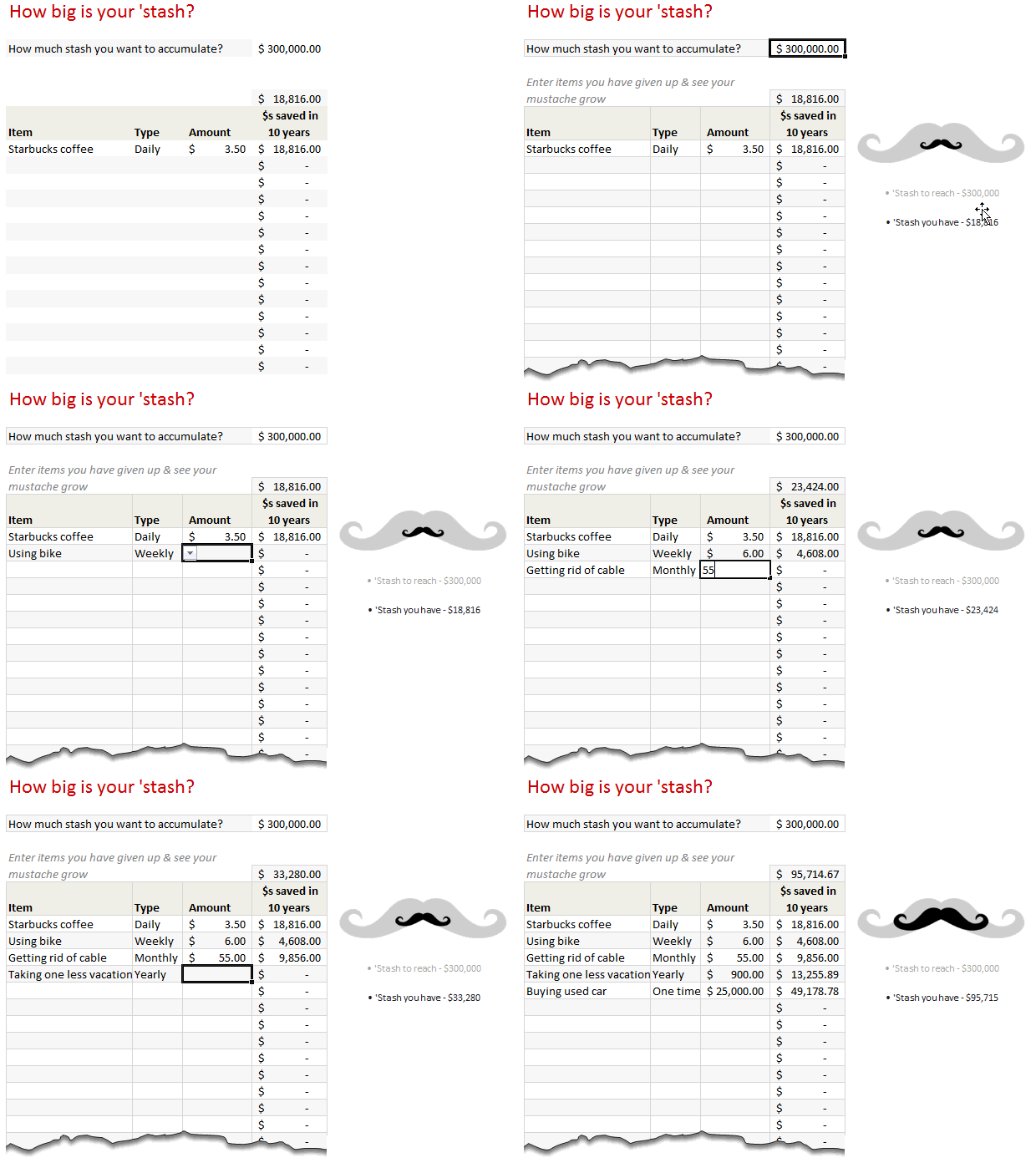
Well, I am not sure what else to call it. So lets stick with growing mustache chart. Here is how it works:
- You enter a sufficiently large number ie the money you want to accumulate to retire or do something equally awesome.
- You also enter your regular expenses (daily, weekly, monthly, annual or one time) and amounts.
- Then it magically calculates how much money you would save by cutting them.
- All this is shown in a dynamic chart that depicts your target and actual as mustaches
See this demo:
This is so cool, how is it made?
There are 4 steps to our growing mustache Excel chart.
1. Calculating future value of regular expenses
Question: If you consume $3.50 latte every day for next ten years, how much would you spend?
Answer: Gee! Sounds like a big problem, let me grab a cup of coffee first!
On a more serious note, the future value of these little expenses depends on rate of return as well. That is, instead of gulping down $3.50 in a hurry, if you saved the money the return you get on yearly basis.
For our calculations, we can assume a 7% return. This gives a future value of$18,498.
You can use the formula =FV(7%/365,365*10,3.5) to get this value.
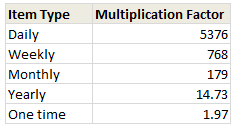
So the multiplication factor is 5,285 (18,498 divided by $3.5)
For our calculations, we can use a simple multiplication factor table so that we can focus on growing mustache than financial mumb0-jumbo.
2. Calculating Totals
Once we know the future values of all such regular expenses, we just need a small table like this that shows the totals:

3. Create a bubble chart
Next, we create a bubble chart with 2 bubbles. 1 for the actual mustache & 1 for target mustache.
4. Convert bubbles to mustaches
Hermione would know a great spell to instantly turn our boring bubbles to mighty mustaches (bulla-mustacium ?). But since we are muggles, lets focus on Excel trickery.
We need the chart on right from our bubbles:
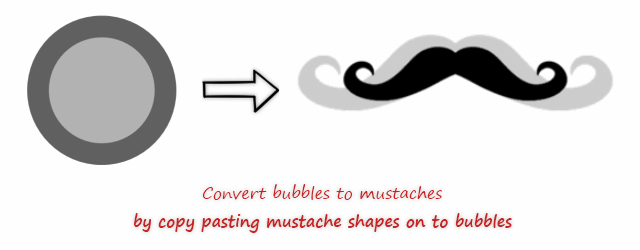
First get a nice handlebar mustache image from web, like this:

- Then, copy the gray color mustache (ctrl+c)
- Next, select outer bubble (target) and press paste (ctrl+v)
- Now, the bubble becomes mustache!
- Repeat the steps for actual bubble too.
That is all!
Download Excel Mustache Chart
Click here to download this chart and play with it. Examine the formulas in “Stash chart” sheet to see how it works.
Do you like the growing mustache chart?
I really liked how this turned out. Simple yet effective. Readers at Mr. Money Mustache site loved it too.
What about you? Did you enjoy this trick. Are you planning to cut any regular expenses after reading this? Please share using comments.
More on Excel and your money
I believe in being frugal, consuming less and living a simple life. So naturally we talk about using Excel to keep track of your expenses, investments, understand the impact of small changes etc. Check out below links to see more on Excel & your money.
- Expense trackers in Excel
- Household Budget Tracker
- Stock Portfolio Tracker
- Excel retirement calculator
- Interactive mortgage payment calculator
- Mutual Fund Portfolio Tracker [for India only]


30 Responses
Great post even more interesting chart and very enlightening MMM blog.
What other blogs do bloggers read :)?
Wow. This is a great technic. I can see the use for this in terms of reaching a bussines plans, in interactive dashboards. Great idea as always 🙂
Amazing… I am new to your website but have been glued since a few days ago.
How do you create the picture on sheet 1 which is linked to the cell references from sheet 2?
Grant.. this is called as Picture link. See here for a detailed tutorial: http://chandoo.org/wp/2010/10/19/how-to-use-picture-links/
Thanks Chandoo
It was the selection of the cells which was a problem for me as I was trying to select the chart – used GoTo to select the range for copying. Brilliant feature cos you can hide/protect the sheet with the data but still show the chart image!
Thanks to Pankaj as well for your explanation.
Great Technique Chandoo !
but I fear the haters out there will say “Is it the Width, Height or Area of the mustache that the chart is representing?“
It is also worth pointing out that this Copy/Paste technique can be used with any markers on all chart types, just have a play and see what happens
Hui…
I, personally, am not a hater, but have the same concerns about width, height, area. Do we know what the standard bubble chart uses?
Looks like default choice is Area of bubble, but you can change it to be width of bubble (under series options). Actually, the fact that the option exists makes me cringe even more as it increases the possibility of confusion. Note that the size is just relative to the other bubbles, So, the one mustaches is simply being displayed relative in area to the gray mustache.
Grant,
Select the cells in the ‘stash chart’ sheet and paste special. To select the cells instead of chart, go to the address bar (left of formula bar) and type F10. The cursor will go there and then use Shift+ arrow keys to select the desired area. When you do that, there is an option of pasting hyperlink picture. You can reach that by clicking on the small arrow on the paste button then at the bottom of the options (in my Excel view) click on the last option that is linked picture.
plz explain how to make that mustache as i tried to make same thing for heart but i am not getting it…i downloaded a pic from web..copy it and then i am not getting this step
select outer bubble (target) and press paste (ctrl+v)
plz help..
You need to first embed the image in to Excel. For this save the image from web to your computer and then, from Excel > Insert > Image and select the image. Now you can copy paste it on to your bubbles.
Hi Chandoo,
I have 2003, i tried inserting that image and then using Shift Edit ‘ paste picture link’ option. But ‘paste picture link’ option is not working in this case
You have surpassed yourself this time! This is so brilliant, I’ve sent it round the office at work and to home so that my husband and I can use it to meet our savings target.
I love the visual of growing a ‘tache, it’s such a simple, silly way of showing your progress, but with a serious message behind it. We’ve all brought into the coffee culture, I remember thinking I was lucky getting an anaemic warm dribble of muddy water from a vending machine at my first job! We do not need to buy $4 coffees, when more often than not there’s a perfectly good kettle in the kitchen and we can make a drink ourselves!
I’m sorry I missed you in Australia in June, ironically I would have brought you a coffee…
Thanks Maddie. Lets hope we can meet next time I visit Australia (should be early 2013). And yeah, you can bring the coffee in a flask if you prefer (or we can walk in to one of the numerous cafes and order a flat white and chit chat)
Very creative Chandoo! I think I have to give up weekday daily coffee.
In addition, I like multiplication factor.
Thank you for sharing wonderful knowledge.
Very interesting! Thanks so much for sharing all your fantastic Excel knowledge with us! I am really enjoying learning with your site! Keep up the good work!
Hi Chandoo,
I have two questions for you.
1)Just noticed daily conversion factor should be 5285 not 5376. Is this correct?
2) Assuming 261 working days in year (Mon-Fri excluding Public Holidays). My workday conversion factor would be 3779.14 (5285*261/365).
Is my assumption correct?
Kind Regards,
Bhavik
You have a keen eye. I used 5376 because that is what Mr. Money Mustache uses (I guess the FV calculations for him had a different number of days, including leap days).
And yes, you are right. If you are spending something only on working days, then the multiplication factor would be less.
This is really shocking fact, and i think you are a great robust idea transformer!!!
Awesome stuff!
My mind is racing with what pictures I’m going to use to illustrate my own companies’ earnings vs. forecast, using the same technique.
Thanks so much!
This reminds me of the Toyota Prius dashboard. It has a small tree display that grows as you drive more efficiently.
Great tip! you know how to turn excel into a fun display.
As always, great post! These tools have so many possible applications.
I want to upload the file but I can’t find it from where I update.
this is superb !!!!!
I like this as a simple teaching tool for the effect of compound interest. I have 2 points to suggest to make it more generalized.
Allow the user to input the rate of return. I added a field above how “much to accumulate” for the percent rate.
Allow the user to input the length of the term. I added a field below the accumulation field
Format the Percentage to allow at least 2 or 3 decimal places ie 7.25 or 6 1/8%
Since you are inputting and reporting $ and Cents, you should probably carry 2 decimal places in the calculations on the second sheet. In the example, that amounts to $661 extra “savings”.
This example sheet violates your suggested formatting rules. The input and output fields all look alike, contrary to your suggestions in: “Best Practice Modeling – Make these 5 changes today” : http://chandoo.org/wp/2012/08/29/best-practice-modeling-5tips/I expected you would ask submitters to follow your “rules”. They are worth following.
I will be forwarding this article to my investment advisor. He doesn’t (yet) use this sort of dynamic teaching aid.
I love this and really want to use it in some of my work reports showing forecast vs. actual but can anyone think of a workaround for when actual exceeds target (target shape is completely obscured as is)?
Thanks!
You can use border for target bubble and filled area (with some transparency) for actual values to handle this. See this example.
http://img.chandoo.org/playground/actual-target-overlap-rai.xlsx
Hi Chandoo,
I think your chart could also be used to track how much money you have raised for charity:
Check this out!
http://uk.movember.com/
Keep up the good work!
Regards,
Andrew
hi,
I want to transfer data from many excel workbooks (there are many users)
to master workbook.