

Lets celebrate these holidays in PHD Style. By learning few excel formulas that you can use to find out dates for some of the popular public holidays like – labor day, memorial day etc.
When is Labor Day (US) in 2010?
Labor day (the US variant) is celebrated on first Monday of every September. It occurs on Sep 6th in 2010.
Using excel date formulas, you can easily find out the labor day’s date for any given year.
Here is the formula I have used:
How this formula works?
The formula finds the weekday of first of September (WEEKDAY(DATE(2010,9,1))) and then uses this information to return one of the possible dates for first Monday.
You can use similar logic to find dates for other holidays like Thanksgiving day (both US and Canada), Memorial Day and Martin Luther King Day.
Is there a long weekend for New Years Day in 2011?
You can use excel to answer questions like whether there will be a long weekend for a given holiday. A long weekend occurs when the holiday is on either Thursday or Monday. So for example, you can check the long weekend condition for January 1st, 2011 like this:
How this formula works?
That is your homework. Go figure!
Download Example Worksheet and Learn by Playing with the Formulas
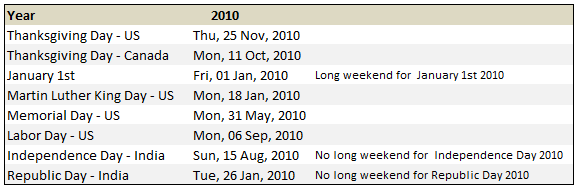
I have prepared a simple worksheet with 8 examples to calculate the dates for Thanksgiving dates, New years Day of Week, Martin Luther King Day, Memorial Day, Labor Day, and Indian variants of Independence and Republic Days. Go ahead and download the example workbook and play with it.
Related Material:
Help on formulas used in this tutorial: WEEKDAY Formula | IF Formula | OR Formula | 75 Excel Formulas – My eBook.
More examples and tutorials on Excel Date Formulas and Features.


12 Responses
I would never have thought of using CHOOSE. I’m more a MOD sort of person.
@Chandoo
Did you forget about my post in your Excel “Findout Thanksgiving Day’s Date for Any Year” blog entry on November 25th? Here is the part that applies to the first part of this current blog entry…
Thanksgiving (the fourth Thursday in November)…
=DATE(A1,11,29)-WEEKDAY(DATE(A1,11,3))
The generic version of this formula (which I first saw posted online by Peo Sjoblom, although I don’t know if it was original with him or not), which can be used to find the Nth such and such day of a given month for a given year, looks like this…
=DATE(Year,Month,1+7*NthDay)-WEEKDAY(DATE(Year,Month,8-DayOfWeek))
So, just plug in the year, month, NthDay and DayOfWeek (1 for Sunday, 2 for Monday, etc.) and perform the indicated math. As an example, for this year’s US Thanksgiving…
Year = 2009
Month = 11
DayOfWeek = 5 (for Thursday)
NthDay = 4 (for 4th Thurday in the month)
which gives…
=DATE(2009,11,1+7*4)-WEEKDAY(DATE(2009,11,8-5)
which reduces to the formula I indicated earlier.
Hey Rick, what is going to be the NthDay if we are looking for like the “last” Monday or the “last” Thursday” etc. I mean, we can put 1 for the “First” and 2 for the “second” etc .. The “Last”??
U rock man!
I believe you meant Friday instead of Thursday when determining a long weekend since Thursday really doesn’t match the Weekday formula’s value equal to 6, which is Friday.
@Derek… you can use an additional parameter to the weekday function and remove the need for choose altogether. I posted this version of formula as it is more easy to understand. As such date formulas are tricky and complicated ones are more so.
@Rick… No, I remember your beautiful formula very much. I have provided a longer version of the formula as it is easy to understand from a learner’s point of view.
@Gregory… yes, I meant friday.. thanks for pointing it out.
Dear Sir,
I leave in Bangladesh, when I calculate workdays it calculate with default excel calender. But I need to calculate with my countries calender. How ? Actually I want to set my holidays in the excel Calender. Please help me.
Shajid
shajid73@yaooo.com
@Shajid
Excel isn’t aware of calendars
Some of its functions have Calendar and Holiday awarness
Workdays
Networkdays
Can have Holidays set
Workdays.intl
Networkdays.intl
Can have Calendars and Holidays set
You should read the help on each function.
Thanks for your valuable suggestion. Now I am facing another problem when I calculating my TAX spreadsheet. If possible please help me.
In our country up 2,00,000 income your tax is 0%
Then next 3,00,000 income your tax is 10%
Then next 4,00,000 income your tax is 15%
then next 3,00,000 income your tax is 20%
then next above your tax is 25%
in the first slab I am entering the formula like
=IF((Total income-200,000)<300000,(Total income-200000)*10%,300000*10%)
Problem is when (Total income – 2,00,000 = Negative figure then it is calculating negative tax, which I don not want.
Please help me.
Shajid
Use this formula:
IF(Total Income>1200000,(150000+(Total Income-1200000)*25%),IF(Total Income>900000,(90000+(Total Income-900000)*20%),IF(Total Income>500000,(30000+(Total Income-500000)*15%),IF(Total Income>200000,((Total Income-200000)*10%),0))))
Yes I solved my problem myself.
Hi Pro, i want to know what day if given date and week, for example : if given 32th week, Tuesday, 2015 >>> I have to calculate and result is 4. Pls help me!
Hello
How to detect if day is bank holiday in one or many given countries ? Poland, India, USA ….
I tried to use international code w. WORKDAYS.INTL, didn’t work fine.
Thx
Jon