Welcome to Chandoo.org.
My mission is to make you AWESOME in your work.

Hello, Namaste & Kia Ora. Welcome to Chandoo.org. 

My name is Chandoo. My mission is to make you awesome in Excel and Power BI.
I do this by sharing Excel & Power BI tutorials, examples, tips, videos and articles on this website. I live in Wellington, New Zealand with my beautiful wife Jo & our twins Nishanth & Nakshatra. Take a minute to browse various topics of the site to see how I can help you.

Thank you and welcome.

What would James Bond have in his Personal Macro Workbook?

You know, I‘m constantly amazed at the depth of knowledge and wisdom that comes up in the comments of this site. For instance, the other day, undercover Excel secret agent KV came up a great list of interview questions in response to Chandoo’s great article What are best Excel interview questions?

I particularly liked this one:
Do you have a Personal Macro Workbook setup ? If yes, what are the most common macros you use in your daily work?

Secret Agent KV obviously has some purpose-built gadgets that he employs to kill inefficiencies. And he obviously also knows the two top-secret reasons to keep code in a Personal Macro Workbook:

  1. To keep it safe from international spy rings.
  2. So you can whip it out whenever you are cornered by any evil-looking spreadsheet.

While that first point is important, that second is the clincher: code stored in a personal workbook can be unleashed with a simple judo-chop to the throat.

Today, lets understand how to setup your personal macro workbook and open a secret passage-way to Excel awesomeness.

Read This »

Thank you Sachin [a small tribute]

Lets talk about people who inspire us. People who show us that anything is possible. People who prove that commitment, hard work and perseverance are true ingredients of a genius.

I am talking about Sachin Tendulkar. Those of you who never heard his name, he is the most prolific cricketer in the world. He is the leading scorer in both tests (15,921 runs) and one day matches (18,426 runs). Read more about him here.

Tendulkar has been an inspiration for me (and millions of others around the world) since I was a kid. The amount of dedication & excellence he has shown constantly motivates me. It is a pity that the great man is retiring from test cricket. He is playing his last test match (200th, most by any person) as I am writing this.

So as a small tribute, I have decided do something for him. Of course, I have never been a cricketer in my life. Once in college I was reluctantly asked to be a stand-by player in a game with seniors. I did not get a chance to pad up though. That is the closest I have been to a cricketer. So I did what I do best. Create an Excel workbook celebrating Sachin’s test career.

Thank you Sachin – his test career in a dashboard

Here is a dashboard I made visualizing his test cricket statistics. It is dynamic, fun & awesome (just like Sachin).

(click on the image to enlarge)
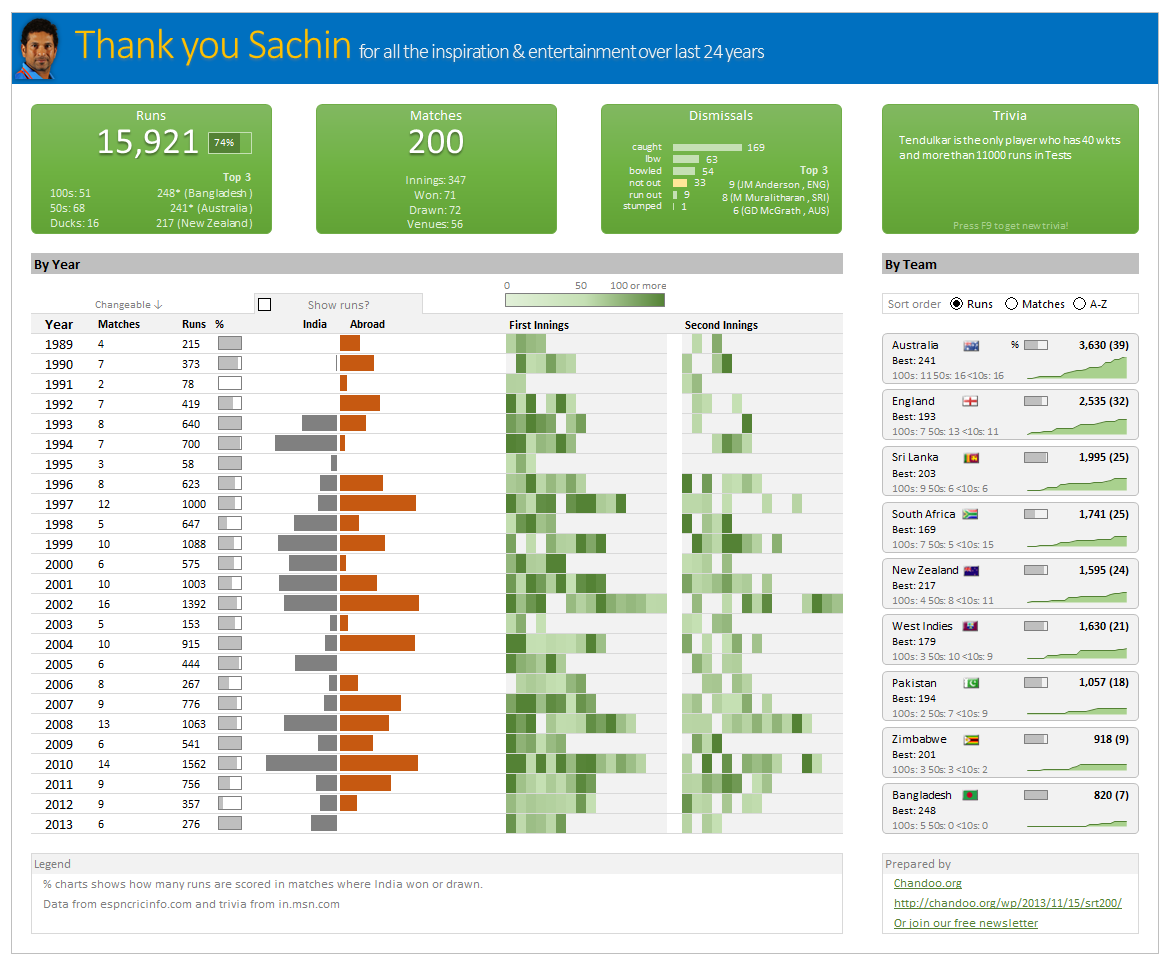
Sachin Tendular 200 Tests - Visualized in an Excel Dashboard

Read This »

Show pop-up calendar upon right click [Excel VBA]

There are times when we are entering dates into several columns and would like to select a date from a popup calendar instead of manually typing.

Today, lets understand how we can set up a pop-up calendar in Excel so that your users can easily input dates by right clicking on a cell and inserting a date.

pop-up calendar vba excel

Read This »

Replace formulas with values using this shortcut [quick tip]

Often in my work, I need to replace a bunch of formulas with values. Blame it on old habits, but this is what I used to do:

  1. Copy the cells with formulas (CTRL+C)
  2. Press ALT+ESV and then enter.

While this is ok, it does take quite a bit of time and key strokes.

Here is a shorter way I recently learned…

Read This »

Closing gaps in this Gender Equality Gap chart…

Today lets close some gaps.

Recently I saw this interesting chart on Economist Daily Charts page. This chart is based on World Economic Forum’s survey on how women compare to men in terms of various development parameters. First take a look at the chart prepared by Economist team.

So what are the gaps in this chart?

This chart fails to communicate because,

  • All country charts look same, thus making it difficult to spot any deviations.
  • We cannot quickly compare one country with another on any particular indicator.
  • It does not provide a better context (for eg. how did these countries perform last year?)

But criticizing someone’s work is not awesome. Fixing it and making an even better chart, that has awesome written all over it. So that is what we are going to do. You can see the improved chart above. Click on it to learn how you can create it.

Read This »

What areas of Excel scare you most? [survey]

Yesterday was Halloween. To our readers who are not familiar with it, ‘Halloween is a colorful festival with lots of costumes, scary stories, theme parties and trick-or-treating, celebrated on 31st October, every year.” I have never celebrated Halloween as it is an unknown tradition in India where I live. But that is no excuse. Especially when the celebration calls for colorful clothes, scary themed houses and shrieking kids.

Of course, we are not going to have a traditional Halloween. Because,

  • At our house, we use pumpkins to make sambar, not lights
  • The only ones with costumes in our house are my kids.
  • If I send my kids for trick or treat, they will get neither.

So that brings us to the only part of Halloween that I can celebrate. Telling scary stories.

So lets talk about the stuff that scares us. But bear in mind that I am not interested in that time when you & your cousin went camping and stumbled in to an abandoned log cabin to discover the …Save it for real Halloween.

We want to talk stuff that scares you in Excel of course.

Read This »

Latest Video

for more videos…

Learn Excel Step by Step

Everything from Power Query to Dashboards, Shortcuts to Formulas, Pivots to Charts in one course.

Topics

Power BI

Excel & Power BI for you

What people say about Chandoo.org

A relative told me about your website since I need help creating pivot tables, I learned how to do it in a matter of minutes thanks to your tutorial. Where have you been all of my excel troubled life, I look forward to viewing your videos on youtube as well as on your site. You are going to make me EXCELLENT at Excel!
Soulful Sista
Excel Sister
Hi Chandoo, I just want to say I really appreciate your Excel tutorials and all your hard work that it took to compile the huge library of content. Your site has helped me gain a better understanding of Excel which has helped me in my job. You are helping the world!
Felix H
Accountant
Throughout my life as an administrative assistant; your site has been invaluable to me. And now that I’m a recruiter; it’s still an amazing resource for when I need to teach someone something quickly. You are a friggin’ Rock Star!!! Thank you for everything you do.
Jason S
Recruiter

Courses for you

training-calendar-view

Excel School

Learn how to work with data, make calculations, pivots, create amazing charts and powerful dashboards from scratch using Excel School + Dashboards program. Suitable for analysts, managers or professionals who need to use Excel often.

vba-classes-from-chandoo

VBA Classes

Use VBA to automate your tasks and build powerful spreadsheet based apps. In this course, learn all about how to program with VBA, how to use the language and object model to your advantage. Suitable for people who build a lot of things with Excel.

cg2018-games-viz-power-bi

Power BI

Power BI, the newest technology from Microsoft is a game changer. You can build rich, interactive and informative displays for your audience using Power BI. In this course, learn all about Power BI, Power Query and Power Pivot and how to combine them to achieve awesome results.

=XLOOKUP(chandoo, on_social_media)
