

Last year, Steven shared a beautiful Christmas Gift List template with all of us. It is packed with lots of Excel goodness. Just a few days ago, he emailed me another copy of his file with some improvements. So if you are planning for Christmas shopping and want a handy tracker, you don’t want to miss this.
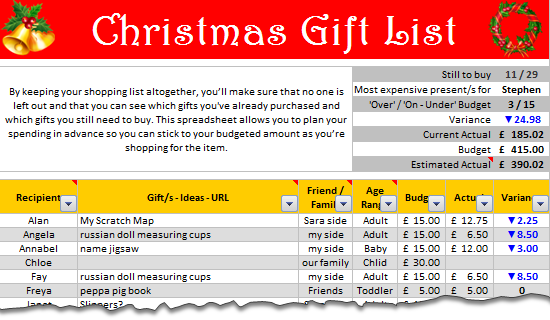
How does this template work?
This template feels magical. To begin with,
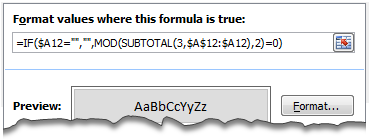
Zebra lines thru Conditional Formatting
Alternative rows of the template are shaded in dull gray color so that the template is easy to use. And this is achieved by Conditional Formatting & SUBTOTAL formula. A very ingenious use of SUBTOTAL formula so that the zebra lines preserve even after filtering data.
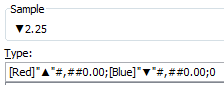
Custom Cell Formatting to Show Budget vs. Actual Variance
Another simple yet elegant solution. To highlight the variance between budgeted & actual gift value, Steven used Custom Cell Formatting.
Awesome Formulas to Summarize the Gift List
The top right area of Steven’s shopping list shows a clear summary of your Christmas shopping list. Each of the values in the summary are calculated by a clever formula. For example, the formula to show how many gifts are over the budget vs. how many are on or under the budget is an intricately woven SUMPRODUCT formula with SUBTOTAL, OFFSET & ROW components. Go ahead and examine these formulas to learn more.
You can filter the list and analyze by segment
The beauty of this template is that you can filter the list and analyze by segment. For example, you can filter all the gifts you are giving to friends and see whether you are with-in budget in that segment, the progress of gift selection & purchase etc. Very useful.
Download Christmas Gift Shopping List Template
Click here to download the template and use it.
Go ahead and Enjoy your Christmas shopping.
Thanks to Steven
for sharing a beautiful & awesome template with all of us.
How do you like this template?
I really loved the simplicity and elegance of this template. It is easy to use, packed with lots of details and fun to poke around.
What about you? Do you like this template? How do you organize your Christmas spending? Do you use Excel, some other tools or rely on your gut feel? Please share using comments.
More Templates on Christmas & Thanksgiving
We, at chandoo.org celebrate holiday season by sharing useful templates, tips & ideas with you all. Here is a collection of holiday stuff for you:


9 Responses
Thanks .. Very nice! Merry Christmas! 🙂
I like it. But, couldn’t you do the “most expensive present” formula far simpler with a helper column to rank the actuals then offset over to the name once you’ve matched the #1 name? =OFFSET(H11,MATCH(1,H12:H40,0),-7) where column H is my ranked helper column.
Thanks for in insight into how other people make spreadsheets for home life. however, it lacks 2 fundamental tricks,
(a) what is the magic present to get my wife that will make up for all those days when I should have changed nappies but was playing with Excel instead.
(b) where to get it for less than “I can’t afford that”
Finally, can’t wait for my Air swimmer shark
Merry Christmas all
Would not open in Excel 2003
Thanks for sharing. I have customized a couple of things to suit me, and I think it will be very helpful. It has given me an extra excitement about Christmas shopping.
I downloaded the template, but my Excel says it is an recognizable format. I do not normally use templates. What did I do wrong. Now, whenever I open any Excel file, this template is also coming up and I get the error message and Christmas-shopping-list.xlt opens up with gibberish.
I had one question regarding the conditional formatting zebra lines formula which was the first part of the formula IF($A12=””,”” . How is excel evaluating the first part of this formula in cthe conditional formatting formula? I used the formula IF($A12=””, False, Mod(Subtotal(3,l$A$12:$A12) which make logical sense to me because it evaluates blanks as false thus no conditional formatting for that cell.
I can’t seem to figure out how to input the triangles, can you show me please?
Thanks.
The downloadable file is in xlsx format but is named with an xls extension. That’s why some are having problems in using it in Excel 2003 and below.