Pie of a Pie of a Pie chart [Good or Bad?]

Share

Facebook
Twitter
LinkedIn

There are some charts that look so stunning and yet confusing. You cant make up your mind whether it tells a compelling story or it is just plain wrong.

Today, let me present you one such chart. I call this Pie of a Pie of a Pie chart (source: thiswoo, thanks to Nassar, our forum member for mentioning this)
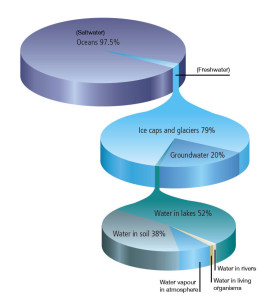
Water Stats - Pie of a Pie of a Pie chart

Pie of pie of pie – What is good about it?

The idea of this chart is quite noble. Show how the water in this world is distributed. Obviously, with such large numbers, making one chart would be difficult. So make 3. The initial pie of salt vs. fresh water, which explodes to show the distribution of fresh water which explodes to show the spread of other water sources.

The chart narrates the story of how little water is available for consumption and where it is one simple picture.

And the pie leaking in to another pie metaphor works really well in this case.

What is not good about it?

To begin with, the 3D pies are very deceptive. It is not clear how much % of water is fresh water (other than the fact that it is very little). Also, compared to a 2d pie, the fresh water slice in 3d pie looks bigger (due to its orientation and 3d effects).

Then, no matter how good the colors are, the 2nd and 3rd pies are confusing. The colors imply that the blue slice (fresh water) corresponds to just ice caps and glaciers.

Since all 3 pies are of similar sizes, we immediately think that we have enough water. Only on closer inspection it becomes obvious that the size of lower pies has no relation to actual water amount (only angles convey the information).

Finally, I think this chart is bad because it takes excessively large amount of time to make in almost any software. That said, it is a good exercise to come up with this tinkering with various drawing shapes etc.

Aren’t there any alternatives?

The easiest and clear (and obviously not so exciting as pie of pie of pie chart) alternative is to just show the numbers like this:
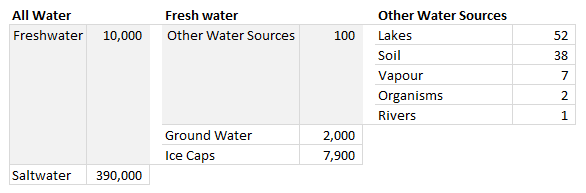
Water stats - showing as a table

Note: This table too is misleading as row heights wrongly indicate that we have more fresh water than salt water etc.

The next option is to use a variation of bar of bars, some thing like this:
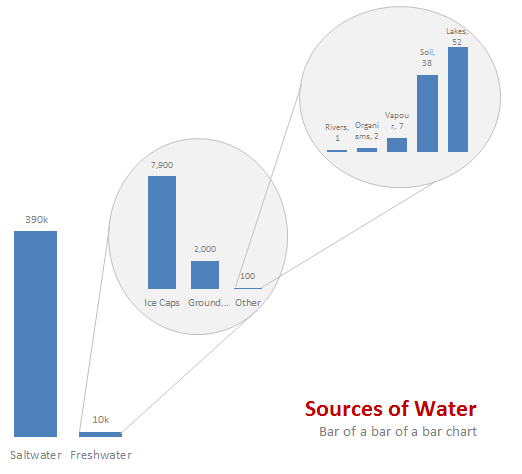
Water stats - displayed as a bar of bar of bar chart

One more option I can think of is a tree map. For hierarchical data like this Treemaps are also a very good option. That said, since the largest value is 390,000 times the smallest value, any treemap will be very large to show the smallest value clearly.

Do you like Pie of Pie of Pie chart?

What do you think? Do you love this or would you prefer some other chart to visualize this data? Share your opinion using comments.

Previously on Pie Charts

Pie charts are one of the most (mis)used charts in business world these days. That is why we talk about them from time to time. See these articles to learn more:

PS: If you want to know to create this pie of pie of pie chart in excel, see here.

Facebook
Twitter
LinkedIn

Share this tip with your colleagues

Excel and Power BI tips - Chandoo.org Newsletter

Get FREE Excel + Power BI Tips

Simple, fun and useful emails, once per week.

Learn & be awesome.

Welcome to Chandoo.org

Thank you so much for visiting. My aim is to make you awesome in Excel & Power BI. I do this by sharing videos, tips, examples and downloads on this website. There are more than 1,000 pages with all things Excel, Power BI, Dashboards & VBA here. Go ahead and spend few minutes to be AWESOME.

Read my storyFREE Excel tips book

Overall I learned a lot and I thought you did a great job of explaining how to do things. This will definitely elevate my reporting in the future.
Rebekah S
Reporting Analyst
Excel formula list - 100+ examples and howto guide for you

From simple to complex, there is a formula for every occasion. Check out the list now.

Calendars, invoices, trackers and much more. All free, fun and fantastic.

Advanced Pivot Table tricks

Power Query, Data model, DAX, Filters, Slicers, Conditional formats and beautiful charts. It's all here.

Still on fence about Power BI? In this getting started guide, learn what is Power BI, how to get it and how to create your first report from scratch.

21 Responses to “How to Filter Odd or Even Rows only? [Quick Tips]”

  1. Vijay says:

    Infact, instead of using =ISEVEN(B3), how about to use =ISEVEN(ROW())

    So it takes away any chance of wrong referencing.

  2. Hui... says:

    I like Daily Dose of Excel

  3. vimal says:

    I like it.

  4. Luke M says:

    Just a heads up, you do need to have the Analysis ToolPak add-in activated to use the ISEVEN / ISODD functions. An alternative to ISEVEN would be:
    =MOD(ROW(),2)=0

  5. Debbi says:

    rather than use a formula, couldn't you enter "true" in first cell and "false" in the second and drag it down and than filter on true or false.

  6. Paul S says:

    Just for clarification, is Ashish looking to filter by even or odd Characters or rows?

  7. Fred says:

    so many functions to learn!

  8. Istiyak says:

    Nice support by chandoo and team as a helpdesk. Give us more to learn and make us awesome. Always be helpful.......

  9. Arps says:

    In case you want to delete instead of filter,

    IF your data is in Sheet1 column A
    Put this in Sheet2 column A and drag down
    =OFFSET(Sheet1!A$1,(ROWS($1:1)-1)*2,,)
    (This is to delete even rows)

    To delete odd rows :
    =OFFSET(Sheet1!A$2,(ROWS($1:1)-1)*2,,)

  10. Pippa says:

    If your numbered cells did not correspond to rows, the answer would be even simpler:
    =MOD([cell address],2), then filter by 0 to see evens or 1 to see odds.

  11. Matthew D. Healy says:

    I sometimes do this using an even simpler method. I add a new column called "Sign" and put the value of 1 in the first row, say cell C2 if C1 contains the header. Then in C3 I put the formula =-1 * C2, which I copy and paste into the rest of the rows (so C4 has =-1 * C3 and so forth). Now I can just apply a filter and pick either +1 or -1 to see half the rows.

    Another way, which works if I want three possibilities: in C2 I put the value 1, in C3 I put the value 2, in C4 I put the value 3, then in C5 I put the formula =C2 then I copy C5 and paste into all the remaining rows (so C6 gets =C3, C7 gets =C4, etc.). Now I can apply a filter and pick the value 1, 2, or 3 to see a third of the rows.

    Extending this approach to more than 3 cases is left as an exercise for the reader.

  12. Paulo says:

    Another way =MOD(ROW();2). In this case, must to choose betwen 1 and 0.

  13. Makhan Butt says:

    very different style Odd or Even Rows very easy way to visit this site

    http://www.handycss.com/tips/odd-or-even-rows/

  14. Terhile says:

    Thanks for the tip, it worked like magic, saved having to delete row by row in my database.

  15. majid says:

    Thankssssssssssssssss

  16. Bhanu says:

    Hi Chandoo- First of all thanks for the trick. It helped me a lot. Here I have one more challenge. Having filtered the data based on odd. I want to paste data in another sheet adjacent to it. How can I do that?
    For Example-
    A 1 odd
    B 3 odd
    C 4 even
    D 6 even
    I have fileted the above data for odd and want to copy the "This is odd number" text in adjacent/next sheet here. How can I do that. After doing this my data should look like this
    A 1 odd This is odd number
    B 3 odd This is odd number
    C 4 even
    D 6 even

  17. Adriana says:

    Hi! Could you please help me find a formula to filter by language?
    Thank you!

  18. avinash says:

    Chandoo SIR,

    I HAVE A DATA IN EXCEL ROWS LIKE BELOW IS THERE ANY FORMULA OR A WAY WHERE I CAN INSTRUCT I CAN MAKE CHANGES , MEANS I WANT TO WRITE ONLY , THE FIG IS FRESH, BUT IN BELOW ROW IT WILL AUTOMATICALLY TAKE THE SOME WORDS FROM FIGS AND MAKE IN PLURAL FORM , WHILE USING '' ARE'' LIKE BELOW

    The fig is fresh - row 1
    Figs are fresh - row 2
    The Pomegranate is red - row 3
    Pomegranates are red - row 4

  19. Arshad Hussain Shah says:

    =IF(EVEN(A1)=A1,"EVEN - do something","ODD - do something else") with iferron (for blank Cell)

Leave a Reply