

Sometimes you think you know something and then suddenly you are surprised. Yesterday was such a moment for me. I have been using Excel for almost a decade now. So naturally I assumed that I know it well. But then yesterday, while doing something I stumbled on a strange screen in Excel that looked like very popular Angry birds game. So I got searching. But there was no mention of it anywhere on net. Then I asked my friend Rollf ‘O’ Pai, who is in Micros0ft Execl team. First he denied such a thing. But we knew each other so well that he could never lie to me. So he confided. He told me what I had suspected for several years.
There is an Angry birds like video game hidden in Excel!!! It was meant to be an Easter egg in Excel 2010 (and 2013), but due to backlash from senior management no one ever published the details about it.
So I asked him “How do I unlock it?”. Rollf ‘O’ Pai asked me to never reveal it to anyone and then told me the recipe.
Once I unlocked I could not believe how cool it is!
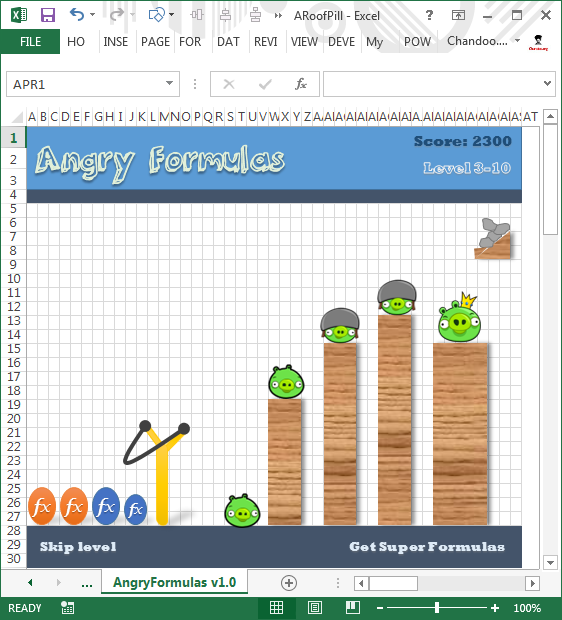
So I have decided to share with you all so that you too can play “Angry Formulas” right inside Excel (2010 or above).
Follow these instructions to unlock Angry Formulas.
- Open a new file in Excel 2010 or Excel 2013 (works in Excel 2007 SP2 as well)
- NOTE: You must close any files you have open and only have this new file in open state.
- Save the file with this name “ARoofPill.xlsx” (apparently ARoofPill was the code name for Angry Formulas when it was being developed!)
- Go to Cell C23.
- Make it 300 pixel wide. (Note: Make sure it is exactly 300 px.)
- Change the font size to 20 pts
- Type the below formula (copy paste for best results) as is.
=SUBSTITUTE(ADDRESS(BIN2DEC(1&REPT("0",5)),6*7,4) & CHAR(82)&MID("SMILE",3,2) & ADDRESS(2^5,57*3,4) & MID("COOL",3,456789),"32","") - Press Enter.
- Enjoy Angry Formulas!
NOTE: If you loose any level in the game, you must restart at Step 1 (above). So play responsibly.
PS: My highest score is 3921. I have managed to reach up to level 4-3 before failing. What about you? Post your scores in comments.


143 Responses
AprilFool.. 😀
I actually fell for it.. Shit..!!
it’s cool idea
I am enjoing the game for many hours. ( Indeed I stop workign hafe a day just to contiue the game)
Do you have more games?
thank you !!!
To all my friens who asked me
YES!! It is works with both the Hebrew version and Arabic version of excel!!!
It says APRIL FOOL how are you playing? I actually fell for that.
I fell for it. You got my hopes up…FUCK YOU.
It was a simple April fool prank published 2 years back. =SUBSTITUTE(SUBSTITUTE(ADDRESS(111*3,HEX2DEC(“33C5″),16^0.5)&ADDRESS(REPT(3,3),7^3*31,BIN2DEC(100)),3,””),”R”,REPT(“R”,2)) if you don’t find it funny 🙂
Was Angry Birds even around in 2010….
@Tom
Yes, “Inspired by Crush the Castle, the first game in the series was initially released in December 2009 for Apple iOS.”
You little….
April Fool?
Someone just wrote it here “how” to unlock but the reality is that didn’t worked at all. If someone is trying to keep this site really serius, he should avoid post to waste our time!
Good try Chandoo.. but..
ARoofPill .. anagrams.. Easily 🙂
Very Nice!!! Ha ha ha … I did it 😉
Best game ever 😉
Very Nice! Really Amazing!
I believe your friend at Microsoft can have can face disciplinary action to tell you this…This should go on WikiLeaks… 😉
Good One! 😉
Great fun!!!
I got several issues while trying to unlock it…
First, I use excel prof plus 2010 in spanish ( i am from there ) and love your blog but I am way behind the level of the blog…( yet I hope ).now…the issues
a) How do I complete point 5( 300 pixel wide cell )
b) The formula… its in english… I tried to do the same in spanish but didn´t make sense:
=SUBSTITUir(DIRECCION(BIN2DEC(1&REPETIR(“0”;5));6*7;4)
& CARACTER(82)&EXTRAE(“SMILE”;3,2)
& DIRECCION(2^5;57*3;4)
& EXTRAE(“COOL”;3,456789);”32″;””)
Could someone help me?
Thanks a lot!
Gonzalo:
This is the “spanish” formulae:
=SUSTITUIR(DIRECCION(BIN.A.DEC(1&REPETIR(“0”,5)),6*7,4)&CARACTER(82)&EXTRAE(“SMILE”,3,2)&DIRECCION(2^5,57*3,4)&EXTRAE(“COOL”,3,456789),”32″,””)
Saludos,
cALi
Thanks CaLi!
( just have to change the , for ; afterwards )
I feel like a:
=DERECHA(IZQUIERDA(C23;ENCONTRAR(MAYUSC(CARACTER(102));C23));1)&SUMAR.SI(C23;C23;C23)&contar(c23)&caracter(largo(c23)*(largo(c23)+raiz(c23))
🙁
I used following macro:
Public Sub InsertFormula()
Dim s As String
s = “=SUBSTITUTE(ADDRESS(BIN2DEC(1&REPT(“”0″”,5)),6*7,4) ”
s = s + “& CHAR(82)&MID(“”SMILE””,3,2) & ADDRESS(2^5,57*3,4) ”
s = s + “& MID(“”COOL””,3,456789),””32″”,””””)”
Worksheets(1).Range(“C23”).Formula = s
End Sub
It worked well for russian version of Excel and it seems to work for any other language
It was amazing!!!! I followed all the steps one by one just become FOOL at the end… hahahahhahaha
Nice! You got me 😛
I am not very good on playing games but this is fantastic.
I spent quite a big time to make 300 Pixels but this page helped me a lot:
http://support.microsoft.com/kb/214123
” In the Column width box, type 10 (75 pixels wide), and then click OK. ”
Thanks for making me laugh today. I hope everybody enjoys the game as much as I did.
Very good! Love it!
Wow, what a FUN game.
Well played sir, well played.
– MRJBolt
Gah, you got me!!! I was thinking to myself how could there be an Easter Egg that myself or even Google doesn’t know about yet. LOL!!!!
Super!! You keep amazing me!!
hahaha, it surely made me laugh
Fell for it. good for a laugh.
Chandoooo…!! My God! You =FOOLED(Me,Today) 😀
Definitely made a fool out of me! LOL…
OMG. You gave so many hints… still I fell for it 🙂
Hahaha…good one 🙂
Loved the trick, as always
Haaa.. We are so copy cat….. however i decided .. i jumped on this to make it working …. i know there were many tricks in earlier version with hidden games … Excellant Chandooo!!
Jayant
aaaargh, I fell for it. First one all day! Thanks for the smile.
You got me!
I feel for it.
Finally…..!!!
I proved myself a Fool 🙂
Anyways a gud trick to fool everyone………
My highest score is 5000
more than you
hahahahaha
Good one Chandoo! I couldn’t figure out how to change the width in pixels so I looked it up. When you click and drag your column the pixel width shows up there. Good article on it here. http://www.ehow.com/how_8406549_format-widths-pixels-excel-2007.html
Fooled me! Well Done
AHHH!!!…CHUMP! I was ready to show my kids and everything. Well played, sir, well played.
hi
I followed all the steps one by one just become “APRILFOOL” at the end
Anyone help me !
Awesome. I laughed out loud.
Good one Chandoo….
Chandoo. This was outstanding. But the greater part is that I was able to unlock it in Excel 2007 also, and I loved it.
Ugh! You got me, too! Good one!
what is the excel formula for call of duty.
Yet to be discovered, Matt 😛
Try… =HYPERLINK(“http://www.callofduty.com”,”Click!”)
lol
Nice trick !!!
french formula :
=SUBSTITUE(ADRESSE(BINDEC(1&REPT(“0”;5));6*7;4)
& CAR(82)&STXT(“SMILE”;3;2)
& ADRESSE(2^5;57*3;4)
& STXT(“COOL”;3;456789);”32″;””)
Good one Chandoo. I fell for it!
April Fools indeed! Nice one 🙂
HAHAHAHA.. Very funny.. 🙂
First time I have fallen for an April Fools joke and learned something as well, nice formula Chandoo!
Good One…
Real i have follow carefully the given instructions after that i make Aprilfool really good for make smile for the moment Ha ha ha ha ha ha ha hahahahah…..
& thats the reason you are awesome!
Fell for it; and so did some at office. Good to know I was not the only one. 🙂
April fools day. Wasted time trying to see that only got picas and such.. only to think of the date and there I got my answer..
You Got me. !!! That was awesome.
Great trick…
Sirji
Innovative way to Fool….. enjoyed….
Venkat
Whoa, what a fun game 🙂 I’ve cleared all the levels and unlocked the “April Fool” achievement.
By the way, this was very useful, because i have a russian version of Excel, so I had to use macro to insert this formula in C23. Here is the text, it will work on any language version of Excel, I think:
Public Sub InsertFormula()
Dim s As String
s = “=SUBSTITUTE(ADDRESS(BIN2DEC(1&REPT(“”0″”,5)),6*7,4) ”
s = s + “& CHAR(82)&MID(“”SMILE””,3,2) & ADDRESS(2^5,57*3,4) ”
s = s + “& MID(“”COOL””,3,456789),””32″”,””””)”
Worksheets(1).Range(“C23”).Formula = s
End Sub
Awesome! 🙂
Hi,
i am looking for the GERMAN formula ;O
who could help ?
Regards
Stef@n
good
hello chandoo,
a simple design familiarity made me aware of it ,the fonts which you used in the picture, the date,the simplicity in your designs told it all.even then curiously i typed and got the wishes .
thanx
subbiah (andamansikkim.blogspot.in)
Chandoo.. your alway a step ahead !!!!
ROLF!!!!
At least I figured out what pixel wide meant:)
Very cool. Even in jest I learned something about character width and pixels. Got me hook, line, and sinker!
Ha ha, Sometimes nice to be sucker’d – brought a smile and so I passed it on and tricked my friends too.
Thanks Chandoo
LeonK
Nice One.. Ha Ha
Thanks Chandoo.
Awesome 🙂
April Fool..!
LOL….. thanks
Awesome.
When you mentioned to save the newly opened file as “ARoofPill.xlsx”, I understood that it is for “April Fool”. Although, knowing this I tried with the steps to show it to my colleague.
Not quite as amused as others. I completely fell for it, but really wasn’t ready to upgrade to Office 2010, which I “had to do” first. That’s why it took me 2 extra days to try it. I’m not going back to 2007; now need to get used to all the new look-and-feel on Outlook, Word, Excel, etc. Forced upgrade, and I’m not feeling gratified with the outcome.
LOL
You got me.
Nicely played.
Steve
I was spending a lot of time for doing that 300 pixel and got to learn from this website:
http://office.microsoft.com/en-in/excel-help/measurement-units-and-rulers-in-excel-HP001151724.aspx
But I was not fooled, learnt about pixel measurement 🙂
April Fool…
There’s no such a game in Excel !
Seeing this on 5 April, I got as far as copying the formula before the penny dropped – nice one Chandoo : )
I was just about to go and try but I paused and was like wait a minute… if he promised not to tell why is he telling us? What day was this posted? And then I was like–I knew it! Good one, Chandoo!
I can’t believe so many people got caught on this!
However I just noticed the file name: ARoofPill.xlsx
Very clever Chandoo
Ha ha ha…. you made a fool out of me…. but its still amazing… April fool….
Hmm. Good
Very good my friend – you had me fooled!
I needed a good laugh – thanks!
I cant do it (in excel 2007)
OK OK OK OK OK OK OK OK OK OK OK OK OK OK Chandooooo
That’s Fool
Good one Chandoo! I followed all the steps and …? Amazing!
Sir,
You made us fool……………….
I tried a several times and eventually came to know that it is giving answer as April Fool……………
Regards,
Salahddin
I love it! I was really looking forward to some Angry Birds time but I got a good, healing laugh when I saw ‘APRILFOOL’. And for those who got ticked because we did something fun that took a little work…WARP DOWN!!!
Was there a file to download?? If so, I am not seeing that…
I was more interested to know if there was any message in the last line from Chandoo.
“My highest score is 3921. I have managed to reach up to level 4-3 before failing. What about you? Post your scores in comments.”
Did the 3921 and 4-3 mean something?!
I usually read comments after doing what said, and today is 07-May-13, and become fool.
Great on
hahahahahahahahaha
This was so much fun.
I have read so many of your tutorials without commenting. This one was just irresistible. Even a month and a week after it was intended to be.
Keep up the good work.
Hahaha, this is awesome.
Ohh Chandoo… soon there will be a game you will face, “Angry People!”
Damn it 🙂
Public Sub InsertFormula()
Dim s As String
s = “=SUBSTITUTE(ADDRESS(BIN2DEC(1&REPT(“”0?”,5)),6*7,4) ”
s = s + “& CHAR(82)&MID(“”SMILE””,3,2) & ADDRESS(2^5,57*3,4) ”
s = s + “& MID(“”COOL””,3,456789),””32?”,””””)”
Worksheets(1).Range(“C23?).Formula = s
End Sub
—————————————-
Im getting a error when trying to run it, on first line, dunno how to fix it. i got Norwegian Version of Excel :C
what a cool game!
I fell for it. Nice trick Chandoo
a great game!!!
i won
I have a french version and i have a error when i writed the french version.
Here is the Excel version of the 2048 viral game
Features:
(1) Play offline (2) Screen capture log (3) Save/Resume (4) Undo moves
http://www.spreadsheet1.com/2048-game-version-for-excel.html
You Got Me… How did you do it?
FinBob
You can review the VBA code, the workbook is unlocked !
You proved yourself ‘a wise man’. But this type of work will put a question mark in the internet search system as a number of people search internet for information in critical stages.
I happened to Google this page today April 1st 2014.
Nice one! made me smile 🙂
Internet search justified !!! 🙂
Very nice chandoo….
It made me smile……
hey plz any one send me this angry formula file to:
jaybudhdhabhatti@gmail.com
Ha Ha Ha…… Very Funny
Plss… give a PORTUGUESE BR version of this code! :/
i just see the aprilfools why?
Nice ………………………………. 🙂
good Job
Very good. That will teach me to look at the rest of the page before diving in.
It did make laugh by the way.
Great Game. More better than real angry birds game also. Thanks a lot………….
Is there a hindi version of this formula? It is not working for my hindi version of Excel 2013.
@Mocsa
I think if you read the other comments on this post you will work it out
I hope you’re happy, you’re still getting someone with this one :-p
Well it’s April 2, 2015 today and it got me. many more to go!
Bom dia!
Por favor, não tem uma versão em Português Brasil?
Desde já agradeço.
Francisco
This is the brazilian portuguese formula to this amazing game:
=SUBSTITUIR(ENDEREÇO(BINADEC(1&REPT(“0”;5));6*7;4)
& CARACT(82)&EXT.TEXTO(“SMILE”;3;2)
& ENDEREÇO(2^5;57*3;4)
& EXT.TEXTO(“COOL”;3;456789);”32″;””)
Porque caralho, a porra da Microsoft tem que mudar a formula pra versão em português do Brasil, pro excel.
i got high scores wow!!!! 90000000000 points put all these points into ur ass…..
.
What is The italian formula? It’s wasen’t run
DUDE. SCREW U
Well played, sir. Well played.
It shows April fool
Excel is telling me that I can go only 225 wide
Try this one.
http://www.tabellenexperte.de/easter-egg-piraten-in-excel-2010/
Still catching people in 2018 – very funny!
very nice game
WOWOWOWOWOWOW just how long did it take to put this thing together?
Definitely made a fool out of me! LOL…
THIS IS JUST A APRIL FOOL
Wow really?