

As you may new, the newest version of Excel is out for a while. I have been using it since last 6 months and enjoying it. Today, lets understand 10 things in 2013 that wowed me (and probably you too).
Flash Fill
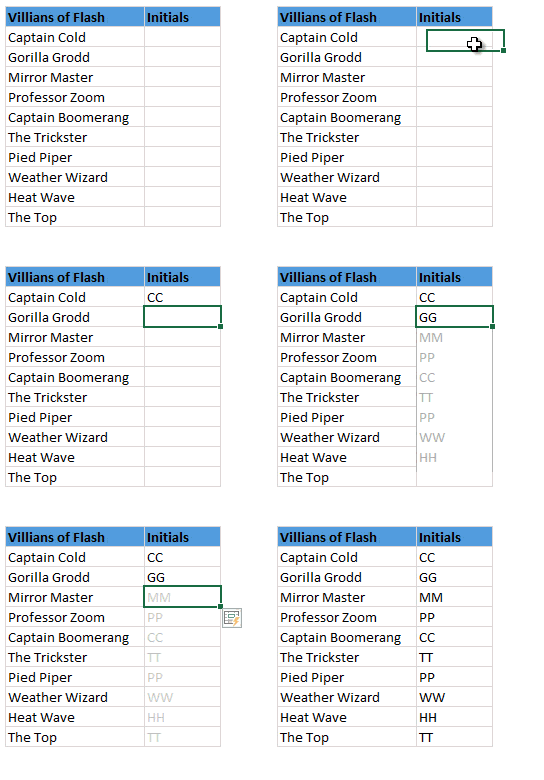
Imagine Flash (the super hero, not browser add-in) is using Excel to extract the middle names of all his villains. Now, flash being flash, do you think he will slowly type out the middle names one at a time? Of course, he can learn Excel formulas and do it in one stroke. But he is too busy running around & saving earth. So, obviously he would use Flash Fill.
Flash Fill works almost like magic. It looks at what you are typing and sees if there is any pattern in it (based on adjacent columns etc.) and then suggests a fill down option. See this demo.
Bonus Tip: Press CTRL+E to activate flash fill.
Built-in Data Model
 The top 3 reasons why analysts & managers spend so much time with Excel:
- Searching for that mysterious flight simulator Easter egg (#)
- Formatting worksheets
- Trying to link up multiple tables of data using VLOOKUP, Copy Paste and black magic.
Fortunately Excel 2013 makes #3 a breeze, thanks to built-in data model. Using Excel 2013 data model, you can link multiple tables with each other (one to one or one to many relationships) and generate powerful Pivot reports & charts with few clicks. Now you have more time to search for flight simulator.
Timelines
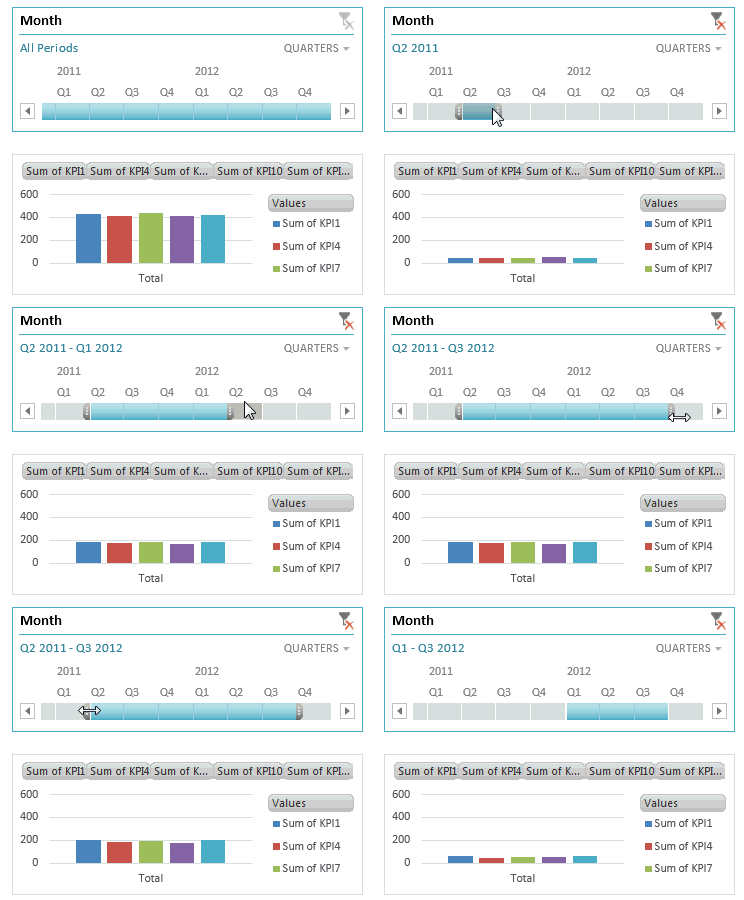
These days everybody boasts of a massive spreadsheet. But almost no one needs all the data at same time. We are always filtering data for latest quarter, 6 months starting Mother’s day or 8 weeks from November 1st etc. Of course, you can use auto-filter and select all the dates. But it is a pain.
Thanks to Timelines, filtering for dates is a breeze. You can add timelines for any date column in a pivot table / pivot chart. I am sure your clients & bosses will love it.
Quick Analysis
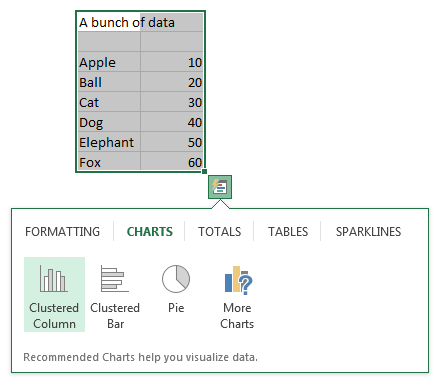
Depending on your work, you may love or hate it. Quick analysis is a new button that appears when you select a bunch of data. Using this, you can do a lot of quick analysis tasks like adding conditional formatting, charts, sparklines or turning your data in to tables (or pivots). To be frank, I find this a bit of annoyance as my analysis work is never quick!
But I am sure there are tons of people who would find this very useful.
Excellent color scheme
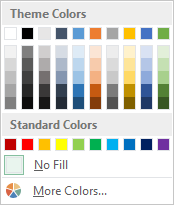
The default color scheme of Excel 2013 is bold, creative and well contrasted. It is a far cry from Excel 2003’s color scheme (which is boring, glaring & poorly contrasted). Now, if you insert a default chart (or table, pivot etc.) from your data, you need to do very little clean up work. It is ready to go!!!
Distinct Counts & more in your Pivot
If you are really quiet, you can hear an analyst in your company screaming with joy once they realize that in Excel 2013, you can get distinct count of values in pivot reports!!!
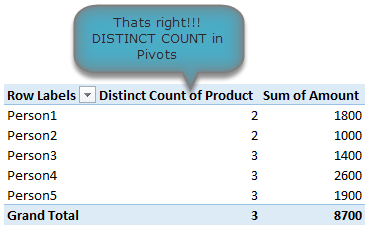
That is right, using Excel 2013 pivot reports, you can find out distinct counts. No extra formulas or no arrays or no VBA. More power to you 🙂
[Related: Using Distinct Count feature in Excel 2013 – case study]
New Formulas
In Excel 2013, there are many new formulas and improvements. My favorite new formulas are,
- Web formulas – WEBSERVICE(), FILTERXML() and ENCODEURL() (an example on these formulas)
- Information formulas – ISFORMULA(), FORMULATEXT(), SHEET() and SHEETS()
- Logical – XOR(), IFNA(), BITXOR(), BITOR(), BITAND() etc.
Easier Charting
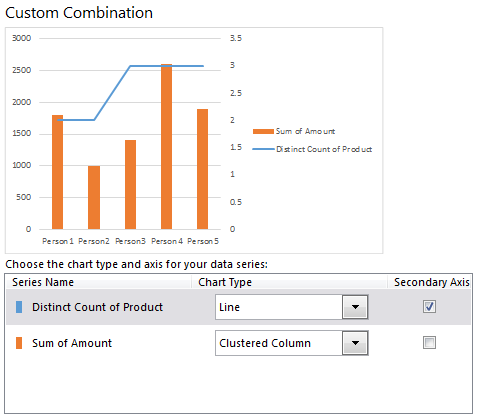
In Excel 2013, there are massive changes in charting. Now you can create combination charts, add secondary axis, set up smart data labels, format the chart or switch styles with ease. Microsoft revamped the default formats too so that when you make a chart from data, it is ready for presentation (with out too many tweaks).
Some of favorite charting features are,
- Recommended charts feature that tells you which charts go well with your data.
- A screen where you can change the chart type for each series easily.
- Common chart customizations are a click away (screenshots 1, 2 & 3)
- Ability to create scatter plots based on a variety of input data layouts (Jon Peltier’s article on this).
That said not everything is rosy with 2013 charting. For example, I do not like that we have to go thru sidebar pane to customize charts (formatting etc.) instead of dialog box.
Animated Charts
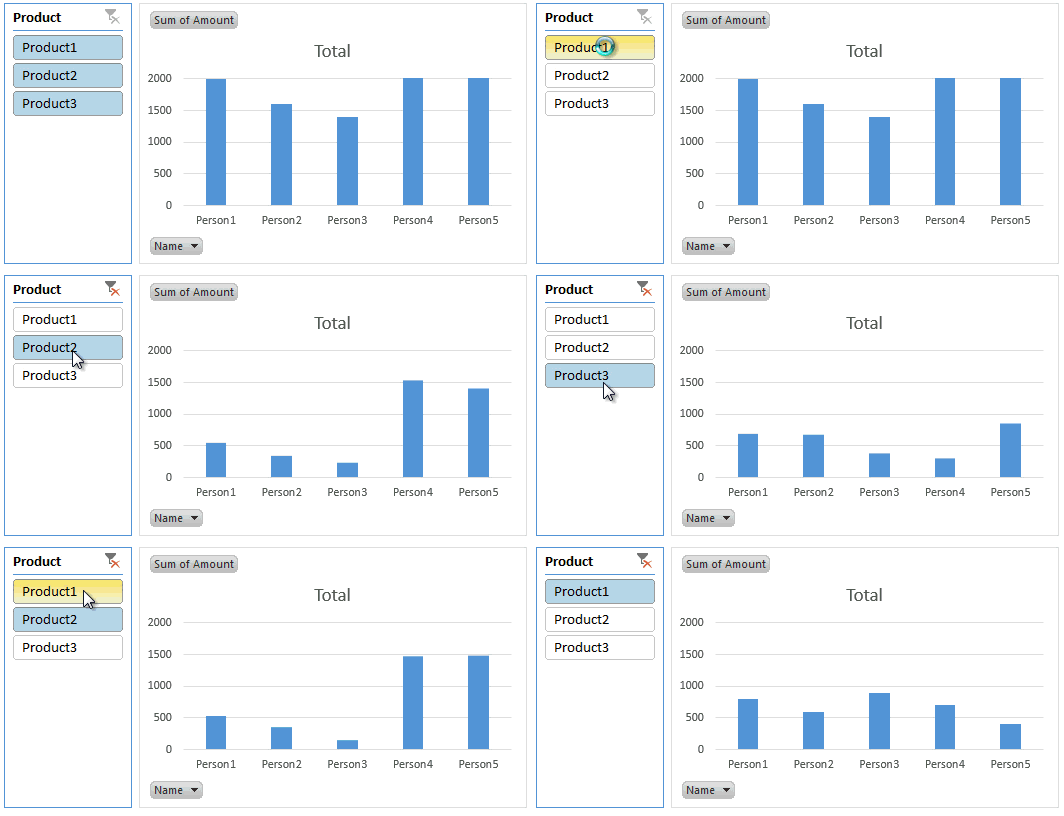
One of the slickest things you will notice in Excel 2013 is the animation that you see when you move selection, do calculations or create charts. While this may be annoying to some, I find one good use for it. When you use charts coupled to interactive elements (like form controls, slicers etc.) they look sexier, thanks to Animation. See this demo to understand what I mean.
Power to you

Excel 2013 Professional Plus versions comes bundled with Power Pivot & Power View, 2 excellent features for powerful data analysis & visualization. You can think of these as full fledged BI solutions sitting right in your computer. The only glitch, Microsoft decided to give these features only Professional Plus users. I know it is annoying that home, office, professional level licenses cannot use Power Pivot even if they want to pay extra. What a pity!!!
More on Excel Power Pivot licensing issues & possible solutions.
Related: What is PowerPivot & How to use it?
3 things that are not so impressive
The whole cloud thing:
While it is understandable that Microsoft wants us all to purchase shiny new Surface tablets and use spreadsheets on the go, it seems like a bad idea. It annoys me that when I want to save a file, the first option I see is Chandoo’s sky drive. The process of saving files to sky drive and later viewing them in browsers is very slow and often results in errors or warnings. Instead, for desktop versions, why not make My computer as first preference?!?
Sharing & Social features:
Share to Facebook?!? seriously! Why would anyone want to share their spreadsheets on twitter or facebook? Do we really want facebook to know our annual budget & appraisal ratings (so that they can show us ads that say – Buy our scissors and cut your budget in half )?
Power Pivot is not for masses:
Microsoft positioned Power Pivot as BI for masses, offered it for free in Excel 2010. Then in Excel 2013, they went ahead and implemented a licensing policy that looks just as complicated as my lawyer’s invoice. Why would a for-profit company like MS want to not offer powerful tools like Power Pivot to masses for a fee? Why sell it only to corporate customers thru volume licensing program? beats me.
Bottom line
Despite these minor annoyances, I think Excel 2013 is a well designed, solid & powerful software ready to make more people awesome in their work. With features like tablet compatibility, data model, slicers & timelines, improved UI & color schemes it has quickly become my first choice when I want to use a spreadsheet (I run Excel 2010 & 2013 on same computer).
Are you using Excel 2013, what do you like about it?
Are you using Excel 2013? How do you like it? Which features are best according to you? Please share your thoughts and views using comments.


28 Responses to “2010 Calendar – Excel Template [Downloads]”
[...] Download and print the calendars today. You can add notes to individual dates or complete … [...] Uni Ego / Free 2010 Calendar – Download and Print Year 2010 Calendar today [...]
Any chance on a 2016 calendar?
Afternoon,
I have one similar calander that I added conditional formatting to so that I could highlight any planned factory holidays. I think i "borrowed" the formula from another calander so I won't post it here.
I also added week numbers to it using the formula =WEEKNUM(MAX(C6:I6)) Where C6:I6 is the range of dates in that give week. It works fine on most of the months but return strange values on other months (Week 6 in October?) I can't see any logic behind why it does this.
Any suggestions for an alternative formula to give the week numbers?
Regards,
William
Hi Chandoo,
I've added a new feature on your spreadsheet.
This control can be useful for all the sheets where you need to check dates.
Cheers
http://cid-69a78592a23a8438.skydrive.live.com/self.aspx/.Public/2010-calendar%5E_Miguel.xls
Hi Chandoo,
Nice calendar.
Till now whichever calendar I saw in Excel, it contained only the outline sheet.
Good to see monthly views and the mini view too.
Liked the mini view much. 🙂
-Nimesh
@William: This weeknum may be because the input dates to max are not properly formatting as excel dates.
Good tip on the conditional formatting and holidays btw...
@Migueal: Now that is super awesome. This is the reason why I love to blog. Readers will always one up me with such cool alternatives. Thank you for sharing this with us.
@Nimesh: You are welcome 🙂
is it possible to get the Notes section on the outline page to display the notes added to the month page for a specific date?
So if you add thing for January 2nd, and then select January 2nd those notes appear on the outline page
@Shish... You can do that using some formula magic. I would not recommend pushing excel to that as outlook / google calendar / icalc etc. do exactly that much more elegantly.
[...] Perpetual Excel Calendar – Free Downloadable Template [...]
Happy christmas to all of you!
This is really awesome. The nicest calender I've seen for Excel. I also like Miguels version of the sheet.
Just one "feature" is missing to me. As I live in Germany - where weeks start on Monday - I'd like to change this. Could someone please give me a hint how to do this?
Thanks in advance
Jörg
Hi Chandoo, I’ve added some new features on your spreadsheet with your permission.
Check it here:
http://cid-6b219f16da7128e3.skydrive.live.com/self.aspx/.Public/Calendar%5E_Pedro.xlsm
Miguel, this calendar is translated to Spanish language.
Jörg, this new approach allows us to start weeks on Monday.
Also it's possible to start weeks on Sunday if you enable Excel macros and push the arrows.
Best Regards,
Pedro.
@Pedro.. superb stuff.. thanks for sharing the file with all of us.
Hi Chandoo, for dates before March 1, 1900 our calendars are wrong.
In Microsoft Excel, DATE, EOMONTH, WEEKDAY functions return an incorrect result between Monday, January 1, 1900 and Wednesday, February 28, 1900.
See this page: http://support.microsoft.com/kb/214326/en-us/
Microsoft Excel incorrectly assumes that the year 1900 is a leap year in all Excel versions.
That's the reason why our calendar versions only work from March, 1, 1900 until December, 31, 9999.
Your comments are welcome.
Pedro.
@Pedro.. Thanks for pointing that out. wow... This reminds me of the Joel Spolsky's first BillG review - http://www.joelonsoftware.com/items/2006/06/16.html (read it, I am sure you would love it.) when Bill out of blue asks about date time implementations for VBA (which Joel is the program manager for...)
Thanks for sharing the URL too... Here is a specially made, chocolate sprinkled, extra fluffy donut for you 🙂
Hi Chandoo, thanks a lot for the donut but I prefer it without chocolate!
Always it's good to know a little history of Excel.
The Joel Spolsky’s last BillG Excel review was about the "Hall of Tortured Souls"
(See this Excel 95 Easter Egg here: http://www.eeggs.com/items/719.html)
Do not miss the humor!
@Chandoo.. I just return with a new calendar version.
http://cid-6b219f16da7128e3.skydrive.live.com/self.aspx/.Public/calendar-pedrowave.xltx
It helped me to practice conditional formatting, formulas to show check boxes, data validation drop down list, find out Thanksgiving Day's date for any year, how to find dates of public holidays using Excel, all reading your wonderful posts!
Perpetual Calendar Spanish version starting weeks on Monday:
http://cid-6b219f16da7128e3.skydrive.live.com/self.aspx/.Public/calendario-pedrowave.xltx
Main characteristics:
- Not macros.
- Select a year from 1900 to 9999 with a dropdown listbox.
- All date fields with the real date format.
- Easy language change of day of the week and month names because are also dates.
- Hide Saturdays and/or Sundays.
- Week starting on Sunday or Monday.
- Week and month numbers.
- Hyperlink between sheets.
- Consistent colors to Holidays, Diary and Events dates.
- Easy change of Holidays by country.
- Include 80 World Days and you can add more.
- A diary with my birthday and 50 more programable appointments.
- Check box to hide individual dates or all.
- Holidays, diary and events text are showed on each month's sheet.
- Ranges defined with Name Manager variables.
I'll appreciate if you make me some suggestions to improve this calendar.
Pedro.
Please, I need help!
I like all calendar from Pedro, thank you for them. Let me show my problem:
I have 2 excel cells (for example AE12 and AE13) which mean the starting and the ending date of my duty. I need a macro to insert sheets with label YEAR. MONTH (for example 2010. August or similar) with the proper datas between the two dates. Is it possible?
Thank you for reading me and sorry about my terribel english! 🙂
Hello Pedro,
Thanks so much for the modified calendar template. I love the extra functionality you added. Is there any way you could upload an unlocked version? I wanted to change some of the comments and data validation so I could use it for one of my applications.
As for feedback on potential improvements, with all the additions you made the file runs pretty slow. I'm sure this has to do with all the interconnectivity between the various tabs, but if there is a way to use less memory via more efficient formulas or something else I think this would make it easier to use. I have a brand new computer and with it running alone the response was pretty slow. One of the changes I'm making is changing the order of the months to match my company's fiscal year, so maybe something to automate a change like that could be useful.
Cheers,
Peter
Peter, my calendars are unlocked but you need Excel 2007 and 2010 versions to open them.
Now I return with a new Programmable Task Calendar:
http://cid-6b219f16da7128e3.office.live.com/view.aspx/.Public/Calendario%20de%20Tareas.xlsx
Wath an introductory video here:
http://pedrowave.blogspot.com/2010/10/programmable-task-calendar.html
This new calendar allows to select the start month to match the school and fiscal year.
This is great stuff Chandoo and company
Wanted to know if someone had built something similar
I need to store one Excel Sheet on this calendar that has all the holidays
US Holidays appear in RED
UK Holidays appear in Blue
Meetings appear in Green
Submissions appear in Orange
Is there a way I can store the list in a separate worksheet and all the calendars get updated with this?
Thanks
[...] Calendars: Year 2010 Excel Calendar | Year 2009 Excel [...]
please tell me "how to convert Rs.10000/- in to words through excel formula
[...] is all! http://chandoo.org/wp/2009/12/11/2010-calendar-excel-template-downloads/ See more Templates at http://www.vertex42.com/ Share this:Like this:LikeBe the first to like this [...]
Greetings,
Thanks for this wonderful excel vacation tracker. I notice that the tracker only has three months November, December and January 2015, however, I would like to add the other ten months for 2014. Can you please instruct me on how I can add the other months?
Thanking you in advance.
Hi Chandoo,
Calendar: can this be printed as single sheet 8.5x11 inch per month
kanu
@Kanu
Yes,
You can resize it to fit
WOW! I just searching some of like this, that help me.
Thank you for sharing.