Excel Training Recommender – Interactive Excel Tool for you

Share

Facebook
Twitter
LinkedIn

First a Quick Announcement

Our VBA Class enrollments will be closed this Friday (Sep 16). If you want to learn VBA & Excel, please consider joining our course. More than 120 students have already joined us in the second batch and are learning VBA as you read this.

Click here to learn more about the VBA Classes and join us.

Moving on…,

As you may know, Chandoo.org offers quite a few Online Excel training programs. Over the last few weeks, many of you have emailed us and asked which training program is best for your situation. This got me thinking. “It should be easy for YOU to know what is best.”

So today morning, I locked my office room, took out my drawing pad and designed the most comprehensive course recommendation engine. It starts with a survey asking you 12 detailed questions. Then we make you go thru an Excel exam with 15 questions to test your proficiency with the tool. Then the engine would do a lot of calculations and finally recommend a list of training programs that suit you.

Then I threw it out.

Because, it was too complex.

Instead, I made a beautiful Excel workbook that asks you only 2 questions and tells you which training programs are best for you.

How our Training Recommender works?

  1. You tell us about your Excel skill level
  2. You tell us why you use Excel
  3. You get a list of recommended courses
  4. There is no step 4. I just like 4 bullet points for every thing.
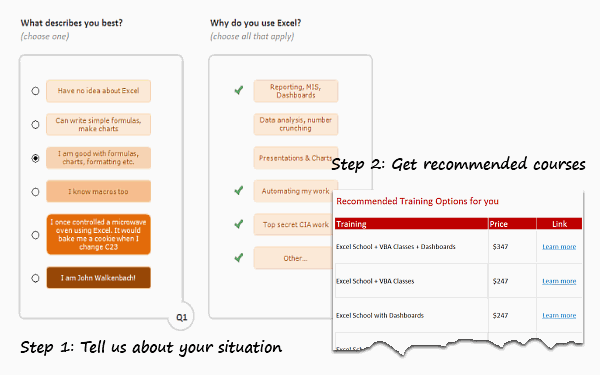
Excel Training Recommender - How it works?

How to get your recommendations?

Simple. Click here to download the tool. Open it using Excel 2007 or above. Just answer the 2 questions to see your recommendations.

How does the Training Recommender Work?

I made a short video explaining how the workbook is constructed. Watch it below or on our Youtube Channel.

Do you like the Training Recommender?

I really enjoyed constructing this. It shows what is possible in Excel.

What about you? Do you like this?

Similar Articles & Ideas

Since I run a small business, I always look for ways to use Excel to enhance areas of my business. Here are some more ideas that you may find helpful.

Last but not least…

This is week is the last week to join our ongoing VBA Classes. Next batch will be in 2012.
So go ahead and enroll here.

Facebook
Twitter
LinkedIn

Share this tip with your colleagues

Excel and Power BI tips - Chandoo.org Newsletter

Get FREE Excel + Power BI Tips

Simple, fun and useful emails, once per week.

Learn & be awesome.

Welcome to Chandoo.org

Thank you so much for visiting. My aim is to make you awesome in Excel & Power BI. I do this by sharing videos, tips, examples and downloads on this website. There are more than 1,000 pages with all things Excel, Power BI, Dashboards & VBA here. Go ahead and spend few minutes to be AWESOME.

Read my storyFREE Excel tips book

Overall I learned a lot and I thought you did a great job of explaining how to do things. This will definitely elevate my reporting in the future.
Rebekah S
Reporting Analyst
Excel formula list - 100+ examples and howto guide for you

From simple to complex, there is a formula for every occasion. Check out the list now.

Calendars, invoices, trackers and much more. All free, fun and fantastic.

Advanced Pivot Table tricks

Power Query, Data model, DAX, Filters, Slicers, Conditional formats and beautiful charts. It's all here.

Still on fence about Power BI? In this getting started guide, learn what is Power BI, how to get it and how to create your first report from scratch.

23 Responses to “Learn Top 10 Excel Features”

  1. Dwi Budi H says:

    What it looks like if excel without formula?? 🙂

    • philip says:

      It would be not excel it would just be fancy tables in which you could just use power point. (Chandoo) would Access be an alternative?

  2. Roy says:

    Awesome piece of work!!!

  3. Rich says:

    Great article.

    Chandoo - my biggest interest in the article was the awesome word-graphic at the top - where did you go to get it done into a shape?

  4. koushik says:

    Awesome Chandoo.. You need always needs coffee to start up with. BTW , how did u created the Heart Shaped picture filled with High Repetitive text in it .. Please put it on your Next blog ...

  5. Bob Watson says:

    Chandoo, good article. I’ve added a link to it from Connexion – our collection of the most useful and interesting spreadsheet-related articles from the web. See http://www.i-nth.com/resources/connexion

  6. ca.nkv says:

    Hi,

    Just one small question. Where the hell have been I in the past for not discovering this website sooner?

    I've lost a job interview recently where even though I had the subject knowledge, I was not upto their mark in Excel.

    Thank you for all the free tips, guidance and for creating this forum environment.

    [PS: I've just been through the site for the 1st time, and have signed up for the newsletter. You can expect pretty stupid questions from me soon]

  7. William Luke says:

    Hy Chandoo, you always inspire me with to explore something new in excel. This data structure table is only for excel 2007 or compatible to 2010. I recently installed latest excel version 2013 in my System and experience problems regarding operating according to previous one. I'm waiting your article relates to that excel version.

    Thanks

  8. Ankit Bansal says:

    Awesome article Mr. Chandoo and that is a awesome heart shaped pic you created. Great tips as well.

  9. [...] Learn Top 10 Excel Features | Chandoo.org – Learn Microsoft Excel Online. [...]

  10. Arvi says:

    Chandoo is awesome..

  11. Kevin Ko (student major in computer and tech.) says:

    Thanks, i got better, And i always get 90.50 in my grade card but now i get 96.50 i improved because of the tutorials you gave, Thank You Very Much Chandoo Guy.

  12. kiran says:

    Hi chandoo, i am intersted in seeing the video or step by step done procedure of analysing the comments and presenting in the data percentage steps. I think this one would be first step in finding out how generally happens data calculation. Thank you.

    As well i would like to know how to get that black shape art of your face which i see in chandoo. I am interested in making it for me.

  13. l3g4to says:

    Nice to see the features considered by Excel users to be most useful. It might be a good idea to also analyze StackOverflow Excel questions to see what keywords appear most often.

    Here are my top 10 Excel Features (for advanced users):
    http://www.analystcave.com/excel-10-top-excel-features/

  14. Nami says:

    Thanks a ton for this it totally helped with my homework ????

  15. pradip says:

    Very good effort

  16. Barb says:

    Thank you for this. Lots of learning in the links you've provided for this septuagenarian.

  17. Arun says:

    Pls send me new post

  18. Abhay says:

    Dude, your humor ? ?
    Loved your work.

  19. Sanjeev Khakre says:

    Hello Sir,

    I am Sanjeev Khakre and i from Indore City, India , I am your big follower and i have watch your videos and learnt a lots of excel trick or function and many more . thanks so much for all of your excellent support.

    Your excel knowledge is real awesome.

    Thanks
    Sanjeev

  20. Your work is excellent but pls willing to know more details about the features of microsoft excel

  21. philip says:

    Chandoo Would Access be a better alternative than VB?

Leave a Reply