


We are opening Financial Modeling School for 2nd batch of classes on 23rd February. It feels very exciting to re-run this successful program. I want to share a few details about the program so that those of you interested to join can know more about it.
1. What is Financial Modeling School?
FMS is an online training program to teach you how to create financial models & project finance models using MS Excel. The program starts with fundamentals of finance (like what is P&L, Cash flow etc.) and takes you all the way to creating an integrated valuation model along with monte-carlo simulations. It is all there.
Starting this batch, we are adding an excel class on Project Finance Modeling using Excel
2. Who should join this program?
This is a very good program for those of you in investment banking, large project management, construction, manufacturing, equity research, financial planning, strategy or commercial banks etc. The program is also ideal for any one aiming for a similar career.
The program assumes you have basic knowledge of MS Excel. We will teach you various features Excel as part of the course, it is advisable that you know how to use Excel.
3. What topics are covered?
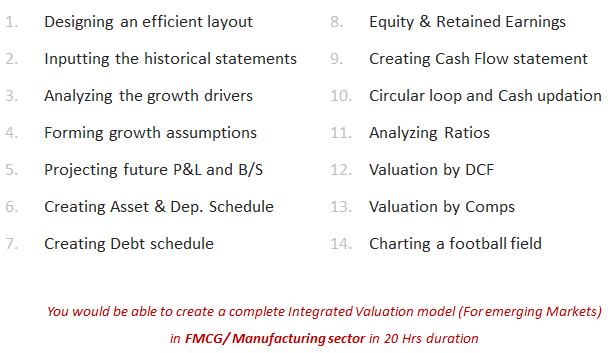
Oh, the course is so in-depth and so rich in content that I sometimes wonder, how Paramdeep (our instructor for this program) can actually give all this away for the price we charge. Here is a brief contents of the course. For more details (along with module-wise breakup) please download Financial Modeling School brochure.
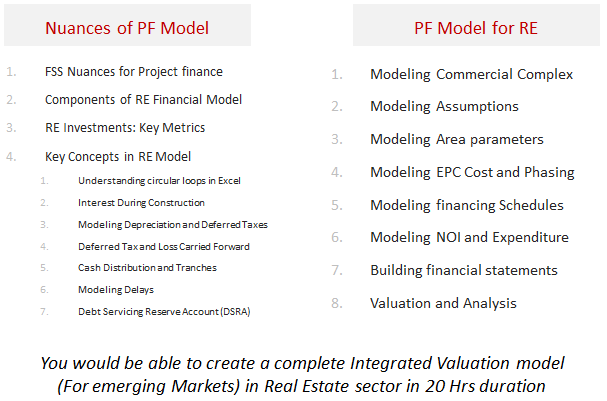
Starting this batch, we have added a new track on Project Finance using Excel. This has the following contents:
4. Who is going to teach?
Paramdeep Singh. Since I know as much about financial modeling as my daughter knows about eating without throwing food away, I have partnered with Pristine Education. They are experts in financial modeling & analysis.
5. How does the program work?
I am glad you are asked. If you have attended Excel School (or seen any promotional videos of it), then you already know it. Financial Modeling School runs just like Excel School.
We made a brief how-to video explaining how the financial modeling school works. Just watch it below:
6. I want more details about the program …,
Sure. Please go ahead and download the course brochure. You can also use it to get your boss to sponsor the program for you.
7. How much is the program?
The course fees are,
- for Financial Modeling using Excel – $247
- for Project Finance using Excel – $247
- if you go for both programs – $397
For people in India or those paying thru Bank Transfer, the prices are as following:
- for Financial Modeling using Excel – INR 8,000
- for Project Finance using Excel – INR 8,000
- if you go for both programs – INR 13,000
8. When can I join?
On Feb 23rd. We are going to open the registrations from Feb 23 to March 8th.
Classes begin on March 9th.
9. What did first batch students say about this?
Oh they loved it. We got so many encouraging testimonials and emails from students that we are really eager to open this program once again for your consideration. Here are 2 testimonials students sent. (More to come later).
This is Best Financial Modeling for small scale to Large Scale Industries irrespective of Product, services, Builders, Dealers, Franchises.
You have not restricted yourself to just constructing the Financial Model(FM) rather very receptive and flexible in your approach and willing to get feedback and share ideas
10. Any more questions?
Please post your questions about this program in comments. We would love to help you out.
PS: Drop us an email at chandoo.d @ gmail.com if you want to discuss about team discounts or anything specific.
See you in Financial Modeling School
We hope you find this program valuable and sign-up for it on 23rd. Paramdeep and I are very eager to meet you in Financial Modeling School and teach you new skills.


6 Responses
HI. Chandoo plz solve the problem. A1 to A3 1 to 3. B1 to B3 1 to 3 in words. C1=100. C2=formula=if(len(c1)=3,left(c1,1),””). C3=formula=vlookup(c2,a:b,2,0). Now c3 show an error #N/A. Instead of showing one. Plz help.
@Istiyak: I do not know whether this was the right place to post this query, but here’s my solution nevertheless:
Replace the formula in cell C2 to =IF(LEN(C1)=3, VALUE(LEFT(C1,1)),””)
Then you will get cell C3 result as “one”.
@Chandoo: Hope this was right. First attempt at troubleshooting queries 🙂
@Jimmy : Thanks Jimmy Its Working Fine
Hi Chandoo
Are there future dates for excel modeling school? I would love to attend the training in the future, but cannot do so for the upcoming session.
Thanks!
Joe
Sign me up for the financial modeling school!
where do I pay?