

As most of you would know, I am re-opening Excel School Online Excel Training Program on June 14th. That means, I am very busy doing behind the scenes work so that new students get best possible excel learning experience when they come rushing next week. (That is why you are seeing less no. of posts on Chandoo.org this week).
But I have few last minute surprises for you. Just read on if you are interested to learn excel and become even more awesome.
1. Find-out if you need a training program like Excel School using this Quiz:
One of the prospective students of Excel School suggested this. However, I couldn’t set up an online quiz. But I could whip up an excel based quiz.
Download the Excel School Assessment Quiz [Excel 2003 version here] and find-out if you would need a program like excel school.
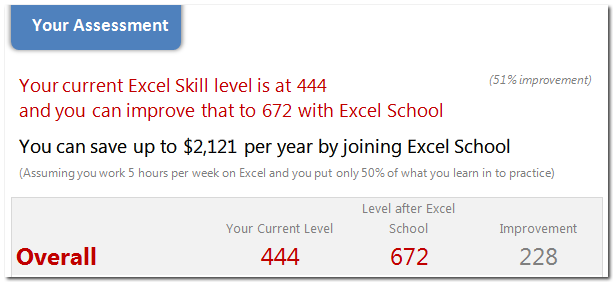
Even if you don’t want to join Excel School, download the file. It is beautiful and has a ton of Excel Trickery. You might end up learning a thing or two about Excel from the file alone.
2. What is it Like to be in Excel School?
I have created a short 7 minute video in which you can get a sneak-peek preview of Excel School.
3. What do Students of Batch 1 think about Excel School?
I have asked my batch 1 students to tell me what is it they like in Excel School. 30 of them enthusiastically responded. I have compiled some of the responses in a page.
Check out student testimonials to know why Excel School is really awesome.
4. Download Excel School Course Guide
This is a small presentation style document with details about Excel School program. You can send this to your boss / manager and easily convince her to sponsor the training cost for you.
Download the Excel school course contents [PDF]
5. Last few days to get 3 free lessons
Only 3 more days before I close the free lesson offer. So go here and enter your name and email id. I will send you 3 free lessons. If you like what you saw, you are going to love what you will see in Excel School.
6. Pricing of Excel School
Excel School will come in 2 flavors
- Online option: you can watch all the lessons online, download example files and do more
- Download option: everything in Online option + ability to download all lessons in HD.
Last time, readers from India asked for special pricing as paying in $s is expensive. So this time, I have special pricing for Indian students. See the below pricing structure to know what it would cost to sign up for Excel School.

Any more questions?
Post a comment or write an email and ask me. I would be very glad to answer your questions.
See you in Excel School 🙂


3 Responses to “How-to create an elegant, fun & useful Excel Tracker – Step by Step Tutorial”
Hi Chandoo,
I am responsible for tracking when church reports are submitted on time or not and the variations from the due date for submission.
Here is the Scenario;
The due date for the submission of monthly reports is on the 5th of each month. and I would like to know how many reports have been submitted on time (i.e, those that have been submitted on or before the due date) I would also want to track those reports that have been submitted after the due date has passed.
How can I create such a tracker?
Hi Chandoo,
I am a member of your excel school.
I was trying to create SOP Tracker I follow all your steps but I keep this error below.
The list source must be a delimited list, or a reference to a single row or cell.
I try looking on YouTube for answer but no luck.
can you help on this?
thanks
Carl.
Dear Mr. Chando,
Rakesh, I'm working in a private company in the UAE. Recently, I'm struggling to get more details about the staff sick, annual, unpaid, and leaves. I would like to get a tracker in excel. Could you please help me in this situation?
I also watching your videos in YouTube. i hope you can help me on this situation.