This is a guest post by Myles Arnott from Clarity Consultancy Services – UK.
- Part 1: Introduction & overview
- Part 2: Dynamic Charts in the Dashboard
- Part 3: VBA behind the Dynamic Dashboard a simple example
- Part 4: Pulling it all together
In this the final post we are going to pull it all together to create our final Dynamic Dashboard model.
The dynamic dashboard VBA example can be downloaded here [Mirror]
Firstly a quick recap of what we have covered so far:
- How to structure a workbook with user friendly front page and user notes
- Using a structured inputs or driver page
- How to create a range of dynamic charts
- Some simple VBA to move items around a page based on the user’s parameters
Ok, so lets get to work to combine all of the above into a workable model. There is a lot to cover here so as Chandoo often says, may be time to grab a coffee!
First things first you need to bring all of the charts that you want to have in your dashboard into the spreadsheet and label up the tabs accordingly.
Homepage
I find that for a model that has multiple tabs a homepage allows any user to easily understand the contents and easily navigate to the page they are interested in.
Obviously you can make the homepage look entirely how you want. I use this design as my standard layout with a relevant title, business logo and contents structured to suit the model.
I use the free form shape to draw my boxes. This can be a bit fiddly to achieve but I think that the end result is worth the effort.

Links are achieved by inserting hyperlinks. I choose to reformat these to change the color and remove the underlining. [related: create a table of contents sheet in excel]

The help sheet is courtesy of John Walkenbach. Of all of the possible user note solutions I have encountered this to me offers the simplest and most user friendly approach. I use this in all the models that I develop for clients.
Now on to the central point of the model: The Dynamic Dashboard
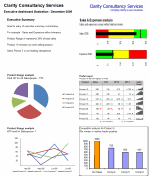
There are three key parts to the dashboard, the driver area, the report area and the chart location matrix.
Driver area
This is the user interface which allows the user to hide, view or position a particular chart.

Each title is hyperlinked to the page containing the chart in question. Each location cell is a named range with data validation to control the inputs. I have also added an input message via the data validation function.
The named range relates to the chart eg: Chart one is CH_1, chart 2 is CH_2 etc.
The validation list is based on a named range Position_Range (in the Inputs tab)

The input message is defined in the Input message tab within the validation function menu.
Report area
This is your dashboard, the area to contain your charts. It is simply an area defined and formatted to be the container for the dashboard charts that the user chooses.
The Chart Location Matrix
The entries for this matrix are made in the inputs tab and pull through to the dynamic dashboard tab. Each cell of the matrix in the dynamic dashboard tab is a named range. These named ranges are referenced in the VBA. I will discuss this later in the post.

This matrix defines where each chart will be placed. Getting these positioning references correct takes a little bit of trial and error but is pretty simple to achieve.
Now onto the images themselves. The images that the model moves around are pictures of the charts in each tab. This is achieved using the camera tool. Chandoo has written an excellent post on the camera tool so I will not repeat that here.
I have then renamed the images by selecting the image and changing the name in the name box.
As you can see the chart below is called Chart4. You will also notice that in the formula bar it refers to =’CH4′!$B$2:$F$17. This is the image that it has taken from the CH4 tab.

The final step is to add a hyperlink back to the chart page so that the user can navigate to the relevant page by clicking on the image.
So now we have a structured model, images of our charts and everything in place to put in the VBA.
The VBA
The basics for the VBA were covered in part 3 – VBA behind the Dynamic Dashboard a simple example.
Location
Unlike in part 3, as we would like to avoid clicking on a button every time we want to update the layout, the VBA is located in the Dynamic Dashboard sheet itself rather than in a module.

The event target
It important to restrict the event function to specific cells. This stops the macro running completely every time any cell is changed in the sheet. In this case I have restricted it to the cells where the user chooses the chart’s position.
Variables
We need to define the variable in the VBA so that Excel knows where to put the images we have moved.
To do this we firstly define the variables and then link them to the named ranges in the chart location matrix.
To manage the loop code I have also used “I” as the current iteration and “ix” as the last desired iteration.
Moving the charts
This is based on the VBA used in part three of the post.
Loop
To avoid having to rewrite the code for each chart we instead use a loop that continues to loop as long as the current iteration “I” is less than the last desired iteration “ix”. I.e. loop for the eight charts and then stop.
The variable “I” is also passed to the position part of the VBA to select the relevant image to move:
ActiveSheet.Shapes(“chart” & i).Select
Ok So here is the full code:
Dim Topleft_T As Integer
Dim Topleft_L As Integer
Dim MiddleLeft_T As Integer
Dim MiddleLeft_L As Integer
Dim BottomLeft_T As Integer
Dim BottomLeft_L As Integer
Dim Topright_T As Integer
Dim Topright_L As Integer
Dim Middleright_T As Integer
Dim Middleright_L As Integer
Dim Bottomright_T As Integer
Dim Bottomright_L As Integer
Dim Hide_T As Integer
Dim Hide_L As Integer
Dim View_T As Integer
Dim View_L As Integer
Dim i As Integer
Dim ix As Integer
‘Define the position values (based on named ranges)
Topleft_T = Range(“Top_Left_T”).Value
Topleft_L = Range(“Top_Left_L”).Value
MiddleLeft_T = Range(“Middle_left_T”).Value
MiddleLeft_L = Range(“Middle_left_L”).Value
BottomLeft_T = Range(“Bottom_left_T”).Value
BottomLeft_L = Range(“Bottom_left_L”).Value
Topright_T = Range(“Top_right_T”).Value
Topright_L = Range(“Top_right_L”).Value
Middleright_T = Range(“Middle_right_T”).Value
Middleright_L = Range(“Middle_right_L”).Value
Bottomright_T = Range(“Bottom_right_T”).Value
Bottomright_L = Range(“Bottom_right_L”).Value
View_T = Range(“View_T”).Value
View_L = Range(“View_L”).Value
Hide_T = Range(“Hide_T”).Value
Hide_L = Range(“Hide_L”).Value
‘Set ix to be the number of charts
ix = 8
‘reset i
i = 1
”Select the shape and position it
Do While i <= ix
ActiveSheet.Shapes(“chart” & i).Select
If UCase(Range(“CH_” & i).Value) = “TOP LEFT” Then
Selection.ShapeRange.Top = Topleft_T
Selection.ShapeRange.Left = Topleft_L
ElseIf UCase(Range(“CH_” & i).Value) = “MIDDLE LEFT” Then
Selection.ShapeRange.Top = MiddleLeft_T
Selection.ShapeRange.Left = MiddleLeft_L
ElseIf UCase(Range(“CH_” & i).Value) = “BOTTOM LEFT” Then
Selection.ShapeRange.Top = BottomLeft_T
Selection.ShapeRange.Left = BottomLeft_L
ElseIf UCase(Range(“CH_” & i).Value) = “TOP RIGHT” Then
Selection.ShapeRange.Top = Topright_T
Selection.ShapeRange.Left = Topright_L
ElseIf UCase(Range(“CH_” & i).Value) = “MIDDLE RIGHT” Then
Selection.ShapeRange.Top = Middleright_T
Selection.ShapeRange.Left = Middleright_L
ElseIf UCase(Range(“CH_” & i).Value) = “BOTTOM RIGHT” Then
Selection.ShapeRange.Top = Bottomright_T
Selection.ShapeRange.Left = Bottomright_L
ElseIf UCase(Range(“CH_” & i).Value) = “VIEW” Then
Selection.ShapeRange.Top = View_T
Selection.ShapeRange.Left = View_L
ElseIf UCase(Range(“CH_” & i).Value) = “HIDE” Then
Selection.ShapeRange.Top = Hide_T
Selection.ShapeRange.Left = Hide_L
End If
i = i + 1
Loop
End If
End Sub
Closing Thoughts
We now have a model that provides pertinent summary information to aid management decision making. It combines a high level of flexibility within each report and then allows the user to choose which reports to include and where to position them. This allows an enormous amount of flexibility over the message to be communicated.
I hope you enjoyed the post and please feel free to make comments and suggestions on the model.
Finally a huge thank you for Chandoo for agreeing to host this post for me.
Download the complete dashboard
Go ahead and download the dashboard excel file. The dynamic dashboard can be downloaded here [mirror, ZIP Version]
It works on Excel 2007 and above. You need to enable macros and links to make it work.
Added by Chandoo:
Myles has taken various important concepts like Microcharts, form controls, macros, camera snapshot, formulas etc and combined all these to create a truly outstanding dashboard. I am honored to feature his ideas and implementation here on PHD. I have learned several valuable tricks while exploring his dashboard. I am sure you would too.
If you like this tutorial please say thanks to Myles.


99 Responses to “How to use Date & Time values in Excel – 10 + 3 tips”
[...] Date with my sheet - 10 tips on using date / time in excel (tags: excel totw) Posted in Uncategorized | [...]
I have this current formula in place for 2014 "=DATE(YEAR(TODAY()),T2,1)"
How do I change it for 2015?
Thanks 🙂
@Liz
You shouldn't have too
If you use it today 1st Jan 2015 it will return the 1st of the month in cell T2 in 2015
[...] 10 Tips on using Date / Time in Excel [...]
[...] More on date / time: 10 tips on using, formatting date / time in excel. [...]
Hi Chandoo,
Since this article was for Dates, below are 2 easy ones to calculate the Start and End of Month. (without using the EOMONTH formula as available in Analysis Toolpak).
In Cell A1, put any date
then in the cell where you would want the Start of Month put the below formula
1. Start of the Month
=DATE(YEAR(A1),MONTH(A1),1)
2. End of Month
=DATE(YEAR(A1),MONTH(A1)+1,0)
Hope this would help a lot who were dependant of EOMONTH..
cheers
~Vijay
@Vijay: That is an awesome tip. Thank you so much for sharing it with all of us.
Perfect
Why not use the EOMONTH formula?
I run a trolley tour business and need to set up a data base to track tickets sold by mutable vendors (from store, on the street ,etc)and by class ( adult, senior,child and discounts ) can you help or direct me to one that could?
I know how to write macro's for excel, but I have 1 issue that I cant figure out and would appreciate some help.
I want to key a range of dates, (7/1/09-7/12/09) then write a macro to go find the info for that range and bring it back to my spread sheet.
Thanks for any help....
@Glenn: you can try a user defined function if the information you want to gather can be derived only from the 2 dates entered. You can write a macro, if you need to refer to other ranges in the workbook to gather the info based on the dates entered. I am not sure what you meant by "go find the info for that range". May be if you tell what you are trying to find, I can suggest the approach for writing a macro...
[...] Important excel formulas: IF and Then, Vlookup, Offset, Sumif, Countif, Working with date and time [...]
[...] Tips on using date & time in excel, List of excel date & time formulas, More excel quick tips [...]
talking about dates, therz a formula that i use very frequently to calculate the difference between two dates.
its not documented in 2007 though
=DATEDIF(START_DATE,END_DATE,"Y") - gives you the years
=DATEDIF(START_DATE,END_DATE,"YM") - remaining months
=DATEDIF(START_DATE,END_DATE,"MD") - remaining days
im sure you'll know this. wonder why it isnt documented. works fine with 2003 and 2007
[...] free downloads | working with date and time in excel tweetmeme_source = 'r1c1'; tweetmeme_style = [...]
[...] Working with Dates & Times in Excel – 10 tips [...]
Help please... I have two dates eg: 1/8/10 - 10/8/10 and i would like to know the number of Fridays and Mondays in any given period
Ray
Try the following user defined function:
===
Function NoMonFri(uStart As Range, uEnd As Range, Optional uType As Integer) As Double
Count = 0
For i = uStart To uEnd Step 1
If Weekday(i) = 2 Or Weekday(i) = 6 Then Count = Count + 1
Next i
If uType = 1 Then
If Weekday(uStart) = 2 Or Weekday(uStart) = 6 Then Count = Count - 1
If Weekday(uEnd) = 2 Or Weekday(uEnd) = 6 Then Count = Count - 1
End If
NoMonFri = Count
End Function
====
Copy the above into a Code Module
To use just enter
=NoMonFri(A1, A2) or
=NoMonFri(A1, A2,1)
Where A1 & A2 are the Start and End Dates (inclusively)
The use of the optional 1 will Exclude the Start and End dates
@Ray... You can also do this using SUMPRODUCT (ahem)
Assuming first date is in C6 and second date is in C7,
=SUMPRODUCT(--(MOD(WEEKDAY(ROW(INDIRECT(C6&":"&C7)),2),4)=1))
Will give you the number of Mondays and Fridays between C6 and C7 (including both days)
Also, checkout NETWORKINGDAYS() UDF for more complicated counting... http://chandoo.org/wp/2009/06/09/networkingdays/
[...] Process your data: Assuming your data looks like what I shown to left, just use simple formulas to make it look like the table to right. [related: how to work with dates & times in excel] [...]
very useful tip, thanks alot
Hello Chandoo,
How to convert no into time. for ex: 3600(In Seconds) into 1:00:00
Thanks,
Chandra Shekar B
@Chandra
Times are a fraction of 1
So 6am is 0.25
12 noon is 0.5
6pm is 0.75
So convert hrs and mins to a fraction of 24 hrs
1 Hr = 1/24
3600 seconds = 3600/(24*3600)
etc
Hello Hui,
Thanks a lot 🙂
Hello,
I cant get Point 6 above to work (highlighting weekends).
Is there an actual example I can see in action anywhere?
Otherwise a very helpful and informative website.
Regards,
Patrick
Hi Chandoo,
When discussing about time.. I have one question too. Basically, I have one sheet in which we enter "Shift IN" & "Shift OUT" times as "hh:mm" format in A and B columns and next columns C & D pulls the scheduled and present count of agents from other sheet by VLOOKUP-ing times as
IN time (hh:mm) - OUT Time (hh:mm). For eg; 03:30 - 12:30
Columns A and B have been validated to accept only values between 00:00~23:30 (half hour intervals). and when pasting data, the values are usually accepted and I don't get any errors of validation.
But, when performing vlookup to get the number of scheduled agents say as of the time interval 03:30, I get an #N/A error. I have confirmed ranges are all fine, but what I found is that the time although shows same but they are actually of different days. Say for eg;
41023.39583 gives 9:30
41024.39583 gives 9:30 too..
Validation is accepted as time is same, and it works fine if I select the time interval from the validation list. So, was wondering, if I can select the same interval from the list using VBA.. so that whatever the time intervals gets updated, I just need to run a macro to automatically select the interval from the validation list.. I have come across that we can use Cell.Validation.Formula1 in some manner to get the item from list.. but it would take the number of the item in the list.. wondered if I could get the item through text. Any ideas to accomplish this task?
Regards,
Avinash
in time - 9:30 am on 11/24/2015
out time - 6:30 am on 11/25/2015
I have to calculate total hours worked.
Tell me the formula to calculate the total hours, please.
hi,
can you help me in, i just want to know how will i get the corresponding DAY when i entered a specific DATE?
Thanks,
Sheila
Hi,
Following could be a solution for findinng out correspoinding Day, Month & Year to a Date:
=TEXT("CELL ADDRESS WHERE DATE IS PLACED","DDDD") ..... For Day
=TEXT("CELL ADDRESS WHERE DATE IS PLACED","MMMM") ..... For Month
=TEXT("CELL ADDRESS WHERE DATE IS PLACED","YYYY") ..... For Year
One can also customized the view by reducing keywords which will promopt to the following results : Mon, J, Jan, 2007, 07 etc
hi,
sir can u help me,
how to set a validity period & date of time in microsoft excel.
eg:- suppose i m using a file sheet and setting a date of 01.04.2012, time 12.00am & wan't dat the sheet should stop working in 1 month date & time ( 30.04.2012 ).
eg :- suppose we are going internet cafe dere we are taking a browsing of 1hour time, as we r close 2 our time d browsing stop working.
in dis way i wan't sheet to be set by date & time.
so pls help me how to do.
thanks,
navin.
Hi,
Sir ur article is very helpful....Thnaks for that but i need ur help in this one. i have a monthly report workbook and the sheets are saved by date of that month. I have two cells FromDate and ToDate through which opening and closing stock is calculated(using =SUM('01-09-2012:25-09-2012'!D7)+ SUM('26-09-2012:30-09-2012'!D8)) .....Please give me a formula when i will enter any date in ToDate or FromDate cell it will automatically change the other cells formula so to give me sum.
please help me
thanks
Suyash
Hi Mr. Chandoo,
I have 1 question. I have 1 pivot table, successfully done with your guidelines, but how to set Sunday as the start week? means the start day is Sunday, and the end day of the week is Saturday.
TQ in advance.
can someone please tell me that if i want the date of the month to appear on each sheet of my workbook how do i do it by itself? i mean the workbook is of meeting room bookings... so i want to print out sheets date wise for a whole year/
[...] So the formula for end time cell is =start-time + duration-minutes / 24 / 60. Note: We need to divide by 24 & 60 because in Excel each day 1 number, each hour is 1/24th and each minute is 1/24/60th. [learn more about Excel dates] [...]
dear friends, please help me to calculate actual time within the range while actual time more or less of range?
TIME IN
TIME OUT
ACTUAL HRS
ACUTAL HRS WITHIN RANGE (7:30:00 to 18:00:00)
7:15:00
18:15:00
11:00:00
?
7:45:00
17:00:00
9:15:00
?
@Niyas
You may want to start having a read of: http://chandoo.org/wp/2010/06/01/date-overlap-formulas/
[...] INTEREST Date with my sheet – 10 tips on using date / time in excel http://chandoo.org/wp/2008/07/29/excel-keyboard-shortcuts/ [...]
If I have dates in Indian format dd-mm-yyyy, excel is not recognizing the same and instead treating the same as mm-dd-yyyy so a date mentioned in Indian system as 09/06/2013 is being treated as 6-Sep-2013 whereas it actually represents 9-Jun-2013.
Can I convert these dates in Indian format to corrected dd-mmm-yyyy system?
Chandoo,
Please i need an advise ASAP i have been using this statement and it cant help
if(and(c1>=a1:a144,c1<=b1:b144),"yes","no"))
and it just works for the first 2 values c1, c2 and doesn't fit for the others.
the case is i have more than one event at the same video and i need to confirm that no event was taken unless it is between start and end.
here are some samples:
Start dtime End Dtime Event Dtime
16/09/2013 22:13:34 16/09/2013 22:14:18 16/09/2013 22:13:38
16/09/2013 22:15:57 16/09/2013 22:24:30 16/09/2013 22:16:02
16/09/2013 22:24:30 16/09/2013 22:33:49 16/09/2013 22:17:32
16/09/2013 22:33:53 16/09/2013 22:35:05 16/09/2013 22:19:02
16/09/2013 22:35:05 16/09/2013 22:39:57 16/09/2013 22:20:02
So as you can see there are more than one event between one start and end dtimes
thanks guys
[…] Using Date & Time in Excel […]
[…] Using Date & Time in Excel […]
Hi Chandoo,
I have an activity tracking sheet, in which column A has activity A, B, C, D & E and column B has start date, column C has start time, column D has end date & column E has end time. Now what i am trying to do is that suppose activity A starts on 31-Mar 9:00 AM and finishes an 4-Apr 5:00 PM and Activity B starts only after A completes, but if suppose Activity A is delayed by say 1 hour, then activity B, C, D & E which are all dependent on each other will also be delayed by 1 hour, i want to create a template in excel, could you please help?
thanks
Chandresh
[…] Day 32 Date and time arithmetic - The symbols / and – need to be used when inputting dates and Excel has the capability to add dates and times together too. Follow the Excel Easy article here on how http://www.excel-easy.com/functions/date-time-functions.html Chandoo also has some Top 10 tips too http://chandoo.org/wp/2008/08/26/date-time-tips-ms-excel/ […]
Hi,
What will b the formula to get the date more than 3 yrs from the present date ?
Example : today is 16-05-2014 (D-M-Y) then three yrs later what will be the date.
Hi,
What will b the formula to get the date more than 3 yrs from the present date ?
Example : today is 16-05-2014 (D-M-Y) then three yrs later what will be the date.
@Roken
I would use: =EDATE(A1,36)
Where A1 has your date
or
=EDATE("16/5/2014",36)
or
=EDATE(Today(),36)
hi..i want to restrict excel from counting non working time.... so i can prepare end dates for a PROJECT if i have total working hours required for my project..
thank for reply if any....
Hi,
Good Morning,
Please use the formula for the below mentioned format in excel.
Formula :- =TEXT(H3,"dd-mmmm-yyyy").
Format :- 17-September-2014
I'm an evaluator and i evaluate about 20 people everymonth between 6-10 times each depending on their performance. i track my work in excel by adding the dates i did each peorson. The only rule that i have its that i cant evaluate a person back to back so i have to wait at least one day in between each evaluation. is there a formula where excel would not allow me to enter a date if its one day after the date of the cell to the left?
@Andres
To add one day to a an existing date
=Date + 1
=A10+1
Could anyone please help me. I have not been able to find a format that I need. I need to subtract a value everyday. Example. If I have 365 dollars and I would like Excell to subtract 1 dollar everyday for a year I would have 0 dollars left at the end. Or even 7 dollars a week would work for me. Could anyone please help me on this formula. Thanks
@Jayson
If you have the value 365 in cell A2
In A3 enter: =A2-1
Then copy A3 down 364 cells
Is there a simple way (no function) to define a formula in a cell like =F(22/08/2014) ?
Currently, i put the date 22/08/2014 in a cell eg. B2 and do my formula a =F(B2).
Thanks
Hai,
I am sathis Kumar , i want to subtract two dates in xl sheet from 05/11/2013 to 30/04/2014 . now i want two days between how many month
DOJ DOL Experince
01/11/2013 05/06/2014 = (05/06/2014 - 01/11/2013)
@Boostsathis
Put your two Dates into separate cells A1 and A2
Then simply =A2-A1
Thank u ,
I try but (30-04-14(-)5-11-13) = 176.0 but two days between months 6 only , what a formula
5-Nov-2013 30-Apr-2014 = 176.00
boostsathis.....
@Boostsathis
Try: =DATEDIF(A1,A2,"ym")
Refer: http://www.cpearson.com/excel/datedif.aspx
Sir, I am trying to figure out how I can prevent user to enter duplicate date (in a pre booking template). The conditions are
1) User A can put a single date or a date range
2) Other user can't pick any day in between whatever user A had chosen
3) A date picker calendar always shows only next 20 days date
Can you please help me
thanks in advance
Dear Sir,
I am trying to update a 2014 historical facts calendar (It has a fact for every day of the entire year.) to reflect the new dates and days of the week for 2015. Is there a single formula I can enter to shift the dates ahead for the entire annual calendar, or do I need to execute a formula at each month's start? Either way, I am also in need of a formula to achieve this.
Thanks for your help.
[…] Date with my sheet – 10 tips on using date / time in excel – Excel date time features are very handy and knowing them a little in depth can help you save a ton of time in your day to day spreadsheet chores…. […]
sir, suppose a date are given in a cell A1 = 20/04/2013... and suppose I want to add 10 years or 10 years and 07 month then how can I add the above ........ so that I Show 21/04/2023..... please justifiee.. sir...
@Lalit
If A1 has a date 20/04/2013
simply
=A1+date(10,0,0) for +10 Years
=A1+date(10,7,0) for +10 Years, 7 Months
=A1+date(10,7,5) for +10 Years, 7 Months 5 days etc
@Lalit
If you want to be more precise
=A1+date(0,120,0) for +10 Years
=A1+date(0,127,0) for +10 Years, 7 Months
=A1+date(0,127,5) for +10 Years, 7 Months 5 days etc
and suppose... tow dates are given .. 20/04/2013 and 27/08/2003.. then how can seprate (-) kare so that the answer should be return in month.. ... it anser of both question are possible to sent the mention email then pls sent the answer in mention e-mail... .. I shall be highly obeliged ...
Dear Sir,
What is the formula using the Data Validation function at excel, to restrict a cell to accept only 2 days of the months (1st and 16th of the month)? Appreciate your kind help. Thanks.
Hi Pro, i want to find day if given date and weekday. example : Given Tuesday, 31week, 2015 year. Result is 28/7/2015, pls help me!
[…] Date and Time Formulas […]
please help
i trying to write a formula for dates
i have a initial date and i am trying to auto populate for 6 months out and one for 9 months out and have the 6 months out change color and when it is 9 months out change another color
please help
I have an Excel workbook for Study room bookings and within it I have 6 worksheets Monday thru Saturday. Without having to create 365 worksheets with individual dates on them what formula can I print these worksheets with the dates for the remaining days of the year automatically populated or is it possible?
Is there a way to take 2 dates and subtract the newest date from the oldest to get the number of days difference? I tried the one that it says on this page but it didn't work.
@Elyse
I would use =ABS(A1-A2)
That way it doesn't matter which date is oldest
The cell should be formatted as [d]
how to highlight days a month which is greater than 10th of every month
Hi,
How can 1 cell can put 2 dates by date format.
I have the problem of 1 customer make 2 times payment.
I can only record as 01/06/2016 & 02/06/16.
The problem is when i filter that cell can't appear
@Jenny
It is poor practice to store multiple records in one cell
It is much easier to store multiple records ion multiple rows
That also allows flexibility in reporting
When entering data in a record that is mostly similar to the record above, you can use the Ctrl+D shortcut, This duplicates the cell directly above you speeding up data entry
Hello,
Could you please tell me the solution to this? I have spent months, years, looking for it...
When I press ctrl+; to enter the date in a cell, I want it to enter d/M/yy. My short date in windows regional settings is d/M/yy. Excel enters d/M/yyyy. The cells must be formatted as text they cannot be formatted as date. I do not want to have to macro-enable my workbooks, There must be a setting in the registry to set this?
Alternatively, how can I assign that key to my own shortcut for a macro to enter NOW with custom date format? Can't find that either!
I hope you can help!
Many thanks
how to shift date to the next working day if time goes after the working hour. if cell a1 has reference date and time i.e. 04/02/2017 12:30:00
and cell b1 has working duration i.e. 7 hours . it shows in cell C3 04/02/2017 19:30:00 but 19:30:00 is not our working time. i want to show the value of plan date as 05/02/2017 11:30:00 . working time id 09:00:00 to 17:00:00
Thanks
No Comments at this time
I have to develop Calendar in Excel considering Monday being the First day of week . How I can develop the same ? Please provide me guidance .
Hi Chandoo!
I export incident data daily to Excel 2016 and the dates are text (e.g. 8 Apr 2018). I changed cell to short date field format, but it still recognises this as text until I 'F2' then 'Enter' in each cell. Is there a more efficient way to do this; I have 3 columns of dates and about 1000 lines of data.
I need it to be dates so I can then create pivot tables and charts from the data.
Many thanks,
Kirst.
Hi Kirst
You can use Data-Text To Column to change one column at a time.
You only need to change the Column Data Format - Date to DMY and click Finish.
Thank you very much!
some things I find useful:
INT this will give you the date part of a datetime field
MOD this will give you the time part of a datetime field
if you had
21/06/2018 10:25:00
in cell a1
then =INT(A1) would give you 21/06/2018
and = mod(a1,0) would give you 10:25:00
oSUM!
The most important thing is if you do any calculations you need to be careful, given the vagaries of floating point math.
e.g. depending on the day you choose, 4pm minus 3pm may be less than, equal to, or greater than one hour.
Results in some infuriatingly subtle bugs when you forget!
Wow! Came here from India's top blogs and this is superb! For some reason, dates have always confounded me in Excel and this was exactly what I needed - esp the section on adding and subtracting dates. Thanks a ton!
Hi,
I have a mixed combinations of date format in one column i.e. 'dd/mm/yy' and 'mm/dd/yy'. How do I make them all in the same format, either all in 'dd/mm/yy' format, or all 'mm/dd/yy' format? Thanks in advance!
@Kale
Select the whole range
Then apply a Custom Number format (Ctrl+1)
want to conditional format and highlight all sunday and only second and fourth saturday in the list of given dates
Hey
have can i work with this time format
tt:mm:ss,000
I want to develop a formula that will enter a an(hour and minute-not to change) in a cell when any data is entered in another specific cell. This will be used to determine lengths of time between three events
Thanks,
Tom
I need to input in Excel formula for the date as follow: 2019/2020. The period for each year is July - June. I would need a formula that can change each period.
The formula for date to change each year November 1, Year.
Hi,
Option 1 is very much helpful for me.
I look this type of formula on google since many times but not satisfied.
Finally I found it.
Thank you ?so much,
Kamlesh Dantani
Great website. These excel formulas, not just this page, have been super helpful while going through old spreadsheets and finding data. Thanks for the info.
Very informative. Date functions are very important. I frequently visit your articles...awesome. Go ahead.
Nice content, keep sharing with us.
Hi Chandoo,
Need a small help to build a formula where we can show the date of Monday i.e. start of week date from time stamp for eg "3/2/2022 9:21 PM" or either from "Week 10'2022" where Week is for entire year i.e till week 52/53 and "2022" represents the year
Thanks in advance
Best
Sid
Hello,
is the format of date case sensitive dd and DD are the same???