

We drove down to one of the Washington’s best attractions. The Mt. Rainier National Park. It is one of the best natural attractions I have ever seen. The mountain, the greenery and the drive are totally awesome. The mountain looked breathtakingly beautiful and the whole park looked awesome with fall colors. Do visit Mt. Rainier national park if you are ever in Seattle.
On to this weeks excel links:
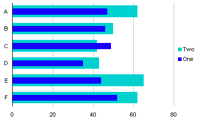 Overlapped Bar Chart – Thinner Bars in Front: This extremely useful and neat charting tweak comes from none other than Peltier himself. Learn how to overlap bars in a bar chart such a way that thinner bars stay on top for that special occasion when you had to.
Fastest way to scan a large range of cells using VBA Most of use a range object if we need to scan a range of cells using VBA. Dany Hoter, a product planner on the excel team at MS takes a look at 2 other methods for scanning a large range in VBA (using offset and using variant) and proves why using variant is the fastest way to scan a range.
Create your own keyboard shortcuts in Excel 2007, knowing a few keyboard shortcuts in excel is a huge help. Lyte Byte describes a nifty way to create your own key board shortcuts in excel 2007 using macros.
Making your visualizations Great, Flowing Data, one of my favorite blogs tells us how to make visualizations great. A great visualization tells a great story, most of times we focus more on the visualizations (charts, slides) that we neglect the story. Next time you set out to design a chart first ask yourself one simple question – “What is the story?” and then create your chart to fit your story.
That is all. If you know some supercool excel articles / tricks and want them to be featured here, just drop a comment.


2 Responses
Thanks for mentioning…
@Joel … 🙂