

Did I tell you I love tennis? Some of my personal heroes & motivators are tennis players. And as you can guess, I admire Roger Federer. Watching him play inspires me to achieve more. So last night when he lifted Wimbledon trophy for 7th time, I wanted to celebrate the victory too, in my style. So I made an interactive timeline chart in Excel depicting his victory.
See it below. (click here for high-res version)
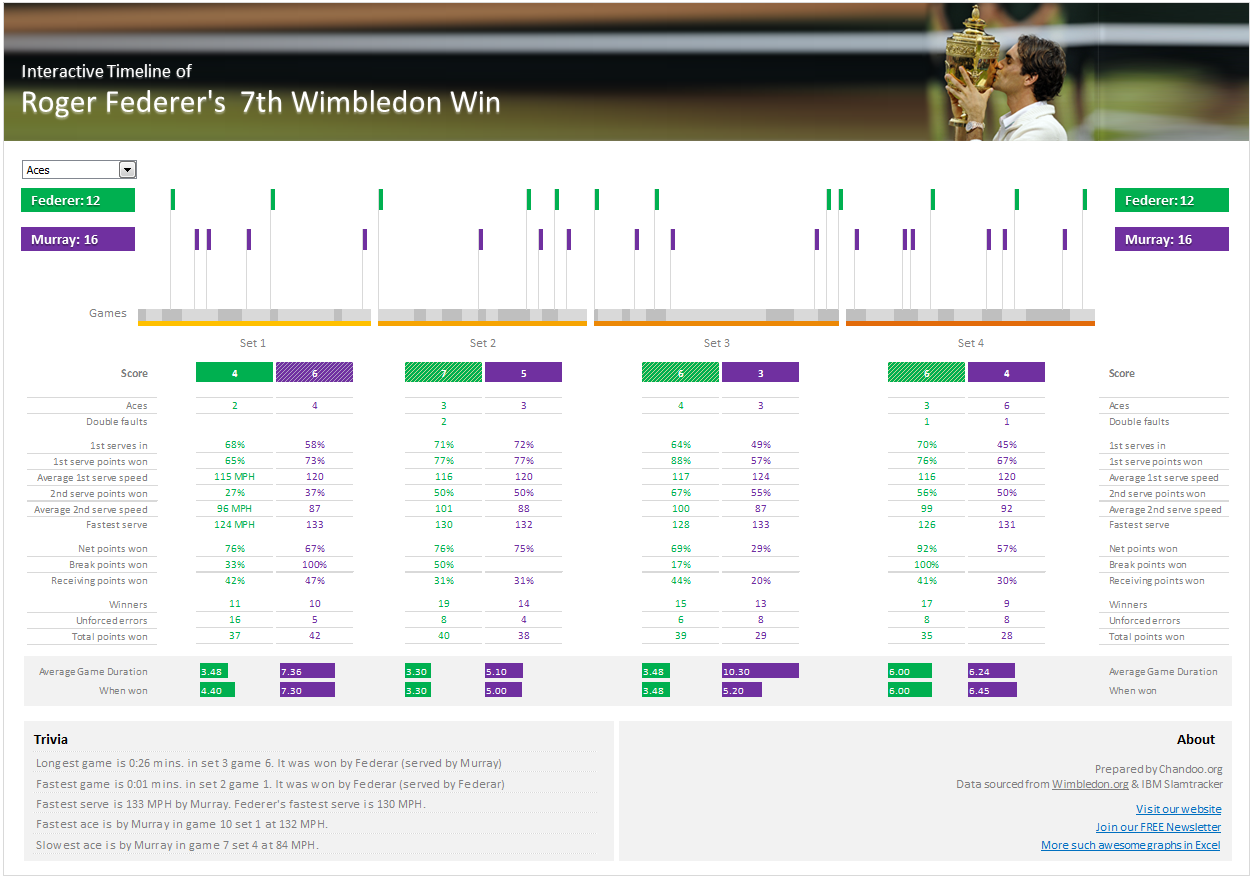
How is this timeline made?
Here is the process in a gist.
- First I sourced the match data from Wimbledon.com. This is done by manually copy pasting or typing the data.
- Then, I created a massive grid of 240 columns by few rows. This is to be used as a timeline for the match (as the match lasted 4 hours, we need 240 columns, 1 for each minute)
- Then in a separate range, I identified whether an ace, break point etc. happened on each minute.
- Then we show one of these on the timeline based on what user selects
- Rest of the statistics are just plugged in using picture links.
- There is only one macro (just one line) that refreshes the screen when form control is changed (so that new conditional formats can kick in).
Download the interactive timeline:
Click here to download the workbook & play with it. You can select Aces, break points, games etc. to see key milestones on this 4 hour match timeline.
I am not explaining techniques in detail as most of my day is went in to constructing it. But you can easily break it apart and see how it works.
Congratulate Federer
If you like this exceptional sportsman, congratulate him. Lets hope he continues to inspire us for few more years.
Thanks to
Thanks to Wimbledon.com & IBM Slamtracker from which I sourced this data.


21 Responses
Master Piece.. Awesome creativity. 🙂
Hey Roger indeed is the best, but let me tell you, so are you in your forte..
Congrats to both.. keep inspiring… u inspired me to take excel to evry thing i do.. thnks..
Could you please post analysis of what in the world happened to Rafa AND Novak??? 🙂
Congrats to Roger, and thanks for the sharp recap.
Amazing Chandoo. I love tennis too and your sheet was amazing clear and easy to see how to game was on sunday (I didn’t see the game). A true data visualization work.
It was an amazing tennis match and well done to Roger Federer ,(but I really want Andy Murray to win).
Game set and match to Chandoo for a prefect presentation
Awesome work Chandoo! You’re a master just like Federer!
Great work Chandoo but I think there’s a problem with the total number of games won. It shows Murray won 23 and Federer won 21. That can’t be right, Federer won more.
Awesome work still.
Thanks
Phil
@Philip… You are right. There is a small mistake in one of the formulas. The total games played are 41, out of which Federer won 23 (and Murray 18). I have uploaded the corrected file. Thanks for pointing this out. Donut for you.
I am very new on excel, knowing some formatting and functions, i am in search of a MIS job, so kindly suggest me what type of questions will interviewer ask me about excel?
and yes, I learned everything from chandoo,org, its really an awesome website for excel learners, i will join it in next few days…
Great work Chandoo…. After seeing this dashboard i remember the quote ““Winners dont do different things,they do things differently”
Another AWESOME dashboard Chandoo!
Thanks for the nice effort. Kudos to Roger (for an Awesome Match) and to You (for an Awesome Dashboard)!
cheers,
Ravi.
Congrats! First Chandoo…….then to great Roger Federer for this MS achievement! I believe that you’d have spent more than 4 hours pitching Federer to create this awesome*100 spreadsheet! Wow! So meticulous & Painstaking……
Thanks a lot to you & your team to really making us Excel-lent!
Lottomaniac649:)
@all.. thanks for the lovely words. I am glad you liked it.
@Deb.. I did not see the match in which Nadal was knocked out. But I saw the one between Novak and Roger. I think it is Federer’s sheer magic & brilliance that outsmarted Novak.
What a great job Roger did in Wimbledon! Now, please go for the Olympic Victory, would then be the 8th title (or better the 9th, because of his junior trophy).
Chandoo, and what an amazing job you did! Where did you get all the data from? You deserve also an Olympic Medal!
I’m actually planning to create a geocache to celebrate Rogers success, let’s see how long it will take.
… now I recognized the data source, please excuse the question.
Hi Chandoo,
All I can ask is, Please celebrate a lot more so that we would get more and more awesome dashboards 🙂
Thanks for all the help you are giving. You are simply great!!!
Kind Regards,
Navaneetha Krishnan.
Congrats! Another Ace!
I hope to apply in the real world everything I have learned from the website soon.
If you have any specify samples and tips on Garden Centres I will be glad to hear from you.
Keep serving more aces!
Regards
Awesome File. I have a question if you don’t mind. on the Timeline I see the Avge GAme Duration and When won is a formula to =DATA!$AR$23:$AS$24. How did you do that in a picture where it shows it on the Timeline linked to the Data tab.
I’m a little slow early this monring. Just notices your line about Picture Links.