

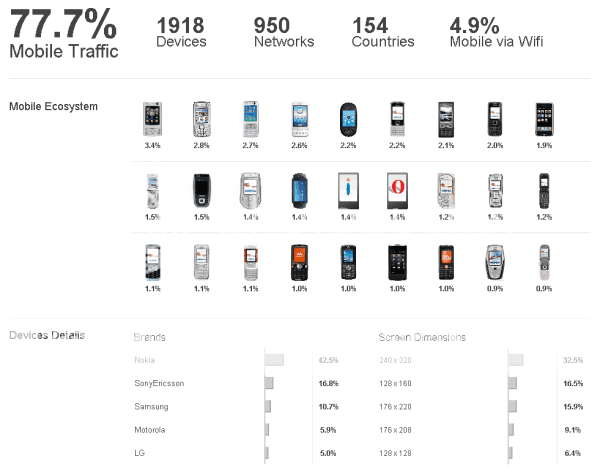
Check out the sample mobile analytics dashboard by Percent Mobile. It is like google analytics, but for mobile device based traffic. I liked the way they presented the information of website traffic that is coming from mobile devices.
What is WOW about it?
The top portion of the dashboard shows quick summary. This is one of the key principles of any good dashboard. Displaying summary at the top and providing detail at bottom. This creates a logical flow and viewer can decide for herself which details to seek.
The bar charts below are executed well. Often we are tempted to use colors and rich formatting, but when you use simple colors, then naturally the attention shifts from formatting to information. I like the way the charts look subtle but still provide good information, thanks to labels.
What can be improved in this chart?
The mobile ecosystem area of the dashboard looks good but it is difficult to spot any trends. Few things I can think of to improve this are,
- Reduce the number of phones displayed here to say Top 5
- Try something else like a tag cloud, but with images. It adds novelty and drives attention to most important devices.
- Restructure information by dimensions like touch-screen devices, gaming devices, good old mobile phones so that viewer will know what type of devices are visiting the site more.
What is your opinion on this dashboard?
Cool or awful? How would you improve it?
More on dashboards: KPI Dashboards using Excel (6 part tutorial and downloads), Excel Dashboards theory, principles and tutorials
[Hat tip to Digital Inspiration for percent mobile]


8 Responses
It isn’t horrible, though it’s a little light on information. What it tells me is that there are a ton of devices, each with a tiny share of the market. It’s not immediately clear how many separate phones boil down to the different companies in the market.
There is a huge gap between the chart labels and the plotted data. I’d move the vertical axis closer to the labels, so the resolution is improved. I would have switched the font colors of the axis labels and the percentage labels.
Hi,
unfortunately the link “sample mobile analytics dashboard” is broken.
I am really interested in Web Analytics Dashboard examples.
Could you please fix it?
Thanks!
@Salvo
Try the link at the bottom of the post
or
This one right here: http://www.labnol.org/internet/know-mobile-phones-of-site-visitors/8364/
Hi Chandoo
I just came across
http://richworks.in/2010/04/50-most-stunning-examples-of-data-visualization-and-infographics/
A couple of these are absolutely awesome. I wonder how the top football earning countries dashboard can be made in excel
@ Hui:
Unfortunately in the page url you provided the link is broken as well.
I would like just to download the excel sampe of mobile analytics.
Thanks.
@Salvo
Try clearing your Browsers cache
Try from a different PC or network as it works fine for me
I use Win 7/Firefox
@Hui
Hello,
I have tried also by mobile the link “http://percentmobile.com/mobileanalytics/report/32” is broken.
@Salvo
The link address I posted is:
http://www.labnol.org/internet/know-mobile-phones-of-site-visitors/8364/