5 wonderful visualizations you must see [Aug 22]

Share

Facebook
Twitter
LinkedIn

Every week Pointy Haired Dilbert celebrates the art of chart making by sharing 5 of the most beautiful, innovative and effective infographic ideas from various sites. Click here to see the visualizations featured earlier.

Pop, Soda or Coke? – Countywise terms used for sweetened carbonated water

pop-vs-soda-by-county-visual

The pop-vs-soda map tells how marketers have been effective and creating a habit in people. The blue colors are for pop, yellow for soda and red for coke. As you can see, quite a few people call any soda as coke, especially in the southern regions of US. [via strangemaps]

Document Contrast Diagram – State of Union Address in 2007 and 2008

document-contrast-infographic-state-of-union-address-2007-2008

Visualizing text is a difficult thing to do. More so when you have 2 texts and need to compare. Document contrast diagrams seem like an interesting way to explore two large pieces of text to see how they space out. The state of union address for 2007 and 2008 are shown above, 2007 is on left. [via Tim Showers]

How poetry looks?

poetry-visualization-ideas

VisualPoetry project aims to take various poetic texts and connect them to show how words (sequences) appear on various poems. Very beautiful. [via information aesthetics]

History of World Records in Olympics

olympic-world-records

Another NY Times Olympic visualization. This shows how in each successive olympics the world records are created. A simple graphic, but the message is powerful: You should never give up., also see the Olympic medal visualization

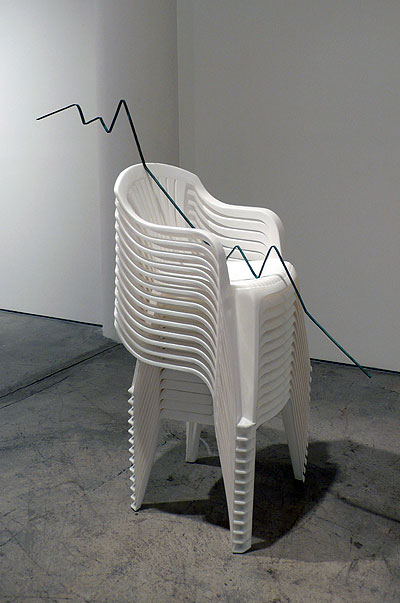
What happens when graphs go physical

physical-graphs-to-increase-awareness

This is an innovative idea by Joshua Callaghan. He took the graphs like military spending by country (shown on the right), world population since 0 AD, consumer confidence and converted them to public art so that many more people can become aware of the situation. Very powerful and effective way to tell the story. [via flowing data]

Bonus Infographic : [NSFW] Flesh Map

flesh-map-nsfw

Dont click on it from work, seriously! [via information aesthetics]

Like this edition of cool infographics? Do you know any charts that should be featured here, drop a comment.

Facebook
Twitter
LinkedIn

Share this tip with your colleagues

Excel and Power BI tips - Chandoo.org Newsletter

Get FREE Excel + Power BI Tips

Simple, fun and useful emails, once per week.

Learn & be awesome.

Welcome to Chandoo.org

Thank you so much for visiting. My aim is to make you awesome in Excel & Power BI. I do this by sharing videos, tips, examples and downloads on this website. There are more than 1,000 pages with all things Excel, Power BI, Dashboards & VBA here. Go ahead and spend few minutes to be AWESOME.

Read my storyFREE Excel tips book

Overall I learned a lot and I thought you did a great job of explaining how to do things. This will definitely elevate my reporting in the future.
Rebekah S
Reporting Analyst
Excel formula list - 100+ examples and howto guide for you

From simple to complex, there is a formula for every occasion. Check out the list now.

Calendars, invoices, trackers and much more. All free, fun and fantastic.

Advanced Pivot Table tricks

Power Query, Data model, DAX, Filters, Slicers, Conditional formats and beautiful charts. It's all here.

Still on fence about Power BI? In this getting started guide, learn what is Power BI, how to get it and how to create your first report from scratch.

8 Responses to “Introducing PHD Sparkline Maker – Dead Simple way to Create Excel Sparklines”

  1. zak says:

    This looks like it could be very useful for a project I'm putting together right now, thank you so much. Quick & silly question, how do I copy & paste the sparkline as a picture?

  2. zak says:

    Question answered. For anyone else:

    Select chart>Hold Shift key & select Edit/Copy Picture>Paste

  3. [...] more information about PHD Sparkline Maker, please read this article and to learn more about Sparklines, read this article from Microsoft Excel 2010 blog. Also there [...]

  4. Andy says:

    Am I right in thinking that the y-axis is set automatically by excel?
    That makes it possible to get the column chart not to start at zero.

  5. Brian Basden says:

    Andy - yes, it is currently set to 'auto', which defaults to a zero base for positive values, but you can change that by left-clicking the chart, then choosing (in Excel 2007):
    "Chart Tools/Layout/Axes/Primary Vertical Axis/More Primary Vertical Axis Options"

    PUBLIC SERVICE ANNOUNCEMENT: When manually editing a chart's minimum/maximum axis values, PLEASE be sure there's a valid reason and that doing so won't skew the message shown by the data (e.g. by exaggerating differences). If in doubt, go back and read Tufte. (W.W.T.D.?)

  6. [...] gridlines, axis, legend, titles, labels etc.) and resize it so that it fits nicely in a cell [example]. This is the easiest and cleanest way to get sparklines in earlier versions of excel. However this [...]

  7. jan says:

    thanks for the work creating the template!!!!

  8. Ghazanfar J says:

    looks good

Leave a Reply