

Ever since I have learned the tables feature in Excel 2007, I have fallen in love with that. They are so awesome and so user friendly.
Here is a simple, yet very effective feature of Excel Tables that will show table header row even when you scroll down. The header row is shown in the place of column headings (the place where you see A,B,C,D etc.).
For eg. if you have the superhero details in a table,when you scroll down, this is what you will see:
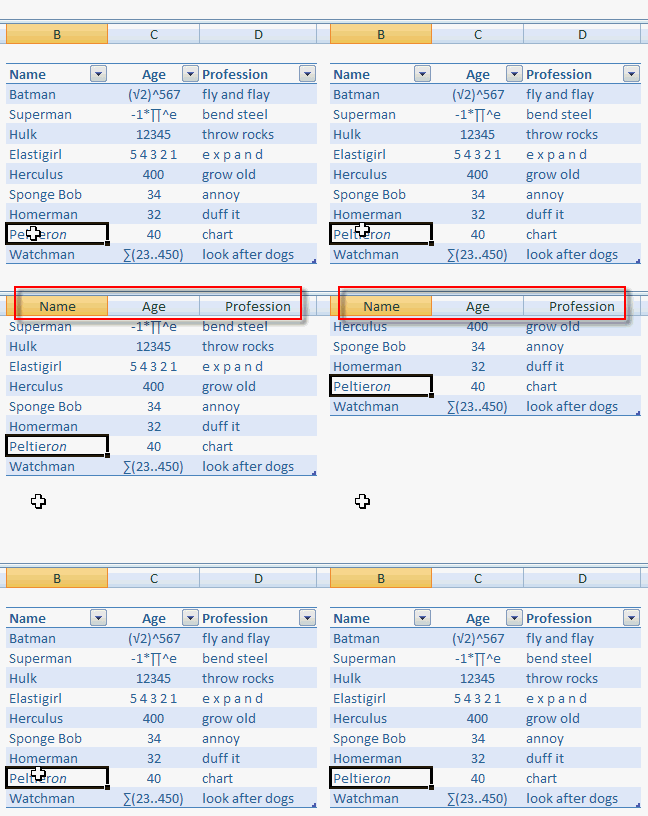
This is a good alternative for freeze panes option in Excel. However there are few limitations,
- You must select a cell in the table when you scroll to see column headers
- Only headers are shown. Not filters.
What is your favorite feature in Excel Data Tables?
Read more excel quick tips


8 Responses
In 2010 the filters are also displayed.
Is it any coincidence that the charting superhero is named Peltieron?
@JP it is intentional 😛
@Sam.. wow that is even cooler. I havent realized it till now.
Excellent thing learned from here , thanks for providing such a useful data for excel lovers
i like this so much i need you to email me a advance excel> may god bless you thank you in anticipation this is so good
I am unable to use this feature. Can you please explain in detail?
Really enjoy every trick that is new to me. Thank you.
You forgot to say how to did this, but other than this was a great how-to.