Its what happens when you have to write a lot of vlookup formulas before you can start analyzing your data. Every day, millions of analysts and managers enter VLOOKUP hell and suffer. They connect table 1 with table 2 so that all the data needed for making that pivot report is on one place. If you are one of those, then you are going to love Excel’s data model & relationships feature.
In simple words, this feature helps you connect one set of data with another set of data so that you can create combined pivot reports.
Practical Example – V(X)LOOKUP hell vs. Data Model heaven
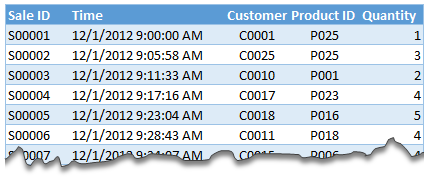
Lets say you are looking sales data for your company. You have transaction data like below.
And you want to find out how many units you are selling by product category and customer’s gender.
Unfortunately, you only have product ID & customer ID.
With VLOOKUP Hell,
You first fetch all the customer and product data and place them in separate ranges.
Then write a vlookup formula to fetch product category, another to fetch customer gender.
Then fill down the formulas for entire list of transactions.
Now make a pivot table.
Assuming you have 30,000 transactions, you have to write 60,000 VLOOKUP formulas to create this one report!!!
With Data Model heaven,
Create relationships between Sales, Products & Customer tables
Create a pivot table
Creating a relationship in Excel – Step by Step tutorial
First set up your data as tables. To create a table, select any cell in range and press CTRL+T. Specify a name for your table from design tab. Read introduction to Excel tables to understand more.
Now, go to data ribbon & click on relationships button.
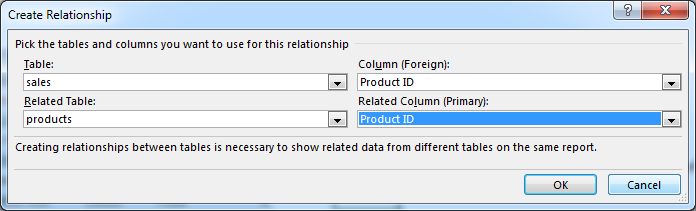
Click New to create a new relationship.
Select Source table & column name. Map it to target table & column name. It does not matter which order you use here. Excel is smart enough to adjust the relationship.
Add more relationships as needed.
Using relationships in Pivot reports & analysis
Select any table and insert a pivot table (Insert > Pivot table, more on Pivot tables).
Make sure you check the “Add this data to data model” check box.
In your pivot table field list, check “ALL” instead of “ACTIVE” to see all table names.
Select fields from various tables to create a combined pivot report or pivot chart
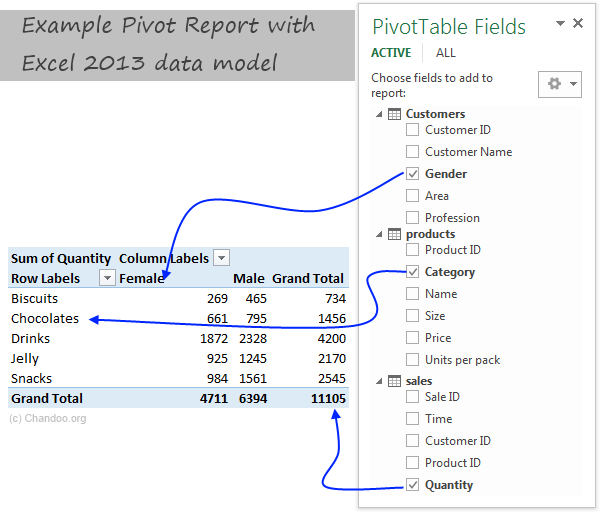
Example: Category & Gender Sales Report
Add category to row labels
Add gender to column labels
Add quantity to values
and your report is ready!
Things to keep in mind when you using relationships
Same data types in both columns: Columns that you are connecting in both tables should have same data type (ie both numbers or dates or text etc.)
One to one or One to many relationships only: Excel 2013 supports only one to many or one to one relationships. That means one of the tables must have no duplicate values on the column you are linking to. (for example products table should not have duplicate product IDs).
You can add slicers too: You can slice these pivot tables on any field you want (just like normal pivot tables). For example, you can further slice the above report on customer’s profession or product’s SKU size.
Benefits of Data Model based Pivot Tables
Once you have a data model in spreadsheet, you will enjoy several benefits (apart from multi-table pivots that is). They are,
Distinct counts: This simple but often tricky to calculate number is easy to get once you have data model based pivot. Just go to value field settings and change the summary type to “Distinct count”. Here is a tip explaining how to get distinct counts in Excel pivots.
Measures & DAX: Once you have a Data Model, you can unleash the full Power Pivot features on your workbook. You can create measures (using DAX language) and calculate things that are otherwise impossible with regular Excel. Here is an example of percentage of something calculation with DAX & Data Model, to get started.
Pivots from data in other files & databases: You can combine data model with the abilities of Power Query to create pivots from data in other places. For example, you can make a pivot from sales data in SAP with customer data in CRM system. Here is an overview of what is Power Query?
Convert Pivot Tables to formulas: Once you have a data model based pivot table, you can turn it in to a set of formulas. You can access this feature from “Analyze” ribbon. This will replace your pivot with a bunch of CUBE formulas. Here is an overview of CUBE formulas.
Drawbacks of Data Model:
Of course, its not all cup cakes and coffee with Data Model. There are a few drawbacks of data model based pivot tables.
Compatibility: Data model & relationship feature is available only in Excel 2013 or above. This means, you cannot create or share such pivot reports with people using older versions of Excel.
Not able to group data: In regular Pivot Tables, you can group numeric, data or text fields. But with data model pivot tables, you can no longer group data. You must create another table with the group mapping and use it as a relationship.
Ever since discovering PowerPivot, I kind of stopped using VLOOKUP (or XLOOKUP) for most of my own analysis. Now that relationships are part of main Excel functionality, I am using them even more.
What about you? Are you using relationships & data model in Excel? What cool things are you doing with it? Share your tips with us using comments.
Want even more? Try PowerPivot
If you want even more out of your reports, then try PowerPivot. It is a new feature in Excel 2013 (available as add-in in Excel 2010) that can let you do lots of powerful analysis on massive amounts of data. Here is an introduction to PowerPivot.
Thank you so much for visiting. My aim is to make you awesome in Excel & Power BI. I do this by sharing videos, tips, examples and downloads on this website. There are more than 1,000 pages with all things Excel, Power BI, Dashboards & VBA here. Go ahead and spend few minutes to be AWESOME.
Read my story • FREE Excel tips book
Here is a fabulous New Year gift to you. A free 2025 Calendar Excel Template with built-in Activity planner. This is a fully dynamic and 100% customizable Excel calendar for 2025.
Cool article. Only downside was that I didn't see at first that I needed 2010. Guess I still have to wait awhile before getting to try this out myself.
Could you add lists of holidays to be transferred to the calendar days?
Two lists would be needed: 1) for the holidays that stay fixed (eg, CHristmas), and 2) for the holidays that move around (eg, Thanksgiving).
Such lists would be prepared externally, and the program would transfer their information to the appropriate days.
Wow! This is something amazing. I am going to do some practicals with this and show a sales trend on this. As we have our sales plans weekly basis, this should impress by boss when put in dashboard. Cool.
Chandoo you have a knack of getting on to these great looking very creative ideas!
One thing with calendars I have seen before is not catering for able to enter notes or appointments or project milestones. But with this one it's easy enough to add the extra lines as you have done for the chart concept and link to this other type of info.
For 2003 we could replace slicers with a validation style dropdown couldn't we?
Chandoo, you are awesome;) i was using calender to show my reports, but i had made all months and then underneith date shows the value, man its really awesome . i am going to use this format for my reports.. only draw back for me is i am using 2007. hence no slicer.. may be have to modify with out slicer.
Great tricks! I love trying to reproduce the charts myself to get the hang of 'em. This one was great.
My only issue is getting the VBA in the year object to refresh the data. I used the VBA provided at the link, and, I can see it in the Macros tab, but, when I click the spinner the data does not update. Any tips?
I opted to use the formula =IF(F6>F5,G5,G5+1) for my weeknum - worked for me (I didn't get all the way through the example, since I'm running Excel 2007 - so don't know if that'll affect anything later in the example). I'm open to comments on this alternative approach.
I wonder whether we can make a school calendar (Class, subjects, teachers) using this calendar, assuming the weekly plan is duplicated across the year.
I would love to be a part of creating a class schedule...I'm attempting to help a friend (gratis) to do just that - can you point me in the right direction or provide a sample of sorts?
[...] Wow – what do you think of the interactive calendar chart demo above? To achieve this impressive effect you must have Excel 2010 because it utilises slicers, which is a feature introduced in Excel 2010. Find out how this treasure was created on Chandoo’s page. [...]
Great works! I learn a lot from this website. Here is the problem I met when I follow your tutorial: once I run and save this cool pivot calendar chart , the size of excel file will increase every time. Could you let me know how to figure it out? Thank you for your time in advance.
I want to start the week on Monday, not Sunday (MTWTFSS). Re-arranging the calendar tab works however, any month where the 1st is a Sunday starts on the second and totally omits Sun 1. I have been tinkerign for a while, but can't seem to figure this out.
Changing F2 on the 'Calcs' tab to 2 so that the week starts on Monday works.
Cutting & pasting Sunday on the 'Pivot Calendar' tab and moving all cells up 1 row works.
However, using April 2013 for example, you lose the 1st off of the pivot calendar so that the month starts on 2 April. What should happen is the first row should only show Sun 1 April and then the next row starts Mon 2 April. Still can't fugure out where the problem lies.
Adjust week start to Monday: Likewise, you can modify your formulas to adjust weekstart to Monday or any other day you fancy."
I have tinkered with this previously with no success, does anyone know which formulas require tinkering, I have only succeeded in breaking this in an effort start a week on a Monday.
Completely off topic, but how do you create those animated pictures in your tutorials? It is not a movie (like the Youtube movie), so what software do you use to create such high quality "animated" pictires? Thanks
[...] on how to generate an interactive calendar using pivot tables. Please check out Chandoo’s Interactive Pivot Table Calendar & Chart in Excel before reading this, as I want to go through how I used his method to adapt a calendar which was [...]
Great tip shared by you... howevr would appreciate if you could mention in your tricks about excel version. The example above would work only in excel 2010 and above I believe. Please help me if there is any way we can use the tip in excel 2007 as well..
Hi, I'm going to give this a shot, but one small question before I do. Can a linked cell be updated based on the date that is selected from the calendar? The calendar is really cool and this would make is especially good to use (and easy and fast).
Regards,
swissfish.
This post is awesome, and using your instructions, I was able to get this to work with a pivot table that pulls directly from a Project Server database. It was a bit complicated to get the day to sum correctly, but I managed to finagle it. I hope you don't mind if I link back to you when I post my instructions.
This is great, and pretty much everything I was looking for.
However, I already have a large spreadsheet, and I want to include your worksheets in it. I copied all the worksheets and the Module 1, but I can't get it to work. What else do I need to transfer / update please?
Hello there, is it possible to use this pivot to produce a calendar style chart, with returns multiple data per date, which on the calendar then, when clicked links to the data to provide more background information? What do you think? I'd love if I could pivot when i need. thanks, m
Wow - this is so creative. I'm taking the basic idea and building a reservation calendar.
Question: How do you get the month and year slicers on a different page than the pivot tables? I'd like to have my final calendar on a separate page from the pivot.
Excel will not let me insert blank rows between lines in the pivot table. I am use Excel 2013 - is there a pivot table tools command that must be used?
I can create the pivot table calender with a year spinner & month slicer but I do not see how to display the the attendance information that I have in the original data table.
Thank you for the wonderful post and I am sorry for my lack of understanding...
Please show me how to add an alternative calendar to this calendar, Chinese or lunar calendar (and by lunar I don't mean phases of the moon), like what they still use in Asia
[…] Wow – what do you think of the interactive calendar chart demo above? To achieve this impressive effect you must have Excel 2010 because it utilises slicers, which is a feature introduced in Excel 2010. Find out how this treasure was created on Chandoo’s page. […]
Hello my name is Maurice, excuse me for my further request, but believe me, without your help priprio not know how to solve this problem.
So: always using a chart positioned on an excel sheet I wanted to match each square (series) to a single cell, to create a perpetual calendar.
Now everything works fine; except that for a fact, and it is this: In the calendar as you well know some numbers may not be apparent until certain conditions, which I solved by writing this "= O code (AA5 = DATE ( $ H $ 1; MONTH ($ AD $ 12) +1; 1)) and the game and done.
Now I would like to achieve the same thing using the Chart; How can I do to make this happen! let me also just a practical example so that I can understand all the rest then I'll do; Thanks Greetings from A.Maurizio
I love your calendar however I am modifying it for use in displaying employee performance metrics on a day by day basis.
I see where tblChosen and tblDates are named ranges however I cannot find them anywhere.
Are they assigned to specific cells because I cannot tell.
I see both of them in the Name Manager, which tells me what they refer to but does not give a value or cell location.
@Mike
With the Names in the Name Manager
Simply select the name
Then click in the Refers To: box at the Bottom
Excel will take you to where the Named Range is referring to
[…] Wow – what do you think of the interactive calendar chart demo above? To achieve this impressive effect you must have Excel 2010 because it utilises slicers, which is a feature introduced in Excel 2010. Find out how this treasure was created on Chandoo’s page. […]
Hi, Chandoo
This Pivot Calendar is an excellent idea. I’ve done one for myself using your guidelines. I just need something I’m not being able to do. I need that when I open the file the default date is set to today’s date. I know how to do it with conditional formatting. But I think I’ll need some vba coding for this. Can you please help me with this. Thanks in advance
49 Responses to “Interactive Pivot Table Calendar & Chart in Excel!”
Excellent post again from awesome chandoo.org
This is one of the post to evident, without using macros we can create excellent charts using available excel options.
Slicer is one of the useful option in excel 2010 .. excited to see more options in excel 2013.
Regards,
Saran
http://www.lostinexcel.blogspot.com
Nice one chandoo............... great work done.....
Cool article. Only downside was that I didn't see at first that I needed 2010. Guess I still have to wait awhile before getting to try this out myself.
I consider myself an Excel expert, but you constantly amaze me with posts like this. Fantastic calendar!
Good post, like this little trick!!
How to not show the value in the cell
format the cell to custom with the below
;;;
Could you add lists of holidays to be transferred to the calendar days?
Two lists would be needed: 1) for the holidays that stay fixed (eg, CHristmas), and 2) for the holidays that move around (eg, Thanksgiving).
Such lists would be prepared externally, and the program would transfer their information to the appropriate days.
Wow! This is something amazing. I am going to do some practicals with this and show a sales trend on this. As we have our sales plans weekly basis, this should impress by boss when put in dashboard. Cool.
And thanks1
Chandoo you have a knack of getting on to these great looking very creative ideas!
One thing with calendars I have seen before is not catering for able to enter notes or appointments or project milestones. But with this one it's easy enough to add the extra lines as you have done for the chart concept and link to this other type of info.
For 2003 we could replace slicers with a validation style dropdown couldn't we?
Chandoo, you are awesome;) i was using calender to show my reports, but i had made all months and then underneith date shows the value, man its really awesome . i am going to use this format for my reports.. only draw back for me is i am using 2007. hence no slicer.. may be have to modify with out slicer.
Why not use =weeknum() for the weeknum column?
Great tricks! I love trying to reproduce the charts myself to get the hang of 'em. This one was great.
My only issue is getting the VBA in the year object to refresh the data. I used the VBA provided at the link, and, I can see it in the Macros tab, but, when I click the spinner the data does not update. Any tips?
Thx!
3G
^^Ignore this! NOT ENOUGH COFFEE YET.
I forgot about the "Assign Macro" option
:-s
Just started at chandoo - this is great!
I opted to use the formula =IF(F6>F5,G5,G5+1) for my weeknum - worked for me (I didn't get all the way through the example, since I'm running Excel 2007 - so don't know if that'll affect anything later in the example). I'm open to comments on this alternative approach.
Thanks for creating this website!
VC (Excel student).
Very cool - but now I'm even more excited for the new time controls for Excel 2013!
Great calendar...
I wonder whether we can make a school calendar (Class, subjects, teachers) using this calendar, assuming the weekly plan is duplicated across the year.
I would love to be a part of creating a class schedule...I'm attempting to help a friend (gratis) to do just that - can you point me in the right direction or provide a sample of sorts?
[...] Wow – what do you think of the interactive calendar chart demo above? To achieve this impressive effect you must have Excel 2010 because it utilises slicers, which is a feature introduced in Excel 2010. Find out how this treasure was created on Chandoo’s page. [...]
Hello Chandoo,
Great works! I learn a lot from this website. Here is the problem I met when I follow your tutorial: once I run and save this cool pivot calendar chart , the size of excel file will increase every time. Could you let me know how to figure it out? Thank you for your time in advance.
An excel chart-fan from China.
I already figured it out.
wow, love the calendar, i'm a newbie, found this site and it's amazing.
Got it mostly figured out, but could do with help with your named range 'tblchosen'
I can build the pivots, link the calendars together but can't see how to use index(tblchosen...) to pull through the productivity figures
appreciate any help
thanks
Great. Miss the Today button. Will try and figure a way to add this to the file.
I want to start the week on Monday, not Sunday (MTWTFSS). Re-arranging the calendar tab works however, any month where the 1st is a Sunday starts on the second and totally omits Sun 1. I have been tinkerign for a while, but can't seem to figure this out.
Changing F2 on the 'Calcs' tab to 2 so that the week starts on Monday works.
Cutting & pasting Sunday on the 'Pivot Calendar' tab and moving all cells up 1 row works.
However, using April 2013 for example, you lose the 1st off of the pivot calendar so that the month starts on 2 April. What should happen is the first row should only show Sun 1 April and then the next row starts Mon 2 April. Still can't fugure out where the problem lies.
"Further Enhancements:
Adjust week start to Monday: Likewise, you can modify your formulas to adjust weekstart to Monday or any other day you fancy."
I have tinkered with this previously with no success, does anyone know which formulas require tinkering, I have only succeeded in breaking this in an effort start a week on a Monday.
[...] Interactivo Artículo original var dd_offset_from_content = 50; var dd_top_offset_from_content = 0; Tags: 2013, calendario, [...]
Completely off topic, but how do you create those animated pictures in your tutorials? It is not a movie (like the Youtube movie), so what software do you use to create such high quality "animated" pictires? Thanks
Jeroen
the animated pics are called Animated Gifs
they are made using Camtasia
Refer: http://chandoo.org/wp/about/what-we-use/
This is fairly easy to do just using calendar formulas, which would be quicker, and doesn't need VBA? Am I missing something?
[...] on how to generate an interactive calendar using pivot tables. Please check out Chandoo’s Interactive Pivot Table Calendar & Chart in Excel before reading this, as I want to go through how I used his method to adapt a calendar which was [...]
Great tip shared by you... howevr would appreciate if you could mention in your tricks about excel version. The example above would work only in excel 2010 and above I believe. Please help me if there is any way we can use the tip in excel 2007 as well..
Many Thanks,
Regards,
FK
Hi, I'm going to give this a shot, but one small question before I do. Can a linked cell be updated based on the date that is selected from the calendar? The calendar is really cool and this would make is especially good to use (and easy and fast).
Regards,
swissfish.
This post is awesome, and using your instructions, I was able to get this to work with a pivot table that pulls directly from a Project Server database. It was a bit complicated to get the day to sum correctly, but I managed to finagle it. I hope you don't mind if I link back to you when I post my instructions.
Thanks for giving me a starting point for this!
[...] http://chandoo.org/wp/2012/09/12/interactive-pivot-calendar/ [...]
This is great, and pretty much everything I was looking for.
However, I already have a large spreadsheet, and I want to include your worksheets in it. I copied all the worksheets and the Module 1, but I can't get it to work. What else do I need to transfer / update please?
Hello there, is it possible to use this pivot to produce a calendar style chart, with returns multiple data per date, which on the calendar then, when clicked links to the data to provide more background information? What do you think? I'd love if I could pivot when i need. thanks, m
Hi, did you ever figure out how to do this? I would love to find a way...
This is amazing and will work well for my calendar project! My question is, how can I expand the calendar to fit a standard sheet of paper?
Wow - this is so creative. I'm taking the basic idea and building a reservation calendar.
Question: How do you get the month and year slicers on a different page than the pivot tables? I'd like to have my final calendar on a separate page from the pivot.
[…] http://chandoo.org/wp/2012/09/12/interactive-pivot-calendar/ […]
This is perfect...is there a way to add notes/tasks to the individual days?
Excel will not let me insert blank rows between lines in the pivot table. I am use Excel 2013 - is there a pivot table tools command that must be used?
I can create the pivot table calender with a year spinner & month slicer but I do not see how to display the the attendance information that I have in the original data table.
Thank you for the wonderful post and I am sorry for my lack of understanding...
Excellent!
Please show me how to add an alternative calendar to this calendar, Chinese or lunar calendar (and by lunar I don't mean phases of the moon), like what they still use in Asia
Thanks
Christopher
[…] Wow – what do you think of the interactive calendar chart demo above? To achieve this impressive effect you must have Excel 2010 because it utilises slicers, which is a feature introduced in Excel 2010. Find out how this treasure was created on Chandoo’s page. […]
Hello my name is Maurice, excuse me for my further request, but believe me, without your help priprio not know how to solve this problem.
So: always using a chart positioned on an excel sheet I wanted to match each square (series) to a single cell, to create a perpetual calendar.
Now everything works fine; except that for a fact, and it is this: In the calendar as you well know some numbers may not be apparent until certain conditions, which I solved by writing this "= O code (AA5 = DATE ( $ H $ 1; MONTH ($ AD $ 12) +1; 1)) and the game and done.
Now I would like to achieve the same thing using the Chart; How can I do to make this happen! let me also just a practical example so that I can understand all the rest then I'll do; Thanks Greetings from A.Maurizio
Link Program : Link: https://app.box.com/s/lhqva3eji0xcf2nmk8lxyki88tt1mi5t
Great info, thanks for sharing
Hi,
I love your calendar however I am modifying it for use in displaying employee performance metrics on a day by day basis.
I see where tblChosen and tblDates are named ranges however I cannot find them anywhere.
Are they assigned to specific cells because I cannot tell.
I see both of them in the Name Manager, which tells me what they refer to but does not give a value or cell location.
@Mike
With the Names in the Name Manager
Simply select the name
Then click in the Refers To: box at the Bottom
Excel will take you to where the Named Range is referring to
[…] Wow – what do you think of the interactive calendar chart demo above? To achieve this impressive effect you must have Excel 2010 because it utilises slicers, which is a feature introduced in Excel 2010. Find out how this treasure was created on Chandoo’s page. […]
Hi, Chandoo
This Pivot Calendar is an excellent idea. I’ve done one for myself using your guidelines. I just need something I’m not being able to do. I need that when I open the file the default date is set to today’s date. I know how to do it with conditional formatting. But I think I’ll need some vba coding for this. Can you please help me with this. Thanks in advance