

Recently I saw a big screaming ad that said “the chartbuster rules”. Of course, I know that chartbusters rule. Not just because I was one of them 🙂
So I got curious and read on. And I realized the ‘chartbuster’ is actually a car, not some cool, spreadsheet waving, goatee sporting dude like Jon Peltier. What a bummer!
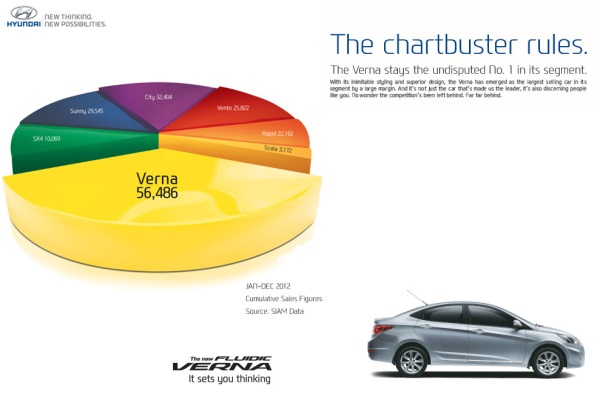
And then to my horror of horrors, I saw the exploding 3d pie chart, with reflection effects & glossy colors. And the sole purpose of the chart is to create an impression that Verna sells better than any car in India.
First take a look at the chart:
Now for criticism
Obviously there is no denying that Verna sells better. If you look at the number of units sold, Verna’s 56,486 is better than any other numbers.
But is that the impression the chart gives?
If you just look at slicers and colors (which is what you would do), you feel that Verna has 40-45% market share.
What is the reality? It is 31.4%
Why such a distortion in our perception?!?
This is because, the ad uses a mildly evil magic called 3d pie charts, to distort what you perceive.
Then the chart maker sprinkled this 3d pie chart with assorted poisonous sprouts called as ‘customized rotation of slices’ and ‘exploding the pie for Verna, to make it look big’.
Now, the chart means one thing, but says another. Its like my wife when she wants new shoes.
Can chart rotation impact your perception – here is the proof!
Now, you might be wondering, “Oh Chandoo, come on my man. Why would I be dumb enough to fall for this.”.
So I have made a proof. I made a similar 3d pie chart from these exact numbers. Then I rotated it from 0 to 360 degrees. And you can see how the slices of pie play with your eye.
So what is a better alternative for this chart?
In this case a column chart is better. It clearly shows the leadership position of Verna without resorting to sneaky tricks.
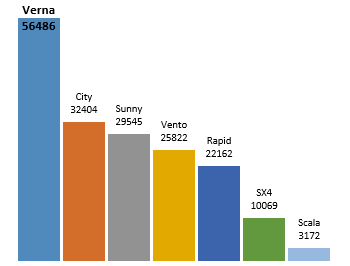
What more, you can format the column chart so that it has all the bling! (not that I recommend such over formatting)
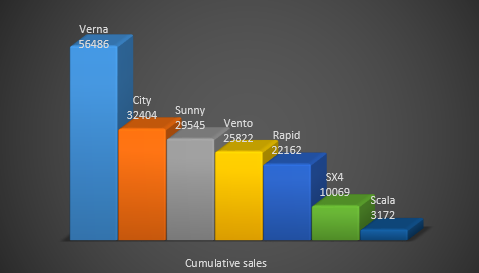
PS: A newer version of this ad features column chart, albeit with convoluted staircase representation.
What do you think about rotated, exploded 3d pie charts
The only time I want to rotate a pie is when it is too big and the portion I want to eat is on the other side.
What about you? do you make 3d pies? Are they tasty or sneaky (like the Verna pie)?
Share your thoughts using comments.
Take our 3d pie pledge
As a fun exercise, why don’t you take our 3d Pie pledge. Here it is.
I promise to never make a 3d pie chart. If I ever see one, I promise to not rotate or explode it. I also promise to create alternative charts (usually column, bar, line or scatter plots) so that my audience can see the truth better.
And oh yeah, I promise to bake & eat pies whenever possible. Apart from cakes, pastries, ice creams, biscuits and other assorted fun foods that is.
signed…
Go ahead and take the pledge
PS: Chartbuster series of articles & more charting principles.


39 Responses
Another little trick they’ve used in that pie chart is in the positioning of the car sales in relation to each other. The way in which you present them in the column chart is from highest seller to lowest seller, left to right, which is what we’re used to seeing. But in the dastardly pie chart, the two smallest selling cars (the SX4 and the Scala) are placed one either side of the Verna, which serves to make it look bigger again.
Also the perspective at which you look at the pie chart makes the Verna look bigger. From my experimintation, a perspective of around 35-37 degrees makes it look like an even bigger slice, which appears to be what the advertiser has done.
All of this manipulation would make you think of the “photoshopping” or “air-brushing” that is done on photos of models, film stars, and so on, in magazines, to give them the unattainable looks, skin, shape, etc., etc., that many aspire to, but can never reach.
This post is quite the learning experience, thanks very much.
please help!!!! im taking a computer class at SPC in clearwater. i have an excel worksheet to turn in and my pie charts are just blank no pie at all, all the other charts are working but i need #D pie chart can anyone help me to restore the 3D Pie chart??? Emergency
@Amanda
Select the Chart
Right Click it
Change Chart Type
Select a 3D Pie chart type
This is a great example of why I do not like pie charts.
I promise to never make a 3d pie chart. If I ever see one, I promise to not rotate or explode it. I also promise to create alternative charts (usually column, bar, line or scatter plots) so that my audience can see the truth better.
And oh yeah, I promise to bake & eat pies whenever possible. Apart from cakes, pastries, ice creams, biscuits and other assorted fun foods that is.
signed David Onder
Reminds me of the quote … statistics are like bikinis … what they reveal is suggestive, what they conceal is vital.
I love that Quote and you are so right, now to get the upper management to understand that!!!
Oh .. and wont it be awesome if u can create a quick decision tree tool for jo so that she can buy shoes :p … perhaps link it to jabong.com or flipkart.com account and boom … a spreadsheet shopping tool!
There are a only two acceptable pie charts: actual pie and cheesecake.
My own commitment to the truth is to incorporate pereto graphs (Few, 2006) into most of my bar/column graphs. The pereto is activated by a non-printing check box form control. This method has proven its worth on a number of occasions when presenting data and demonstrating its integrity when challenged – Also gets a kudos point from the boss for foresight, preparedness and professionalism :-).
Leonk
Hi Leon,
Can you elaborate? I’m aware of pareto as the 80/20 rule what do you mean by you “include” it?
@JungleJme
A Pareto Chart is a Ranked Column chart
With the column of the highest Rank occurring at the left and the Smallest column at the right
It highlights the issues with most impact easily
Have a read of: http://chandoo.org/wp/2009/09/02/pareto-charts/
A little part of me dies inside whenever I see presentations from upper level technical management that includes exploded 3D pie charts.
I promise to never make a 3d pie chart. If I ever see one, I promise to not rotate or explode it. I also promise to create alternative charts (usually column, bar, line or scatter plots) so that my audience can see the truth better.And oh yeah, I promise to bake & eat pies whenever possible. Apart from cakes, pastries, ice creams, biscuits and other assorted fun foods that is.signed Luke M
So if the goal is to mislead, 3-D pie charts are great. There is a use for everything.
Definitely agree with you. They did the appropriate thing as a marketing scheme. The chart is not “wrong” in any way, just misleading to the eye.
I think it’s an excellent ploy.
I think these are an excellent display of the versatility of storytelling that is allowed by the champion of charts, the pie. Great work Chandoo. See my site for some further examples of effectively working with pie charts. eagerpies.com
Well done Chandoo, all points clearly made; I’d add that there are lies, damned lies, statistics, pie charts and tweaked pie charts.
I never recommend a pie chart but some of my custoners are so stupi are sure their requirements are correct. And the customer is always right (when he is the boss). So no pledge but lots of support.
When I teach charts I ask what is the purpose of charts? Fairly sharp students talk about information over data. The purpose is to make better decisions happen. The accuracy is essential, the usability is essential, but the real gain is when the manager sees what to do to make the figures better.
Why do you have strikethru option in replies that is visble when editing but lost when posted? Of course is this does show a strikethru I must have got it wrong; let’s see..
… no thought not. Register aplea for strikethru to work. Thanks
Hand on experience, thank you for sharing this.
My favourite (if that’s the right word) is Stve Jobs at
http://www.myspace.com/crazyalaskandude/photos/30206354
Some people must be assumed to know better, in which case it must be intentional.
There’s a classic book called How to Lie with Statistics, and another called How to Lie with Maps. Time for How to Lie with Charts?
A time and a place for everything, in my opinion. E.g. pie charts are good for communicating specific things to a wide and general audience, because everyone feels comfortable with the form at least.
3D pie charts are good for giving the appearance of analysis to people who wouldn’t read them anyway.
In Excel, I use flattened 3D pie charts because they let me control the rotation of the chart to put the most important slices where I want them. That said, I don’t use pie charts very often because my audience doesn’t demand them
Sorry, but all kind of 3d stuff is horrible! Better, let’s back a pie!
Sorry, but all kind of 3d chart stuff is horrible! Better, let’s back a pie!
Ha Ha you are right, but why 3D on a flat screen that doesn’t work I think and in the end it’s all about the data right..
Call this the chandoo effect!!! Did u check out the same advertisement with a different type of chart in yesterdays newspapers??? Even the marketing managers listen to chandoo.
I’ve always disliked pie charts for this reason and exploded 3d pie charts makes a liar out of their creators. its like the old man and his fish story…. I promise to never make a 3d pie chart (unless its as a joke). If I ever see one, I promise to not rotate or explode it. I also promise to create alternative charts (usually column, bar, line or scatter plots) so that my audience can see the truth better.
And oh yeah, I promise to bake & eat pies whenever possible. Apart from cakes, pastries, ice creams, biscuits and other assorted fun foods that is.
I teach mathematics at high school, and this article will now feature as a regular teaching tool in the topic Misleading Graphs. Thank you.
…and along those lines, I realise I need to create more exploded 3D pie charts, more over-formatted graphs and more line graphs for categorical data to demonstrate poor graph choice.
…and the staircase graph is even worse than the 3D pie chart. When you analyse it in terms of the amount of yellow on the graph compared to any other colour – particularly green which was second – it appears that Verna holds at least 50% market share.
I ran through this graph as a lesson on Misuse of Graphs. We placed a 5mm grid over the image of the graph and counted the squares. The image is 58% yellow. This surprised the students because they were analysing the chart and interpreting it as about 40%. I remarked that the 58% yellow was influencing their judgement. It was a very good lesson.
Thanks for this great teaching resource.
For most practical reasons, I believe there is no need to use a 3D chart unless a Z-axis is needed for your data — and pie charts need not be 3D since they don’t need to show any axis!
Your method of telling the whole thing in this paragraph is genuinely good, every one be capable of simply
understand it, Thanks a lot.
I agree about pie charts. I didn’t recognize the name “Verna” so I had to Google it: Hyundai sells the same car in the US as the “Accent.”
I cant stand 3d pie charts. 2d ones are bad enough. And im my opinion the staircase chart is even worse. Note that with the verna we see two sides which gives it a visible width on the page/screen about three times as wide as the second highest scoring one, where we can only see one side of it.
However, I won’t make the promise. Whilst I think acurate representation of stats is a morale obligation of those who need to present impartial data, you have to admire the marketing team for not missing a single trick.
Unfortunately with slick charts with the lighting and 3d effects, it makes acurate flat charts look boring and unprofessional to the uniformed 90% who view style over substance.
As an example of this, I was reading information packs from vendors, and out of the dozen or so, not a single one had flat charts….
Hi, Chandoo!
Can we download some chart template like in your post? ))
It is really pretty.
I think if the point is to create BS, everything should be not only in 3d but in 4d!
4d FTW