In a recent consulting assignment I had a tricky data validation problem. The customer wanted to have an either-or condition in the data validation, like this:
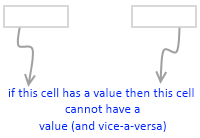
My initial reaction to this requirement was “hmm… that is not possible“. But before shooting the email back to client, I got curious and checked if excel data validation can actually do this. And of course we can do this in Excel with ease.
First see the demo of how this would work:
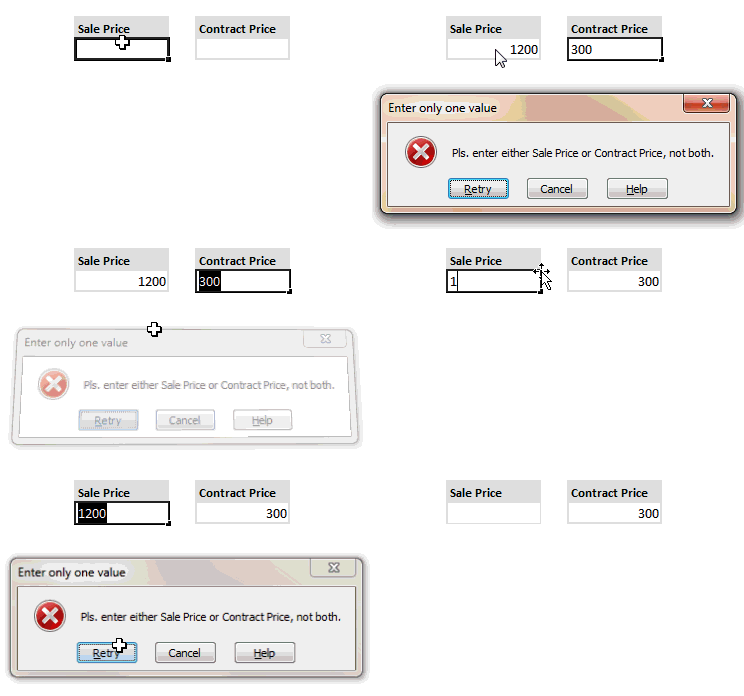
Now to the specifics:
- Select both cells where you want this data validation to be applied.
- Now go to data validation (Data Ribbon > Data Validation or Data Menu > Validation)
- Specify validation type as “Custom” and use a formula like COUNTA() to check count of cells with a value (see the illustration)
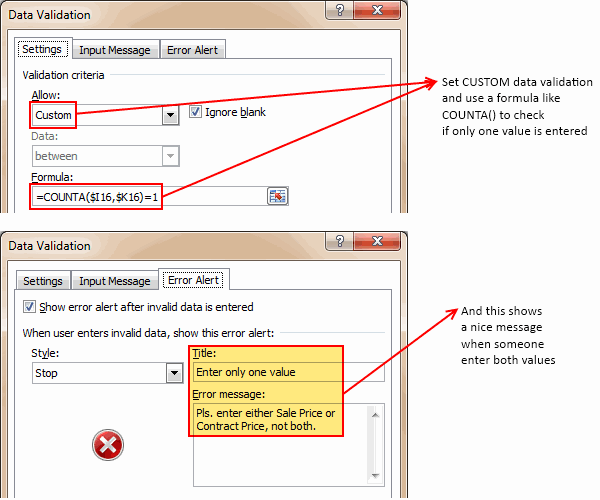
- Optional: Use Error Message settings to set a message you prefer.
- That is all. Now your Either Or Data Validation set up is done.
Download the example file:
Click here to download the example file with this kind of data validation setup. Play with it and learn how to do this on your own.
Learn more about Data Validation in Excel:
Read more about adding a drop down list validation or advanced data validation tricks or all of them.
Related: Writing XOR (either or) formulas in Excel


12 Responses to “Analyzing Search Keywords using Excel : Array Formulas in Real Life”
Very interesting Chandoo, as always. Personally I find endless uses for formulae such as {=sum(if(B$2:B$5=$A2,$C$2$C$5))}, just the flexibility in absolute and relative relative referencing and multiple conditions gives it the edge over dsum and others methods.
I've added to my blog a piece on SQL in VBA that I think might be of interest to you http://aviatormonkey.wordpress.com/2009/02/10/lesson-one-sql-in-vba/ . It's a bit techie, but I think you might like it.
Keep up the good work, aviatormonkey
Hi Chandoo,
You might find this coded solution I posted on a forum interesting.
http://www.excelforum.com/excel-programming/680810-create-tag-cloud-in-vba-possible.html
[...] under certain circumstances. One of the tips involved arranging search keywords in excel using Array Forumlas. Basically, if you need to know how frequent a word or group of keywords appear, you can use this [...]
@Aviatormonkey: Thanks for sharing the url. I found it a bit technical.. but very interesting.
@Andy: Looks like Jarad, the person who emailed me this problem has posted the same in excelforum too. Very good solution btw...
Realy great article
"You can take this basic model and extend it to include parameters like number of searches each key phrase has, how long the users stay on the site etc. to enhance the way tag cloud is generated and colored."
How would you go about doing this? I think it would need some VB
Hi,
I found the usage very interesting, but is giving me hard time because the LENs formula that use ranges are not considering the full range, in other words, the LEN formula is only bringing results from the respective "line" cell.
Using the example, when I place the formula to calculate the frequency for "windows" brings me only 1 result, not 11 as displayed in the example. It seems that the LEN formula using ranges is considering the respective line within the range, not the full range.
Any hint?
@Thiago
You have to enter the formula as an Array Formula
Enter the Formula and press Ctrl+Shift+Enter
Not just Enter
Thank you, Hui! I couldn't work out how this didn't work
is there a limit to the number of lines it can analyse.
Ie i am trying to get this to work on a list of sentances 1500 long.
@Gary
In Excel 2010/2013 Excel is only limited by available memory,
So just give it a go
As always try on a copy of the file first if you have any doubts
Apologies if I am missing something, but coudn't getting frequency be easier with Countif formula. Something like this - COUNTIF(Range with text,"*"&_cell with keyword_&"*")
Apologies if I missed, but what is the Array Formula to:
1. Analyze a list of URL's or a list of word phrases to understand frequency;
2. List in a nearby column from most used words to least used words;
3. Next to the list of words the count of occurrences.