

I feel very happy to share this with you. Our blog reader and excel ninja Fernando sent me this in e-mail.
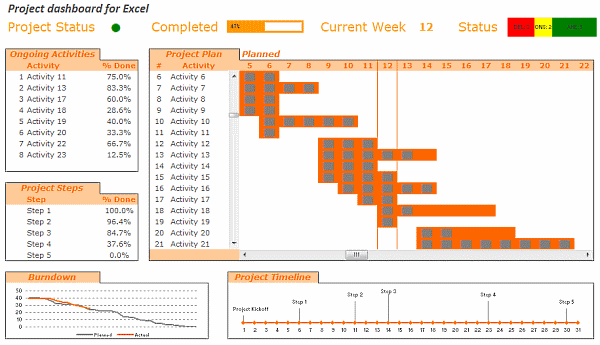
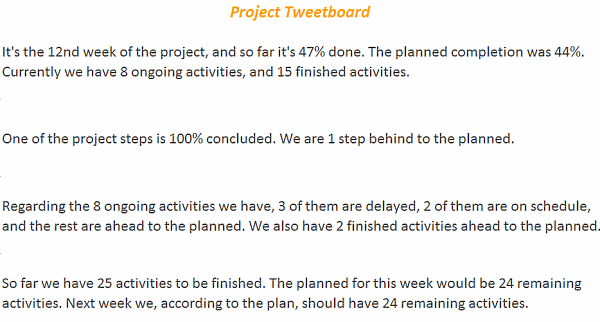
 Based on your last post about Project Management, I did a tool to track project status at my company. I’ve included some things differently than your suggestion, and even added a Tweetboard (which turned out to be a great success – thanks a lot for the idea! 🙂 ) on another tab, to resume information about project status. I loaded it with your sample data, to protect our personal info (compliance stuff), and translated it to English (although I’m not pretty sure everything is well-translated – feel free to correct). …
All the best from Brazil! 🙂
See the implementation of the project management dashboard along with the tweetboard below:
Download the dashboard + tweetboard example:
Click here to download the excel workbook and see it yourself.
I have locked the file as the project dashboard is on sale. If you want an unlocked version of the dashboard template (and 23 other excel templates for better project management) click here. You can be rolling out a similar dashboard in a couple hours using the project management bundle.
Also checkout,
Do check out the 6 part tutorial on Project Management using Excel and Tweetboard implementations as well.
Share your success stories
Have you implemented any of the ideas on PHD at work? Share your success stories with us by e-mailing me at chandoo.d @ gmail.com. I want to know about your success and share it with world.
Thank you Fernando, for sharing this with us. More success to you and all our members.


One Response to “Loan Amortization Schedule in Excel – FREE Template”
The balance formula as given doesnt seem to work on my excel