

 It is Easter Time again. Although I am not in Scandinavia (where Easter is a big thing) any more, we have a rather biggish family gathering here at PHD household during this weekend. We are also having anna prashanam for the little ones. It is the ceremony we do in India when kids eat rice for first time. [more about Anna Prashanam rituals on Wikipedia]
So, as you can imagine, PHDs will be busy during the weekend and on Monday as well. But we don’t want a dull Easter for you. So I have hidden 3 Easter eggs in this post. Go ahead and discover them to enjoy your Easter.
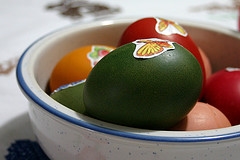
Easter Egg photo from tillwe.
PS: You may not find the eggs if you read this post in email or feed reader. Just come to my blog and see it. Click here.
PPS: Check out last year’s Easter Egg post to get some inspiration.
PPPS: Have a blasting weekend. See you on Tuesday with more excel stuff!


13 Responses
hi, found them all:)
happy easter:)
Cool post, as usual!
Happy Easter/Anna Prashanam to Nakshatra & Nishanth; you aren’t pointy haired, we agree; and thanks for the Excel formula cheat-sheet 😉
yes, got all
second one got little difficult to find
Happy Easter to all
Nakshatra & Nishanth bothook eager (and ready!) to try their first rice, and the pointy hair is more curly than pointy. So where is the cheat sheet? !
Happy Anna Prashanam!
Danièle
Eastern to all Excel-Friends
I am fascinated by the Anna Prashanam ceremony. This is a wonderful way to mark key life passages. Will you elaborate on the following part “The feeding ceremony is often followed with a game, in which the child is presented with a tray containing a number of objects. These will include a bangle or jewel (symbolizing wealth), a book (symbolizing learning), a pen (symbolizing career) and a clay pot or container of earth/soil (symbolizing property). The child’s future direction and prospects in life are indicated by the object which it prefers to hold and play with.” Thanks.
I found the 2 pictures, the little ones are lovely, but not the cheatsheet either 🙁
hehehe got all three…
Hint to those who didnt get it…
”
alt text for the eggs….
“
Must be blind…can’t find the kids!
@bill… “Will you elaborate on the following part “The feeding ceremony is often followed with a game, in which the child is presented with a tray containing a number of objects. These will include a bangle or jewel (symbolizing wealth), a book (symbolizing learning), a pen (symbolizing career) and a clay pot or container of earth/soil (symbolizing property). The child’s future direction and prospects in life are indicated by the object which it prefers to hold and play with.””
It is fairly common in Indian traditions to celebrate various key phases in life with festival like events. Although we didnt have the game for the kids, it is a common practice and done mostly for fun than to determine kids future.
Other events that celebrated include naming of the kid (done in first month), first time the kid is introduced to writing (ie education) etc.
Just note we, PHDs do not follow any religion per se. I am a Hindu, Jo is a Christian. But we want our kids to be religion free and make informed choices on their faith once they are of age… 🙂
A picture worth a thousand words …