

As the gentleman at immigration counter stamped my passport & said, “Welcome to Australia”, I could barely contain my excitement. You see, Australia has been on my list of places to visit as far back as I can remember. It finally happened on On Sunday, 29th of April 2012.
After collecting my baggage, I walked out of Sydney Kingsford Smith Airport. My friend Danielle (from Plum Solutions) is waiting for me there. Thus began my Australian adventure and it was fantastic. (Aussies so fondly use this word).
Grab a fine cup of coffee, sit back and read to know how the whole experience went.
Back story: How the opportunity came
I am not sure how the fascination with Australia began. But as I grew up the desire to visit land down under grew up too. So much that during my MBA placement season, I even applied for Macquarie Bank to work as an analyst in Sydney. Despite not knowing how to balance a balance sheet. It was a good thing they did not hire me, or else I would have been blamed for the global financial mess.
When I quit my job to work on Chandoo.org full time, I pushed the Australian trip further in to future, as I wanted to focus on running business.
Almost one year ago, on 30th June, a brilliant idea crossed my mind, “why not conduct a set of classes in Australia. That would give me an excuse to visit the place while not paying for the trip out of my pocket.”
Danielle’s name immediate came to my mind. So I emailed her “Excel workshops in Australia …?” and we got talking.
In March this year I have applied for Australian Visa & announced about the session on Chandoo.org. We got tremendous response for the session with many early sing-ups.
Initially I have planned to travel with Jo & kids. But after discussing about it, we realized that it may not be a good idea to travel with kids given that I would have to visit a new city every week to conduct the trainings. So I left for Australia alone with mixed feelings. Sad to leave kids & Jo behind, excited to visit it finally.
Response for our Excel & Dashboards Masterclasses
We conducted 4 Masterclasses – 1 each in Sydney & Brisbane and 2 in Melbourne. A total of 64 people attended the sessions. We also conducted 3 masterclasses for KPMG for their offices in Sydney, Perth & Melbourne. Around 30 people from financial modeling, risk management, auditing teams of KPMG attended these. And we did a 1 day training program (shorter version of masterclass) for SEEK.COM.AU in their Melbourne office.
I received very positive & happy feedback from delegates everywhere. This shows the generosity of Aussies. I felt fortunate to have eager, enthusiastic & excellent participants for all the classes. Few testimonials from the attendees,
Chandoo’s personality makes learning advanced excel techniques actually _fun_. I think that says a lot. You don’t often say to yourself “Wow, I had fun playing with Excel today!”, do you?
– Tom Hubbard, Manufacturing (Sydney)
Great useful content focused on real world examples. Emphasis on planning aswell as actual excel examples which means content can be applied to any dashboards e.g. BI or other software.
… very knowledgeable both about excel and business scenarios. Clear simple instructions with excellent knowledge across all versions of excel.
– Sinead Starrs, Marketing (Sydney)
chandoo is like a ‘drug’, that keep you want to get even more for excel 🙂 no wonder why he’s a CEO for this. I think from professional point of view .. Chandoo is helping us to get into the skill sets where the reporting level should be more straight forward, lively, and help the decision maker to make a good decision. I strongly recommend this training for any excel savvy just to enhance knowledge and found a ‘new love’ to excel.
– Chandra Jong, Financial Services (Sydney)
Chandoo was fantastic. He was very easy to understand and made everyone feel comfortable to any raise questions. Chandoo’s knowledge about Excel is unbelievable – I wish I had his brain! I would recommend this course to everyone who works with Excel to prepare data/reports. Excel is forever changing and unless you keep up to date it’s hard to know about new techniques. Chandoo also gave some useful tips on keeping our Excel knowledge up to date. I was never a big fan of Excel but after this course I absolutely love it!! It’s amazing what we can use Excel for.
– Anonymous, Mining (Brisbane)
Presenter very knowledgeable and ran through alot of topics. I have been on other excel courses, and they always teach to the lowest common denominator. This was very fast paced, so I was never bored.
– Anonymous, Telecommunications (Brisbane)
Business-oriented. In our country, there are many PC schools, but the instructor has little business backgrounds and presentation skill.
– Anonymous, Teaching (Melbourne) – Flew from Japan to attend this.
Just wanted to say thank you for the fantastic course you conducted at KPMG in Melbourne. Some of the ideas you presented were fantastic and I will definitely incorporate them into client work in the future.
The course exceeded my expectations. The method and format you presented the course in was absolutely brilliant. I especially loved the help function you created by using a SHOW/HIDE macro on text-boxes and bubble-boxes. So simple but so powerful! I hope we can get you back out here again and teach us some more cool tricks and ideas that will impress our clients!
– Adam, Consulting (Melbourne)
I have managed to collect few video testimonials too. I will share them some other time.
I was a little worried before starting my first class, mainly because,
- I never charged $1000 per class, so I am not sure if the participants would be happy with what they get.
- Most of them had very high expectations as they have been reading Chandoo.org for a while and wanted to learn even more.
But I felt happy knowing that majority liked the course and immensely benefited from it.
What I learned by conducting the classes
Many things. Training 100 people from different industries, experience levels & skills in a short span of 6 weeks proved to be both a challenge & an excellent opportunity. The best things I learned are,
- Slow down during my explanations: Because we had a steep task of designing powerful dashboards in 2 days, I had to rush thru some concepts like INDEX+MATCH combination, SUMIFS, Conditional formats etc. While this worked well for many, there are a few people in each class who felt lost. I modified my style and pace for each session to make sure delegates get the best out of it. Next time when we plan a public training, I will make sure we cover fewer topics so that everyone can enjoy it.
- Most of my explanations work alright: Since I do very few live classes every year, this trip gave me confidence as almost every one told me they liked the explanations & examples.
- Add some printable material to the course: Quite a few people asked for print outs to take back home. I will be including several documents & detailed tutorials in my next courses so that delegates can carry the instructions back.
I have also learned various simple things & tips during this trip. I will be implementing them to make my future training programs even more awesome.
About Australia
Now what do I say. It certainly was worth the wait.
In Sydney, I loved the long walks on harbor bridge, excellent food & coffee near rocks, flowers & greenery in Royal botanical gardens, the magic of opera house, the bustling shops & arcades at Pitt & Hay streets. I loved the warm, smiling people. Everyone I met welcomed me to Sydney.
In Perth, I loved meeting Hui after all the time, loved their family (Eva, Lovely, Jhuvy & Leonard), enjoyed the majestic views from kings park, liked running next to Swan river, savored delicious fish & chips at Fremantle beach cafes. Perth was sunny & blue all the while I was there.
In Brisbane, I loved meeting Kurt (from Plum Solutions), enjoyed excellent food & coffee, Sprawling views from Roma street gardens, bustling shopping malls in down town, walking besides Brisbane river. It was a pity that I stayed only 2 days in Brisbane.
In Melbourne, I loved the vibrant culture, the criss-crossing trams, amazing national gallery of Victoria, walking on Bourke & Swanston streets amidst a sea of humanity, having coffee at Federation square. I spent a whole day exploring MCG, Rod Laver arena. I learned the rules of Australian Rules Football. Even though it rained, remained cold, Melbourne felt like a lovely place all along.
I felt bad not bringing Jo & kids to enjoy all this. But I know for sure that I will be in Australia next year. And we will fly together.
Thank you
I could not have done any of this on my own. Many thanks to,
- Danielle for planning these masterclasses & relentlessly pushing it so that I could fly there.
- Kurt & Susan from Plum Solutions who helped me conduct the classes
- Hui & family for showing me good time while I am in Perth
- KPMG & SEEK for having me at their offices so that I could share some of my knowledge with their teams.
- All the 64 (+1 who paid, but missed) delegates who attended my Masterclass and took time to learn. You are fabulous.
- Special thanks to people who flew in from different places to attend – from Hobart, from Adelaide, from Canberra, from Tokyo – Your eagerness to learn makes you awesome.
- Hugs & lots of love to all the people who spared an evening to have drinks with me in Sydney, Perth, Brisbane, Melbourne.
- Special thanks to Crystal, who bought me lovely breakfast in Sydney.
- Thanks also to Saxons training institute for taking care of all the arrangements for our public classes.
- Ravindra, Sameer & Vijay for holding the fort at Chandoo.org while I am away
- Last but not least – thanks to you. Because you take time to read Chandoo.org, I find the confidence & support to dream something like this and achieve. Thank you.
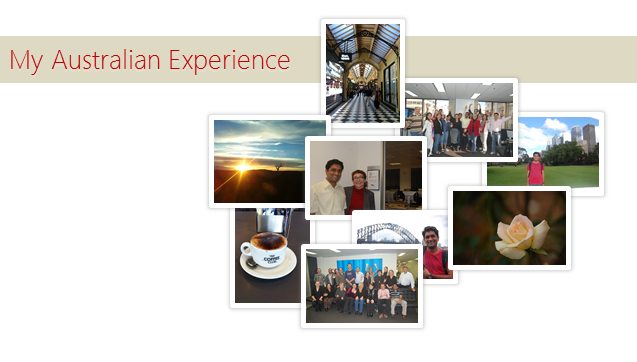
Few Pics
Here are some pics from the last 6 weeks.
Have a good weekend.


12 Responses
Thank you for sharing. What an amazing experience you had!
Thank you Chandoo! for sharing your great experience at Australia! Everyone’s tour intinary should contain Australia & Newzland! Both are lovely Country to vist! Hope, you’ll make your next visit to meet Kiwis.
With Best Wishes!
Many thanks to you, Chandoo. Your work is irreplaceable and an inspiration to us all.
Chandoo,
I love your style of writing. Its very simple and effective. cheers
Dear Sir,
Greetings…
many thankx for share your Australian experience.
great
Come to Brazil plz!
Thats indeed good to read about experiences Chandoo 🙂 Congratulations and best wishes for your future <i>fantastic</i> trips to Aussie..:)
Chandoo u do an awsm job and really make people awsm in excel.. wenevr i am required to suggest someone a site which teaches excel in the simplified manner.. CHANDOO.ORG is the only name that comes in my mind.. fan of ur excel knowledge.. 🙂 😛
Chandoo…..What i like the most at your place is your views and sharing your view/life experience with us…I came to your website few months back searching excel questions but after coming hare i stopped going hare and there and come to chandoo.org many times a day.
Hay while in Melbourne did you visit Melbourne aquarium…For me it was a lifetime experience.
Dear chandoo,
As a age of my 53 years, i fascinated by your detailed oratory style of writing, i respect your commentable knowledge, and make me to go to fun there will be excel behind that, i enjoyed, thank you lot
regards,
nizar ahamed khan
If the courses were anything like your blog, I can see why some people got “addicted”…
Seriously never give up : the world would implode (the world of excel reporting, analysis and decision making that is 🙂 )
Cheers
Chandoo, you are simply great. Aussies were lucky to have you. When are you planning to make us lucky in Dubai.