

 While I was working Denmark, there is one thing I noticed. Danes are one hell of football lovers. The football (soccer) enthusiasm is over the top when there is a match between Denmark and Sweden.
A common practice in many offices is a football pool. This is how it works:
- When there is a match between 2 countries, say Denmark and Sweden, the pool will be open.
- You can bet any amount on any goal combination (say 10 Kr on 1-2 Denmark vs. Sweden)
- Your name is written against the cell combination that denotes 1-2
- Once the match is over, the people who guessed the scores right will share the total pool money
- No matter who wins, everyone drinks a few beers and gossip about the match
Since FIFA 2010 Worldcup is around the corner, I thought it might be fun to create a football betting sheet template in excel that all football lovers can use to bet.
Download the football betting sheet template
Here is how it works:
- Select both countries from drop-downs
- Specify the names of people against goal combinations (for. eg. if Stacey bets for 1-2, her name will be against row 2 and column 3).
- Now, take a printout of this
- Watch the match
- Distribute the money to winners
- Repeat!
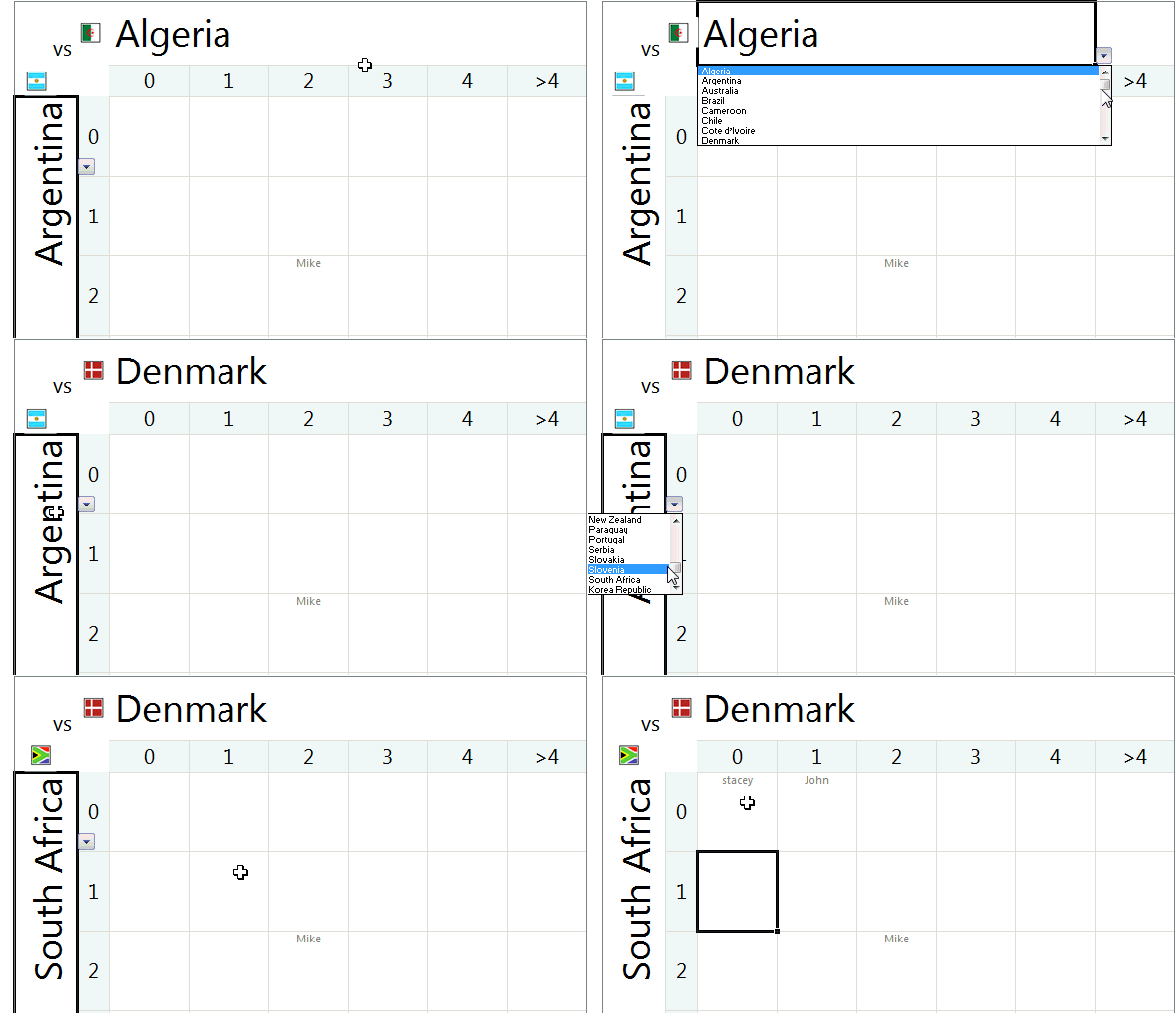
As a bonus, you can see the flags of country based on selection. This mild awesomeness uses excel camera tool.
Go ahead and download the file. I bet that you are going to enjoy the file, even if you don’t bet. 😛
More football madness: Balls used in Fifa Worldcups since 1930 – Visualization.


9 Responses
for the sake of the good order, please note that for us Argentinians, fútbol is THE national sport. No other country, except perhaps Brazil, love football as much as we do.
That said, over this past weeks I have received a lot of fixtures in Excel, and this betting one I think can be included into a General Development World Soccer Cup Dashboard project, which can include not only the fixtures, in the most convenient way to display, but also the local times for each country, some stats, the betting tab, and a summary dashboard.
wow, suddenly, I gave you the topic for your next post contest !!!!
Rgds,
Martin
in Spain, this kind of football pool is called “porra”
thanks for your template.
wonderful again.
There have been quite a few WC2010 spreadsheets recently, notably here and the Excel2010 sites competition. I expect we’ll see a few more in the following weeks. How about a round up Chandoo?
Not really an Excel post but …
Go The Socceroos !!!
Excellent post. Also the the picture tutorial helps me. Sure.
i would like to know if you have any excel application for download the last five results at home for HOME team and the last five away results for away team for upcoming daily soccer games.if you do pls let me know the cost