

In a recent consulting assignment I had a tricky data validation problem. The customer wanted to have an either-or condition in the data validation, like this:
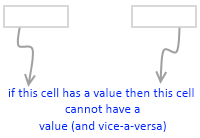
My initial reaction to this requirement was “hmm… that is not possible“. But before shooting the email back to client, I got curious and checked if excel data validation can actually do this. And of course we can do this in Excel with ease.
First see the demo of how this would work:
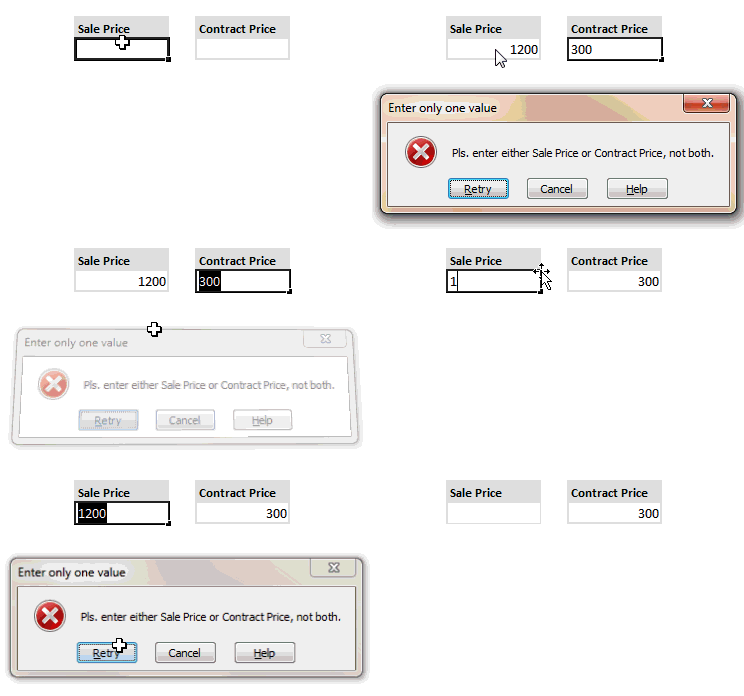
Now to the specifics:
- Select both cells where you want this data validation to be applied.
- Now go to data validation (Data Ribbon > Data Validation or Data Menu > Validation)
- Specify validation type as “Custom” and use a formula like COUNTA() to check count of cells with a value (see the illustration)
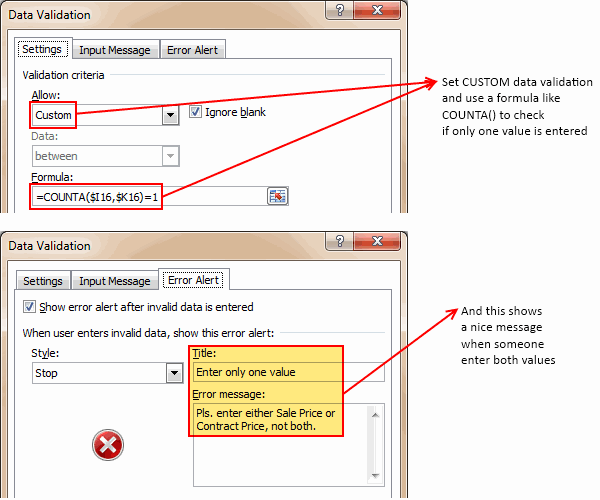
- Optional: Use Error Message settings to set a message you prefer.
- That is all. Now your Either Or Data Validation set up is done.
Download the example file:
Click here to download the example file with this kind of data validation setup. Play with it and learn how to do this on your own.
Learn more about Data Validation in Excel:
Read more about adding a drop down list validation or advanced data validation tricks or all of them.
Related: Writing XOR (either or) formulas in Excel


30 Responses to “Rescue oddly shaped data – Battle between Formulas, VBA and Power Query”
Nice use of Power Query! Power Query is simply awesome! But somehow a lot of people are punishing themselves by not using it (not learning it).
An imperfect 4th approach for consideration... no codes at all...
Select myrange.
Go to Special --> Blank
Delete Cell --> Shift cell left
90% done... now we just need to move the data of 2nd column to the bottom of 1st column
Of course... Power Query is the best.
Cheers,
There is another way but it involves multiple steps:
Copy the values in column E, move the cursor to F5, Paste Special with Skip Blanks, OK
Copy the values in column D, move the cursor to F8, Paste Special with Skip Blanks, OK
And so on.
This works perfectly, albeit a little clumsily apart from the values in B17 and C16, which can be moved with simple copy and paste
Power Query Forever! I do not know how I survived for so long without knowing and using this tool, I can not recommend it to my colleagues, but by the way they prefer to suffer to learn.
My congratulations here from Brazil.
I rolled my eyes when I saw that data
Using decimal places is a nice trick to order data, thanks for that
And tweaking the first formula a bit, you can use OFFSET instead of INDIRECT
=OFFSET($A$1, MIN(IF(myrange, ROW(myrange)), ROWS(A$1:A1))-1, RIGHT(TEXT(MIN(IF(myrange, ROW(myrange) + COLUMN(myrange)*0.00001), ROWS(A$1:A1)), ".00000"), 5)-1)
Tried the above formula with the downloaded oddly shaped data file and I could not get it to work. I get #value without ctrl+shift+enter, and #ref with ctrl+shift+enter.
Sorry, it was SMALL, not MIN.
Add with CTRL+SHIFT+ENTER.
Thank you for your formula. Like the indirect formula I tested this one in older versions of EXCEL and it worked without ALTERATION in EXCEL 95. Very impressive.
Too complicated
Use =Sum to summarize all the sells to the left and Bobs Your Uncle
@Bertie... I am afraid that won't work when you have more than one value in a row.
I tested this formula in versions of Excel all the way back to Excel 95
=IF(ISERROR(INDIRECT("R"&SUBSTITUTE(TEXT(SMALL(IF(MyRange"",ROW(MyRange)+COLUMN(MyRange)*0.00001),ROWS(A$1:A9)),"00000.00000"),".","C"),FALSE)),"",(INDIRECT("R"&SUBSTITUTE(TEXT(SMALL(IF(MyRange"",ROW(MyRange)+COLUMN(MyRange)*0.00001),ROWS(A$1:A9)),"00000.00000"),".","C"),FALSE)))
So there are multiple ways of cleaning up messy data by formulas.
Wow.. Excel 95. Who knew people still use that. But as you have shown, Excel has all these beautiful and powerful functions for 23 years. It has data sciency stuff before DS was even a thing.
I had a problem with pasting the formula in the original post.
Formula should be: =IF(ISERROR(INDIRECT("R"&SUBSTITUTE(TEXT(SMALL(IF(myrange"",ROW(myrange)+COLUMN(myrange)*0.00001),ROWS(A$1:A1)),"00000.00000"),".","C"),FALSE)),"",(INDIRECT("R"&SUBSTITUTE(TEXT(SMALL(IF(myrange"",ROW(myrange)+COLUMN(myrange)*0.00001),ROWS(A$1:A1)),"00000.00000"),".","C"),FALSE)))
EXCEL even in a 16 bit version, is a very robust and capable program.
I don't like the VBA code. If you have a blank row in MyRange, the last entry in the range is doubled up in the paste.here range.
Not really. The macro is writing one cell at a time from paste.here. You have to clean the range before, which I was too lazy to write. But a line like Range(range("paste.here"), range("paste.here").end(xldown)).clearcontents should do the trick.
Adding Range(range("paste.here"), range("paste.here").end(xldown)).clearcontents fixed the problem.
for step split column by delimiter i am not getting option of split into rows or columns. Can you help me in this
Thanks Chandoo for promoting Power Query.
To simplify further, you can "Unpivot Columns" instead of right click on the newly created column and split it by comma in to rows in step 3 of Power Query.
i used
=LOOKUP(10000,B5:F5)
and got the answers. I just plagiarized this formula somewhere and use it, maybe you can explain why it works.
Regards
@Johan... I am not sure if the formula works correctly. When I tested it with the sample data in this post, it showed #N/As in two cells. Essentially, it will only give first value in each row. So if a row has multiple values, then subsequent values are missed. LOOKUP() function goes thru a list and finds the first value that is less than or equal to the input - in this case 10000 in B5:F5.
I have the need to convert pdf's to excel on occasion and they often come out a mess like this. I have used:
Cell G2 =COUNT(myrange)
Cell G3 =IFERROR(IF(G2-1<1,"",G2-1),"") copied down to G100
Cell H2 =IFERROR(LARGE(myrange,G2),"") copied down to H100
Waouw...
=IFERROR(INDIRECT("R" & SUBSTITUTE(TEXT(SMALL(IF(myrange "", ROW(myrange) + COLUMN(myrange)*0.00001),
ROWS(A$1:A1)), "00000.00000"), ".", "C"), FALSE), "")
but CTRL Shift Enter with {} before and after 🙂 😀
Here's a way with pivot table
https://www.bookkempt.com/2018/02/aligning-non-contiguous-data.html
This is brilliant. Bookmarked 🙂
Another possibility.
This assumes that you have a row index 'k' to use in the SMALL function and a column index 'h' to identify the columns of 'myRange'.
If you define 'coord' to refer to
=k+h/10 [assuming h<10]
then it will be possible to recover values later based upon location within 'myRange'. The formula 'nb' that identifies non-blanks by coordinates is given by
= SMALL( IF(myRange"", coord), k )
Finally, to unpick the pieces
= INDEX( myRange, INT(nb), 10*MOD(nb, 1) )
Whilst I am here and making trouble the PQ solution is also a tad over-complicated. All that is needed is to unpivot the entire table and remove the Attribute column.
The advanced editor would show
let
Source = Excel.CurrentWorkbook(){[Name="myRange"]}[Content],
#"Unpivoted Columns" = Table.UnpivotOtherColumns(Source, {}, "Attribute", "Value"),
#"Removed Columns" = Table.RemoveColumns(#"Unpivoted Columns",{"Attribute"})
in
#"Removed Columns"
1.fill the blank cells with 0
2.the requested column value=sum of those mess number column
but this can be used in only one column has value
Chandoo
And if we use the formula SEARCH (100000000, B5: F5)
JC
Another approach with Power Query, it will still work if the number of columns changed:
let
Source = Excel.CurrentWorkbook(){[Name="myrange"]}[Content],
#"Added Custom" = Table.AddColumn(Source, "List", each Record.ToList(_)),
#"Removed Other Columns" = Table.SelectColumns(#"Added Custom",{"List"}),
#"Expanded LIst" = Table.ExpandListColumn(#"Removed Other Columns", "List"),
#"Filtered Rows" = Table.SelectRows(#"Expanded LIst", each ([List] null))
in
#"Filtered Rows"
Cool idea to use Record.ToList as added column. Thanks for sharing this.
Nowadays, you can just use TOCOL on Excel 2024, MS 365, and Web Excel. It has a parameter to ignore blanks/errors/both.