

Have you ever worked on a project which has a plan? What is your experience like?
Let me tell you what my experience is like:
The project plan was changed dozens of times. Delivery dates, shipping dates, testing dates or any other important milestones were constantly revised, sometimes until the last week. Uncertainty seemed to be the biggest problem project managers spent their time on. My managers worked hard to avoid unpleasant surprises.
And this is where the ubiquitous gantt charts often fail.
- A gantt chart based project plan assumes that there is only one possible end date for each activity.
In real world, the end date for each project activity depends on various factors like productivity, progress of other tasks, extra work, employee mood etc.. Thus, the end dates are best expressed in a format like {best case, realistic case, worst case} instead of just one date.
So I am boldly proposing a new type of project plan, henceforth to be called as,
…wait for it…
Gantt Box Chart
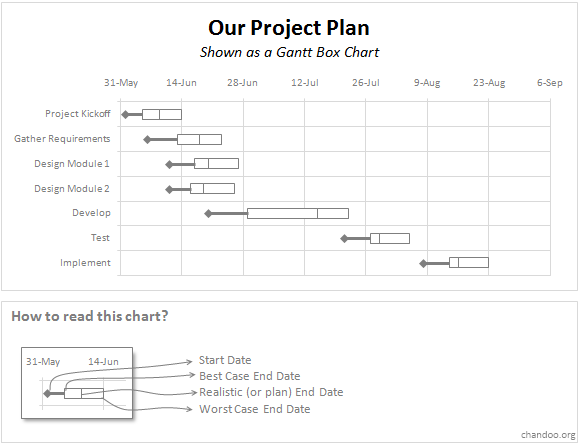
Think of Gantt Box Chart as a holy matrimony between Gantt Chart with Box Plot. The Gantt Box Chart shows uncertainty in project activity end dates by clearly showing 3 end-dates instead of one in the familiar box plot format. The end dates (best case, realistic or plan and worst case) are encoded as a box while the start date is shown as a dot.
Here is how a Gantt Box Chart looks like:
Despite the ugly name, I think the chart is very useful because,
- It shows the uncertainty in plan, very clearly
- It is as easy to read since we follow the Box Plot protocol
- It lets manager focus on the most uncertain portions of project, quickly
- It is new, so the chances of it getting neglected by everyone in boardroom are less 😀
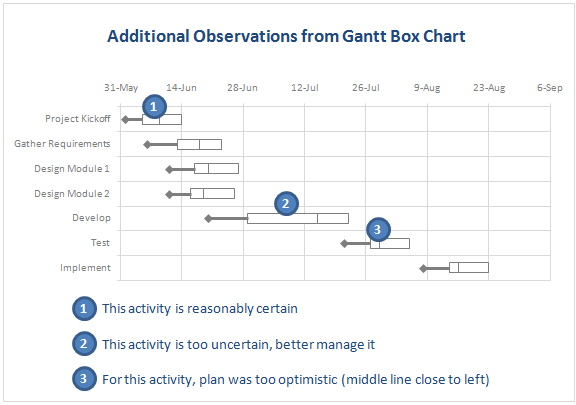
I have summarized few additional observations you can get from a Gantt Box Chart here:
How to make a Gantt Box Chart in Excel?
I will be showing a way to create the gantt box charts in excel on Monday (12th July). Meanwhile, feel free to discuss this new chart and share what you think.
What do you think about Gantt Box Chart?
Would you use Gantt Box Chart for your next project or is this a little too much? What do you think about my proposal? Please share using comments.
Related: Project Management using Excel – an extensive collection of resources, templates, tutorials and ideas for project managers using excel.


20 Responses to “Simulating Dice throws – the correct way to do it in excel”
You have an interesting point, but the bell curve theory is nonsense. Certainly it is not what you would want, even if it were true.
Alpha Bravo - Although not a distribution curve in the strict sense, is does reflect the actual results of throwing two physical dice.
And reflects the following . .
There is 1 way of throwing a total of 2
There are 2 ways of throwing a total of 3
There are 3 ways of throwing a total of 4
There are 4 ways of throwing a total of 5
There are 5 ways of throwing a total of 6
There are 6 ways of throwing a total of 7
There are 5 ways of throwing a total of 8
There are 4 ways of throwing a total of 9
There are 3 ways of throwing a total of 10
There are 2 ways of throwing a total of 11
There is 1 way of throwing a total of 12
@alpha bravo ... welcome... 🙂
either your comment or your dice is loaded 😉
I am afraid the distribution shown in the right graph is what you get when you throw a pair of dice in real world. As Karl already explained, it is not random behavior you see when you try to combine 2 random events (individual dice throws), but more of order due to how things work.
@Karl, thanks 🙂
When simulating a coin toss, the ROUND function you used is appropriate. However, your die simulation formula should use INT instead of ROUND:
=INT(RAND()*6)+1
Otherwise, the rounding causes half of each number's predictions to be applied to the next higher number. Also, you'd get a count for 7, which isn't possible in a die.
To illustrate, I set up 1200 trials of each formula in a worksheet and counted the results. The image here shows the table and a histogram of results:
http://peltiertech.com/WordPress/wp-content/img200808/RandonDieTrials.png
@Jon: thanks for pointing this out. You are absolutely right. INT() is what I should I have used instead of ROUND() as it reduces the possibility of having either 1 or 6 by almost half that of having other numbers.
this is such a good thing to learn, helps me a lot in my future simulations.
Btw, the actual graphs I have shown were plotted based on randbetween() and not from rand()*6, so they still hold good.
Updating the post to include your comments as it helps everyone to know this.
By the way, the distribution is not a Gaussian distribution, as Karl points out. However, when you add the simulations of many dice together (i.e., ten throws), the overall results will approximate a Gaussian distribution. If my feeble memory serves me, this is the Central Limit Theorem.
@Jon, that is right, you have to nearly throw infinite number of dice and add their face counts to get a perfect bell curve or Gaussian distribution, but as the central limit theorem suggests, our curve should roughly look like a bell curve... 🙂
[...] posts on games & excel that you may enjoy: Simulating Dice throws in Excel Generate and Print Bingo / Housie tickets using this excel Understanding Monopoly Board [...]
[...] Correct way to simulate dice throws in excel [...]
[...] Simulate dice throws in excel [...]
I'm afraid to say that this is a badly stated and ambiguous post, which is likely to cause errors and misunderstanding.
Aside from the initial use of round() instead of int(),.. (you've since corrected), you made several crucial mistakes by not accurately and unambiguously stating the details.
Firstly, you said:
"this little function generates a random fraction between 0 and 1"
Correctly stated this should be:
"this little function generates a random fraction F where 0 <= F < 1".
Secondly, I guess because you were a little fuzzy about the exact range of values returned by rand(), you have then been just as ambiguous in stating:
"I usually write int(rand()*12)+1 if I need a random number between 0 to 12".
(that implies 13 integers, not 12)
Your formula, does not return 13 integers between 0 to 12.
It returns 12 integers between 1 and 12 (inclusive).
-- As rand() returns a random fraction F where 0 <= F < 1, you can obviously can only get integers between 1 and 12 (inclusive) from your formula as stated above, but clearly not zero.
If you had said either:
"I usually write int(rand()*12) if I need a random number between 0 to 11 (inclusive)",
or:
"I usually write int(rand()*12)+1 if I need a random number between 1 to 12 (inclusive)"
then you would have been correct.
Unfortunately, you FAIL! -- repeat 5th grade please!
Your Fifth Grade Maths Teacher
Idk if I'm on the right forum for this or how soon one can reply, but I'm working on a test using Excel and I have a table set up to get all my answers from BUT I need to generate 10,000 answers from this one table. Every time, I try to do this I get 10,000 duplicate answers. I know there has to be some simple command I have left out or not used at all, any help would be extremely helpful! (And I already have the dice figured out lol)
Roll 4Dice with 20Sides (4D20) if the total < 20 add the sum of a rerolled 2D20. What is the average total over 10,000 turns? (Short and sweet)
Like I said when I try to simulate 10,000turns I just get "67" 10,000times -_- help please! 😀
@Justin
This is a good example to use for basic simulation
have a look at the file I have posted at:
https://rapidshare.com/files/1257689536/4_Dice.xlsx
It uses a variable size dice which you set
Has 4 Dice
Throws them 10,000 times
If Total per roll < 20 uses the sum of 2 extra dice Adds up the scores Averages the results You can read more about how it was constructed by reading this post: http://chandoo.org/wp/2010/05/06/data-tables-monte-carlo-simulations-in-excel-a-comprehensive-guide/
Oh derp, i fell for this trap too, thinking i was makeing a good dice roll simulation.. instead of just got an average of everything 😛
Noteably This dice trow simulate page is kinda important, as most roleplay dice games were hard.. i mean, a crit failure or crit hit (rolling double 1's or double 6's) in a a game for example dungeons and dragons, if you dont do the roll each induvidual dice, then theres a higher chance of scoreing a crit hit or a crit failure on attacking..
I've been working on this for awhile. So here's a few issues I've come across and solved.
#1. round() does work, but you add 0.5 as the constant, not 1.
trunc() and int() give you the same distributions as round() when you use the constant 1, so among the three functions they are all equally fair as long as you remember what you're doing when you use one rather than the other. I've proven it with a rough mathematical proof -- I say rough only because I'm not a proper mathematician.
In short, depending on the function (s is the number of sides, and R stands in for RAND() ):
round(f), where f = sR + 0.5
trunc(f), where f = sR + 1
int(f), where f = sR + 1
will all give you the same distribution, meaning that between the three functions they are fair and none favors something more than the others. However...
#2. None of the above gets you around the uneven distribution of possible outcomes of primes not found in the factorization of the base being used (base-10, since we're using decimal; and the prime factorization of 10 is 2 and 5).
With a 10-sided die, where your equation would be
=ROUND(6*RAND()+0.5)
Your distribution of possible values is even across all ten possibilities.
However, if you use the most basic die, a 6-sided die, the distributions favor some rolls over others. Let's assume your random number can only generate down to the thousandths (0.000 ? R ? 0.999). The distribution of possible outcomes of your function are:
1: 167
2: 167
3: 166
4: 167
5: 167
6: 166
So 4 and 6 are always under-represented in the distribution by 1 less than their compatriots. This is true no matter how many decimals you allow, though the distribution gets closer and closer to equal the further towards infinite decimal places you go.
This carries over to all die whose numbers of sides do not factor down to a prime factorization of some exponential values of 2 and 5.
So, then, how can we fix this one, tiny issue in a practical manner that doesn't make our heads hurt or put unnecessary strain on the computer?
Real quick addendum to the above:
Obviously when I put the equation after the example of the 10-sided die, I meant to put a 10*RAND() instead of a 6*RAND(). Oops!
Also, where I have 0.000 ? R ? 0.999, the ?'s are supposed to be less-than-or-equal-to signs but the comments didn't like that. Oh well.
How do you keep adding up the total? I would like to have a cell which keeps adding up the total sum of the two dices, even after a new number is generated in the cells when you refresh or generate new numbers.
So, how do you simulate rolling 12 dice? Do you write int(rand()*6) 12 times?
Is there a simpler way of simulating n dice in Excel?
I've run this code in VBA
Sub generate()
Application.ScreenUpdating = False
Application.Calculation = False
Dim app, i As Long
Set app = Application.WorksheetFunction
For i = 3 To 10002
Cells(i, 3).Value = i - 2
Cells(i, 4).Value = app.RandBetween(2, 12)
Cells(i, 5).Value = app.RandBetween(1, 6) + app.RandBetween(1, 6)
Next
Application.ScreenUpdating = True
Application.Calculation = True
End Sub
But I get the same distribution for both columns 4 and 5
Why ?
@Mohammed
I would expect to get the same distribution as you have effectively used the same function