

In today’s quick tip, lets find how to check for between conditions in Excel using formulas, like this:

Between Formula in Excel for Numbers:
Lets say you have 3 values in A1, A2 and A3. And you want to find out if A1 falls between A2 and A3.
Now, the simplest formula for such a thing would be test whether the conditions A1>=A2, A1<=A3 are both true. Hence, it would look like,
=if(AND(A1>=A2,A1<=A3),"Yes", "No")
However, there are 2 problems with a formula like above:
1. It assumes that A2 is smaller than A3.
2. It is just too big.
Shouldn’t there be a shorter and simpler formula?!?
Well, there is. Last week when chatting with Daniel Ferry, he mentioned a darned clever use of MEDIAN formula to test this. It goes like,
=if(A1=MEDIAN(A1:A3),"Yes","No")
Now, not only does the above formula look elegant and simple, it also works whether A2 is smaller or larger than A3.
Between Formula in Excel for Dates:
Well, dates are just numbers in Excel. So you can safely use the technique above to test if a given date in A1 falls between the two dates in A2 and A3, like this:
=if(A1=MEDIAN(A1:A3),"Yes","No")
Between Formula for Text Values:
Lets say you want to find-out if the text in A1 is between text in A2 and A3 when arranged alphabetically, a la in dictionary. You can do so in Excel using,
…
wait for it…
…
that is right, <= and >= operators, like this:
=if(AND(A1>=A2,A1<=A3),"Yes", "No")
Between Formulas in Excel – Summary and Examples:
Here is a list of examples and the corresponding Excel Formulas to test the between condition.
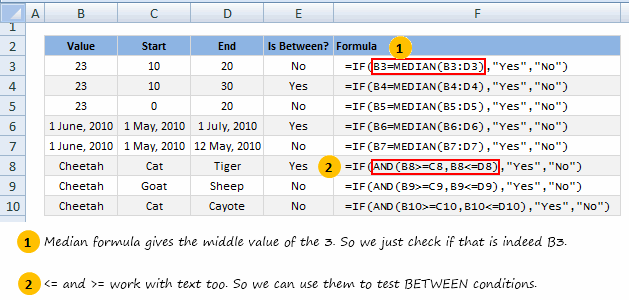
Do you check for Between Conditions in Excel?
Checking if a value falls between 2 other values is fairly common when you are working with data. I would love to know how you test for such conditions in excel? What kind of formulas do you use?
Share using comments.


6 Responses to “A quick personal update”
Thank you for the personal update. It was quite encouraging and a breath of fresh air in my Inbox. Take care and stay safe.
David
Doctors advise:
Virus obstructs lungs with thick mucus that solidifies.
Consume lot hot liquids like tea, soup, and sip of hot liquid every 20 min
Gargle w antiseptic of lemon, vinegar, & hot water daily
It attaches to hair/clothes detergent kills it, when come from st go straight shower
Hang dirty clothes in sunlight/cold overnight or wash immediately.
Wash metal surfaces as it can live on them 9 days
Do not touch hand rails
Do not smoke
Wash hands foaming 20 sec every 20 min
Eat fruit/veg and up zinc levels.
Animals do not spread it
Avoid common flu
Avoid eat/drink cold things
If feel sore throat do above immediate as virus is there 3-4 days before descends into lungs
Would love help with my database mgt in excel.
Thanks for being thoughtful of us.
BTW How do you track your expenses/income in excel? Can you share the worksheet please.
Stay safe you and your family, best wishes.
Thanks for the update and happy to know that you and family are doing good. A 21 day lockdown has now been announced in India (I live around Kolkata) so it's uncertain times ahead. I check up on your wonderful articles often and will do so even more regularly now. Stay safe and God bless.
Hi from Argentina, I follow you for a lot of years now. We here are in a quarantine for 2 or 3 weeks, because the pandemia.
Excel is also my passion and I came here looking for a Num2Words formula, but in spanish. If anyone have it, please let me know.
Best regards.
Pablo Molina
La Rioja - Argentina
I'm glad to have your personal update. I'm from India & following you for so many years. Cheers to have any further personal update.