

One of our readers Jennifer mailed me with this excel charting problem she is having. I thought why not ask other readers for their advice on this. So here it goes:
The Charting Challenge – Visualizing Changes in Market Share
Here is an excerpt from her email:
The gist of my problem is how to show change-in-market-share between time period 1 and time period 2 for two different products in the cleanest, easiest-to-grasp way.
One of the restrictions that I have are that I have to somehow show both the fact that the mkt shares add up to 100%, and the changes.
However, I am concerned that the main takeaways; increases in competitor 1 is being driven by decreases in competitor 2 … might get lost.
The sample data along with the initial graphs she has built are shown below:


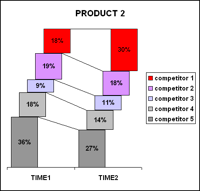
you can access the market share data at this shared google doc.
Now, the question for you is: How would you improve this graphs to bring out the message?
Here are few ways I could think of:
- Reversing the competitor order to 1 at bottom and 5 at top so that comparison can be easy
- Changing the stack overlaps from partial to full so that the step-case look can be removed.
- Instead of stacks, using regular bar charts with 5 sets of columns, 1 each for a competitor and using colors to bring contrast between period 1 and period 2.
Your turn…
PS: you can post images in comments by uploading the images to a free site like flickr or photobucket and then copy pasting the image link in the comment box.


17 Responses
How about using 2 bump charts?
Useful links:
http://www.processtrends.com/toc_bumps_charts.htm
http://junkcharts.typepad.com/junk_charts/bumps_chart/
Sorry if this is a duplicate comment — wordpress returned an error that said I am not authorized to access comments.php? Maybe because I tried to insert the photobucket link w/embedded image?
Anyway, let’s try again:
I’d put two charts together for each product highlighting gain/loss on the left and before/after on the right.
http://i376.photobucket.com/albums/oo206/thenoob666/marketshare-1.jpg
I might go with a simple column or bar chart that only shows the change in market share by competitor with maybe a total market share label. I would not use stacked bars because the baselines are different after the first segment, which makes a comparison difficult.
I will try a sample when I have a few minutes.
Chandoo — Thanks for posting this.
And Robert, thanks for the pointer to the bump charts. I had never seen them before. I gave them a try with my data and really like the results.
You can see it here:
http://i453.photobucket.com/albums/qq251/sollje2002/bumpchart_example.jpg
After sitting on this one for almost two months, I have finally added my 2¢ in Challenge – Show Market Share Changes.
@Jon: thanks for your post. It is surely very insightful 🙂
Hello Chandoo – I’ve posted another solution at Jon’s Blog (see link two posts up) and Jon suggested I post a note here as well. — regards nixnut
Can i get the template ?
gr8 work done Chandoo(MVP)…
Kudo’s Jon, nixnut, Dave
I’m 1st year student from NITIE and I really liked your passion for data visualization…
Hope you come up with such real time tricky problems which involves lotz of man power into this…
I thought of leaving you guys a complement over here…
Thanks a lot of you guys…
@Bharath: Welcome to PHD. I really like NITIE even though I have been to the insti only once for few hours in 2003 for GDPI. It is peaceful and soothing amidst the buzz of Mumbai. Hope you are having a great time there.
We have several discussions on visualizations and related topics almost on weekly basis. Do chip in with your views and suggestions and see how you can learn and share.
Hi Chandoo, I have looked to the above concept for measuring the Markt share, but that little bit not updated in matter of charting ( i mean not advance) , i have subscribed to the Excell lessons, but i didnt see any dashboard helping in analayzing market share for products.. Do you have any new format/templates for that purpose?
Thanks
Ahmed
I think the stacked column chart should serve the purpose but data bars from Conditional Formatting would also work
http://i1025.photobucket.com/albums/y311/Kiarie_William_Njihia/mktshare_zpsdjn6dpd6.png?t=1439451727