

With 2008 US Presidential elections around the corner everyone is busy including chart makers. There are hundreds of excellent visualizations on the presidential election campaign, speeches, issues, predictions that keeping track of what is best can be a tough task. We at PHD have compiled a list of 35 totally awesome visualizations on the 2008 election. Do check these to get more insights in to this election.
The visualizations are grouped in to these categories:
- Campaigns & Speeches
- Projections
- Primaries & Caucuses
- Other Politics
- Trivia & Fun Facts
Like this list? Browse other cool visualizations here.
Visualizations on Campaigns & Speeches
Article References to Obama & McCain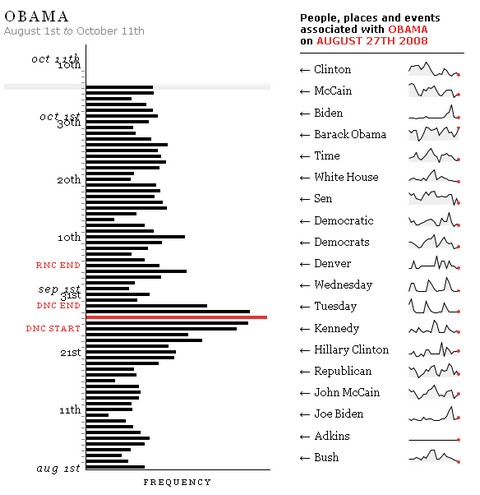
How many articles are referring to Obama and McCain
Donations Made to Political Candidates
Donations received by each candidate. The blue semi-circles in the center describe the size of the overall donations by both Obama and McCain. The lines indicate the amount of donation made.
Anatomy of Speech – Barack Obama’s Acceptance Speech at DNC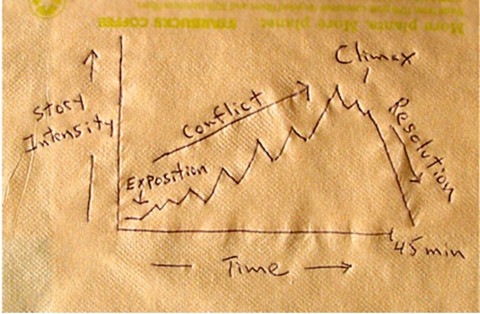
Presentation Zen takes a look at Obama’s acceptance speech at DNC and compares it with a symphony.
Wordtree – Obama Speaks at DNC
Obama’s speech, the word “WE” in a word tree.
Sarah Palin in VP Debates – Wordle Tag Cloud
Look at what Palin spoke in the VP debates recently, in a word cloud. More Wordle clouds : McCain, Obama @ DNC, Obama vs. King – the speeches I have a Dream vs. More Perfect Union
Marginal Taxes – Obama vs. McCain
How each candidates taxation policies effects the marginal taxes.

Break up of campaign finance information by NY Times.

How the tax plans of Obama and McCain are going to impact you?

Campaign finances information visualization by BBC

This info-graphic shows which candidate is spending how much in each state in advertising. Looks like Obama beat McCain hands down in most states as far as ad spending is concerned.
Candidate Visits to Each State
This visualization by CNN shows us how many times each candidate has visited each of the 50 states since the campaign has began. You can see that swing states have attracted unusually large amounts visits compared pre-decided states.
Issues and Agendas, What is their Stance?
This stacked chart shows how much each candidate has given preference to the various issues like health care, taxation etc.
Visualizations on 2008 US Presidential Elections – Projections & Polls
Vote Prediction Tracker – US Electoral College
Intrade – 2008 Electoral Projections

Pollster – View & Analyze Polls
Perspctv – another Election Tracking Site
Presidential Watch – what various websites are saying
The Economist’s pole – Economists prefer Obama over McCain


Google Maps Projections Tracker

Primaries & Caucuses
Who names who – Debates leading to Iowa Caucuses
This interactive visualization takes a look at the speeches made during primaries and caucuses and tells us who is naming who.
How they voted in primaries ? – Clinton vs. Obama
This brilliant visualization provides very good analysis of how people voted in democratic primaries.
Visualizations on Trivia & Fun Facts
The Measure of a President – NY Times
The height and weight of presidential candidates since the 1896.
Obama vs. McCain – Google Search Insights
Who is searched more? Obama or McCain, now you can find it with Google Search Insights
Compare Political Quotes – Google Labs
Compare quotations made by candidates on various issues.
Red vs. Blue – Popularity of Books – Amazon
Amazon plots their book sales data to show which states are reading what wrt. political orientation.

This interactive chart shows the life of each president and when he became the White house inhabitant. A fun way to look at who got the opportunity very early and who waited long.
Amazon Halloween Mask Sales – Obama vs. McCain
Can Halloween mask sales predict who is going to be next president. Amazon has built a meter for us to track who is selling more masks – Obama or McCain. Looks like Obama is leading here.

Want to findout more about party head quarters in each city / state? This google maps application is perfect for trivia mongers.
Visualizations on Other Politics
who voted No to the $ 700 Bn Bailout Plan
The NY Times interactive graphic tells the story behind the initial NO vote for the $ 700 Bn bailout package.
How republican and democratic senators voted in 2007
Another look at how both republicans and democrats voted in 2007, you can see why McCain calls him self a maverick. He is the only one not connected to the republican network.
National Debt by Political Party
This graph shows US National Debt by in years since 1975. The bars are colored based on the ruling political party at that time.
Bonus Visualizations – For Fun
Palinworld – New Yorker coverpage
A humorous take by New Yorker on how Palin Sees the world form her home
What your vote helps determine – PHD Comics
PHD Comics takes a look at the irony of what each vote determines.
So which one(s) do you like better?


8 Responses to “Top 5 keyboard shortcuts for Excel Charts”
As far as I remember (checked, again, 2 minutes ago) in my "Excel 2013" in order to select various chart elements I need to use the Arrow keys and not the TAB key.
Practically, the TAB key does nothing (within a Chart).
----------------------------
Michael (Micky) Avidan
Thanks for pointing this out. This is how I remember it too, but when I was recording the video yesterday, only TAB key worked. MS must have changed the keys in Excel 2016. I have edited the post to include both keys.
The key navigation on charts is different in 2016.
TAB cycles through a layer of objects (SHIFT+TAB cycles backwards)
ENTER move down a layer
ESC moves up a layer
So on a column chart with title/legend/data labels if you select the plotarea the TAB will go through Title > Legend > Plotarea.
ENTER at plotarea will then select Vertical axis. Tab will take you through
Horizontal axis > gridlines > Series > Horizontal Axis.
ENTER with series selected will then allow you to TAB through individual data points and data labels.
If you ENTER on datalabels you can TAB through each data label.
ALT + F1 : to create default chart
ALT+E S T = CTRL + ALT + V, T : I find that easier to remember
I second what Michael already said about TAB and arrow keys. I can't help but think if this is related to the "," or ";" as separator. I prefer to use the chart tools - layout- drop down box, anyway.
Got to be F11 for instant charting. Highlight your data , hit F11 and voila! ?
Ctrl+1 is the most important chart shortcut. In fact, it works for any Excel object: whatever is selected, Ctrl+1 opens the task pane or dialog to format that object.
Somewhere along the line, maybe when Excel 2016 came out, the arrow keys stopped working to cycle through the elements of a chart. But what works is holding Ctrl while clicking the arrow keys. I haven't gotten used to the Tab and other keys, but as long as Ctrl+Arrow works, I'm good.
And F4 used to be so helpful when formatting a lot of charts. But since Excel 2007 came out, it has been mostly useless. It used to remember a whole set of changes at once, so I get that the newer modeless dialogs make that impractical. But now it only seems to work with formatting of lines and borders, and maybe fills. I find myself writing a lot of VBA one-liners in the Immediate Window to handle these tedious formatting tasks.
after clicking on a chart, is there a shortcut key to copy it?
Thank you for the Alt E S T - tip. This is more than a time saver. Because of dynamic charts or de-activated external references to data when you make the charts, you often have empty charts that are otherwise impossible to format. So this shortcut helps adressing that. I will work with it more and see if there remain some obstacles.