

I have 2 quick announcements & 1 Excel tip for you.
Announcements
- Registrations for next batch of VBA Class start form January 11th (Wednesday). Please click here to download the course brochure.
- 20% Holiday discount on Excel School expires tonight (Midnight, Pacific Time). Please visit Excel School page and use the code LETSGOEXCEL to claim your discount.
Excel Tip
When you print a long report, notice how Excel chops it in to pages? Sometimes, you don’t like how the pages are broken and want to insert page breaks where you want.
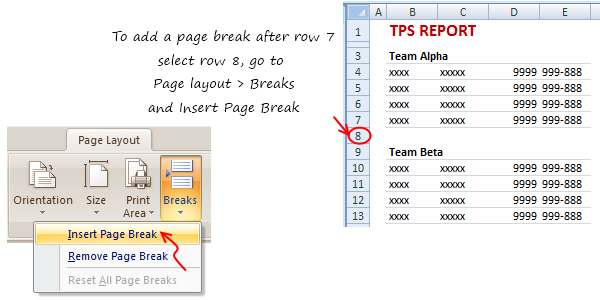
Here is how you can insert page breaks:
- If you want to insert a break after Row 7
- Select the row 8
- Go to Page Layout > Breaks
- Select Insert Break
PS: If you use Page Break Preview mode (from view ribbon), you can manually drag and resize pages until everything looks the way you want.
PPS: If you want to learn Excel (and dashboards), consider joining Excel School. If you hurry up, you can even get 20% discount. Click here.


One Response to “Quick Update about VBA Classes & Discount Expiry!”
Hi,
I tried to register for your excel class using the LETSGOEXCEL discount code (for which I can see no actual expiry date) and it says that it has already expired 🙁
Have I, in fact, missed this special?
thanks,
Tracy