

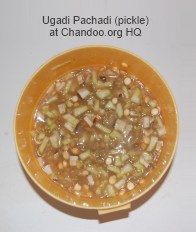
 Today, I am taking a break from Speedy Spreadsheet Week to celebrate Telugu New year with my family. Ugadi (meaning start of a new era) is celebrated on first day of Telugu year and occurs in March / April.
Just like other festivals in India, Ugadi too has some rituals which are fun & have deep meaning. For example, on ugadi it is customary to eat Ugadi pickle – made of different ingredients so that it has 6 tastes – sweetness, sourness, bitterness, salty, hot taste and tang. This signifies life has all experiences – happiness, disgust, sadness, fear, anger and surprise and be prepared (more on wikipedia).
Here is a pic from early today morning, when we could finally convince the kids to laugh when the camera clicks.
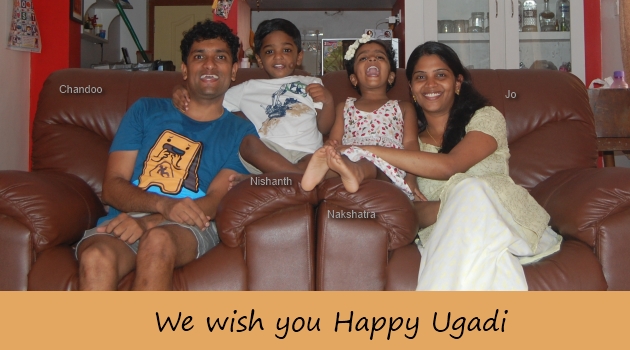
We wish you happy Ugadi and I hope that your life is filled with happiness & awesomeness.
PS: Excel Speeding up tips by Experts article will be published on Monday (March 26) and Tips submitted by you will be posted on Tuesday (March 27).
PPS: If you want to wish some one Ugadi, you say Ugadi Shubhakamkshalu (pronounciation)


32 Responses to “Happy Ugadi”
Hi Chandoo,
Happy Ugadi...... Good to see ur pic with family.....
Hello Mr.Chandoo,
May this Ugadi bring you new spirit, new beginning and new prosperity.
Wishing you a very happy Ugadi!
I am very new to your website which very informative and useful.
Though I have completed my 36th year of age but completely 0 in Excel. I want to begin it as a beginner. Can you help me?
Regards,
Murali
Hi Murali...
Thanks for the wishes & love. I suggest starting here:
http://chandoo.org/wp/excel-tutorial/
http://chandoo.org/wp/2011/12/12/learn-excel-by-topic/
and then, may be enrolling in Excel School here:
http://chandoo.org/wp/excel-school/
Wow, it also happens to be my 39th b'day !!!
Happy Ugadi to you all too !!!
Many happy returns of the day Martin 🙂
I hope your celebration marks the beginning off new things: happiness, personal growth, and awesome Excel-ing. In America, we often give presents for celebrations, so here's my present to you:
http://kvisit.com/SzMfiAQ
Thank you so much for the lovely present Jordan... 🙂
Hey Jordan
how does it work?
How did you do that?
kind regards
Stef@n
@Stef@n
Have a look at: http://chandoo.org/wp/2008/12/17/creating-excel-art-from-images-spreadsheet-fun/
You could do that. But I also made my own version, here: http://optionexplicitvba.blogspot.com/p/fun-downloads.html
I'll be honest and say that Excel Art version is probably a bit better than mine.
Happy New Year!
Ugadi Shubhakamkshalu!
Thank you for sharing this day with us. It brought a big smile to my face!
Hi Chandoo,
Happy Ugadi…… Good to see ur pic with family…..
I hope your celebration marks the beginning off new things: happiness, personal growth, and awesome Excel-ing. In America, we often give presents for celebrations, so here’s my present to you:
Hi, Mr. Chandoo,
Happy Igadi to you and your family. Thanks for all. Be happy.
Happy New Year!!! Good to see you all so cheerful...
Hi Mr Chandoo,
Happy New year to you and your family. thanks for share we us.
Hi Chandoo,
;o)) Ugadi Shubhakamkshalu
good spirit and prosperity !
Happy Ugadi
i wish you and your family a good life and happy year and i want to thank you so much for your efforts that help us to do best things in excel and more.
Looks like you are all having fun! Happy Ugadi!
Dear one of my most valuable man, chandoo...
happy new year
Ugadi Shubhakamkshalu..
we hope happines and excellence in your professional and personel life..
Hai Chandoo garu
Meeku Mee Kutumba sabyulaku Ugadi subhakankshalu
Hi chandoo & family, Nandana naama samvathsara subhakankshalu
i wish your family to be a rockstar in all the aspects of life
We love u and ur service chandoo. 🙂
Ugadi Shubhakamkshalu Poorna Garu meeku, mee familiki..
Thanks a lot for excellent website and its like GOLDMINE really..
Adivishnu Nandam
Hi, Chandoo!!!
Happy Ugadi to you all!!!!
All the best for you!!!
Hi
It was indeed a pleasure to see your nice picture. Life does not mean business alone. We should enjoy and celebrate our rich and diverse culture.
BTW I really enjoy your excel tips.
Natwar
Ugadi Shubhakamkshalu to you all.
Thank you as always for the awesome tips.
Thank you sir..and wish u the same.
HI Chandoo, Ugadi Subhakankshalu.
I have been recently following your posts and found very handy and useful for new users of excel and professionals equally.
Thanks for this effort.
Marokkasari, Ugadi Subhakankshalu.
hope you had a great weekend!
Regards,
Bala
@All...
Thanks for lovely wishes & blessings. We had a wonderful Ugadi and weekend. I hope you had fun too 🙂
Hi Chandoo,
You are really doing great job !!! apart from that you have not forgotten our traditional celebrations and trying to give information about the festival to others also.... Very good ... All the best 🙂
Regards
Jayashree
Happy Ugadi Chandoo! Thanks for sharing your culture. Wishing you a blessed new era!