In the 13th session of Chandoo.org podcast, lets turn our attention to on-going FIFA worldcup and ask an important question.
What is in this session?
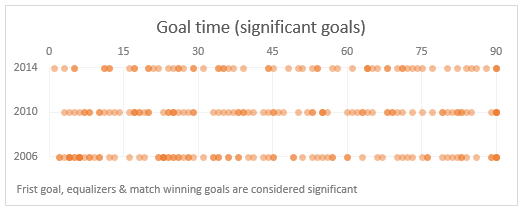
A week ago, we discussed “Has it been a late goal FIFA worldcup?” and used various charts & analysis techniques to answer the question. In podcast, lets tackle the same problem, understand various approaches to answer questions like these & shares some lessons for all the analysts.
In this podcast, you will learn,
- A familiar problem in many situations (including sports)
- First rule of analysis – Define context
- Various attempts to understand goal timing data of FIFA worldcups
- Lessons for analysts
- Bonus tip: Friday the 13th calculations using Excel
Go ahead and listen to the show
Podcast: Play in new window | Download
Subscribe: Apple Podcasts | Spotify | RSS
Links & Resources mentioned in this session:
About data analysis & charting:
- Has it been a late goal FIFA worldcup – analysis & charts
- How to select right type of charts for your analysis needs
- GOOOOOOOAL – Goal timing analysis by Economist [Recommended reading]
- Messi is impossible by FiveThrityEight [Recommended reading]
- Understanding & visualizing Roger Federer’s 7th Wimbledon win [Recommended reading]
Friday the 13th:
Transcript of this session:
Download this podcast transcript [PDF].
What kind of questions do you face in business analysis? How do you try to answer them?
While our example is on football, the same kind of questions are asked everywhere. Many businesses, non-profits, institutions & individuals ask these questions every day and struggle to find right answers.
So what about you? What kind of interesting questions do you face in business analysis? And how do you answer them? Please share your experiences in comments area.


13 Responses to “Convert fractional Excel time to hours & minutes [Quick tip]”
Hi Purna..
Again a great tip.. Its a great way to convert Fractional Time..
By the way.. Excel has two great and rarely used formula..
=DOLLARFR(7.8,60) and =DOLLARDE(7.48,60)
basically US Account person uses those to convert some currency denomination.. and we can use it to convert Year(i.e 3.11 Year = 3 year 11 month) and Week(6.5 week = 6 week 5 days), in the same manner...
This doesn't work for me. When applying the custom format of [h]:mm to 7.8 I get 187:12
Any ideas why?
@Jason
7.8 in Excel talk means 7.8 days
=7.8*24
=187.2 Hrs
=187 Hrs 12 Mins
If you follow Chandoo's instructions you will see that he divides the 7.8 by 24 to get it to a fraction of a day
Simple, assuming the fractional time is in cell A1,
Use below steps to convert it to hours & minutes:
1. In the target cell, write =A1/24
2. Select the target cell and press CTRL+1 to format it (you can also right click and select format cells)
3. Select Custom from “Number” tab and enter the code [h]:mm
4. Done!
Hi, sorry to point this out but Column C Header is misspelt 'Hours Palyed'
good one
So how do I go the other way and get hours and minutes to fractional time?
If you have 7.5 in cell A1,
- Use int(A1) to get the hours.
- Use mod(A1,1)*60 to get minutes.
If you have 7:30 (formatted as time) in A1
- Use hours(a1) to get hours
- Use minutes(a1) to get minutes.
I had the same issue. You can solve it by changing the format as described above:
Right click cell > Format Cells > (In Number tab) > Custom > Then enter the code [h]:mm
([hh]:mm and [hhh]:mm are nice too if you want to show leading zeros)
Thanks guys, these are the tips I'm looking for.
...dividing the number of minutes elapsed by the percent change is my task - "int" is the key this time
It doesnt work for greater than 24 hours
It returns 1:30 for 25.5 hours. It should have returned 25:30
Ideally I would right function as
=QUOTIENT(A1,1)&":"&MOD(A1,1)*60
Sorry, replied to wrong comment....
----
I had the same issue. You can solve it by changing the format as described above:
Right click cell > Format Cells > (In Number tab) > Custom > Then enter the code [h]:mm
([hh]:mm and [hhh]:mm are nice too if you want to show leading zeros)
Clever use of MOD here to extract the decimal part of a number. Divide a number containing a decimal by 1 and return the remainder. Humm. Very clever.
Thanks very much, extremely useful !