

Not that I have friggatriskaidekaphobia or anything. But since today is Friday & 13th, lets put our Excel skills to test and find out when the next Friday the 13th is going to be.
(trivia: Check this for some interesting facts about Friday the 13th)
Finding Next Friday the 13th using Excel Formulas – Approach 1
Lets say, you have a date in cell C3, and you want to find out when the next Friday, the 13th is going to be starting the date in cell C3.
The first approach I can think of is pretty straight forward.
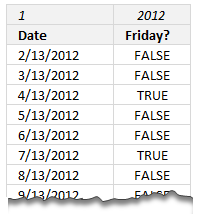 We list all the 13ths in a column and find the next 13th which is also a Friday. For this,
- In cell E3, we write =MONTH(C3)
- In cell F3, we write =YEAR(C3)
- We use these 2 cells to refer to the month and year of the starting date.
- Then, we write in an empty cell =DATE($F$3,$E$3+ROWS($A$1:A1),13) – lets say this cell is E5
- This gives us the 13th date of next month, from the start date in cell C3.
- Now, lets drag this formula and fill it down, for say, next 100 cells to get next 100 13ths.
- The ROWS($A$1:A1) portion generates continuous numbers from 1 thru 100 and thus we get next 100 13ths.
For more on this technique, read – Using ROWS() to generate a series of numbers
Once all the 13ths are listed, in an adjacent column, we can use WEEKDAY() formula to see if the 13th is a Friday – WEEKDAY(E5)=6
This column will have a bunch of TRUE & FALSE values.
Now to find the next Friday the 13th, we just look for TRUE value in this column (say F5:F104) use it to derive the date.
So this formula =DATE(F3,E3+MATCH(TRUE,$F$5:$F$104,0),13) should give us the next Friday, the 13th.
Break up of above formula:
- MATCH(TRUE,$F$5:$F$104,0) tells us the position of first TRUE value (ie first Friday, the 13th in our list)
- DATE(F3,E3+Match value, 13) gives the date of next Friday, the 13th
- Remember, F3 contains the year and E3 the month of starting date you entered in C3.
Finding Friday the 13th, 2nd Approach
While above approach works fine, it requires a few helper columns. So I got thinking, how can we write a one shot formula that gives us next Friday, the 13th date?
First the formula:
This is an array formula.
{ =DATE(YEAR($C$3), MATCH(TRUE, WEEKDAY(DATE(YEAR($C$3),MONTH($C$3)+ROW($A$1:$A$100), 13))=6,0) + MONTH($C$3),13) }
Scary formula indeed. We may have to coin a word for fear of long excel formulas – doubleXLformulaphophia.
How does this formula work?
Before understanding the portions of this formula, we need to understand the approach.
This formula uses similar thinking as of earlier formula. Just that it shrinks all those helper columns to an array and works the magic.
To find next Friday, the 13th, we need to list down next few 13ths and check which one is a Friday. Since Excel lookup formulas always return the first match, we find the first such Friday.
Parts of the formula:
- To get the next 100 13ths, we use, DATE(YEAR($C$3),MONTH($C$3)+ROW($A$1:$A$100), 13)
When used in an array formula, this gives us the 13th days of next 100 months.
(aside: technically, we do not need next 100 months. As per Wikipedia, the maximum gap between successive Friday, the 13ths is 14 months. more)
Also, note that we are using ROW() formula, not ROWS(), as we want all the row numbers for first 100 rows as an array.
- Once we have these 100 dates, we just check for their Fridayness with, WEEKDAY(100 dates))=6
This formula returns a 100 TRUE & FALSE values. TRUE, whenever the date is a Friday, FALSE, when it is not.
- Then, we find the first TRUE value (ie first occurrence of Friday, the 13th in next 100 months) with, MATCH(TRUE, next 100 dates’ Fridayness, 0)
This gives us the position of next TRUE value.
- Finally, we use that to construct the date of next Friday, the 13th – DATE(YEAR($C$3), MONTH($C$3) + first TRUE value, 13)
And that is how we find the next Friday the 13th based on the start date in cell C3.
Important Note:
Both approaches only search for Friday, the 13th starting next month of the date in C3. If C3 has a date prior to 13th and the 13th of that month is a Friday, the 13th, it would not be considered. For example, if you enter 10-JAN-2012 in C3, both formulas would find next Friday the 13th as April 13, 2012 not Jan 13, 2012.
Download Friday, the 13th Example Workbook
I have made a colorful (and almost gory) download workbook. Even if you do not want to learn this, I suggest downloading the file, for fun!
Click here to download the Friday, 13th calculations workbook & play with it.
Bonus: It has homework too!
Your Homework
Finally some homework to wrap up this week.
Write a formula to find the maximum gap between consecutive Friday, the 13ths in next 5 years, from a starting date in cell C3.
Please post your answers in comments so that we all can learn.
Checkout more Formula Forensics
Once in a while, we take a complex real world (or as in this case, gory world) problem and write an equally scary formula. Then, we go great lengths breaking it down and explaining it. We call this as Formula Forensics. Much like forensics in CSI, without ultra zoom & hot chicks. You can check out some of our recent adventures here:
- Using an array formula to count maximum occurrences of a text
- Counting specific words in a multi-cell range
- Extracting a list of items from a larger list by criteria
- … More formula forensics
PS: It is also Hui’s birthday today. Lets wish him many more years of fun, happiness & Excel craze.
PPS: Finding his next birthday is going to be simple, we just write =DATE(2013,1,13) 😛


22 Responses
excellent..!!!
I think this will work. Must be set as an arrary formula =MAX(DATEDIF(A1:A12,A2:A13,”m”))
This method calculated the max difference to be 14 months. (July 2012 to September 2013)
Well, this exceeds the 7 function nest limit in pre-2007 workbooks, but this the array formula I’ve got so far:
=MAX(LARGE(IF(WEEKDAY(DATE(YEAR(C3),MONTH(C3)+ROW(A1:A60),13))=6,DATE(YEAR(C3),MONTH(C3)+ROW(A1:A60),13)),ROW(INDIRECT(“A1:A”&COUNT(IF(WEEKDAY(DATE(YEAR(C3),MONTH(C3)+ROW(A1:A60),13))=6,DATE(YEAR(C3),MONTH(C3)+ROW(A1:A60),13)))-1)))-LARGE(IF(WEEKDAY(DATE(YEAR(C3),MONTH(C3)+ROW(A1:A60),13))=6,DATE(YEAR(C3),MONTH(C3)+ROW(A1:A60),13)),ROW(INDIRECT(“A2:A”&COUNT(IF(WEEKDAY(DATE(YEAR(C3),MONTH(C3)+ROW(A1:A60),13))=6,DATE(YEAR(C3),MONTH(C3)+ROW(A1:A60),13)))))))
Idea is to use 2 sets of Chandoo’s original formula to create arrays, then use the LARGE function to compare them by taking the differences. (note that it compares the 1:(n-1) largest with the 2:n largest. Then use a MAX to get the largest difference. With a date of Jan 13th, 2012 in C3, I get a result of 427, the gap between 9/13/2013 and 7/13/2012. I’m going to work now on reducing the nesting level.
Here’s my alternate way that I don’t believe exceeds the 7 nest limit:
=MAX(IF(LARGE(IF(WEEKDAY(DATE(YEAR(C3),MONTH(C3)+ROW(A1:A60),13))=6,DATE(YEAR(C3),MONTH(C3)+ROW(A1:A60),13),0),ROW(A1:A59))-LARGE(IF(WEEKDAY(DATE(YEAR(C3),MONTH(C3)+ROW(A1:A60),13))=6,DATE(YEAR(C3),MONTH(C3)+ROW(A1:A60),13),1),ROW(A2:A60))<1000,LARGE(IF(WEEKDAY(DATE(YEAR(C3),MONTH(C3)+ROW(A1:A60),13))=6,DATE(YEAR(C3),MONTH(C3)+ROW(A1:A60),13),0),ROW(A1:A59))-LARGE(IF(WEEKDAY(DATE(YEAR(C3),MONTH(C3)+ROW(A1:A60),13))=6,DATE(YEAR(C3),MONTH(C3)+ROW(A1:A60),13),1),ROW(A2:A60))))
Plugs in a 1 instead of FALSE in Chandoo's portion of the formula, and then uses an overall IF check to sort out any differences that are outside the needed range.
For the first approach I have the following alternative:
– I would write first date (1/13/2012) in A1
– Then would drag it down by holding mouse’s right button and fill months. This will give us 13th of each month
– Then in B1 would use simple WEEKDAY formula (=WEEKDAY(A1,2))
“5” will represent Friday.
– Then would count number of “5”s, using Countif function for example.
Here’s a little formula to give you all the friday 13th’s in any year!
=”Friday 13’s for the year “&M19&” are in months “&SUBSTITUTE(TEXT(SUMPRODUCT({10000,100,1}*(0&MID(“05 0110 0407 0912 06 02031105 10 0104070912 06 0311 0208 0110 “,{1,3,5}+(((MONTH(DATE(M19,2,29))=2)*7+MOD(DATE(M19,1,1),7))*6),2))),”00\,00\,00″),”,00″,””)
Or simpler
=”Friday 13’s for the year “&L23&” are in months “&SUBSTITUTE(TEXT(SUMPRODUCT(LARGE(–(MOD(DATE(L23,{1,2,3,4,5,6,7,8,9,10,11,12},13),7)=6)*{1,2,3,4,5,6,7,8,9,10,11,12},{3,2,1})*{10000,100,1}),”00\,00\,00″),”00,”,””)
And to find the next friday the 13th, try this little array formula :-
=MATCH(“13.Fri”,TEXT(ROW(INDIRECT(“1:366″))+C2,”dd.ddd”),0)+C2
And to find the next friday the 13th, try this little array formula :-
=MATCH(“13.Fri”,TEXT(ROW(INDIRECT(“1:366″))+C2,”dd.ddd”),0)+C2
Enter with CTRL+SHIFT+ENTER
1:366 should be 1:430 since the maximum period between Friday the 13th is 427 days!
Assuming A1 to have a friday the 13th
=EDATE(A1,MATCH(6,WEEKDAY(EDATE(A1,ROW(A1:A430))),0))
Here is an update to your array formula that will allow you to find the next friday the 13th even if you are in the same month that it occurs. The original formula only searched dates in months after the current month.
DATE(YEAR($C$3),MATCH(TRUE, WEEKDAY(DATE(YEAR($C$3),IF(DAY($C$3)<=13,0,MONTH($C$3))+ROW($A$1:$A$100),13))=6,0)+IF(DAY($C$3)<=13,0,MONTH($C$3)),13)
All I can say is “WOW”
You guys are amazing.
@Sqiggler
I love your lateral thinking!
amazing amazing ama . . . . .. . .. . . . . . .. .
just write a start date 13-jan-2012 apply the formula =edate(13-jan-2012,1) and in the b column apply formula =if(text(a1,”ddd”)=”fri”,a1,””) its sorts all the fri13th after this use the filter and visible sales and paste……..
427
{=MAX(‘Approach 2’!C7:C18-‘Approach 2’!C6:C17)}
As for the important note (although a little late) and I quote:
“If you enter 10-JAN-2012 in C3, both formulas would find next Friday the 13th as April 13, 2012 not Jan 13, 2012”.
The following Array Formula will return Jan 13, 2012 for 10-JAN-2012 in cell C3:
———————————————————————————-
=C3+MIN(IF(DAY(C3+ROW(1:999))=13,IF(WEEKDAY(C3+ROW(1:999))=6,ROW(1:999),999),999))
———————————————————————————-
Michael (Micky) Avidan
ISRAEL
…and as per the single formula (no helper columns) ?????? ?? ??? ???try the suggestion in the linked picture:
—————————————————-
http://s31.postimg.org/lcpil44zf/NONAME.png
—————————————————-
Michael (Micky) Avidan
ISRAEL
Amazing!
There is a much easier way to do this.
Label A1 “Date” and B1 “Day”
Start with Jan 1st of any year in A2 (01/01/2017). In B2 write the formula =weekday(a1) and copy both formulas down 100 or more cells. Put a filter on and in the Date column filter for all 13 days and in the Day column filter all number 6 days which is all Fridays.
Done.
Hey,
I used a much more simplified approach.
I had two columns aside Column 1), which held the 13th dates.
Column 2) =WEEKDAY(A1, 1)
Column 3)=IF(B1 = 6, “Friday”, “Not Friday”)
Then you can just use conditional formatting to highlight the cell if it equals Friday.
I hope that helps!