

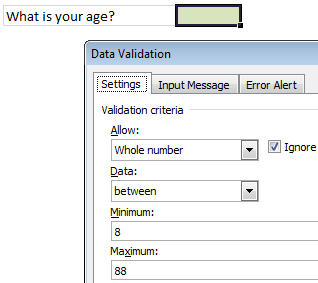
Here is a quick tip on removing data validation rules.
We all know that data validation is a powerful feature in Excel to control what data is entered. But, sometimes, you may want to remove the rules from a set of cells. How would you do it?
The normal approach is,
- Select the cells with data validation rules
- Go to Data > Data Validation
- Select rule as “any value’
- Press OK
In short, you have to move your mouse alot. It would make sense if we accumulate frequent flier miles on the mouse travel too.
Shouldn’t there be a shorter, quicker way?!? Well, of course, there is a way.
We use Paste Special.
What ?!? Paste Special?!?
 That is right. A simple paste special can remove the data validation rules for us quickly. Here is how.
- Select an empty cell without any data validation on it. Press CTRL+C
- Now, go back to the cell(s) from which you want to remove data validation rules
- Press ALT+E S N (In other words, Paste Special > Data Validation)
- Press OK and you are done.
How does it work?
Simple, we took the data validation rules from empty cell in (1) and then pasted them over our original cell(s) using Paste Special option.
What next?
Nothing, Its almost weekend here. We are taking a train to go to a place 400 kilometers away to see a classmate and close friend getting married. Lots of fun and partying awaits. When I am back on Monday, I will surprise you with more Excel awesomeness.
Go ahead and enjoy your weekend…
PS: Paramdeep reminds me that Financial Modeling School enrollments close on March 8th – just 4 more days. Sign-up already.


14 Responses
This is interesting…
but it takes 7 – 8 keystrokes to clear validation with paste special
and 6 keystrokes to clear it via the data validation dialog box
What the heck is ALT+E S N? Hold down the Alt key while pressing and holding the other keys? Hold down the Alt key while pressing E then release and hit the other two keys?
I have Excel 2010 and neither works.
Nice trick! It is always hard to clear all validation in a sheet.
@Khushnood Viccaji It is a lot harder to clear a sheet with a lots of cells with different validation rules
@Charley
Use the Go-to dialogue (Ctrl+G), Special, select Data Validation (you can choose to select all, or just similar to current active cell). Then it’s a quick step to clear all data validation.
If you’re not worried about keeping the formatting, just copy an empty cell (Ctrl+C) and paste (Ctrl+V) over the cell with conditional formatting. Or better yet, click the cell with conditional formatting and either use Ctrl+D to copy down a blank cell above, or Ctrl+R to copy a blank cell from the left.
I simply copy and do paste with “paste special” and “values” selected from edit. No formatting of cells, I am done with pasting. Quickest 3 steps.
@ Luke
Its amazing.. it saves a lot of time by clearing all the Data Validation by combining two tricks..
@ Luke M
Nice trick indeed.
@Luke.. interesting tip… thank you for sharing. Here is your donut ….
Hi chandoo,
First of all many many thanks, because I subscribed just one month but i improved a lot.
Once again thanks.
Regards,
Abhijit
hi Chandoo,
Thank you so much, i’ve learned lot of from this site.
Regards,
Manjunath N
One click only ….add this to your VB module and then create a new button on your toolbar…
Sub RemoveDataValidation()
With Selection.Validation
.Delete
.Add Type:=xlValidateInputOnly, AlertStyle:=xlValidAlertStop, Operator _
:=xlBetween
.IgnoreBlank = True
.InCellDropdown = True
.ShowInput = True
.ShowError = True
End With
End Sub
How can i remove data used for the validation after i am done
Great tip!