

Situation
We know that VLOOKUP formula is useful to fetch the first matching item from a list. So what would you do if you need 2nd (or 3rd etc.) matching item from a list?
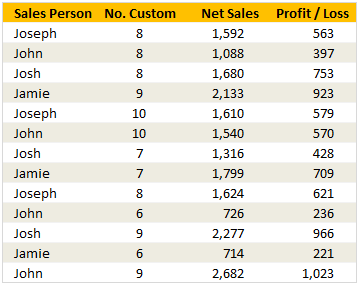
For eg. If you have below data, and you want to find out how much sales John made 2nd time, then VLOOKUP formula becomes quite useless. Or is it?!?
Data:
Solution
A simple solution to this problem would be sorting our data on sales person’s name. That way all Johns would line up one beneath another. And we just have to find the first John’s position and add 1 to it to get to 2nd occurrence. Like this =MATCH("John", C5:C17, 0) + 1
But sorting is not an option all the time. So there should be a better way to do this?
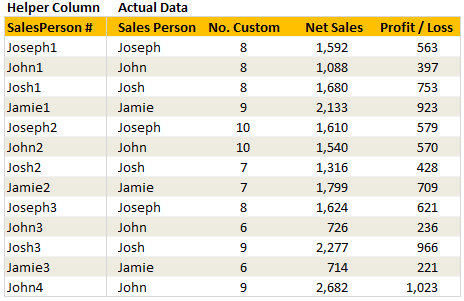
Well, there is. We just add a helper column before the sales person name and fill it with sales-person’s name & occurrence. (see the below data table).
For this we can use COUNTIF() Formula, like this: =C5&COUNTIF($C$5:C5,C5). Notice the $C$5:C5?, well the mix of absolute & relative references does the trick here and gets John1, John2… etc.
Now, to lookup 2nd occurance of John, all we do is, simply write =VLOOKUP("John2",...) and we are done.
Sample File
Download Example File – Getting the 2nd matching item from a list using VLOOKUP formula
The file includes few examples on how to fetch 2nd, 3rd etc. matches using lookup formulas. It also has some interesting (and challenging) home work for you. Download & play with it.
Similar Tips
- Excel SUMPRODUCT Formula – What is it, how to use it & examples
- Excel VLOOKUP Formula – What is it, how to use it & examples
- Excel SUMIF and COUNTIF Formulas – What are they, how to use & examples



59 Responses
4. Is there way to fetch 2nd sales amount for Josh without using the helper column (B5:B17) ?
Select Cell I6
Define a name : cName = If(Person=$H6,Row(Person)-Row($C$3))
In cell I6 Type = Index(Sales,Small(cName,2))
This will return the 2nd instance.
Hi friends,
go for =sumif() formula..
regards,
Vinay
Essentially the same as sam’s idea, but you could combine it all into one formula if you use an array formula:
=INDEX(D:D,SMALL(IF(B5:B17=”John”,ROW(B5:B17)),2))
You can, of course, make these formulas dynamic by replacing the text “John” and the number 2 with cell references.
Stumped! I got the first one, but can figure out the other ones! 🙁 Any place to find the answers?
Here is what I have:
1)
=SUMPRODUCT((MAX((C5:C17=”Jamie”)*ROW(C5:C17))=(C5:C17=”Jamie”)*ROW(C5:C17))*1,E5:E17)
2)
=SUMPRODUCT(MAX((C5:C17=”John”)*(E5:E17)))
3)
=COUNTIF(INDIRECT(“C5:C”&SUMPRODUCT((MAX((C5:C17=”John”)*(E5:E17))=((C5:C17=”John”)*(E5:E17)))*1,ROW(C5:C17))),”John”)
4)
=INDIRECT(“E”&SMALL(INDEX(((C5:C17=”Josh”)*ROW(C5:C17))+((C5:C17″Josh”)*10^8),0,0),2))
The matrix formula Luke M has is definitely simpler. I was just trying to avoid a matrix.
I did come up with a more complicated matrix formula for #4. I was thinking of how I could make a matrix form of a running total of the number of occurrences of value. Maybe it will help me some other time.
Here it is:
{=OFFSET($E$4,MATCH(2,MMULT(IF(ROW(OFFSET(INDIRECT(“A1”),0,0,ROWS(C5:C17),ROWS(C5:C17)))>=COLUMN(OFFSET(INDIRECT(“A1″),0,0,ROWS(C5:C17),ROWS(C5:C17))),1,0),INDEX((C5:C17=”Josh”)*1,0,0)),0),0)}
Would you mind untangling your formulas for questions 1 and 3 please? Thanks
I had a strong desire to use a vlookup on problem 4. Here is the matrix formula I worked out for doing that.
{=VLOOKUP(2,MMULT(IF(ROW(OFFSET(INDIRECT(“A1”),0,0,ROWS(C5:C17),ROWS(C5:C17)))>=COLUMN(OFFSET(INDIRECT(“A1”),0,0,ROWS(C5:C17),ROWS(C5:C17))),1,0),IF(COLUMN(C5:F17)=COLUMN(C5:C17),((C5:C17=”Josh”)*1),0))+IF(COLUMN(C5:F17)=COLUMN(C5:C17),0,C5:F17),3,FALSE)}
A few named formulas and this can be simplified.
All Array Formulas
1) =INDEX(NetSales,LARGE(IF(SalesPerson=”Jamie”,ROW(SalesPerson)-MIN(ROW(SalesPerson))+1),1))
2) =MAX(IF(SalesPerson=”John”,NetSales))
3) =”John”&COUNTIF(C5:INDIRECT(“C”&MAX(IF(IF(SalesPerson=”John”,NetSales)=MAX(SalesPerson=”John”,NetSales),ROW(NetSales)))),”John”)
4) =INDEX(NetSales,SMALL(IF(SalesPerson=”John”,ROW(SalesPerson)-MIN(ROW(SalesPerson))+1),2))
@All.. good solutions.
@Perry: Here is a set of solutions. You can obviously improve or comeup with diff. approaches. http://chandoo.org/img/f/vw/vlookup-2nd-value-instructor-copy.xls
@Tristan: Can you explain =INDIRECT(“E”&SMALL(INDEX(((C5:C17=”Josh”)*ROW(C5:C17))+((C5:C17?Josh”)*10^8),0,0),2)) for us?
It’s an awesome job!!!… thank you
I will endeavor to do so, Chandoo.
First off, I just now noticed that there is a not equal sign missing between the second C5:C17 and “Josh” (It must not render incorrectly)
So here is the idea behind how it works:
The overall idea is to return the row of the second occurrence of “Josh”
First the array is checked to see it if an item is equal to “Josh” (C5:C17=”Josh”) this generates and array of True and False
Then multiply the true and false array by the array of row numbers (Row(C5:C17)) this transforms the array into an array of zeros and row numbers where the value is “Josh”
The problem here is that there are an unknown number of zeros in the array. This causes the small function to fail. So I want to replace the zeros with values that are larger than any encountered as a row.
This I did by adding the array of items not equal to “Josh” (C5:C17 not equal “Josh”), multiplied by 10^8
This results in an array of large numbers (where the value is not equal to “Josh”) and row numbers where the value is equal to “Josh”
The index function causes everything to be treated as an array, and then small picks the second smallest number which is the row number of the second occurrence of “Josh”
Can you get the this to work but on a different sheet in the same file?
=INDIRECT(“H”&SMALL(INDEX(((‘Above Ground’!B6:B800=’Pipe Stringing_Lowering’!C8)*ROW(‘Above Ground’!B6:B800))+((‘Above Ground’!B6:B800<>’Pipe Stringing_Lowering’!C8)*10^8),0,0),2))
I get it to work in the sheet I am looking up the value but I can’t find a way to get this to work if I want it on another sheet.
Help would be great!
Thanks!
Never Mind Got It. Just one of those moments.
Thank you for the post, it actually helped me to make an auto-fill list, depending on an specific value on a cell. Thanks again!
Dear Chandoo:
Can you explain what exactly happens with the formula you have written as answer for the 2nd question in the exercise, i.e.:
= SUMPRODUCT(MAX(($C$5:$C$17=”John”)*($E$5:$E$17))).
Also in the answer of the 3rd question, how does Countif arrives at the right answer? Does Excel check the Countif first or the calculates Offset first?
sorry, my bad. I was little confused in the 3rd answer, i got it now. Will wait for your reply for the 2nd.
@Rahul… The sumproduct formula checks for all records and returns true where person=John. This gets multiplied to the actual sales values. Since true is 1 and false is 0, we get a bunch of values with actual sales for john and rest as zeros. The max, then returns the maximum value among these. Refer to this article for a tutorial on sumproduct formula: http://chandoo.org/wp/2009/11/10/excel-sumproduct-formula/
@Tristan: Very clever approach. Thanks for teaching us this technique. Here is a donut for you 🙂
DISCOUNT -7% & -5% = ?
MRP
EX 880
( Two discount in one MRP – FIRSR SEVEN PERCENTAGE & AFTER 5% DISCOUNT , HOW CAN I GIVE THE FORMULA FOR ROWS IN NEXT CLOUMN DIRECT VALUE?
Dear All
I think I need to give more time to catch up with you all… thanks to guru chandoo… i am confident that i can learn with these techniques…. thanks to all
V S Venkatraman
Hi Chandoo,
It was nice reading your blog. I got introduced to your blog by my brother ‘Ayush Jain’. Really good good stuff. Very innovative and different approach.
Regards
Ashish Jain
http://www.excelitems.com
http://www.openexcel.com
When you are posting examples, you need to post the column letters and row numbers. Otherwise, the reader has no idea to which cells a formula is referencing. What makes your example above especially egregious is that you skipped an arbitrary number of rows and columns before the data table. Therefore, no one could possibly know which cell is C5.
Yeah, I know we can download the spreadsheet. That’s not the point.
You could try either of these links if you want a custom function (thanks to ozgrid!)
http://www.ozgrid.com/Excel/find-nth.htm
http://www.ozgrid.com/VBA/TwoColLkUp.htm
Hi All,
I was preparing Birthday Reminder Sheet and I was using VLOOKUP. If the date of birth and month of a person matches with todays date and month(dd-mm), then their name should display. I used simple VLOOKUP formula
=VLOOKUP((TEXT(TODAY(),”dd-mm”)),G2:H165,2,FALSE)
However, if there is more than 1 Birthday’s then this formula doesnt work.:(
Kindly resolve this and provide me solution.
Thanks in advance.
Raghuram Bhat
raghurambhatg@gmail.com
Thanks Heaps for this solution, allows me to look up values based on the first return so that each return after is relevant.
To the complainers and wingers, if you dont understand how the data is used in the downloaded spreadsheet, look up what you are not understanding. Stop bagging someone who is trying to help you.
Cheers
Just ON-TIME when i needed it the most…. No Words to thank
Hi!
There’s a more simple way to solve above problem, by only using vlookup and countif, but it need extra column
Sample.
Row column A Column B column C
1 Name_C Name Score
2 mark1 Mark 3
3 Jay1 Jay 4
4 Mark2 Mark 5
5
6 mark 3 1st value
7 mark 5 2d value
A2 formula = b2 & countif(b$1:b2,b2)
to be copied until a4
b6 formula = vlookup(a6&1,$a$2:$c$4,3,false)
b7 formula = vlookup(a7&2,$a$2:$c$4,3,false)
Done!
Use a combination of the Vlookup function, Match function, and the Offset function.
Example:
=VLOOKUP(lookup_value,OFFSET(‘sheet_name’!$A$1:$C$2000,MATCH(lookup_value,’sheet_name’!$A:$A,0)+1,0),2,FALSE)
What the does is:
1. Returns the first occurrece of the lookup value as an integer and adds one (Match function)
2. Takes the lookup_range and offsets it by the the total number of rows returned in step 1 (Offset function returns new range)
3. Runs a Vlookup using the new range and the vlookup value
Hope this helps.
Awesome approach. Solved my problem perfectly.
Thanks Much!!!
Good stuff! I have a problem. I’m trying to populate a field based on an occurence of a value in a range and it works fine. Shown below:
=IF(ISERROR(MATCH(ROUND($E$3,10),’2013-TaskList’!$J$4:$J$5004,0)),””,INDEX(‘2013-TaskList’!$K$4:$K$5004,MATCH(ROUND($E$3,10),’2013-TaskList’!$J$4:$J$5004,0)))
But I also want to populate the 2nd, 3rd, and 4th occurence of the same value in the given range and its not working. I need to nest it into the current formula I have but I’m unsuccessful in doing so.
Can anyone help???
Thanks.
How do I CONCATENATE 1st, 2nd .. values
Excel Concatenate() formula does not take arrays or ranges. It can take separate values though.
One way is to use a small UDF to do this. See here for one:
http://chandoo.org/wp/2008/05/28/how-to-add-a-range-of-cells-in-excel-concat/
What also works very well is to add the returned value in the same row. This will allow you to compile a list off the result of one vlookup. Choose the one you wish to see, and then use another vlookup to return those values.
Hi all,
I am having difficulty wrapping my head around this formula:
=COUNTIF(INDIRECT(“C5:C”&SUMPRODUCT((MAX((C5:C17=”John”)*(E5:E17))=((C5:C17=”John”)*(E5:E17)))*1,ROW(C5:C17))),”John”)
Could someone please explain this…..
I tried to go different way: through MATCH function to determine the position of John’s max sale. But all it gives to me is 13, instead of 4. If I have an following array :
{0;1088;0;0;0;1540;0;0;0;726;0;0;2682}, how can I make it look like this {1088;1540;726;2682}, in other words how can I get rid of zeros(false) and keep the order of non-zero(true) values.
My formula was like: =match(max((salesman=”john”)*(sales));((salesman=”john”)*(sales));0)
Thank you.
I am trying to lookup the sequence of values using this MATCH INDEX formula. I trying to find the second and subsequent values but i can”t get it. Please help me.
=IFERROR(INDEX(‘2013 MBR’!M3:M6000,MATCH(“1″&$F$2&”Day”,’2013 MBR’!$S$3:$S$6000&’2013 MBR’!$Z$3:$Z$6000&’2013 MBR’!$AA$3:$AA$6000,0)),IFERROR(INDEX(‘2013 MBR’!M3:M6000,MATCH(“1″&$F$2&”Day”,’2013 MBR’!$S$3:$S$6000&’2013 MBR’!$AC$3:$AC$6000&’2013 MBR’!$AD$3:$AD$6000,0)),IFERROR(INDEX(‘2013 MBR’!M3:M6000,MATCH(“1″&$F$2&”Day”,’2013 MBR’!$S$3:$S$6000&’2013 MBR’!$AF$3:$AF$6000&’2013 MBR’!$AG$3:$AG$6000,0)),IFERROR(INDEX(‘2013 MBR’!M3:M6000,MATCH(“1″&$F$2&”Day”,’2013 MBR’!$S$3:$S$6000&’2013 MBR’!$AI$3:$AI$6000&’2013 MBR’!$AJ$3:$AJ$6000,0)),IFERROR(INDEX(‘2013 MBR’!M3:M6000,MATCH(“1″&$F$2&”Day”,’2013 MBR’!$S$3:$S$6000&’2013 MBR’!$AL$3:$AL$6000&’2013 MBR’!$AM$3:$AM$6000,0)),IFERROR(INDEX(‘2013 MBR’!M3:M6000,MATCH(“1″&$F$2&”Day”,’2013 MBR’!$S$3:$S$6000&’2013 MBR’!$AO$3:$AO$6000&’2013 MBR’!$AP$3:$AP$6000,0)),”NA”))))))
Thanks
karthik
@Karthik
It may be more use if instead of asking how to fix a formula that you explain the problem and post a sample file
As often in Excel there are many ways to skin the proverbial cat.
http://chandoo.org/forums/topic/posting-a-sample-workbook
.
You may also want to post the question in the forums
http://chandoo.org/forums/
@Hui..
Thanks for your reply… I will post the sample file in the above link.
Regards,
Karthik
Hi Guys
1 question
A vlookup when done with a wild card for example =VLOOKUP(A1&”*”,C:C,1,0) always returns the exact match first, how can you get the 2nd match with extensions (for which we use wild card) first without sorting the list.
Thanks
Rahul
my question is :- If one sku is sitting on multiple locations than how we can find all locations with the help of Vlookup
I used =VLookup($c18,list2,2,false)
In column 2 i have multiple location for sku but i m getting only one in Vlookup, How i can get all location of this sku.
Please advise
Thanks & regards
I want to lookup completion date for X employee in a sheet wherein multiple entries are there, how to Pick up the Latest completion date for the employee
Why can’t we add another helper column so that we can lookup
a diiferent value?
Dear all,
I am average user of MS Excel. I just read all formulae above but I couldn’t understand & I have same problem too. I wanted to arrange two sheets on single sheet to refer data. On both sheets common column is “name of item”. but in that few items are repeated. thus when I apply vlookup on it, it shows same value for repeated items. whereas it suppose to show different values.
which formula should I apply?
Please help!
Thank you!
Great solution, and yet so simple to replicate! Thanks a lot for such a useful tip! Cheers.
Thanks for this! Worked a treat!
Thanks for your website and truely appreciate your sharing. Help me a lots ( Both Stat and Excel Function)
Cheers~
Of course sometimes it might be better to use a pivot table.
Generally, I now prefer to use a nested match within a index as it is more flexible.
I generally find countif(s) and sumif(s) are handy and have my own user defined functions for MAXifs, MINifs, which could be used to find earliest or latest/ largest or smallest entries. I have also combined sumifs to do a kind of averageifs for example if an item is sold at different prices in different volumes working out the average price per unit.
Here is the thing. It worked well with the text (John and etc,) and if the value is number. It wont work.
200 A
200 B
200 C
200 D
how to find the following with formula
200 A B C D
Hi, can u pls upload a video so that we can understand it more
Excellent. You are the best dear.
Chandoo please unravel this formula for me. Thanks. =INDEX($E$5:$E$17,SUMPRODUCT(SMALL(($C$5:$C$17=”Josh”)*(ROW($C$5:$C$17)-4),2+COUNTIF($C$5:$C$17,”Josh”))))
So I’ve used this guide (really good by the way) to allow me to return a cell from a VLOOKUP based upon selections from 2 drop downs.
I want to be able to drag the code down and return the 1, 2, 3, 4 etc cell until i have all of the cells listed, then i have a hlookup returning the data relating to the cells.
How do I make my VLOOKUP formula automatically increase the number that it’s searching for as i drag it down the column?
I’ve tried this, it just returns the same cell over and over and I can’t think how to increment the 1 up:
=VLOOKUP($C$2&$C$3&1,’Raw Data’!$M$2:$N$499,2,FALSE)
Hope someone can help!
Alex
I have been looking for this answer for a very long time. I use vloolup all the time but have been stumped with multi row data. All the previous solutions I have found out there where to complicated. This solution is so simple and is amazing. Thanks
Doug Meadows
Hey – relating to the original question here. Is there a way of returning multiple matches for a single date rather than for a list of names using vlookup?
eg
Date Price
1/5/16 25
1/5/16 30
3/10/16 35
instead of John and John, an equivalent for dates? eg: 1/5/16 a and 1/5/16 b or something to separate the two dates and return 25 and 30 respectfully?
many thanks!
I want to know that i have one invoice having 2 lots.for instance.
Invoice no Lot no
INV17038 421C22
INV17038 421C23
Suppose i put INV17038 I Should be able to get all lots in connection to one invoice. which formula need to be putted
Chandoo, u r simply gr8!
U make things look so simple.
I have something similar to below:-
A B C
101 Bill Fish
101 Bill Chips
103 Joe Chicken
104 Don Pizza
103 Joe Prawn
101 Bill Peas
107 Sam Pie
103 Joe Curry
101 B1ll Gravy
search Column (A) above and produce below from Colomn (C) in a separate sheet
A B C D E
101 Fish Chips Peas Gravy
103 Chicken Prawn Curry
104 Pizza
107 Pie
Please can you help me ?
Hi,
The above solution works well if the reference value is in text format.
What to do if the reference value is in number format.
Need a solution for the reference value as number format.