What is camera tool and how to use it? [spreadcheats]

Share

Facebook
Twitter
LinkedIn

Camera tool is your way of creating visual reference in an excel sheet. It is one of the useful and hidden features of excel. Here is how it works. You specify a rectangular area in your workbook and camera tool creates a mirror image of that area as a drawing object. You can move it or resize it. And whenever the contents of original rectangular area changes (charts, drawings or cell values) the mirror image changes too.

How to add camera tool to standard toolbar?

In order to use camera tool, you must add the tool to a tool bar in excel menu area. Here is how you can do that:

  1. Go to menu > tools > customize
  2. In the dialog go to “Commands” tab and select “tools” in categories.
  3. Scroll down in the commands area until you see a little camera tool
  4. Now drag and drop this in your tool bar as shown below
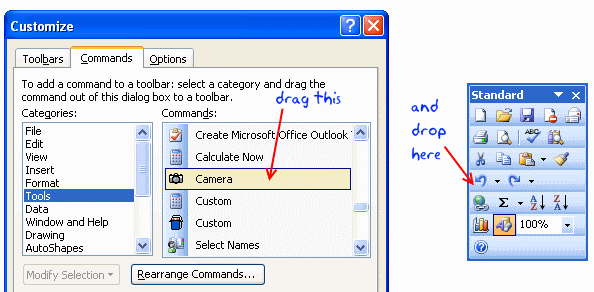
  5. Adding Camera tool to Excel Toolbar

How to use excel camera tool?

Using Camera tool in MS Excel - How to and tutorial
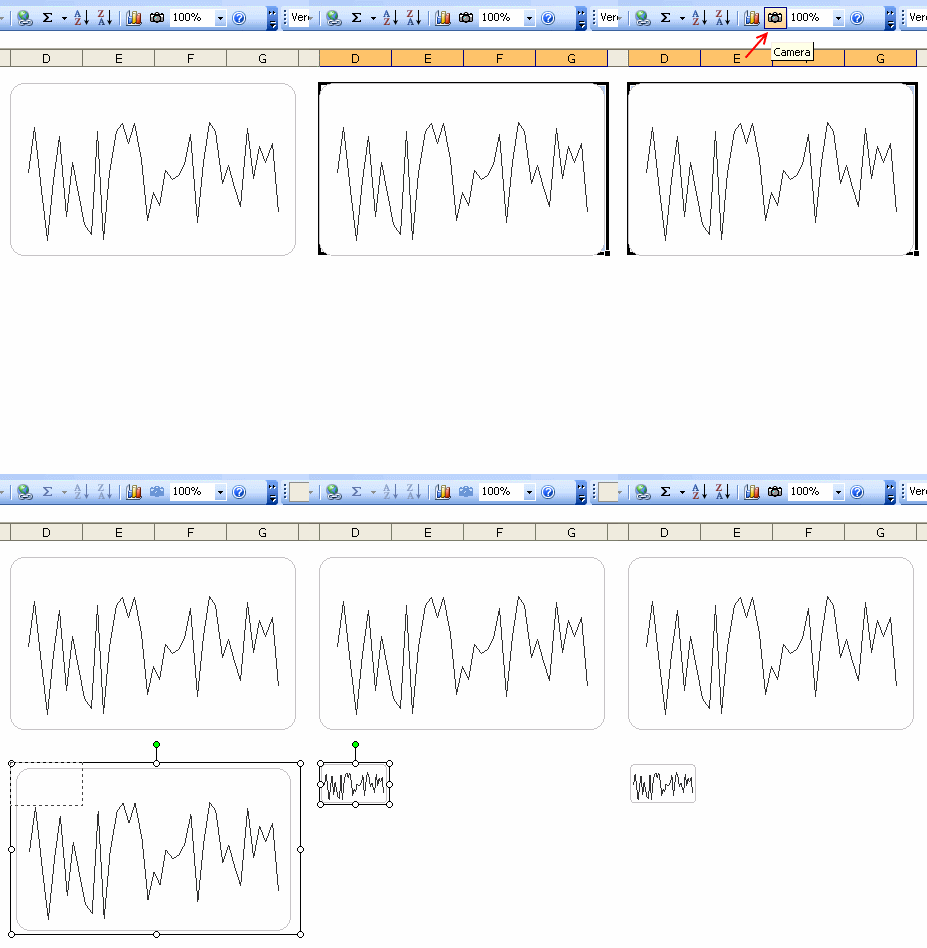
We will use camera tool to create a micro-chart in excel.

  1. First make a normal chart.
  2. Now select the cells surrounding the chart
  3. Click on camera tool
  4. Now click any where in the worksheet and excel places a snapshot of the range you have selected
  5. Resize it until you get the microchart effect.
  6. Bingo !
  7. Btw, excel adds a border to the camera tool output. You can remove it by using drawing tool bar

Bonus tip: Alternatives to camera tool

Another alternative to camera tool is to use the image and indirect references technique we have learned in conditionally hide or show charts post.

Read earlier spreadcheats as well.

Facebook
Twitter
LinkedIn

Share this tip with your colleagues

Excel and Power BI tips - Chandoo.org Newsletter

Get FREE Excel + Power BI Tips

Simple, fun and useful emails, once per week.

Learn & be awesome.

Welcome to Chandoo.org

Thank you so much for visiting. My aim is to make you awesome in Excel & Power BI. I do this by sharing videos, tips, examples and downloads on this website. There are more than 1,000 pages with all things Excel, Power BI, Dashboards & VBA here. Go ahead and spend few minutes to be AWESOME.

Read my storyFREE Excel tips book

Overall I learned a lot and I thought you did a great job of explaining how to do things. This will definitely elevate my reporting in the future.
Rebekah S
Reporting Analyst
Excel formula list - 100+ examples and howto guide for you

From simple to complex, there is a formula for every occasion. Check out the list now.

Calendars, invoices, trackers and much more. All free, fun and fantastic.

Advanced Pivot Table tricks

Power Query, Data model, DAX, Filters, Slicers, Conditional formats and beautiful charts. It's all here.

Still on fence about Power BI? In this getting started guide, learn what is Power BI, how to get it and how to create your first report from scratch.

12 Responses to “Analyzing Search Keywords using Excel : Array Formulas in Real Life”

  1. Very interesting Chandoo, as always. Personally I find endless uses for formulae such as {=sum(if(B$2:B$5=$A2,$C$2$C$5))}, just the flexibility in absolute and relative relative referencing and multiple conditions gives it the edge over dsum and others methods.

    I've added to my blog a piece on SQL in VBA that I think might be of interest to you http://aviatormonkey.wordpress.com/2009/02/10/lesson-one-sql-in-vba/ . It's a bit techie, but I think you might like it.

    Keep up the good work, aviatormonkey

  2. Andy Pope says:

    Hi Chandoo,

    You might find this coded solution I posted on a forum interesting.

    http://www.excelforum.com/excel-programming/680810-create-tag-cloud-in-vba-possible.html

  3. [...] under certain circumstances.  One of the tips involved arranging search keywords in excel using Array Forumlas.  Basically, if you need to know how frequent a word or group of keywords appear, you can use this [...]

  4. Chandoo says:

    @Aviatormonkey: Thanks for sharing the url. I found it a bit technical.. but very interesting.

    @Andy: Looks like Jarad, the person who emailed me this problem has posted the same in excelforum too. Very good solution btw...

  5. bob says:

    Realy great article

    "You can take this basic model and extend it to include parameters like number of searches each key phrase has, how long the users stay on the site etc. to enhance the way tag cloud is generated and colored."

    How would you go about doing this? I think it would need some VB

  6. Thiago says:

    Hi,
    I found the usage very interesting, but is giving me hard time because the LENs formula that use ranges are not considering the full range, in other words, the LEN formula is only bringing results from the respective "line" cell.

    Using the example, when I place the formula to calculate the frequency for "windows" brings me only 1 result, not 11 as displayed in the example. It seems that the LEN formula using ranges is considering the respective line within the range, not the full range.

    Any hint?

  7. Hui... says:

    @Thiago
    You have to enter the formula as an Array Formula
    Enter the Formula and press Ctrl+Shift+Enter
    Not just Enter

  8. Gary says:

    is there a limit to the number of lines it can analyse.
    Ie i am trying to get this to work on a list of sentances 1500 long. 

    • Hui... says:

      @Gary
      In Excel 2010/2013 Excel is only limited by available memory,
      So just give it a go
      As always try on a copy of the file first if you have any doubts

  9. Sumit says:

    Apologies if I am missing something, but coudn't getting frequency be easier with Countif formula. Something like this - COUNTIF(Range with text,"*"&_cell with keyword_&"*")

  10. Ray says:

    Apologies if I missed, but what is the Array Formula to:

    1. Analyze a list of URL's or a list of word phrases to understand frequency;
    2. List in a nearby column from most used words to least used words;
    3. Next to the list of words the count of occurrences.

Leave a Reply