

 Lets start the week with a quick tip.
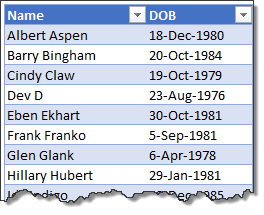
Lets say you have a list of employees and their birthdays. Now you want to sort this list, based on their birthday, not age. How would you do it?
Sorting by day and month alone:
- Add a column next to original dates. Lets call this Birthday.
- Then, calculate birthday in current year for everyone.
- Assuming DOB is in B1, Formula for birthday (in current year) would be,
=DATE(YEAR(TODAY()),MONTH(B2),DAY(B2)) - This formula gives you a date which has same year as TODAY(), same month & day as original date.
- Then, fill down the formula for all rows.
- Now sort this new column (Birthday) in chronological order.
- You are done!
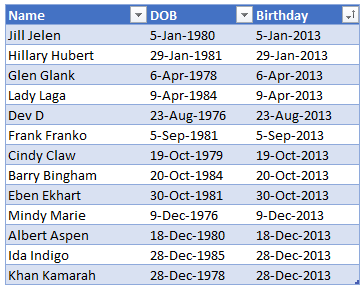
Note: if you are using tables, then use this formula.
(Assuming original date is in DOB column),
=DATE(YEAR(TODAY()), MONTH([@DOB]),DAY([@DOB]))
Related: Introduction to Tables & Structural References.
More Sorting Examples:
- Sorting sideways
- Sorting in Olympic medals table style, Formula 1 racing style
- Rounding and sorting data
- Checking if a list is sorted using formulas
- Sorting text values using formulas
Homework for you:
If you think sorting by birthdays is easier than eating a birthday cake, then I have a challenge for you. Assuming a list of data of births is in the range A1:A100, write a formula to find how many birthdays are in this month?
Go ahead and post your answers in comments.


47 Responses
Hi,
To my opinion there is a shorter & easier way to achieve the task.
Type the following formula into cell C2 and copy it downwards.
Sort the table according column “C”.
=TEXT(B2,”mmm dd”)
Michael (Micky) Avidan
“Microsoft® Answer” – Wiki author & Forums Moderator
“Microsoft®” MVP – Excel (2009-2014)
ISRAEL
According the Date format in your area it can also be:
=TEXT(B2,”dd mmm”)
Michael (Micky) Avidan
“Microsoft® Answer” – Wiki author & Forums Moderator
“Microsoft®” MVP – Excel (2009-2014)
ISRAEL
As for the challenging question:
=SUMPRODUCT(–(MONTH(A1:A100)=MONTH(TODAY())))
Michael (Micky) Avidan
“Microsoft® Answer” – Wiki author & Forums Moderator
“Microsoft®” MVP – Excel (2009-2014)
ISRAEL
I wanted to go with sumproduct, but I probably mistyped something so I could not get it working. so I did the next best thing:
=SUM((MONTH(A1:A100)=MONTH(TODAY()))*1) arrey entered
Hi Chandoo,
I try this formula to find how many birthdays are in this month?
=SUMPRODUCT(–(MONTH(TODAY())=MONTH(A1:A100)))
It showing me correct ans.
@lockdalf,
I always looked at SUMPRODUCT and SUM (array entered) as identical formulas.
Why didn’t you present the SUMPRODUCT you claim you could not use !?
I do hope that you understood that the “dash” (–( are 2(!) Minus signs that were glued together in that site reply window.
Here again is my proposed formula:
=SUMPRODUCT(xx(MONTH(A1:A100)=MONTH(TODAY())))
Type a minus sign instead of each(!) x character in the above formula.
By the way “two minus” signs equal multiplication by: 1
Michael (Micky) Avidan
“Microsoft® Answer” – Wiki author & Forums Moderator
“Microsoft®” MVP – Excel (2009-2014)
ISRAEL
This formula will also work
=SUMPRODUCT((MONTH(A1:A100)=MONTH(TODAY()))*(1))
@Rach,
Too many brackets (at least two) and this is the formula suggested by lockdalf.
The only difference is (and “it is not”) using SUMPRODUCT instead of SUM as an Array Formula.
Michael (Micky) Avidan
“Microsoft® Answer” – Wiki author & Forums Moderator
“Microsoft®” MVP – Excel (2009-2014)
ISRAEL
Too Many Brackets – Yes, i like to put my formulas in bracket, easy to handle for me
Same as Lockdalf – i did not notice it before posting.
Chandoo,
I have found myself using this same approach with my son’s kinder classmates, so we can tell which ones we should purchase the birthday gift on a given month.
Mike, as to your proposed formula =TEXT(B2,”mmm dd”) , It works partially, as it needs a little tweak for what Chandoo asked.
All you need is to enclose it on a VALUE formula, like this:
=VALUE(TEXT(B2,”mmm dd”)), or in my case, as you well pointed out since I am in Argentina, =VALUE(TEXT(B2,”dd-mmm”). That way, you can sort it by date value, as opposed to the text one, where you can sort it as, well, a text, which will not give you the desired order.
@Martin,
I disagree.
I have tested my suggestion several times and to my opinion there is no need for the VALUE function in order to sort(!) the DOB as per DAY-MONTH ascending order.
Have a look at the hereunder link which shows the data before sorting by column “B”
http://i43.tinypic.com/xgd2s5.jpg
If this does not work at your end – please upload a simple “Excel” file in which you use the: =TEXT(B2,…)) formula, and present a link to the download address of that file.
Michael (Micky) Avidan
“Microsoft® Answer” – Wiki author & Forums Moderator
“Microsoft®” MVP – Excel (2009-2014)
ISRAEL
for me
=TEXT(B2, “mmm dd”) (for today gives “Aug 26”)
and
=TEXT(B2, “dd mmm”) (for today gives “26 Aug”)
give results that do not give the requested sort order.
maybe for your locale setting it might give output that works, but it is not a general solution for the question asked by Chandoo.
@Martin,
Please read again Chandoos question/task.
To my opinion – he did not explained himseld prpperly.
If you use the VALUE function than the formula will return an Integer number which represents the FULL(!) DOB including the YEAR – and therefor the range will be sorted by “AGE” – something Chandoo wanted to avoid.
It is possible that I misunderstood the task.
Let us wait for Chandoo to reply.
Michael (Micky) Avidan
“Microsoft® Answer” – Wiki author & Forums Moderator
“Microsoft®” MVP – Excel (2009-2014)
ISRAEL
Here’s the gift and where’s the cake!
Assuming that the DOB are in column B starting with row 2:
1. Enter in C2, the formula =Text(month(b2),”00″)&”-“&text(day(b2),”00”)?
2. Copy it down.
3. Sort column C.
This will list the birthdays in mm-dd format.
As for the birthdays falling in current month, let’s assume that the list of birthdays is as per column B starting with row 2. The formula in cell C2 would be =month(B2)=month(today()). List all the “TRUE” and discard all the “FALSE”.
Am I wrong? Or was this too simple?
My homework: Two array formulas (Ctrl + Shift + Enter)
=SUM(IF(MONTH(A1:A100)=MONTH(TODAY()),1,0))or
=COUNT(IF(MONTH(A1:A100)=MONTH(TODAY()),NOW(),""))
Into the last formula, notice that the NOW() function is essential to work fine 😉
@Pedro,
With all due respect the use of NOW() is NOT essential.
Instead of NOW() you can type a single comma.
The use of: “” is also unnecessary.
Try: =COUNT(IF(MONTH(A1:A100)=MONTH(TODAY()),))
Michael (Micky) Avidan
“Microsoft® Answer” – Wiki author & Forums Moderator
“Microsoft®” MVP – Excel (2009-2014)
ISRAEL
@Michael, you’re absolutely right.
If not write the optional arguments when the months are equal returns 0’s and if the months are different returns False, counting the 0’s, as it is expected.
When I wrote the function NOW() was to make a little joke (did you see the emoticon?) and your answer are very serious 😉
@Pedro,
1) Sorry for not noticing the emoticon.
2) I always try to be serious while dealing with “Excel”.
Michael (Micky) Avidan
“Microsoft® Answer” – Wiki author & Forums Moderator
“Microsoft®” MVP – Excel (2009-2014)
ISRAEL
@Michael,
1) You are forgiven.
2) I always try to have fun while I’m learning and to be awesome while I write one of my blog posts. Did you read it? 😉
No – haven’r read.
What about a direct link !?
This does not work for people born on Feb 29 if the current year is not a leap year.
An alternative is “=MONTH(B2)*100+DAY(B2)” and sort in numeriek order.
How about using sumifs.
COUNTIFS(A2:A100,”>”&EOMONTH(TODAY(),-1),A2:A100,”<="&EOMONTH(TODAY(),0)+1)
@Venky,
There are additional ways to resolve the challaging question – however, as far as I’m familiar with Chandoos tips – he likes short formulas – “The shorter the better”.
Have a look at all 4 Parts and you’ll see what I mean:
Part 1: http://chandoo.org/wp/2013/07/16/formula-challenge-001-1/
Part 2: http://chandoo.org/wp/2013/07/17/formula-challenge-001-return-everything-from-a-string-after-the-first-block-of-numbers-part-2/
Part 3: http://chandoo.org/wp/2013/07/19/formula-challenge-001-return-everything-from-a-string-after-the-first-block-of-numbers-part-3/
Part 4: http://chandoo.org/wp/2013/07/22/formula-challenge-001-return-everything-from-a-string-after-the-first-block-of-numbers-part-4/
Michael (Micky) Avidan
“Microsoft® Answer” – Wiki author & Forums Moderator
“Microsoft®” MVP – Excel (2009-2014)
ISRAEL
Thanks for excellent comments on this thread Michael. We are honored to have an MVP sharing his wisdom with us in comments.
I personally believe that “Quicker is better”. Any formula that one can think of quickly, write quickly and get things done is better. I do not subscribe to “shorter is better” theory as this can take a lot of time and learning. But often, I challenge myself to come up with shorter, better formulas as way to see how much we can improve (on length, brevity, coolness).
The formula challenge series is actually authored by our guest bloggers. Those four posts by Jeff W.
@Chandoo,
Thanks for the warm welcome words.
I’m proud to be honored by MS as an MVP nor less to share my knowledge with other and despite the above I, like other, learn new tricks every day.
My moto is NOT to use helper column(s) if a task can be achieved by “pure” formulas.
Some of my friends claim that it is a “Scratch” I suffer from and they might be right.
I like using formulas and find it most challenging to end up with as shorter as possible.
Michael (Micky) Avidan
“Microsoft® Answer” – Wiki author & Forums Moderator
“Microsoft®” MVP – Excel (2009-2014)
ISRAEL
Why not by sort command?
@Zurman,
You will understand, why not, if you’ll read the Chandoos question again…
Michael (Micky) Avidan
“Microsoft® Answer” – Wiki author & Forums Moderator
“Microsoft®” MVP – Excel (2009-2014)
ISRAEL
I think that if I was asked for a list of birthdays, I would probably want them forward from the current date (i.e. – not interested in those that have past), so my formula becomes:
=IF(DATE(YEAR(TODAY()),MONTH(B2), DAY(B2))<TODAY(),DATE(YEAR(TODAY())+1,MONTH(B2), DAY(B2)),DATE(YEAR(TODAY()),MONTH(B2), DAY(B2)))
Robert
Wooooooooooooooo…!
Tis is what we use to call “A waste of ink”.
Your suggestion can be shorter by, at least, 67% !!!
=EDATE(B2,(DATEDIF(B2,TODAY(),”y”)+1)*12)
*** In older versions, of “Excel”, the user must mark the Analysis ToolPak add-in for the EDATE to function properly.
Farther to the above – using my short formula will enable you to congratulate a 29/2/2008 born child on the 28/2/2014 (a day before) and not on the 1/3/2014 (a day “too late”).
Michael (Micky) Avidan
“Microsoft® Answer” – Wiki author & Forums Moderator
“Microsoft®” MVP – Excel (2009-2014)
ISRAEL
I would prefer a solution without the need for an add-in, even if it is readily available.
That said, could you explain the edate and datedif functions, as I’ve not experienced them before?
@JD Hen,
1) As for the EDATE Function – please refere to the build-in Help.
2) As for the DATEDIF FFunction:
It is known for many many years but, unfortunatelly, Microsoft didn’t bother to add it to their Help engine (exceptional is “Excel 2000”).
Have a look at Chip pearsons site:
http://www.cpearson.com/excel/datedif.aspx
Michael (Micky) Avidan
“Microsoft® Answer” – Wiki author & Forums Moderator
“Microsoft®” MVP – Excel (2009-2014)
ISRAEL
@Michael: Clever! I like!
Hi Chandoo,
I put my birthday reminder list in Month & Day order by adding an extra column and simply typing into the cells a number equal to (MONTH number) + the (DAY number)/100. (e.g. for 23 March Type 3.23) and the sorting by that column.
Following your bright suggestion 🙂 I changed to
birthdate in cell A1
and in cell B1=(MONTH(A1))+(DAY(A1)/31).
Then SORTing by column B will put the Birthdates in Month & Day order.
The inclusion 29 Feb is not a problem.
The divisor shown as 31 can of course be any number!
Alternatively B1=100*MONTH(A1)+(DAY(A1) would work just as well (formatting as a leading zero makes it look better e.g 17 Jan shows as 0117)
As I have people with same ‘Month+Day’ so I have added another column C1= YEAR(A1) and then SORTed by column B and col C to put them into age order.
Very interesting technique John…
All Interesting…
I personally feel that the formula provided by Mr. Chandoo is better and simplest one. In order to solve the leap year problem, we modify the same formula as follows…
=DATE(2000,MONTH(B2),DAY(B2))
Since year “2000” is a leap year, it always returns the correct answer.
– Shaji
Hi all, it’s really a pleasure to learn from you through from posts.
@Micheal, maybe there is a typo in your 1st post that leads to some misunderstanding… I think you mean “mm dd” instead of “mmm dd”
@MF,
As you probably noticed we, in Israel, use a completely different months names (in Hebrew).
But, I am curious to know – what did you(!) get, as the result, when using:
=TEXT(B2,”mmm dd”)
Michael (Micky) Avidan
“Microsoft® Answer” – Wiki author & Forums Moderator
“Microsoft®” MVP – Excel (2009-2014)
ISRAEL
@Micheal,
I see where the misunderstanding came from, as I was totally unaware of the regional differences in month name…
FYI, I get
“Sep 06″ for =TEXT(today(),mmm dd” (won’t sort well)
“09 06″ for = TEXT(today(),mm dd” (sort well)
Cheers,
This is really useful for sorting anniversaries for anything really (in addition to people’s birthdays)!
Hi everyone, thanks for giving my brain a workout! To determine birth month and day, I entered =TEXT(B2,”mm.dd”) down column C. Then, to determine how many birthdays in this month, I entered =COUNTIF(C2:C100,”09.??”).
Connie
To count DOB in current month:
Note: If there is at least one BLANK cell in A1:A100, using MONTH will incorrect results when current month is Jan. Because excel treat blanks cells are 1/0/1900 for 1904 1/0/1904. Either add one more condition in SUMPODUCT (A1:A100″”) or use TEXT function like,
=SUMPRODUCT((TEXT(A1:A100,”m;;”)=TEXT(TODAY(),”m”))+0)
Haseeb
What if somebody on the list was born on 29 Feb in a leap year, but current year is not a leap year?
{=SUM(IF(TEXT(F2:F28,”MM”)=TEXT(I2,”MM”),1,0))}
{=SUM(IF(TEXT(Birthday_Range,”DD-MM”)=TEXT(Today,”DD-MM”),1,0))}
I have 4 Sheets in my excel sheets Same Sheets. (Sheet1-Sheet4)
Like:
Coloum A Have : Location/Place
Coloum B Have : Name
Coloum C have : Birthdays
Coloum D Have : another details.
Now I want to know on Sheet 5 Like a Summary of Only “Today” Birthdays.
Like:
Today [Date: 03/Feb/2015] Birthday List
Coloum A: Location/Place
Coloum B: Name
Coloum C : Total Age/Year Completed.
Please Help on This
Thanks so much that has made it so much easier to be able to sort to be able to do in two batches per month!