How to Look up Based on Multiple Conditions

Share

Facebook
Twitter
LinkedIn
This article is part of our VLOOKUP Week. Read more.

Situation

Not always we want to lookup values based on one search parameter. For eg. Imagine you have data like below and you want to find how much sales Joseph made in January 2007 in North region for product “Fast car”?

Data:
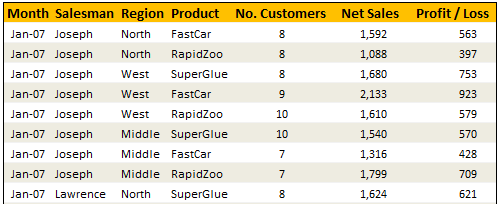
Data for this Example -Looing up Based on More than One Value

Solution

Simple, use your index finger to scan the list and find the match 😉

Of course, that wouldn’t be scalable. Plus, you may want to put your index finger to better use, like typing . So, lets come up with some formulas that do this for us.

You can extract items from a table that match multiple criteria in multiple ways. See the examples to understand the techniques:

Using SUMIFS Formula [help]
Formula =SUMIFS(lstSales, lstSalesman,valSalesman, lstMonths,valMonth, lstRegion,valRegion, lstProduct,valProduct)
Result 1592
Using SUMPRODUCT Formula [help]
Formula =SUMPRODUCT(lstSales,(lstSalesman=valSalesman)*(lstMonths=valMonth)*(lstRegion=valRegion)* (lstProduct=valProduct))
Result 1592
Using INDEX & Match Formulas (Array Formula) [help]
Formula {=INDEX(lstSales,MATCH(valSalesman&valMonth&valRegion&valProduct, lstSalesman&lstMonths&lstRegion&lstProduct,0))}
Result 1592
Using VLOOKUP Formula [help]
Formula =VLOOKUP(valMonth&valSalesman&valRegion&valProduct,tblData2,7,FALSE)
Result 1592
Conditions: A helper column that concatenates month, salesman, region & product in the left most column of tblData2
Using SUM (Array Formula) [help]
Formula {=SUM(lstSales*(lstSalesman=valSalesman)*(lstMonths=valMonth)* (lstRegion=valRegion)*(lstProduct=valProduct))}
Result 1592

Sample File

Download Example File – Looking up Based on More than One Value

Go ahead and download the file. It also has some homework for you to practice these formula tricks.

Also checkout the examples Vinod has prepared.

Special Thanks to

Rohit1409, dan l, John, Godzilla, Vinod

Similar Tips

VLOOKUP Week @ Chandoo.org - Learn tips on lookup formulas in Excel

Facebook
Twitter
LinkedIn

Share this tip with your colleagues

Excel and Power BI tips - Chandoo.org Newsletter

Get FREE Excel + Power BI Tips

Simple, fun and useful emails, once per week.

Learn & be awesome.

Welcome to Chandoo.org

Thank you so much for visiting. My aim is to make you awesome in Excel & Power BI. I do this by sharing videos, tips, examples and downloads on this website. There are more than 1,000 pages with all things Excel, Power BI, Dashboards & VBA here. Go ahead and spend few minutes to be AWESOME.

Read my storyFREE Excel tips book

Overall I learned a lot and I thought you did a great job of explaining how to do things. This will definitely elevate my reporting in the future.
Rebekah S
Reporting Analyst
Excel formula list - 100+ examples and howto guide for you

From simple to complex, there is a formula for every occasion. Check out the list now.

Calendars, invoices, trackers and much more. All free, fun and fantastic.

Advanced Pivot Table tricks

Power Query, Data model, DAX, Filters, Slicers, Conditional formats and beautiful charts. It's all here.

Still on fence about Power BI? In this getting started guide, learn what is Power BI, how to get it and how to create your first report from scratch.

11 Responses to “Fix Incorrect Percentages with this Paste-Special Trick”

  1. Martin says:

    I've just taught yesterday to a colleague of mine how to convert amounts in local currency into another by pasting special the ROE.

    great thing to know !!!

  2. Tony Rose says:

    Chandoo - this is such a great trick and helps save time. If you don't use this shortcut, you have to take can create a formula where =(ref cell /100), copy that all the way down, covert it to a percentage and then copy/paste values to the original column. This does it all much faster. Nice job!

  3. Jody Gates says:

    I was just asking peers yesterday if anyone know if an easy way to do this, I've been editing each cell and adding a % manually vs setting the cell to Percentage for months and just finally reached my wits end. What perfect timing! Thanks, great tip!

  4. Jon S says:

    If it's just appearance you care about, another alternative is to use this custom number format:
    0"%"

    By adding the percent sign in quotes, it gets treated as text and won't do what you warned about here: "You can not just format the cells to % format either, excel shows 23 as 2300% then."

    • Steven Peters says:

      Dear Jon S. You are the reason I love the internet. 3 year old comments making my life easier.

      Thank you.

  5. Jon Peltier says:

    Here is a quicker protocol.

    Enter 10000% into the extra cell, copy this cell, select the range you need to convert to percentages, and use paste special > divide. Since the Paste > All option is selected, it not only divides by 10000% (i.e. 100), it also applies the % format to the cells being pasted on.

  6. Chandoo says:

    @Martin: That is another very good use of Divide / Multiply operations.

    @Tony, @Jody: Thank you 🙂

    @Jon S: Good one...

    @Jon... now why didnt I think of that.. Excellent

  7. sajith says:

    Thank You so much. it is really helped me.

  8. Winnie says:

    Big help...Thanks

  9. Chris Fry says:

    Thanks. That really saved me a lot of time!

  10. Texas says:

    Is Show Formulas is turned on in the Formula Ribbon, it will stay in decimal form until that is turned off. Drove me batty for an hour until I just figured it out.

Leave a Reply

